Bought the wrong casing, please recommend me some peripherals

symbiote28

Master Member
Joined
Sep 18, 2006
Messages
2,593
Reaction score
218
hi all,

so i DIY my desktop a few months back and i bought the wrong casing which doesn't allow me to fit a 3.5" drive at the front.

i'm open to suggestions for best bank for buck to use the PCI-E or USB for:

1. PCI-e card for more USB 3 ports
2. Bluetooth
3. Card reader for transferring RAW files frequently from my camera to PC (Most would suggest a USB one)

appreciate all the suggestions as always from HWZ :)

thanks!
 

Rashkae

Arch-Supremacy Member
Joined
Sep 24, 2004
Messages
22,372
Reaction score
80
I haven't used a 3.5" drive bay in years! They're useless!

1. Most casings already have ports at the front, your motherboard also has - why do you need more?

2. Nope, if you use a wireless kb/mouse they'll have an adapter anyway

3. Lost of cheap and good ones - I recommend SanDisk or Transcend
 

symbiote28

Master Member
Joined
Sep 18, 2006
Messages
2,593
Reaction score
218
I haven't used a 3.5" drive bay in years! They're useless!

1. Most casings already have ports at the front, your motherboard also has - why do you need more?

2. Nope, if you use a wireless kb/mouse they'll have an adapter anyway

3. Lost of cheap and good ones - I recommend SanDisk or Transcend

thanks for the reply!

1. front port only has 2. back ports i think about 6 but almost all used up
2. my keyboard and mouse are all using usb (Razer ones) so i might need a bluetooth for other connections
3. i should be looking at a 3.1 specs right to get the most of it?
 

hellspawn_one

Supremacy Member
Joined
Mar 4, 2001
Messages
8,238
Reaction score
1
On usb, i think you need to look for a usb 3.1 (gen 2) spec

Sent from LGE LG-H870DS using GAGT
 

-Synchronicity-

Senior Member
Joined
Apr 29, 2012
Messages
2,463
Reaction score
198
How many usb devices you have? 6 back ports, 2 for mouse/keyboard, maybe 1 for Bluetooth dongle. Can't think of much other stuff....

The front ports usually for your thumb drives/portable hdd/card reader etc. Basically you want easy access and they are not permanent. If permanently placed in usb, just plug the back ports.
 

ZrE0_Cha0s

Arch-Supremacy Member
Joined
Jun 21, 2011
Messages
16,703
Reaction score
26
Buy a USB hub. Plug all those devices which doesn't require high transfer rates or any transferring to it. There u have a lot of free slots.
 

xonix

Arch-Supremacy Member
Joined
Mar 24, 2001
Messages
17,587
Reaction score
1,689
If you are getting USB hub, I recommend to get one that at least includes USB type C just in case you need one in the future.
 

Koenig168

Arch-Supremacy Member
Joined
Nov 4, 2007
Messages
10,037
Reaction score
1,748
As many have suggested, a USB hub is the way to go. Just note that there is no USB 3.1 Gen 2 hub available. Those that are currently selling and claiming to be USB 3.1 Gen 2 are actually rated up to 5 gbps only.
 
Joined
Oct 26, 2011
Messages
48,316
Reaction score
7,461
hi all,

so i DIY my desktop a few months back and i bought the wrong casing which doesn't allow me to fit a 3.5" drive at the front.

i'm open to suggestions for best bank for buck to use the PCI-E or USB for:

1. PCI-e card for more USB 3 ports
2. Bluetooth
3. Card reader for transferring RAW files frequently from my camera to PC (Most would suggest a USB one)

appreciate all the suggestions as always from HWZ :)

thanks!

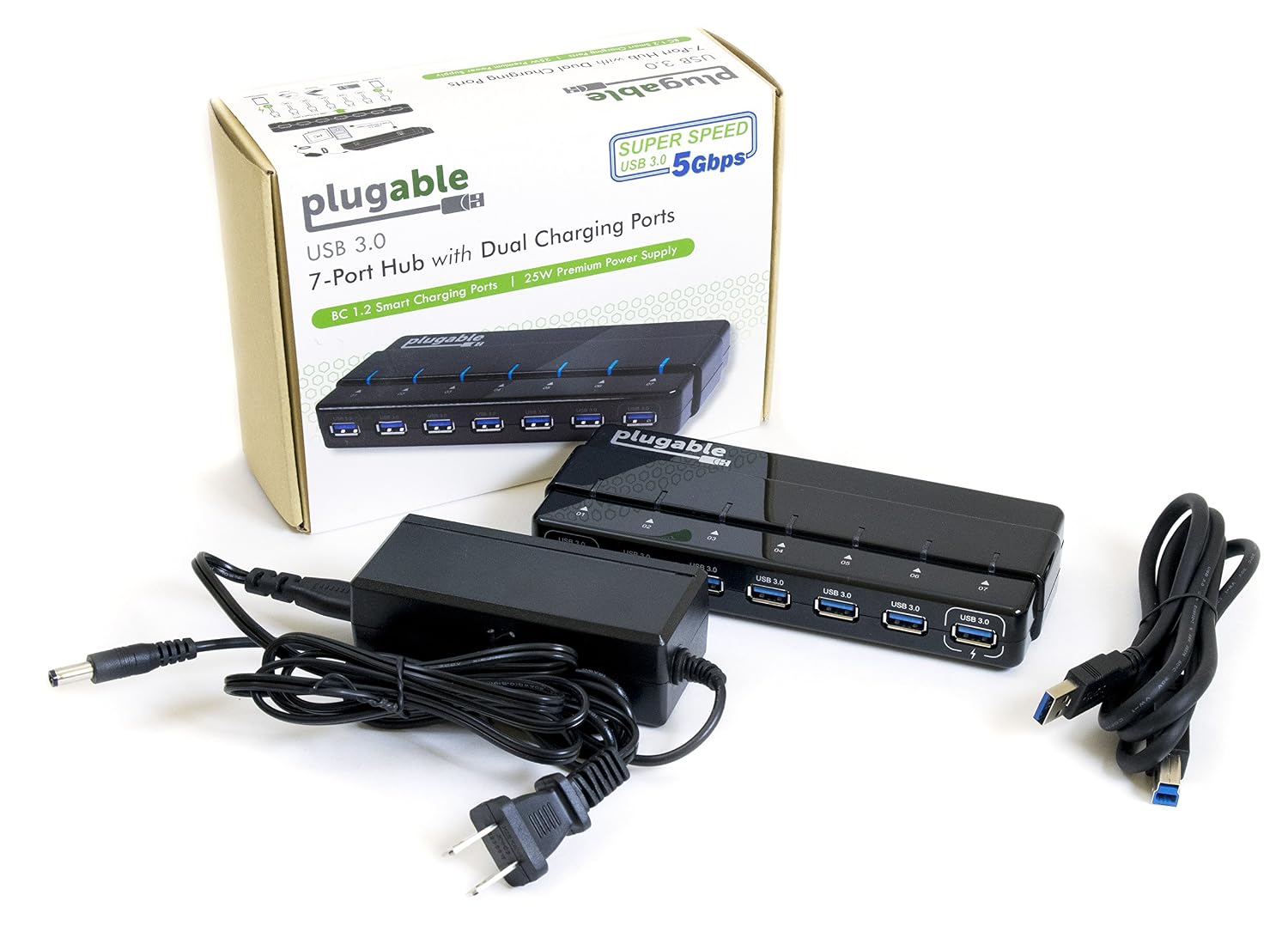
Just buy an external USB 3 powered hub.

81vuaRt0vlL._SL1500_.jpg


Of cos downside would be the total bandwidth is limited to 5Gbps (640MBps) in total.

But you won't hit that limit unless you using 2 or more SSD through USB3.
 

Rashkae

Arch-Supremacy Member
Joined
Sep 24, 2004
Messages
22,372
Reaction score
80
thanks for the reply!

1. front port only has 2. back ports i think about 6 but almost all used up
2. my keyboard and mouse are all using usb (Razer ones) so i might need a bluetooth for other connections
3. i should be looking at a 3.1 specs right to get the most of it?

What on earth is taking up your back ports?

I can think of:
1. Mouse
2. Keyboard
3. Wireless gaming headset dongle (can use front USB also)
4. USB speakers

As for Bluetooth, generally only mouse / keyboard uses it.
 

symbiote28

Master Member
Joined
Sep 18, 2006
Messages
2,593
Reaction score
218
How many usb devices you have? 6 back ports, 2 for mouse/keyboard, maybe 1 for Bluetooth dongle. Can't think of much other stuff....

The front ports usually for your thumb drives/portable hdd/card reader etc. Basically you want easy access and they are not permanent. If permanently placed in usb, just plug the back ports.

Buy a USB hub. Plug all those devices which doesn't require high transfer rates or any transferring to it. There u have a lot of free slots.

What on earth is taking up your back ports?

I can think of:
1. Mouse
2. Keyboard
3. Wireless gaming headset dongle (can use front USB also)
4. USB speakers

As for Bluetooth, generally only mouse / keyboard uses it.

here's what i'm using for my USB ports at the back:

1. USB powered speakers
2. Lightning cable for my iPad just for syncing it so i just leave it there
3. Micro-USB to charge my Gear S3
4. Keyboard
5. Mouse
6. a bluetooth dongle

for the front one, i usually connect a ext HDD and leave there so i'm left with one more port to swap between card reader or thumbdrive to transfer stuffs.

if i were to purchase a usb hub, i'm thinking of double-siding tape it to mount on the side or top of my casing for easy access. the only thing i want for a fast one would be for transferring my photos and videos.

from what i see, all my devices connected to the back don't require that much speed?
 

ZrE0_Cha0s

Arch-Supremacy Member
Joined
Jun 21, 2011
Messages
16,703
Reaction score
26
here's what i'm using for my USB ports at the back:

1. USB powered speakers
2. Lightning cable for my iPad just for syncing it so i just leave it there
3. Micro-USB to charge my Gear S3
4. Keyboard
5. Mouse
6. a bluetooth dongle

for the front one, i usually connect a ext HDD and leave there so i'm left with one more port to swap between card reader or thumbdrive to transfer stuffs.

if i were to purchase a usb hub, i'm thinking of double-siding tape it to mount on the side or top of my casing for easy access. the only thing i want for a fast one would be for transferring my photos and videos.

from what i see, all my devices connected to the back don't require that much speed?

above of that i have bold are those not required usb 3, even 2 is okay.

but for the ipad sync is like depends on u la. and how frequent u using it.

and if your casing does comes with usb 3.1 gen 2 (that will be great) den use that for your card reader. otherwise, just use your back for it.

placement for the hub is sololy under your preferences, so place it anyway as u please.
 
Last edited:

symbiote28

Master Member
Joined
Sep 18, 2006
Messages
2,593
Reaction score
218
above of that i have bold are those not required usb 3, even 2 is okay.

but for the ipad sync is like depends on u la. and how frequent u using it.

and if your casing does comes with usb 3.1 gen 2 (that will be great) den use that for your card reader. otherwise, just use your back for it.

placement for the hub is sololy under your preferences, so place it anyway as u please.

thanks. this is my mobo specs:

my mobo has this specs:

Chipset:
2 x USB 3.1 Gen 2 Type-A ports (red) on the back panel
2 x USB 3.1 Gen 1 ports (available through the internal USB header)
5 x USB 2.0/1.1 ports (1 port on the back panel, 4 ports available through the internal USB headers)

CPU:
4 x USB 3.1 Gen 1 ports on the back panel

so the usb hub just connect it to any 3.1 ports then all the ports on the hub will be of the same speed right?
 
Joined
Oct 26, 2011
Messages
48,316
Reaction score
7,461
so the usb hub just connect it to any 3.1 ports then all the ports on the hub will be of the same speed right?

No.
Unless it is a 3.1 HUB.
Otherwise the HUB will be capped at USB 3.0 speed.
Also, do get a POWERED HUB.
Otherwise it might not have enough power to run your external HDD.
 

symbiote28

Master Member
Joined
Sep 18, 2006
Messages
2,593
Reaction score
218

symbiote28

Master Member
Joined
Sep 18, 2006
Messages
2,593
Reaction score
218
sorry but when you guys say a powered one, meaning that it needs a dedicated power plug for dc current?
 

lifeishard

Supremacy Member
Joined
Apr 30, 2012
Messages
5,623
Reaction score
7
TS already said he wants more usb ports...why he still need to justify he has really used up all his ports, so funny. Even if his ports are not used up, some individuals just dun like using ports that are located at the back la.

Sometimes just answer the questions posted la.
 
Important Forum Advisory Note
This forum is moderated by volunteer moderators who will react only to members' feedback on posts. Moderators are not employees or representatives of HWZ Forums. Forum members and moderators are responsible for their own posts. Please refer to our Community Guidelines and Standards and Terms and Conditions for more information.
Top