Camera brand colour signature

ykgoh

Master Member
Joined
Jan 1, 2000
Messages
2,782
Reaction score
0
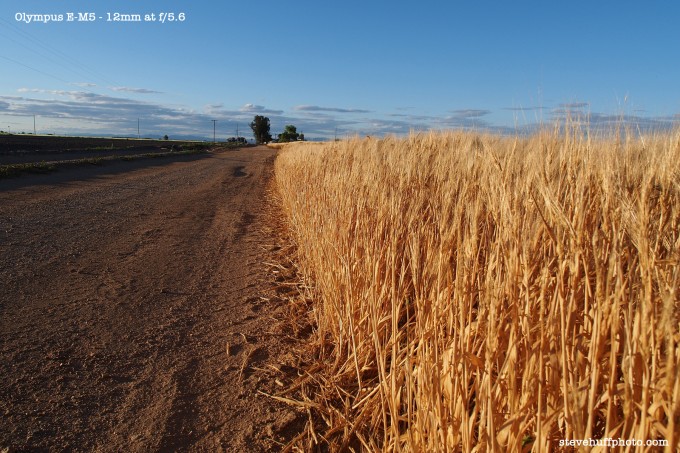
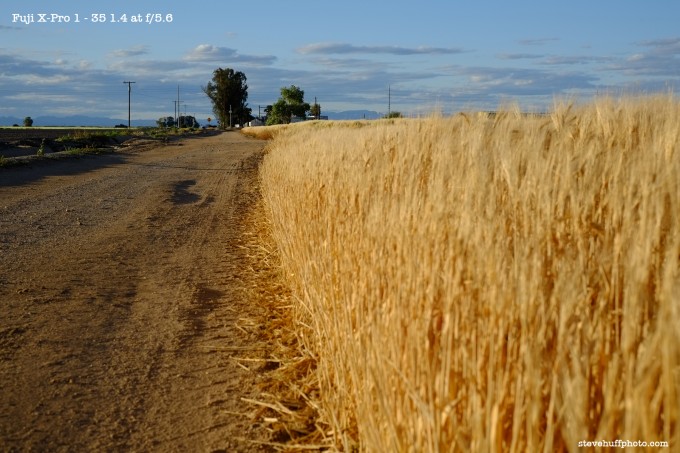
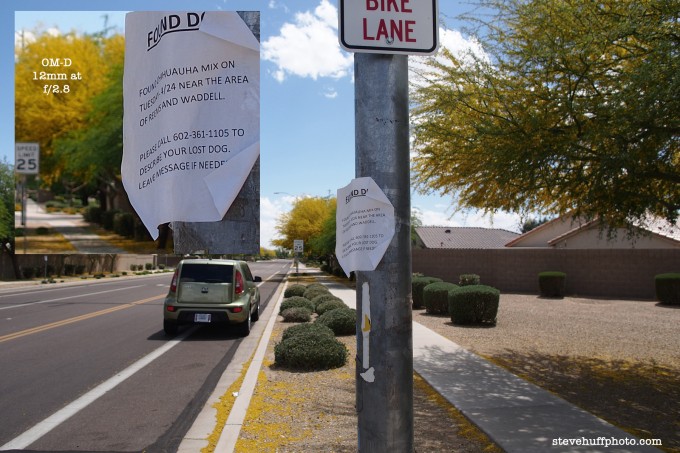
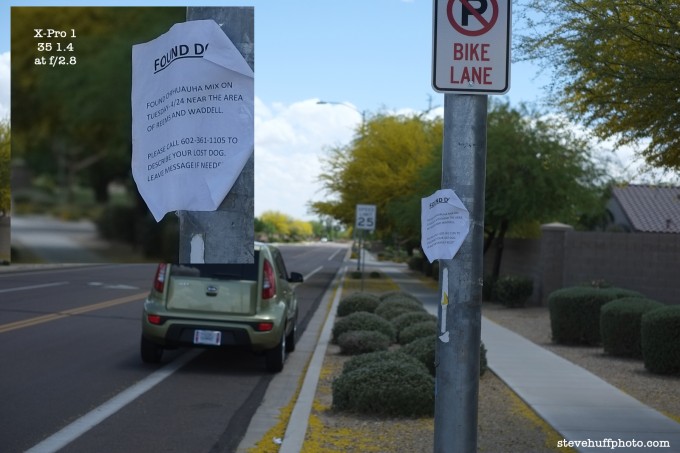
Which camera brand color signature is more accurate or realistic ah? Some camera brands biased toward cooler or warmer color temperature, or certain color (e.g. blue becomes purplish, yellow becomes orangish, white becomes yellowish)

How do the various brand compare? Sony? Fujifilm? Olympus? Samsung? Nikon? Canon?

Any experience or thoughts?
 

davidktw

Arch-Supremacy Member
Joined
Apr 15, 2010
Messages
13,550
Reaction score
1,302
Which camera brand color signature is more accurate or realistic ah? Some camera brands biased toward cooler or warmer color temperature, or certain color (e.g. blue becomes purplish, yellow becomes orangish, white becomes yellowish)

How do the various brand compare? Sony? Fujifilm? Olympus? Samsung? Nikon? Canon?

Any experience or thoughts?

If you are concern with the colour captured by your camera sensor, you can always use a calibration charts.

However if you are doing RAW, colour temperture is just a value, you can easily edit it during post processing.

When you blue turn purplish, it is not about temperature. It is due to color gamuts. Are you talking about printing out ?
 

ykgoh

Master Member
Joined
Jan 1, 2000
Messages
2,782
Reaction score
0
If you are concern with the colour captured by your camera sensor, you can always use a calibration charts.

However if you are doing RAW, colour temperture is just a value, you can easily edit it during post processing.

When you blue turn purplish, it is not about temperature. It is due to color gamuts. Are you talking about printing out ?

No intention to print photos out. Just that I notice different camera can capture the same colour differently.

Also, I notice that Nokia smartphones have a tendency to turn blue sky purplish (too much red?). Apple iPhone, Sony and Samsung smartphones seem to have less of this problem.

So a little curious whether there's a brand that always get its colors right. asking experts here who may have experience with many cameras or brands.

Source: More Fun Comparisons – Fuji X-Pro 1 vs Olympus OM-D vs Sony NEX-7 – JPEG | STEVE HUFF PHOTOS

For example:

olympus5.6-680x453.jpg

fujixpro5.6-680x453.jpg

olympusdoglost-680x453.jpg

fujidoglost-680x453.jpg

OMDDR.jpg

FujiDR.jpg
 

insignificant figure

Senior Member
Joined
Apr 10, 2009
Messages
556
Reaction score
0
Colour tints are most likely that the white balance is not correctly selected. You can change it manually if you see that it doesn't match the scene you're seeing. With more advanced cameras, it can also correct white balance by pointing it at something white like a wall and press a button. It can also be corrected very easily through Photoshop.

And as pointed out, shooting in RAW is the best as the no in-camera processing is applied. You can apply your own white balance correction when converting.

All in all, not really a problem when buying anything more advanced than point-and-shoots
 

davidktw

Arch-Supremacy Member
Joined
Apr 15, 2010
Messages
13,550
Reaction score
1,302
No intention to print photos out. Just that I notice different camera can capture the same colour differently.

Also, I notice that Nokia smartphones have a tendency to turn blue sky purplish (too much red?). Apple iPhone, Sony and Samsung smartphones seem to have less of this problem.

So a little curious whether there's a brand that always get its colors right. asking experts here who may have experience with many cameras or brands.

Source: More Fun Comparisons – Fuji X-Pro 1 vs Olympus OM-D vs Sony NEX-7 – JPEG | STEVE HUFF PHOTOS

For example:

First of all, there is NEVER a right colour in the first place. What your eyes see and what other eyes see is different in the first place. Each sensor or display or print has its own set of gamut. Good cameras will be able to capture near 100% sRGB gamut and even better ones will be able to achieve even larger gamut set such as the commonly defined one by AdobeRGB. Normally photographers uses AdobeRGB only when the end-to-end process is printed materials. For display purpose, sRGB is good enough since what your screen display is not going to be what others screen display. It applies to if you share your photo with others or display via browsers online in Facebook, Instagram, Flickr or other such services.

As long as one of the components along the colour workflow is out of control, the control you seek is effectively useless. Therefore I would suggest you not to venture into this unless you are ready to control every aspect of colour reproduction. Of which the most common one is ambience lighting. The recommended temperature to view any visual content is D50 since most objects will look rather vibrant and rich under this lighting

Among all the smartphones I have come across, Apple has the temperature that shows the most comfortable. Samsung using AMOLED tend to have a more blueish temperature. The reason is due to the blue component has a shorter half-life, hence new AMOLED screen start to be blueish and over time becomes warmer. I'm not sure among Nokia since i hardly handle one.

There are discussion about between Canon and Nikon, but not so much I have read about other camera brands. Regarding camera colour calibration, you will want to watch the following video Lightroom Camera Calibration Settings - YouTube

I'm not colour expert, but to answer you, there is no camera today that I know the claim that by default they capture the colour right. Because in the first place, there is no Right to start with :) Just to update abit, if you want to dwell on colour accuracy, you have to calibrate for every single scene. It's not a calibrate once and done, because your ambient light during capture differs all the time. Hence it only really make sense if you are doing it under controlled lighting conditions, or perhaps for outdoor, capture your calibration chart against the scene for every shots(unless the light is not changing all the time, or up to your preference of accuracy)

 
Last edited:
Important Forum Advisory Note
This forum is moderated by volunteer moderators who will react only to members' feedback on posts. Moderators are not employees or representatives of HWZ Forums. Forum members and moderators are responsible for their own posts. Please refer to our Community Guidelines and Standards and Terms and Conditions for more information.
Top