Capcut cannot be installed on my PC

Steyr69

Arch-Supremacy Member
Joined
Oct 7, 2006
Messages
19,876
Reaction score
307
Hi Folks,

It's me again....I'm not sure whether this is hardware or software issue.
Anyway, I DL this capcut installer file and I tried to install on my PC.
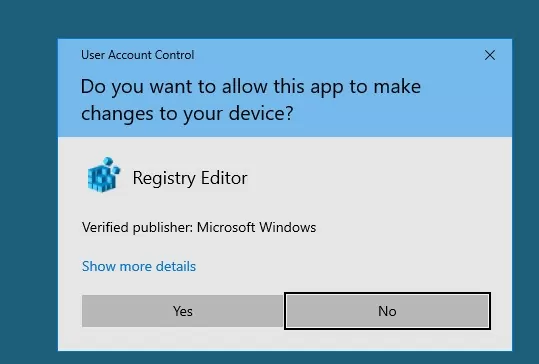
But, nothing happened after I click Yes to the "Do you allow this app to make changes to my device?" dialog box.
I tried a few times also same.
Hardware incompatibility?? No GPU only iGPU. But I'm able to run this capcut online though.
Software problem?? My Win 10 is unactivated. But I just tried and able to install Firefox.

My PC specs is as below:-

ASUS TUF GAMING A520M-PLUS WIFI + AMD R5 5600G
Crucial Ballistix 3200 CL16 (8GBx2)
ADATA XPG SX6000 Lite 128GB - OS drive at M.2 slot.
Win 10 (unactivated)

Really bewildered...first time encounter this.

Hope can help. Thank You!!
 

Koenig168

Arch-Supremacy Member
Joined
Nov 4, 2007
Messages
10,030
Reaction score
1,741
Could be Windows Defender or your anti-virus preventing installation. Suggest you check the logs for error messages.
 

86technie

High Supremacy Member
Joined
Jun 8, 2006
Messages
40,338
Reaction score
5,934
Your Windows is fresh install or carried over from another PC.
Cuz if Windows files is corrupted, when you try to install certain program.
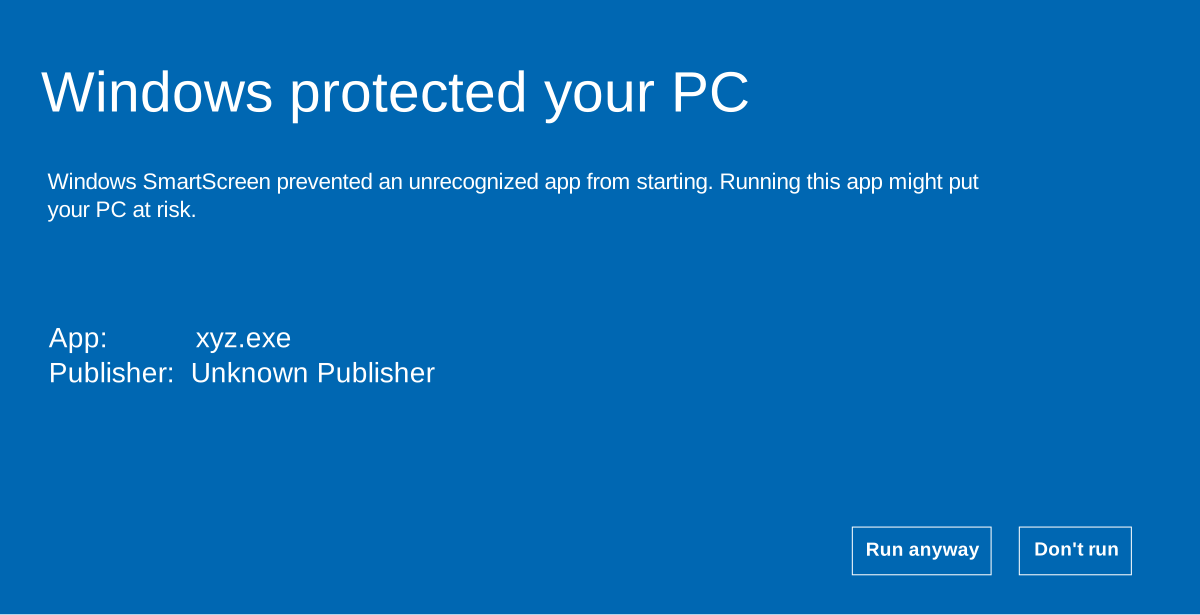
It will not appear the Windows smartscreen message.

windows-protected-your-pc.svg

By right this should appear first than this.

uac-prompt-windows10.jpg.webp


This is UAC account control.
So try a clean install of WIndows (not reset) see how.
 

Steyr69

Arch-Supremacy Member
Joined
Oct 7, 2006
Messages
19,876
Reaction score
307
Your Windows is fresh install or carried over from another PC.
Cuz if Windows files is corrupted, when you try to install certain program.
It will not appear the Windows smartscreen message.

By right this should appear first than this.

This is UAC account control.
So try a clean install of WIndows (not reset) see how.

It is fresh install.
Strange I didn't see the first screen....I always see the UAC when I install any new program.
 

tsteo77

Senior Member
Joined
Oct 28, 2011
Messages
1,542
Reaction score
216
Hi Folks,

It's me again....I'm not sure whether this is hardware or software issue.
Anyway, I DL this capcut installer file and I tried to install on my PC.
But, nothing happened after I click Yes to the "Do you allow this app to make changes to my device?" dialog box.
I tried a few times also same.
Hardware incompatibility?? No GPU only iGPU. But I'm able to run this capcut online though.
Software problem?? My Win 10 is unactivated. But I just tried and able to install Firefox.

My PC specs is as below:-

ASUS TUF GAMING A520M-PLUS WIFI + AMD R5 5600G
Crucial Ballistix 3200 CL16 (8GBx2)
ADATA XPG SX6000 Lite 128GB - OS drive at M.2 slot.
Win 10 (unactivated)

Really bewildered...first time encounter this.

Hope can help. Thank You!!
I guess your computer does not meet requirement to run capcut on your local pc, just rely on the online server yhen. Check the computer requirements i got from here > https://apps.microsoft.com/detail/XP9KN75RRB9NHS?hl=en-us&gl=US

CapCut​

Bytedance Pte. Ltd.


System Requirements​

Available on:
PC
Architecture:
x64
OS:
Windows 10 version 0.0 or higher
Keyboard:
Integrated Keyboard
Mouse:
Integrated Mouse
Memory:
8 GB (Minimum), 16 GB (Recommended)
DirectX:
Version 9 (Minimum), DirectX 12 API, Hardware Feature Level 12 (Recommended)
Video Memory:
2 GB (Minimum), 6 GB (Recommended)
Processor:
Intel® Core 6th Generation or later CPU or AMD Ryzen™ 1000 Series or later CPU (Minimum), Intel® Core 8th generation or newer CPU or AMD Ryzen™ 3000 / Threadripper 2000 series or newer CPU (Recommended)
Graphics Processor:
NVIDIA GTX 900 series and above; AMD RX560 and above; Intel HD 5500 and above; graphics driver dated 2018 or newer; 2 GB GPU VRAM (core graphics shared RAM, included in total RAM) (Minimum), NVIDIA GTX 1000 series and above models; AMD RX580 and above models; graphics driver date in 2018 or newer; 6GB GPU VRAM; NVIDIA graphics card driver version recommended is version 472.12 or newer (Recommended)
 

Steyr69

Arch-Supremacy Member
Joined
Oct 7, 2006
Messages
19,876
Reaction score
307
Hi Folks,

I'm back. I tried again to DL the installer yesterday and the installation kicks in!
I went away to do some other things as the installation seemed slow.
When I came back, there is this ending screen from Capcut stating my computer can run Capcut smoothly.
The program load without much issue and seemed to have no problem while doing editing and stuffs.

Not sure what went wrong the other time. Maybe there is some issue with the installer file.

Thanks for all the comments!!
 

Steyr69

Arch-Supremacy Member
Joined
Oct 7, 2006
Messages
19,876
Reaction score
307
Ok. Dig back this thread. The issue is due to a missing MFPlat.dll file.
I install Da Vinci Resolve after Capcut failed to install.
When I tried to start up Da Vinci Resolve, it gives an error prompt stating this file is missing.
So I did some research and apparently this is a well known problem if you are using Win 10 Pro N.
(Im using Pro N)
Need to install Media Feature Pack to solve this problem.

Bottom left box, type 'Add an optional feature'
Click the plus sign near 'Add a feature'
Type 'media feature pack'
Select and install.
Restart PC.

After that, Da Vinci Resolve started up successfully.

And when i attempt to install Capcut again, it works.
 
Important Forum Advisory Note
This forum is moderated by volunteer moderators who will react only to members' feedback on posts. Moderators are not employees or representatives of HWZ Forums. Forum members and moderators are responsible for their own posts. Please refer to our Community Guidelines and Standards and Terms and Conditions for more information.
Top