Comp frequent hangs.

Sherra

Master Member
Joined
Apr 13, 2004
Messages
3,419
Reaction score
1
Hi...
Recently I have a problem of my comp hanging on me. It used to happen at most once a week.
But now I'm encountering it a few times a day, too often to just ignore it already.
What I have done previously was changing my psu, the previous one was a 6 years old seasonic 750w, so I thought it might be failing on me, since it's the oldest part in the comp. I changed it to another seasonic 650w gold.
Now the problem still persist, I have done the windows memory diagnostic and it show up with 0 error.
So I proceed to narrow it down by removing all my hdd/ssd to test them one by one.
The gskill 120gb ssd is my original os ssd, I plugged only that in, and removed the other crucial ssd and the wd hdd. Still hang.
Took out gskill and put in crucial, format the crucial and put in the os, still hang.
So it's either both my ssd are spoilt, or both are working and I do not know what other parts can be the culprit.

Currently on the mobo only video card is slotted in,
Took out my NICs and soundcard already as I changed to usb DAC.

How ah?
 

jtjt00

Arch-Supremacy Member
Joined
Jan 1, 2000
Messages
17,665
Reaction score
510
You have with cpu/motherboard/graphics card yet to confirm.
 

Sherra

Master Member
Joined
Apr 13, 2004
Messages
3,419
Reaction score
1
Yeah... The three things that I don't have spare ...
But with such symptoms, which of this 3 parts likely culprits ?
 

KeYoKe

High Supremacy Member
Joined
Jul 14, 2005
Messages
37,935
Reaction score
10,019
dont use windows memory diagnostics. Try to use mentest86. more stressful on the rams. sometimes, windows memory diagnostics shows no error, while memtest86 detects error
 

Sherra

Master Member
Joined
Apr 13, 2004
Messages
3,419
Reaction score
1
Hmm, tried memtest86 as suggested,
One round of it suggests 0 errors,
Need more rounds?
Currently using onboard graphics to test it for extensive time to see how it goes...
 

fleas1

Senior Member
Joined
May 16, 2009
Messages
819
Reaction score
1
have you checked your temperatures on load and idle?

May consider doing a refresh OS installation. <--- this is extreme though, but at least it eliminates the software side.
 

jtjt00

Arch-Supremacy Member
Joined
Jan 1, 2000
Messages
17,665
Reaction score
510
TS already tried with another SSD and result is the same.

....Took out gskill and put in crucial, format the crucial and put in the os, still hang....

have you checked your temperatures on load and idle?

May consider doing a refresh OS installation. <--- this is extreme though, but at least it eliminates the software side.
 

zetken

Senior Member
Joined
Mar 6, 2014
Messages
568
Reaction score
0
not hardware problem at all i think :) not to worry. just firmware problem.
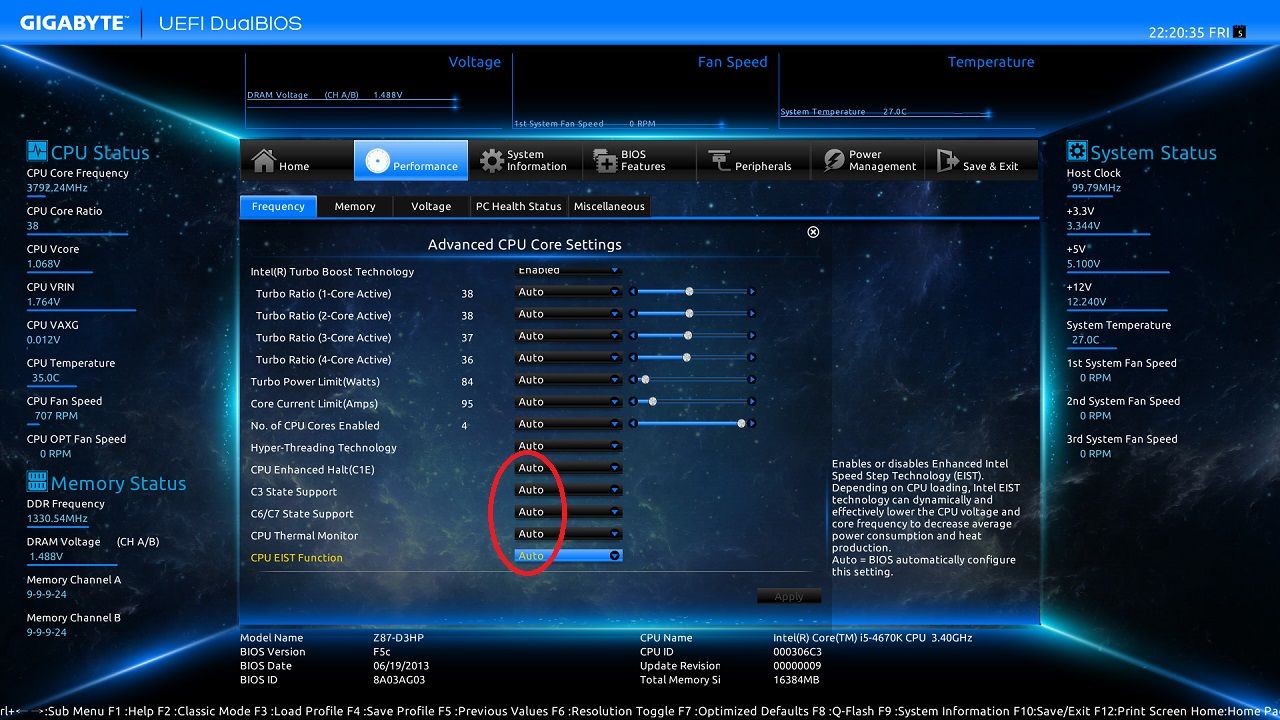
Try updating if you dare for bios. if not, try to off c1e state, c6/7, c3, EIST state in here:

130705222036_zpsef3efbab.jpg~original


although ur pc may run at full speed ( wont underclock on idle but not max load only max cpu ghz, hence not to worried about heat) but now its usable.

if it fails, check for temperature.
Btw did u use eraser on the ram? if not try too. might be static.
if fail again, go rma. might be bad board.
Might be other stuff causing the problem. such as melted connector on dvd drive. connector not put in properly.

thats all i can think out for u haha
 

tamjinhang

Senior Member
Joined
Nov 14, 2010
Messages
548
Reaction score
0
don't forget the CPU too. just helped someone else troubleshoot similar problem and determined it was a dying i7-3770 CPU :s22:
 

Unclemun

Supremacy Member
Joined
Jun 21, 2003
Messages
8,736
Reaction score
749
how are the cpu and gpu temperatures? Are you playing 3D games when it hangs?

If you do Windows in safe mode, will it hang?
 

fleas1

Senior Member
Joined
May 16, 2009
Messages
819
Reaction score
1
TS already tried with another SSD and result is the same.

erm.... if the other SSD is a copy of the same SSD OS then it kinda defeats the purpose of the test(to test for OS/driver corruption).


For z77 motherboards, this is unlikely but in this situation we should try to find every possible problem to eliminate so please try to update your bios as some motherboards on z77 seems to be not 'incompatible' with certain SSD if its using out of the box firmware.
 
Important Forum Advisory Note
This forum is moderated by volunteer moderators who will react only to members' feedback on posts. Moderators are not employees or representatives of HWZ Forums. Forum members and moderators are responsible for their own posts. Please refer to our Community Guidelines and Standards and Terms and Conditions for more information.
Top