

singaporean
Senior Member
- Joined
- Jan 1, 2000
- Messages
- 2,335
- Reaction score
- 0
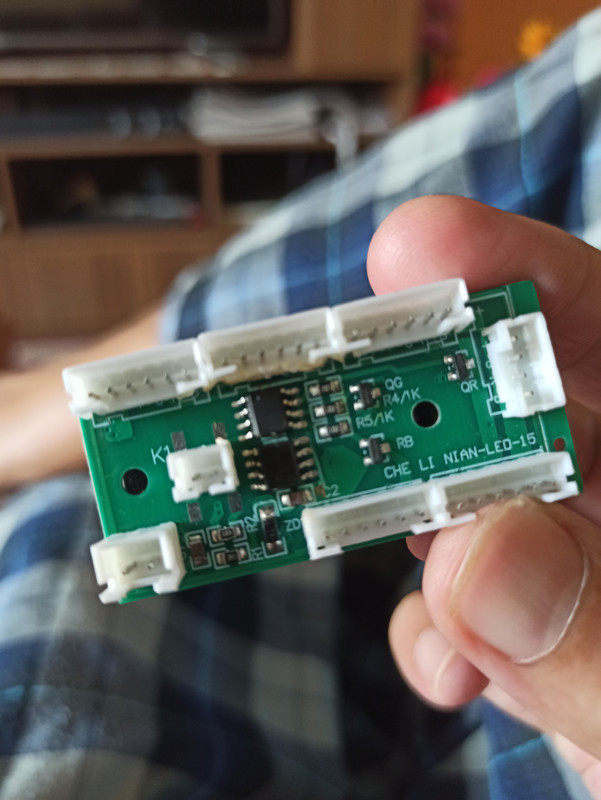
The picture is from a board that came with Armageddon ATX casing. It should be for the colorful casing fans.
Can I clarify the following:
a) the bottom left 2pin socket has a marking -12V. Is this for power supply?
b) the middle 2pin socket marked K1 - is this to connect to toggle button to control color mode?
c) I am guessing the 5nos 6pin sockets (3 at the top and 2 at the bottom) are for the fans. There are 2 fans provided in the casing that have 6pin connectors.
d) lastly, what is the 4pin socket (vertical relative to the other sockets) at the right for?
I hv not installed fanciful rgb fans and LEDs before so this is something new to me. And unfortunately no instructions were included.
Can I clarify the following:
a) the bottom left 2pin socket has a marking -12V. Is this for power supply?
b) the middle 2pin socket marked K1 - is this to connect to toggle button to control color mode?
c) I am guessing the 5nos 6pin sockets (3 at the top and 2 at the bottom) are for the fans. There are 2 fans provided in the casing that have 6pin connectors.
d) lastly, what is the 4pin socket (vertical relative to the other sockets) at the right for?
I hv not installed fanciful rgb fans and LEDs before so this is something new to me. And unfortunately no instructions were included.
