Copying files from ex HD to ex HD...error.

JackBootThug

Member
Joined
May 25, 2008
Messages
191
Reaction score
0
Im using my MBA to copy large files from one external hard drive directly to another external hard drive.

But I get an error message that says something like "this process cannot be completed because the file abcd in being used."

Am I doing something wrong?
 

chehjin

Supremacy Member
Joined
Jun 2, 2000
Messages
6,607
Reaction score
854
Im using my MBA to copy large files from one external hard drive directly to another external hard drive.

But I get an error message that says something like "this process cannot be completed because the file abcd in being used."

Am I doing something wrong?

usually only get this when using move command.
Did you accidentally open this file in some app?

when you get this kind of message, you can check which process is holding on to the file and close the process if necessary
 

JackBootThug

Member
Joined
May 25, 2008
Messages
191
Reaction score
0
Thanks for the reply.

I'm new to Mac. How can I determine what is "holding on"? Btw, I have restarted my mac and it didn't seem to help.
 

asriznet

Senior Member
Joined
Oct 2, 2009
Messages
981
Reaction score
0
Thanks for the reply.

I'm new to Mac. How can I determine what is "holding on"? Btw, I have restarted my mac and it didn't seem to help.

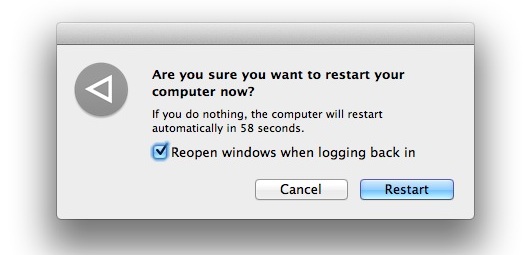
When you restart, make sure you uncheck this box to be sure the same program will not relaunch after restart.

disable-reopen-windows.jpg


You can also view Apple's version of task manager by using keyboard Shortcut: Command-Option-Escape

Also when copying/moving files, try to not move/copy everything if you have large amount of files, do it by batches. Even so, the transfer will still happen concurrently.
 

chehjin

Supremacy Member
Joined
Jun 2, 2000
Messages
6,607
Reaction score
854
Thanks for the reply.

I'm new to Mac. How can I determine what is "holding on"? Btw, I have restarted my mac and it didn't seem to help.

Use lsof to find 'file in use' culprits - Mac OS X Hints

try this command in terminal. Are you comfortable on command line. Don't worry, Super is disabled by default on Mac.

Anyway, again, you must have attempted to move the file instead of copy. Please do a copy than delete the old file.
 
Important Forum Advisory Note
This forum is moderated by volunteer moderators who will react only to members' feedback on posts. Moderators are not employees or representatives of HWZ Forums. Forum members and moderators are responsible for their own posts. Please refer to our Community Guidelines and Standards and Terms and Conditions for more information.
Top