CPU Electric Shocks

Gambler.

Arch-Supremacy Member
Joined
Jul 13, 2008
Messages
14,042
Reaction score
760
Folks, my CPU/casing has been giving me slight electric shocks upon touch.

Particularly the exterior metal parts of the casing. I have not installed any new hardware recently and my PSU was just changed about 3 months ago.

Anything I should be looking out for?

I've also tried switching different powerpoints for the PSU cable plug, still the same result
 
Last edited:

obichacha

Master Member
Joined
Dec 1, 2015
Messages
3,030
Reaction score
534
Folks, my CPU/casing has been giving me slight electric shocks upon touch.

Particularly the exterior metal parts of the casing. I have not installed any new hardware recently and my PSU was just changed about 3 months ago.

Anything I should be looking out for?

Should check your UPS
 

Maserati

Member
Joined
Dec 24, 2002
Messages
383
Reaction score
7
Try powering up your pc from another extension cord if you are using one.
The earthing to your PC casing is poor or not connected.
Do you have a multimeter and know how to measure resistance?
 

Gambler.

Arch-Supremacy Member
Joined
Jul 13, 2008
Messages
14,042
Reaction score
760
Try powering up your pc from another extension cord if you are using one.
The earthing to your PC casing is poor or not connected.
Do you have a multimeter and know how to measure resistance?
I'm not using any extension cord by default. I've only played around using different powerpoints.

No eh, I dont have any device to measure resistance.

So it's likely the casing's problem?
 

Koenig168

Arch-Supremacy Member
Joined
Nov 4, 2007
Messages
10,035
Reaction score
1,745
Did you try a power plug in another room? This is to check whether the power point in your room is faulty.
 

Maserati

Member
Joined
Dec 24, 2002
Messages
383
Reaction score
7
I'm not using any extension cord by default. I've only played around using different powerpoints.

No eh, I dont have any device to measure resistance.

So it's likely the casing's problem?
Problem is your PC casing is not conducting to the "earth" pin of the socket outlet .
Assuming your wall socket is OK (functioning), it can be your PSU or the cable
 

Gambler.

Arch-Supremacy Member
Joined
Jul 13, 2008
Messages
14,042
Reaction score
760
Problem is your PC casing is not conducting to the "earth" pin of the socket outlet .
Assuming your wall socket is OK (functioning), it can be your PSU or the cable
Thanks let me rule out the socket/power point first by trying different ones in the house
 

It's_Not_Me

Senior Member
Joined
Sep 30, 2017
Messages
1,089
Reaction score
470
Unplug the pins from power supply. Just power on the power supply only and check if still the same problem. If yes, then power supply problem. If no, then plug in the cable one by one and test again until you found which cable causing the issue. Maybe cable is pinch or parts.
 

Gambler.

Arch-Supremacy Member
Joined
Jul 13, 2008
Messages
14,042
Reaction score
760
thanks I’ve tested just turning on the power supply using different sockets in the house.

same problem exists, likely is the power supply problem now or the cable chord. But I got no extra cable to test

do I bring it to rma? Still under warranty I just bought it this year
 

Gambler.

Arch-Supremacy Member
Joined
Jul 13, 2008
Messages
14,042
Reaction score
760
Gg my casing side glass panel shattered when I was transferring the cpu around to test.

fated to bring it to SLS now
 

RLWZ21

Senior Member
Joined
Jan 6, 2018
Messages
1,166
Reaction score
59
damn....that is so sad, guess u can consider this as a chance buying a new case and psu?
 

tsteo77

Senior Member
Joined
Oct 28, 2011
Messages
1,542
Reaction score
216
Folks, my CPU/casing has been giving me slight electric shocks upon touch.

Particularly the exterior metal parts of the casing. I have not installed any new hardware recently and my PSU was just changed about 3 months ago.

Anything I should be looking out for?

I've also tried switching different powerpoints for the PSU cable plug, still the same result
Might be due to poor grouding design of your sliver stone psu, get brands mostly use by members here.
 

86technie

High Supremacy Member
Joined
Jun 8, 2006
Messages
40,356
Reaction score
5,944
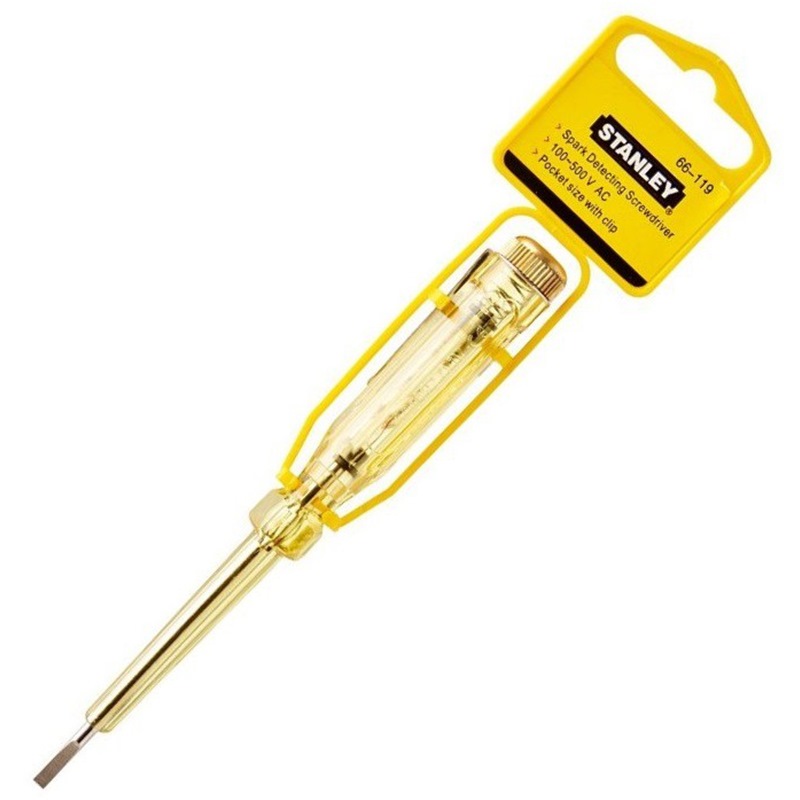
1) Get a test pen from DIY store
20201022130725VBK6W9WHEP5FL_700.jpg

2) Use this to check where the electric current are at.
It will blink when detected.
To isolated if it is PSU issue, if your PSU can be removed outside of the chassis
than try it.
 
Important Forum Advisory Note
This forum is moderated by volunteer moderators who will react only to members' feedback on posts. Moderators are not employees or representatives of HWZ Forums. Forum members and moderators are responsible for their own posts. Please refer to our Community Guidelines and Standards and Terms and Conditions for more information.
Top