CPU fan error

Smurfette

Junior Member
Joined
Jul 9, 2011
Messages
69
Reaction score
0
I keep getting this error upon boot. When I click F1 to go into BIOS, the fan category shows N/A. Is my CPU fan dead? I'm a total noob, but is the CPU fan the one near the motherboard with an intel stick on it? :(

Also can recommend me a reliable person to help me fix my computer? Please.
 

Smurfette

Junior Member
Joined
Jul 9, 2011
Messages
69
Reaction score
0
If the CPU is the one near the motherboard then no, it's not spinning. Cable seems attached and fine, I haven't touched it.
 

teddy1994

Member
Joined
Sep 25, 2010
Messages
240
Reaction score
8
The cpu is normally always at the middle-top of the mother board, but it is covered with a 'heat sink (metal block with many fins)' and a fan right on top of it.

It's not moving? There should be a cable from the fan to the motherboard, check whether it is plugged in properly or not... Maybe it's loosely connected or something..
 
Last edited:

Smurfette

Junior Member
Joined
Jul 9, 2011
Messages
69
Reaction score
0
I tried very hard to see, doesn't seem to be moving. I'm concerned about touching the insides of the computer because I don't have an anti static wrist strap. I know they say you can touch the metal part of your casing, but my entire casing is coated in black paint.
 

teddy1994

Member
Joined
Sep 25, 2010
Messages
240
Reaction score
8
You can ground urself by touching any metal

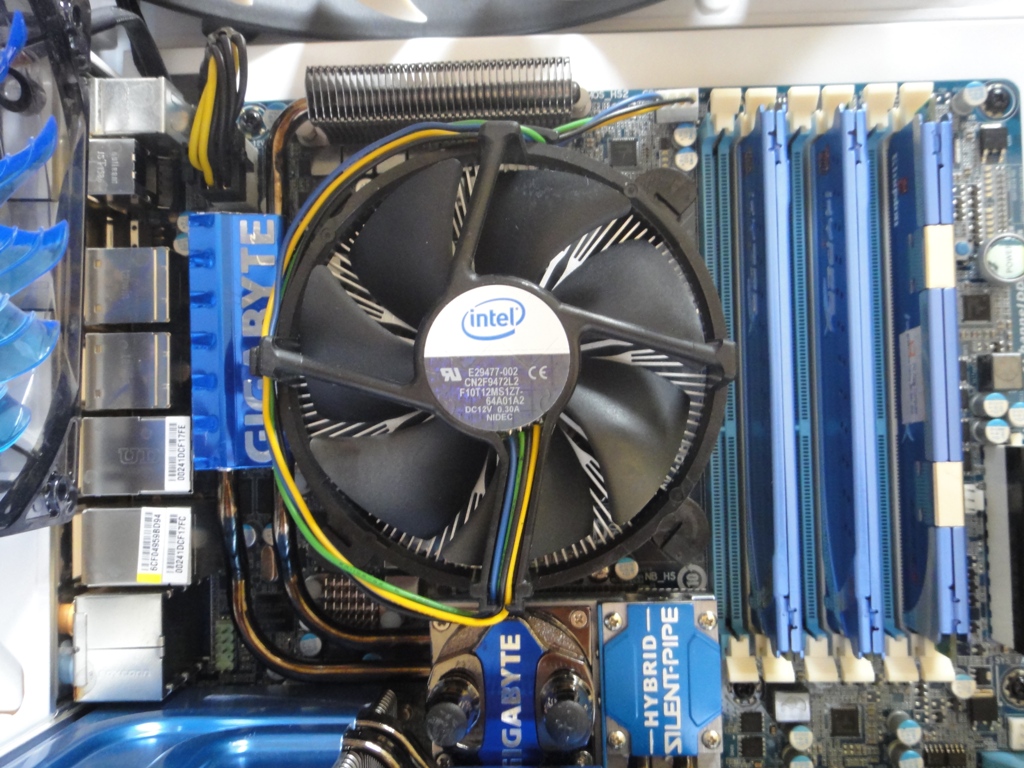
See where the fan cable connects in the image below? that should be where your fan cable connects (mobos should have CPU_fan on top of that 4 pin connection)

DSC01541.JPG
 
Last edited:

Smurfette

Junior Member
Joined
Jul 9, 2011
Messages
69
Reaction score
0
Okay, I went to have dinner and then came back to turn on the computer again. The fan is running, for now, and I didn't even touch anything. Any reason why it stopped running?

Is it because it's dirty? Or the CPU fan is actually failing and those are warning signs??

If it's dirty how should I clean it?
 

teddy1994

Member
Joined
Sep 25, 2010
Messages
240
Reaction score
8
I'm not sure about the fan, maybe more experienced people can help.
And don't fret even if the fan spoil, intel stock fans are quite cheap to get

I think best way to clean is to take off the heatsink+fan from the cpu, but simpler means would be to blow the dust using compressed air (can be found in some it shops, even in Challenger although more expensive)

How to do it:
http://www.youtube.com/watch?v=W9T6WGFmam0

another way is to use a paint brush and try to brush off the dust off the fan blades and possibly parts of the fins of the heat sink.

Just try not to blow the dust off with ur mouth =/ do-able, but don't.. haha
 
Last edited:

Smurfette

Junior Member
Joined
Jul 9, 2011
Messages
69
Reaction score
0
I'm worried because if the fan is spoiled, I don't know how to change it myself :( Also, mine is a desktop so I can't just carry it down to some repair shop. Hm, the compressed air method, won't the dust like land on the other parts instead?? Making it more dusty inside my computer? Haha. I don't know how to 'catch the dust'.
 

teddy1994

Member
Joined
Sep 25, 2010
Messages
240
Reaction score
8
I'm worried because if the fan is spoiled, I don't know how to change it myself :( Also, mine is a desktop so I can't just carry it down to some repair shop. Hm, the compressed air method, won't the dust like land on the other parts instead?? Making it more dusty inside my computer? Haha. I don't know how to 'catch the dust'.


Should look for video guides on youtube to learn DIY ^^
Usually, if done right, it is almost always better than asking an IT shop/guy to fix for you.. Past few years always let others repair my desktop and laptop, but always spoil again within 2-3 months... Fix myself, able to run for 2 years straight (always overheating problems apparently)
But of course... Have to note that it is risky for first-timers.. Safer to let others do~

When you blow off the dust, they should not be stuck too hard on anything anymore, so it should be rather easy to clear them out of the case.
 

Smurfette

Junior Member
Joined
Jul 9, 2011
Messages
69
Reaction score
0
does your computer run?

Yep. Just the CPU fan stopped spinning.

Should look for video guides on youtube to learn DIY ^^
Usually, if done right, it is almost always better than asking an IT shop/guy to fix for you.. Past few years always let others repair my desktop and laptop, but always spoil again within 2-3 months... Fix myself, able to run for 2 years straight (always overheating problems apparently)
But of course... Have to note that it is risky for first-timers.. Safer to let others do~

When you blow off the dust, they should not be stuck too hard on anything anymore, so it should be rather easy to clear them out of the case.

Okay. I also think it's better to fix it myself, but it's so scary!
 

gs

Master Member
Joined
Jun 5, 2003
Messages
3,541
Reaction score
0
Hi,ts if u want can bring over to my place to test it out..but if urs is a asus or gigabyte main board u can turn off the f1 halt on fan error...as asus and gigabyte have cool & quiet function whereby onli when CPU is hot den it start spinning..and sometime from cold boot in the morning or in air con room will have this type of problem which is common..so just turn off the f1 halt or ignore fan speed for asus board
 

xkiller213

Senior Member
Joined
Oct 21, 2012
Messages
647
Reaction score
0
fan stop spinning is normal what, probably some motherboard bios option that set minimum speed = off to reduce noise... check if that is true before dissembling your computer..
 

Smurfette

Junior Member
Joined
Jul 9, 2011
Messages
69
Reaction score
0
fan stop spinning is normal what, probably some motherboard bios option that set minimum speed = off to reduce noise... check if that is true before dissembling your computer..

Okay, thanks. As far as I know, I haven't changed any BIOS settings, and this is the very first time it has happened to me(desktop a little over 2 years old) so I got panicky.

Hi,ts if u want can bring over to my place to test it out..but if urs is a asus or gigabyte main board u can turn off the f1 halt on fan error...as asus and gigabyte have cool & quiet function whereby onli when CPU is hot den it start spinning..and sometime from cold boot in the morning or in air con room will have this type of problem which is common..so just turn off the f1 halt or ignore fan speed for asus board

Yep, mine is an Asus board, but it is not situated in an air-con room. This happened while I was trying to use the computer in mid afternoon, which was quite hot today haha.
 
Important Forum Advisory Note
This forum is moderated by volunteer moderators who will react only to members' feedback on posts. Moderators are not employees or representatives of HWZ Forums. Forum members and moderators are responsible for their own posts. Please refer to our Community Guidelines and Standards and Terms and Conditions for more information.
Top