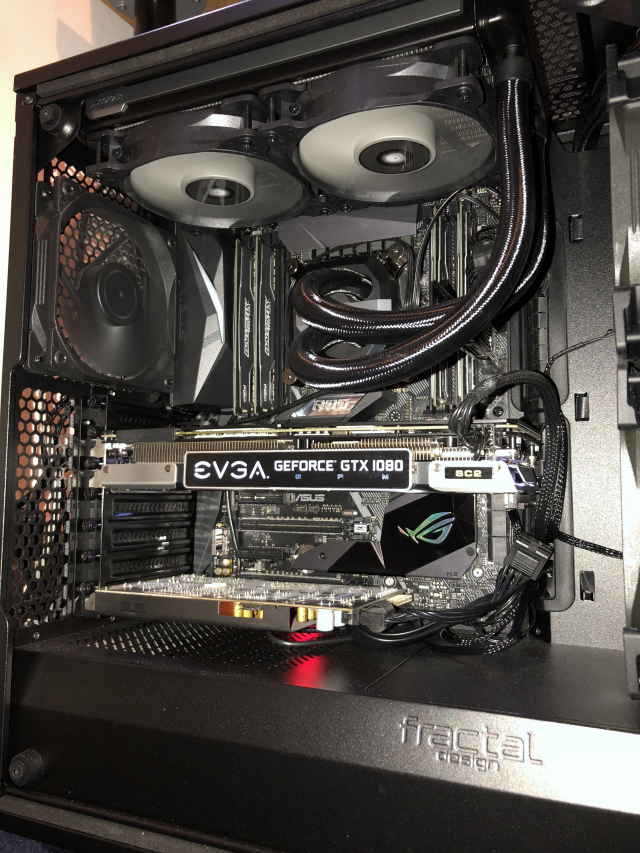
CPU temp while playing helldivers 2

Encrypted11

Supremacy Member
Joined
Jun 9, 2012
Messages
5,935
Reaction score
270
If the BIOS shows 1.4V on CPU instead of 0.8-0.9v, probably C states are disabled.
Enable all C states and TVB. IA CEP and GT CEP.

Enable ultimate performance plan to have an in-OS control to “disable” power management when your thermal budget permits, when power management is needed change back to Balanced plan.

With a 4800 JEDEC based Corsair kit, I don’t think you need more than 1.2V in CPU VDD2/IMC or CPU VDDQ Voltage (not sure if these controls are locked in B board)

Also, is it me or every fan is exhausting air? Where is the push pull?
 

86technie

High Supremacy Member
Joined
Jun 8, 2006
Messages
40,338
Reaction score
5,931
the 97deg was achieved under aircon on in the room

now idle is
3DmcHCW.png


i cannot add anymore fans liao
0ttLlbK.jpeg


fan profile
Yc8r6Gu.png

BTW never notice your Artic freezer is 240mm version.
Opt to get Arctic freezer 360 more cooling power.
Do also ensure that the AIO fan on the unit itself is spining.

How to make it spin is under the fan setting, set to PWN.
Make sure the AIO connector is connected to CPU fan header.
 

matique

Senior Member
Joined
Sep 25, 2017
Messages
797
Reaction score
786
the 97deg was achieved under aircon on in the room

now idle is
3DmcHCW.png


i cannot add anymore fans liao
0ttLlbK.jpeg


fan profile
Yc8r6Gu.png

Not sure if your fans are the fancy ones where intake looks like exhaust. But if all those fans are standard configuration, your AIO is starved for air.

Have bottom fans do intake, pulling air in to feed the gpu.
Rear fan can remain as exhaust,
Your three side fans should be intake, if you plan on using your AIO rad fans as exhaust.

Additionally, ensure your pump speed is on the higher side, as the LFIII coldplate is quite dense and would benefit from higher flow.
 

Phen8210

High Supremacy Member
Joined
Jul 29, 2011
Messages
29,028
Reaction score
8,284
yeah.. make sure your radiator is plugged into the AIO pump header.
 

Vanyel

Arch-Supremacy Member
Joined
Sep 5, 2014
Messages
12,202
Reaction score
2,121
Not sure if your fans are the fancy ones where intake looks like exhaust. But if all those fans are standard configuration, your AIO is starved for air.

Have bottom fans do intake, pulling air in to feed the gpu.
Rear fan can remain as exhaust,
Your three side fans should be intake, if you plan on using your AIO rad fans as exhaust.

Additionally, ensure your pump speed is on the higher side, as the LFIII coldplate is quite dense and would benefit from higher flow.
bottom 3 are reverse fans, my exhaust are on rear and top
 

Vanyel

Arch-Supremacy Member
Joined
Sep 5, 2014
Messages
12,202
Reaction score
2,121
yeah.. make sure your radiator is plugged into the AIO pump header.
its plugged in there, earlier i posted my bios screen shot
Helldivers 2 is the only game giving me this kind pf temp
this PC was assembled last yr

and only recently my boys then informed me that the temp when running helldivers 2 going off the charts
they also had been playing for quite awhile already the game

only changes i made recently was change of psu and swapping their GPUs
 

Vanyel

Arch-Supremacy Member
Joined
Sep 5, 2014
Messages
12,202
Reaction score
2,121
BTW never notice your Artic freezer is 240mm version.
Opt to get Arctic freezer 360 more cooling power.
Do also ensure that the AIO fan on the unit itself is spining.

How to make it spin is under the fan setting, set to PWN.
Make sure the AIO connector is connected to CPU fan header.
was thinking to change to 360mm version also, but then i stopped to think about how much deg is it gonna reduce?
last yr when sourcing for AIO i already watched some videos and did some searching online
the differences in the top end AIOs and the bottom ones arent really huge
if the temp at 85-97deg, upgrading to more exp AIO wont really save it

anyways with the undervolting done the temp is now settled, its now 50-60+deg when running helldivers 2
now my new problem is i think the undervolting was overdone, his fps now drop to 60-70+ from 90-110+
 

Vanyel

Arch-Supremacy Member
Joined
Sep 5, 2014
Messages
12,202
Reaction score
2,121
Enable all C states and TVB. IA CEP and GT CEP.

Enable ultimate performance plan to have an in-OS control to “disable” power management when your thermal budget permits, when power management is needed change back to Balanced plan.

With a 4800 JEDEC based Corsair kit, I don’t think you need more than 1.2V in CPU VDD2/IMC or CPU VDDQ Voltage (not sure if these controls are locked in B board)

Also, is it me or every fan is exhausting air? Where is the push pull?

bottom and the front side panels are reverse blades, i decided to waste some $$ for aesthetics when setting up last yr
reverse fans slightly more exp T_T

btw i think i totally cannot absorb what u suggested, i tonite go research abit what u wrote haha
 

86technie

High Supremacy Member
Joined
Jun 8, 2006
Messages
40,338
Reaction score
5,931
was thinking to change to 360mm version also, but then i stopped to think about how much deg is it gonna reduce?
last yr when sourcing for AIO i already watched some videos and did some searching online
the differences in the top end AIOs and the bottom ones arent really huge

if the temp at 85-97deg, upgrading to more exp AIO wont really save it

anyways with the undervolting done the temp is now settled, its now 50-60+deg when running helldivers 2
now my new problem is i think the undervolting was overdone, his fps now drop to 60-70+ from 90-110+

Is not say more expensive AIO bro.
Difference between 240 and 360 cooling will be maginal better.
Cuz the radiator is longer and additional one more fan.
The way you setup looks weird also, the top is meant for 360 but you only
put 240.

0ttLlbK.jpeg


Actually the 240 radiator you should put towards the end of the case.
That fan can put in front.

resizedimage640853-IMG-3918.png


Most setup the radiator is place like this so hot air can escape quickly.
Not sure what case fan you are using, hopefully is not Tecware fan.
360 AIO wise there are some budget option like this Corsair new model AIO.

71tpFJGzndL._AC_UF894,1000_QL80_.jpg


Around $150.
You can try with a 360 cooler like this, three fans to exhaust more hot air out than 2.

 

Vanyel

Arch-Supremacy Member
Joined
Sep 5, 2014
Messages
12,202
Reaction score
2,121
Is not say more expensive AIO bro.
Difference between 240 and 360 cooling will be maginal better.
Cuz the radiator is longer and additional one more fan.
The way you setup looks weird also, the top is meant for 360 but you only
put 240.

0ttLlbK.jpeg


Actually the 240 radiator you should put towards the end of the case.
That fan can put in front.

resizedimage640853-IMG-3918.png


Most setup the radiator is place like this so hot air can escape quickly.
Not sure what case fan you are using, hopefully is not Tecware fan.
360 AIO wise there are some budget option like this Corsair new model AIO.

71tpFJGzndL._AC_UF894,1000_QL80_.jpg


Around $150.
You can try with a 360 cooler like this, three fans to exhaust more hot air out than 2.
well initially the aio was towards the rear, i just thought i swapped it around to see if it makes any difference or not haha
i bought the 240mm for my older casing last yr when i first bought the 14700kf, because the PC keeps crashing nonstop from day1
and after buying and installing, it didnt really helped, still keeps crashing
went to test change to a bigger casing from the sff casing
and it finally stopped crashing haha

didnt wanted to waste $$ buy a 360mm as crash issue fixed and i have nowhere else to put the 240mm also hence i just left it like this

anyways with the undervolting done, i dun need to do anything already isnt it?
im kinda planning to reduce the undervolting later tonite see will get better fps bo

*top 3 fans ar, got 1 stand alone normal fan lol
 

Vanyel

Arch-Supremacy Member
Joined
Sep 5, 2014
Messages
12,202
Reaction score
2,121
oh the frnt side panel 3fans are default with the tecware case

bottom 3 i ownself bought

fan maxed spd too low?
 

ragnarok95

Senior Moderator
Senior Moderator
Joined
Mar 9, 2004
Messages
125,154
Reaction score
6,386
its plugged in there, earlier i posted my bios screen shot
Helldivers 2 is the only game giving me this kind pf temp
this PC was assembled last yr

and only recently my boys then informed me that the temp when running helldivers 2 going off the charts
they also had been playing for quite awhile already the game

only changes i made recently was change of psu and swapping their GPUs
Maybe it's game issue if this game is the only issue you have. Else, make sure your AIO pump is connected to the pump header and speed is always set to high/pwm mode. 240mm is like a high end air cooling HS, so you should be getting reasonable temp.
 

Vanyel

Arch-Supremacy Member
Joined
Sep 5, 2014
Messages
12,202
Reaction score
2,121
Maybe it's game issue if this game is the only issue you have. Else, make sure your AIO pump is connected to the pump header and speed is always set to high/pwm mode. 240mm is like a high end air cooling HS, so you should be getting reasonable temp.
all his other games max was 80deg+, infact i dun think it even hits 70deg much for his other games
only this goddamn helldiver lol

actually im kinda inching back towards normal aircoolers already
if got issue will immediately know rather than guess here guess there aio working or not working

my other boy's PC running 7800X3D + 9070XT helldiver temp 80+
wont see 90deg, running aircoolers there

but i honestly think is the intel 14700kf hotter than normal
 

86technie

High Supremacy Member
Joined
Jun 8, 2006
Messages
40,338
Reaction score
5,931
well initially the aio was towards the rear, i just thought i swapped it around to see if it makes any difference or not haha
i bought the 240mm for my older casing last yr when i first bought the 14700kf, because the PC keeps crashing nonstop from day1
and after buying and installing, it didnt really helped, still keeps crashing
went to test change to a bigger casing from the sff casing
and it finally stopped crashing haha

didnt wanted to waste $$ buy a 360mm as crash issue fixed and i have nowhere else to put the 240mm also hence i just left it like this

anyways with the undervolting done, i dun need to do anything already isnt it?
im kinda planning to reduce the undervolting later tonite see will get better fps bo

*top 3 fans ar, got 1 stand alone normal fan lol

Do check if motherboard has any BIOS update.
As many manufacturer have release BIOS update to address Intel stability issue.
As for ASUS motherboard you can use Q-tune for Fan.

But first before you use this Q-fan Tune feature.
Press F5 reset all BIOS setting than redo again.
Memory XMP than Q-fan Tune as well as Secure boot.

Q-fan tune will adjust all the fan that is connected to the motherboard.
It's RPM and etc. profile accordingly to the type of fan.
 

Vanyel

Arch-Supremacy Member
Joined
Sep 5, 2014
Messages
12,202
Reaction score
2,121
the old casing where the 14700kf kept crashing
vIUFKYV.png


its housing the 13600kf without issue with the 9070 non xt card

mhw however is hitting 90deg more times than i care to notice and my corner in the room beginning to feel like an oven again like when the 14700kf was on it

my personal feel on temp is that bigger casing is really loads better
i have order a bigger new casing from taoabo since
 
Important Forum Advisory Note
This forum is moderated by volunteer moderators who will react only to members' feedback on posts. Moderators are not employees or representatives of HWZ Forums. Forum members and moderators are responsible for their own posts. Please refer to our Community Guidelines and Standards and Terms and Conditions for more information.
Top