
You are using an out of date browser. It may not display this or other websites correctly.
You should upgrade or use an alternative browser.
You should upgrade or use an alternative browser.
Dell S2419H vs U2419H
- Thread starter hereiam7788
- Start date
More options
Who Replied?hereiam7788
Master Member
- Joined
- Dec 10, 2015
- Messages
- 4,826
- Reaction score
- 532
U2419HC
thank me later.
monitors don't change often.
My 3x 27" Dell Ultrasharp since 2015 still going strong at 1440p 60hz.
$100 difference no brainer, for something u stare at for 8-10hr daily
it is not $100 woh. it is $220 vs $400.
hereiam7788
Master Member
- Joined
- Dec 10, 2015
- Messages
- 4,826
- Reaction score
- 532
Just received it . Love the ports availability and adjust-ability of it. Love the stylish design and thin bezels of dell monitor too.
It is a matte display. It will be nice if it is a glossy display though. S2319h is glossy but I did not choose it because I dun like the fact it does not have the adjust-ability and ports.
I believe the display quality of u2419h or u2419hc should look similar since they are also matte display.
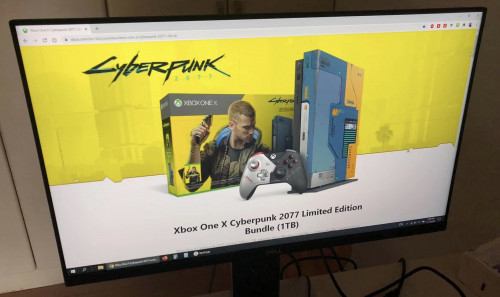
It is a matte display. It will be nice if it is a glossy display though. S2319h is glossy but I did not choose it because I dun like the fact it does not have the adjust-ability and ports.
I believe the display quality of u2419h or u2419hc should look similar since they are also matte display.
Last edited:
carmelmore
Senior Member
- Joined
- Apr 21, 2019
- Messages
- 1,118
- Reaction score
- 7
Just received it . Love the ports availability and adjust-ability of it. Love the stylish design and thin bezels of dell monitor too.
It is a matte display. It will be nice if it is a glossy display though. S2319h is glossy but I did not choose it because I dun like the fact it does not have the adjust-ability and ports.
I believe the display quality of u2419h or u2419hc should look similar since they are also matte display.
Do fonts look blurry on the monitor when used with your Macbook compared to Windows?
hereiam7788
Master Member
- Joined
- Dec 10, 2015
- Messages
- 4,826
- Reaction score
- 532
Do fonts look blurry on the monitor when used with your Macbook compared to Windows?
certainly. while view texts etc., it is very obvious.
apple macbook display has wide colour (P3) gamut which dell monitor will have no fight. i think even u series also cannot fight. also another obvious difference can tell immediate is the brightness. macbook has 500 nits while dell only has 250 nits which it is 2X difference. dell monitor is indeed not bright enough. even U series is also 250 nits too.
macbook pro has closed to 2k resolution on a 13-inch display while now there is only 1080p on a much bigger display. once you have used any apple product with retina display. all the rest of display will just look worse.
especially apple display is glossy one with anti reflective coating while dell monitors are mostly matte one if not it is glossy without anti-reflective coating.
watching video then will not feel any much difference. since i was watching videos on my 50-inch TV that is 1080p only too.
no regrets on the choice though. although i have not seen u series in real to tell the difference.
but i think likely it won't be significant difference given that both u series and mine is matte display. i find the price of $220 is worthy for what i get.
$100 savings instead going to U2419H (extra one more DP out port and better display) and $180 savings instead going for U2419HC (extra one more DP out port and usb-c port with better display). Given the number of reviews on U2419H on dell sg website, I can tell that a lot of people are going for the model though. somehow this model S2319HS seems not to be popular among people which people may either go with S2319H (Glossy display) or U2419H (matte display).
Last edited:
carmelmore
Senior Member
- Joined
- Apr 21, 2019
- Messages
- 1,118
- Reaction score
- 7
https://www.chanhvuong.com/4403/fix-blurry-text-on-mac-using-external-non-apple-monitor/
https://www.mathewinkson.com/2013/0...ix-the-picture-quality-of-an-external-monitor
Have you tried those fix for blurry texts?
https://www.mathewinkson.com/2013/0...ix-the-picture-quality-of-an-external-monitor
Have you tried those fix for blurry texts?
hereiam7788
Master Member
- Joined
- Dec 10, 2015
- Messages
- 4,826
- Reaction score
- 532
I actually use boot camp windows 10 on my mac. Technically it is not blurry just not as 'sharp' as per MacBook Pro display. Think it is due to the resolution instead since it is 1080p vs 1600p.
Besides, any how to use dell monitor in potrait mode? Under windows it is on landscape mode by default and I cannot change it. The option is greyed out.
hereiam7788
Master Member
- Joined
- Dec 10, 2015
- Messages
- 4,826
- Reaction score
- 532
managed to rotate using the monitor physical button but could not rotate using the windows 10 settings.
however, somehow did not get used to the portrait mode. stick to landscape mode instead.
however, somehow did not get used to the portrait mode. stick to landscape mode instead.
hereiam7788
Master Member
- Joined
- Dec 10, 2015
- Messages
- 4,826
- Reaction score
- 532
so far so good. after like 6 days of usage, quite happy with this model S2319HS.
started to get used to the matte display too.
it is really worthy for the price.
too bad there is no IT show due to covid-19 situation, else it will be even cheaper.
started to get used to the matte display too.
it is really worthy for the price.
too bad there is no IT show due to covid-19 situation, else it will be even cheaper.

orbvius
Greater Supremacy Member
- Joined
- May 7, 2004
- Messages
- 79,407
- Reaction score
- 2,247
Gxgx on your hoot. Should be an OK monitors.already decided to go for S2319HS.
https://www.dell.com/en-sg/shop/del...9hs/apd/210-aujp/monitors-monitor-accessories
After much research and consideration, i find that this model is the best to suit my needs now. it is more all-rounded for my what want now.
1) price is cheap 2) adjustable pivot, tilt, swivel and height 3) ports availability - comes with all ports HDMI, DP, VGA and even USB ports. 4) thin bezels due to S series.
I was considering the following models before this. In fact, only at the later stage, i noticed the S2319HS model.
A) S2319H B) U2419H C) U2419HC D) S2319HS
In terms of price both A & D are about the same. both have slim bezels due to the S series. I am not fond of P series becos the bezels are not as thin as S series. Did not go for A because of no adjustable pivot, tilt, swivel and height and lesser ports availability. Only good thing for A is it comes with built-in speakers, but read the reviews online, most complain the built-in speakers are not loud enough and they are commenting on S2419h which comes with 5W speakers, S2319h has only 3W speakers which will likely to be even worse. If given me a choice, i would rather go for ports availability which will be more useful than built-in speakers unless they are excellent that can replace external speakers. no VESA mount does not bother me becos i dun need to mount it.
B & C - U series are certainly the best in terms of screen quality. price is also on the higher side. it comes with Display Position Adjustments (Height, pivot (rotation), swivel, tilt) which is for my liking too. Again, no VESA mount does not bother me for U series. It has the full ports availability too. However, price wise, U2419H - $319, U2319H - $399. If i buy, i go with U2419HC for the usb-c connection as already spend more than sgd3xx on a monitor, i might as go for the best spec that has usb-c port for future proof too which i can connect my ipad pro (coming soon) to it.
As i am buying a monitor just to be used an external monitor because my macbook pro 2017 is having a display flickering issue and the total cost of repair will take $930. therefore i am thinking of not repairing but buy an external monitor to use it at home and not on the go instead.
Finally, deciding between U2419HC ($399) vs U2319HS ($220)
they have almost similar specs and both are matte display. only difference is that U2419HC has better screen quality and USB-C connection for future proof but U2319HS has one extra VGA port. I decided to go with U2319HS instead which I can save the $$ for my next macbook pro.
Yes, most laptops don't have native displayports. Some have the mini displayports (eg. MacBook)
Sent from cat basket using GAGT
hereiam7788
Master Member
- Joined
- Dec 10, 2015
- Messages
- 4,826
- Reaction score
- 532
Gxgx on your hoot. Should be an OK monitors.
Yes, most laptops don't have native displayports. Some have the mini displayports (eg. MacBook)
Sent from cat basket using GAGT
yeah. dell monitors are quite decent indeed especially the design itself is very stylish. good for me who cares a lot on the outlook.
after all, i just buy it to use it as a temporary solution because my macbook display is having issues, else i hardly dun really use monintor normally.
yes, most devices do not even have DP. even macbook only 2015 and before one has it only.
hereiam7788
Master Member
- Joined
- Dec 10, 2015
- Messages
- 4,826
- Reaction score
- 532
For S2319HS, it is 72% NTSC (CIE 1931) colour gamut, 82% NTSC (CIE 1976) colour gamut.
For U2419H, it is 99.9% sRGB colour gamut, 99% Rec 709 colour gamut, 85% DCI-P3
Does it mean that S2319HS is not having 99.9% sRGB since it mentioned 72% NTSC. From my readings online, it is mentioned that 100% sRGB = 72% NTSC but 72% NTSC does not equal to 100% sRGB since the coverage of colours 72% NTSC may not be the same as sRGB.
For U2419H, it is 99.9% sRGB colour gamut, 99% Rec 709 colour gamut, 85% DCI-P3
Does it mean that S2319HS is not having 99.9% sRGB since it mentioned 72% NTSC. From my readings online, it is mentioned that 100% sRGB = 72% NTSC but 72% NTSC does not equal to 100% sRGB since the coverage of colours 72% NTSC may not be the same as sRGB.

RyoHarusaki
Arch-Supremacy Member
- Joined
- Jan 22, 2009
- Messages
- 10,165
- Reaction score
- 439
Almost one month still haven’t buy monitor ?
Just get the U series end of story
Just get the U series end of story
Currently using the U2419H. Was using U2417H previously for more than 3 years, then realised that the issues I was having was covered by warranty (back then had 5yr warranty). They replaced it with the newer model U2419H which looks BNIB. Still have about 1yr+ of warranty on the new set. I like it for its thinner bezel, no complains on the current set but now itching to get a 144hz or higher monitor.
hereiam7788
Master Member
- Joined
- Dec 10, 2015
- Messages
- 4,826
- Reaction score
- 532
i have both S series and U series.
Day and night difference.
mind to elaborate what are the differences, is it the colours accuracy difference?
hereiam7788
Master Member
- Joined
- Dec 10, 2015
- Messages
- 4,826
- Reaction score
- 532
i have both S series and U series.
Day and night difference.
Currently using the U2419H. Was using U2417H previously for more than 3 years, then realised that the issues I was having was covered by warranty (back then had 5yr warranty). They replaced it with the newer model U2419H which looks BNIB. Still have about 1yr+ of warranty on the new set. I like it for its thinner bezel, no complains on the current set but now itching to get a 144hz or higher monitor.
is u2419h good? in terms of colour accuracy?
is u2419h good? in terms of colour accuracy?
I have no idea cos been using the U series for many years. My first LCD monitor previously was the U2312HM till I accidentally physically damaged it. I bought the U series all along as it's an IPS panel and it had 5 years 1-1 exchange warranty back then. So can't really say how it compares to other models in terms of colour accuracy. Also I like the USB downstream of the U series.
hereiam7788
Master Member
- Joined
- Dec 10, 2015
- Messages
- 4,826
- Reaction score
- 532
I am a fulltime trader and works with numbers and charts.
U series show the numbers with great sharpness and clarity.
Which looks fuzzy on S series.
i see. thanks for the sharing.
what about colour gamut wise? do they look differently by a lot in terms of colours?
Important Forum Advisory Note
This forum is moderated by volunteer moderators who will react only to members' feedback on posts. Moderators are not employees or representatives of HWZ. Forum members and moderators are responsible for their own posts.
Please refer to our Community Guidelines and Standards, Terms of Service and Member T&Cs for more information.
Please refer to our Community Guidelines and Standards, Terms of Service and Member T&Cs for more information.
