diy com but wont run!

LiNuxIDIoT

Supremacy Member
Joined
Oct 15, 2001
Messages
6,322
Reaction score
6
Hi all, 1st time diy-ing. However when start pc. Gt power casing fan running but cpu fan not running, display blank also... any idea wat have i not done yet?
 

yusoffb01

Arch-Supremacy Member
Joined
Jun 17, 2008
Messages
16,853
Reaction score
1,786
Hi all, 1st time diy-ing. However when start pc. Gt power casing fan running but cpu fan not running, display blank also... any idea wat have i not done yet?

you forgot plugin power cable to graphics card? Or u connect display cable to motherboard instead of graphics card.

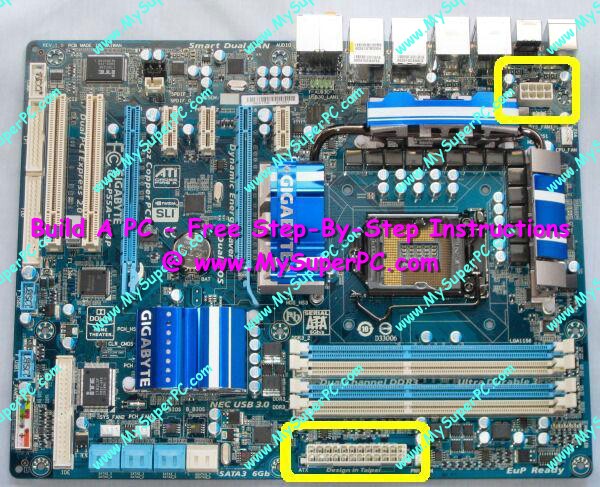
Or u forgot to plugin 4/8pin cpu power
 

ykgoh

Master Member
Joined
Jan 1, 2000
Messages
2,782
Reaction score
0
Your casing fan is connected to your PSU directly or through your mobo?

Looks like your front panel power switch not properly connected to your mobo header?
 

ykgoh

Master Member
Joined
Jan 1, 2000
Messages
2,782
Reaction score
0
Oh thr is another cpu 8 pin ah o.o

You've found your answer...

There is a power for your heatsink fan. And a power for your processor. If you've discrete GPU, maybe need another power.
 
Last edited:

Allanlee82

Senior Member
Joined
Dec 10, 2009
Messages
1,450
Reaction score
10
Oh thr is another cpu 8 pin ah o.o

there is 2 connection that need to be connected to the psu, something like the following pic
motherboard_gigabyte_ga_p55a_ud4p_power_cr.jpg
 

ykgoh

Master Member
Joined
Jan 1, 2000
Messages
2,782
Reaction score
0
The 8 pins are for the heatsink fan if I m not mistaken. if not connected, maybe heatsink won't work, but still can start but cpu will heat up fast and shuts down?

The main 24 pins are for the CPU+mobo?
 

wacko

Arch-Supremacy Member
Joined
Jan 1, 2000
Messages
15,544
Reaction score
266
do refer to the manual faithfully especially since this is the first time you are DIY-ing. another important thing to note, if you are using 2 sticks of RAM, put them in A2/B2 slots (2nd and 4th slots counting from CPU).
 

wacko

Arch-Supremacy Member
Joined
Jan 1, 2000
Messages
15,544
Reaction score
266
The 8 pins are for the heatsink fan if I m not mistaken. if not connected, maybe heatsink won't work, but still can start but cpu will heat up fast and shuts down?

The main 24 pins are for the CPU+mobo?

please don't give advice to a rookie if you are not sure yourself. this is incorrect info.
 

Rashkae

Arch-Supremacy Member
Joined
Sep 24, 2004
Messages
22,372
Reaction score
80
There's a Manual included for a reason... Please read it.
 

Just Me

Arch-Supremacy Member
Joined
Jan 1, 2000
Messages
14,249
Reaction score
41
Nowadays mobo designs are really straightforward. Last time I remember setting up a 486DX mobo. Full of jumpers and capacitors everywhere. Without the manual you can forget about getting it to work ever..
 

Rashkae

Arch-Supremacy Member
Joined
Sep 24, 2004
Messages
22,372
Reaction score
80
Nowadays mobo designs are really straightforward. Last time I remember setting up a 486DX mobo. Full of jumpers and capacitors everywhere. Without the manual you can forget about getting it to work ever..

Yeah, I remember when it was jumpers on the mobo that set up base clock and multiplier hahahaha
 

nwh_sg

Senior Member
Joined
Oct 21, 2001
Messages
2,193
Reaction score
6
The 8 pins are for the heatsink fan if I m not mistaken. if not connected, maybe heatsink won't work, but still can start but cpu will heat up fast and shuts down?

The main 24 pins are for the CPU+mobo?

The 8-pin is known as the EPS12V connector or just ATX power connector and it supplies current to the CPU.
 

LiNuxIDIoT

Supremacy Member
Joined
Oct 15, 2001
Messages
6,322
Reaction score
6
do refer to the manual faithfully especially since this is the first time you are DIY-ing. another important thing to note, if you are using 2 sticks of RAM, put them in A2/B2 slots (2nd and 4th slots counting from CPU).
Oh ok i nid to swap then tot is a1 n a2
 

ykgoh

Master Member
Joined
Jan 1, 2000
Messages
2,782
Reaction score
0
The 8-pin is known as the EPS12V connector or just ATX power connector and it supplies current to the CPU.

Oh yes, this makes sense. Apology. Last did it 2 years ago.

The heatsink fan was connected to a header, like 3 or 4 golden pins instead.
 

wacko

Arch-Supremacy Member
Joined
Jan 1, 2000
Messages
15,544
Reaction score
266
ok, in TS defence, the Asrock manual is not that great. it mentions the 8-pin ATX power connector, but it doesn't state specifically that you have to connect it.
 

LiNuxIDIoT

Supremacy Member
Joined
Oct 15, 2001
Messages
6,322
Reaction score
6
So if nvr connect the 8 pin will it fry my cpu coz no fan running? Or nothing coz no power supply to it? I juz installed my windows, so far so gd. Any gd software to monitor temp n fan spd?
 
Important Forum Advisory Note
This forum is moderated by volunteer moderators who will react only to members' feedback on posts. Moderators are not employees or representatives of HWZ Forums. Forum members and moderators are responsible for their own posts. Please refer to our Community Guidelines and Standards and Terms and Conditions for more information.
Top