DIY PC Rig Recommendations For 2025

Solidus_GZ

Master Member
Joined
Nov 8, 2008
Messages
3,865
Reaction score
530
Which mb for 7600x will you recomend? I wanted pcie 5 for future proofing for gpu
Currently I'm looking TUF x670e
Is it a good mb?
 

1l92041H

Senior Member
Joined
Oct 13, 2021
Messages
1,675
Reaction score
614
Can I have a best value build? Cheaper the better.

Will do some light gaming like D4, cs go.

from my research, seems 3060ti paired with ryzen 5600 seems to be what I’m looking for?
 

NightRaven49

Master Member
Joined
May 17, 2019
Messages
3,699
Reaction score
1,544
Which mb for 7600x will you recomend? I wanted pcie 5 for future proofing for gpu
Currently I'm looking TUF x670e
Is it a good mb?
i would say any x670/e motherboard is decent, with beefy vrms and pretty good feature sets.
u can watch this video from 5:33 onward, has comparisons between some boards in different price ranges. if ur primary consideration is only pcie 5 on the primary x16 slot for gpu, u can also consider b650e. like i mentioned the last time though, u probably wont be needing it for a very long while, so i would still suggest u go for a regular b650 board and while ur at it, u can get the non x 7600.
Can I have a best value build? Cheaper the better.

Will do some light gaming like D4, cs go.

from my research, seems 3060ti paired with ryzen 5600 seems to be what I’m looking for?
ive already suggested a value gaming pc in the list @ about $1.1k. u are quite close with what u are looking for, though the 3060ti commands quite a premium over the suggested 6650 xt, costing almost 50% more ($600 vs $420) for only around 10% more performance, so for best value the 6650 xt is better.
 

NightRaven49

Master Member
Joined
May 17, 2019
Messages
3,699
Reaction score
1,544
how about these 2 board? the X670 cost $100 more than B650, which might sway me into getting cheaper board, the B650 seem like supporting Pcie 5, correct me if I was wrong.

https://www.amazon.sg/GIGABYTE-B650...650+aorus+pro+ax+am5/+lga+1718,aps,296&sr=8-1
https://www.amazon.sg/GIGABYTE-X670...e+ax+am5/+lga+1718/+amd/+x670+,aps,241&sr=8-1
neither support pcie 5 for the x16 slot, only have pcie 5 for nvme. if u want pcie 5 on the x16 slot u need to go to the extreme mobos (b650e, x670e).
 

kimsix

Arch-Supremacy Member
Joined
Jan 6, 2009
Messages
19,000
Reaction score
9,049
how about these 2 board? the X670 cost $100 more than B650, which might sway me into getting cheaper board, the B650 seem like supporting Pcie 5, correct me if I was wrong.

https://www.amazon.sg/GIGABYTE-B650...650+aorus+pro+ax+am5/+lga+1718,aps,296&sr=8-1
https://www.amazon.sg/GIGABYTE-X670...e+ax+am5/+lga+1718/+amd/+x670+,aps,241&sr=8-1

personally using 7600x + strix b650e-e, very happy. it boots fast and tuned stable without a fuss.

b650e is enough with gen5 gpu and nvme. x670e is just 2 b650e chipsets with the same zen4 limitations.

asus 600 boards seems the best now. have exclusive features like medium loadboost and trefi tuning. their subsidiary asmedia makes the 600 chipset for amd!

local set after coupons and card discounts, around $530 with 3 years warranty.

beated m2 pro!

sI1W511.png
 

Solidus_GZ

Master Member
Joined
Nov 8, 2008
Messages
3,865
Reaction score
530
personally using 7600x + strix b650e-e, very happy. it boots fast and tuned stable without a fuss.

b650e is enough with gen5 gpu and nvme. x670e is just 2 b650e chipsets with the same zen4 limitations.

asus 600 boards seems the best now. have exclusive features like medium loadboost and trefi tuning. their subsidiary asmedia makes the 600 chipset for amd!

local set after coupons and card discounts, around $530 with 3 years warranty.

beated m2 pro!

sI1W511.png
Did you buy at shoppee? Which seller you buy the board from?
 

iron2000

Senior Member
Joined
Feb 8, 2003
Messages
1,917
Reaction score
9
For the ryzen 5 5600 + asrock b550m/ac combo, the mobo from box need to update bios with old CPU to support the 5600?
Will shops do it for you?

Thinking of going for the value gaming pc build as my 10 year old PC is spewing BSOD recently.
Scrolling Youtube will suddenly BSOD, watching YT halfway BSOD, shut down also BSOD, Genshin leave there no touch will auto crash, Honkai enter battle sure crash, repair install Win 10 also cannot got error.
Though Netflix and games like Nier Automata, Sonic Mania and old Stanley Prable are alright.

Banking on this AM4 thing for the next 10 years lol
AM5 combo too expensive.
 

bitperfect

Junior Member
Joined
Jan 29, 2023
Messages
6
Reaction score
0
6750 xt / 6700 xt seems to be out of stock locally already (unless at like 3070 prices). The sapphire nitro+ 6800 will not fit my case (too long)

Would the next price point only make sense for 3070 if paired with Intel 13400 for gaming? Corsair Rm 650 psu so have some limitations
 

NightRaven49

Master Member
Joined
May 17, 2019
Messages
3,699
Reaction score
1,544
For the ryzen 5 5600 + asrock b550m/ac combo, the mobo from box need to update bios with old CPU to support the 5600?
Will shops do it for you?
can double check with the shop. i would expect local stock to support out of the box by now though, and most shops should be gracious enough to do it if u ask.
Thinking of going for the value gaming pc build as my 10 year old PC is spewing BSOD recently.
Scrolling Youtube will suddenly BSOD, watching YT halfway BSOD, shut down also BSOD, Genshin leave there no touch will auto crash, Honkai enter battle sure crash, repair install Win 10 also cannot got error.
Though Netflix and games like Nier Automata, Sonic Mania and old Stanley Prable are alright.
what kind of bsod error is it throwing? have u tried reinstalling windows?
Would the next price point only make sense for 3070 if paired with Intel 13400 for gaming?
not sure what ur trying to ask. 13400 with 3070 is fine, though for only gaming, the 13400 does not offer much more than a 12400/ryzen 5 5600. u should go 3070 if u want to do video editing anyway.
 

iron2000

Senior Member
Joined
Feb 8, 2003
Messages
1,917
Reaction score
9
what kind of bsod error is it throwing? have u tried reinstalling windows?
Some of the BSOD errors I've gotten these few days:
IRQL_NOT_LESS_OR_EQUAL
MEMORY_MANAGEMENT
SYSTEM_THREAD_EXCEPTION_NOT_HANDLED_M
SYSTEM_SERVICE_EXCEPTION
KERNEL_SECURITY_CHECK_FAILURE
BAD_POOL_CALLER

lol sometimes will BSOD 2 times while watching a 20 min+ youtube video.
They just seem to come up suddenly.

I tried repair installing Windows 10.
Mount ISO and run setup.exe.
But got this error:
0x8007025D - 0x2000C
The installation failed in the SAFE_OS phase with an error during APPLY_IMAGE operation
 

Steyr69

Arch-Supremacy Member
Joined
Oct 7, 2006
Messages
19,866
Reaction score
305
Could it be memory module issue? Maybe resit ram and see how.
 

iron2000

Senior Member
Joined
Feb 8, 2003
Messages
1,917
Reaction score
9
Could it be memory module issue? Maybe resit ram and see how.
Thinking back it all seem to start when the PC didn't boot like 1 week+ back.
It was a red light of the DRAM LED on the mobo.
I removed the 2 sticks I mixed in some months back leaving the original 2 sticks.
CMOS reset and the PC boots again.

Then the BSOD nightmare begins.
I cleaned the PC internals, wipe down fans, compress air can everything and resit RAM and gfx card.
SMART data of the storage drives are green.
I did 4 passes of Memtest86 and the 2 original sticks pass with 0 errors.
DDU the gfx driver and reinstall gfx driver (though I do use NVcleanstall as I did for years).
Tried a Win10 repair install but failed.

Just yesterday it dawned on me that perhaps its the ramdisk?
I uninstall Softperfect Ramdisk.
I could play Honkai and Genshin again.
Though Genshin crashed first time when I left it loading to map untouched.
Second time I loaded to map and actively play then it didn't crash.

Installed ramdisk again and Honkai freezes and BSOD started appearing.

I've been using ramdisk for quite some years already though.
Just to save the SSD from the wear of frequent writes of the browser cache (as the net suggest).

Though I remember theres a few times the PC went off when the PCB trip during thunderstorm.
Would that cause corruption?
Maybe I'll try repair install Win10 without ramdisk.
Also read that PSU can cause BSOD too, that I have no tools to test.

So easy to spot a bloated capacitor back then lol.
Back then just eyeball bloated capacitor then go down to SLS and bought this current PC.

EDIT:
Still BSOD without ramdisk, pretty random at this point.
Win10 repair install still same error without ramdisk.

 
Last edited:

shingetterrobo

Junior Member
Joined
Oct 13, 2008
Messages
8
Reaction score
13
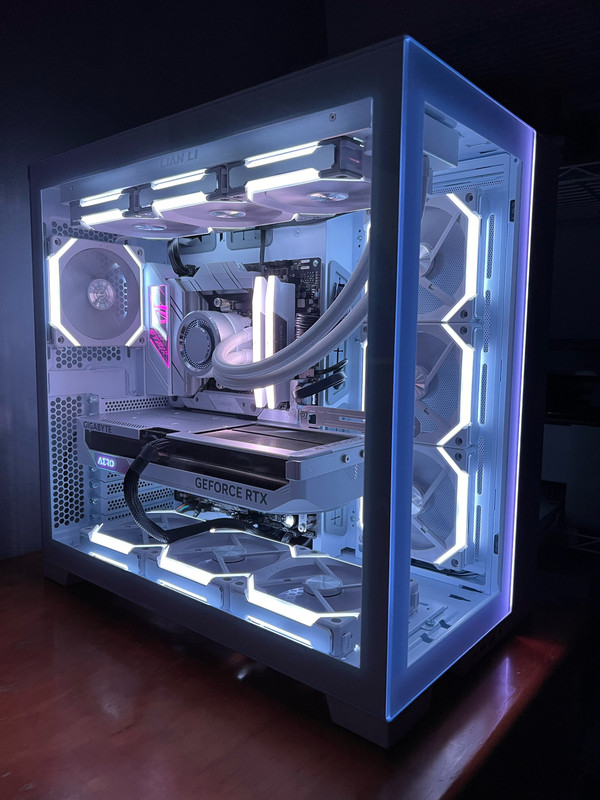
I build my white theme gaming PC about one month ago to replace my 2014 budget gaming PC (been waiting to upgrade since Covid started in 2020). I selected the components I wanted and overspec on some components for future proofing (Mobo, CPU & PSU). The assembly and most of the components are from PC Themes except for some components I bought on my own due to shortages or online local stocks has better price (AIO, ATX3.0 PSU and case fans).

PC specs:
Mobo: Asus ROG Strix X670E-A Gaming Wifi
CPU: AMD Ryzen R9 7900
AIO: Lian Li Galahad UNI FAN SL Edition 360 White
Ram: Corsair Veng RGB DDR5 32GB 6000MHz CL40 White
OS SSD: WD Black SN850X NVME M.2 Gen 4 SSD 1TB
GPU: Gigabyte RTX 4070 Ti AERO OC 12G
PSU: ATX3.0 Thermaltake Toughpower GF3 1200W Gold - TT Premium Edition
Case: Lian Li O11 Dynamic Evo Case (White)
Case fans: 7 x Lian Li UNI SL120 V2 RGB Fan (White)

PC-Buiild-Jan-2023.jpg
 

kaixax555

Honorary Member
Joined
Nov 6, 2007
Messages
125,535
Reaction score
311
I build my white theme gaming PC about one month ago to replace my 2014 budget gaming PC (been waiting to upgrade since Covid started in 2020). I selected the components I wanted and overspec on some components for future proofing (Mobo, CPU & PSU). The assembly and most of the components are from PC Themes except for some components I bought on my own due to shortages or online local stocks has better price (AIO, ATX3.0 PSU and case fans).

PC specs:
Mobo: Asus ROG Strix X670E-A Gaming Wifi
CPU: AMD Ryzen R9 7900
AIO: Lian Li Galahad UNI FAN SL Edition 360 White
Ram: Corsair Veng RGB DDR5 32GB 6000MHz CL40 White
OS SSD: WD Black SN850X NVME M.2 Gen 4 SSD 1TB
GPU: Gigabyte RTX 4070 Ti AERO OC 12G
PSU: ATX3.0 Thermaltake Toughpower GF3 1200W Gold - TT Premium Edition
Case: Lian Li O11 Dynamic Evo Case (White)
Case fans: 7 x Lian Li UNI SL120 V2 RGB Fan (White)

PC-Buiild-Jan-2023.jpg
How much did you spend? I am looking to build something around a similar range as well :s13:
 

transparos

Senior Member
Joined
Dec 5, 2012
Messages
1,414
Reaction score
226
I build my white theme gaming PC about one month ago to replace my 2014 budget gaming PC (been waiting to upgrade since Covid started in 2020). I selected the components I wanted and overspec on some components for future proofing (Mobo, CPU & PSU). The assembly and most of the components are from PC Themes except for some components I bought on my own due to shortages or online local stocks has better price (AIO, ATX3.0 PSU and case fans).

PC specs:
Mobo: Asus ROG Strix X670E-A Gaming Wifi
CPU: AMD Ryzen R9 7900
AIO: Lian Li Galahad UNI FAN SL Edition 360 White
Ram: Corsair Veng RGB DDR5 32GB 6000MHz CL40 White
OS SSD: WD Black SN850X NVME M.2 Gen 4 SSD 1TB
GPU: Gigabyte RTX 4070 Ti AERO OC 12G
PSU: ATX3.0 Thermaltake Toughpower GF3 1200W Gold - TT Premium Edition
Case: Lian Li O11 Dynamic Evo Case (White)
Case fans: 7 x Lian Li UNI SL120 V2 RGB Fan (White)

PC-Buiild-Jan-2023.jpg
a bit not worth for me leh.. i think 4.4k can give u at least a 4080 ba
 
Important Forum Advisory Note
This forum is moderated by volunteer moderators who will react only to members' feedback on posts. Moderators are not employees or representatives of HWZ. Forum members and moderators are responsible for their own posts.

Please refer to our Community Guidelines and Standards, Terms of Service and Member T&Cs for more information.
Top