DIY PC Rig Recommendations For 2025

linxiaobei

Supremacy Member
Joined
Dec 24, 2009
Messages
6,076
Reaction score
3
The mobo doesn't come with BT and wifi unless you opt for the Wifi version which will add around $30-40.
Case is separate and you get to choose whichever you like.
Based on the list from @NightRaven49 you can either go to Tradepac or Dynacore and ask if you can get a better price for the entire list. Building pc service is usually around $30.
thank you for the insight! didn't know we can ask them to better price it and build for me at one go.
 

NightRaven49

Master Member
Joined
May 17, 2019
Messages
3,699
Reaction score
1,544
This will require to buy separately then get tradepac to build?
well the only part not from tradepac in that list is the gpu. while they dont normally list gpu prices, the 7800xt is quite new and popular, so i cant imagine them not having stocks of it and would be a good idea to inquire on their prices. if u do get all parts from them, likely they wont charge build fee and u can bargain the whole build price abit also. they should allow including parts from outside, though as hiryu mentioned there will likely be a build fee in this case.
I think this list excludes the case and wifi function right?
yes, though case recommendations are also in the first post and a budget of $150 has been included in the build cost. for wifi, u can look at pcie wifi cards if u are not open to dongles. or if u are willing to be janky like me, u can get a m.2 key m to key e adapter and use ur unused nvme slot as a wifi card slot (once u source ur own wifi card elsewhere).
PXL_20220108_071757142.jpg
 

Durron

Senior Member
Joined
Oct 30, 2004
Messages
529
Reaction score
0
Hi guys, am looking to build a gaming rig after many years, is there anything incompatible or inefficient (bottleneck) for this setup? Will be on 2x27" monitors (gaming on one monitor @ 1440p).

Ryzen 5 7600 + Asrock PG Riptide b650m + Lexar Ares RGB 6000c34 2x 16gb ddr5666Tradepac
Thermalright Peerless Assassin 120 *157mm height55Tradepac
WD Black SN850X NVMe 2TB208Dynacore
Crucial P3 Plus Gen4 NVMe 2TB120Dynacore
Sapphire RX 7800 XT Pulse770Bizgram
Adata XPG Core Reactor 750w Gold162Tradepac
Lian Li Lancool 216 (Black)122Tradepac
MS Windows 11 Home138Bizgram
LIAN LI LAN216-2X13.2 (OOS)Performance PC
  1. Can the Asrock PG Riptide b650m fit two NVMe M.2 drives? Looked at the specs but didn't really understand, can I get both NVMe from the list above since the mobo has the "Blazing M.2 socket" and the "Hyper M.2 socket"?

  2. Is it worth it to get two NVMe M.2 drives? Am thinking of setting the WD Black SN850X as the OS/game drive and the Crucial P3 Plus Gen4 as storage.

  3. Is there anything you would change from the setup?

  4. Some games that I will be playing: Starfield, Cyberpunk 2077, Baldur's Gate 3, Diablo 4, Mortal Kombat 1, Armored Core VI: Fires of Rubicon

    Thanks!
 
Last edited:

NightRaven49

Master Member
Joined
May 17, 2019
Messages
3,699
Reaction score
1,544
is there anything incompatible or inefficient (bottleneck) for this setup?
looks good (well its just my enthusiast reco with additional storage and the psu from the high perf reco, so i may only be slightly biased here :grin:). for bottlenecks, every system will have one somewhere, but its really just another way of saying that a certain component is being maxed out. imo ideally this should be the gpu, since it is the main contributor in gaming performance and is often the most expensive single part in the system, so u would want it to not be held back. most of my recommendations have this slant, and since u are gaming at a higher resolution that is likely to be the case.
Can the Asrock PG Riptide b650m fit two NVMe M.2 drives? Looked at the specs but don't really understand, can I get both NVMe from the list above since the mobo has the "Blazing M.2 socket" and the "Hyper M.2 socket"?
yeah. blazing m.2 is the gen 5 nvme slot, while hyper m.2 is the gen 4 nvme slot, so it can fit 2 nvmes.
Is it worth it to get two NVMe M.2 drives? Am thinking of setting the WD Black SN850X as the OS/game drive and the Crucial P3 Plus Gen4 as storage.
u would be better off getting the samsung 980 pro from dynacore for a $30 discount.
Is there anything you would change from the setup?
other than the ssd change above, i wouldnt buy the windows key from sls. u can find legit keys for way cheaper elsewhere.
 

sneakyj

Junior Member
Joined
Oct 2, 2023
Messages
2
Reaction score
0
Hi all, long time lurker first time poster here. Finally taking the jump to get my first build, looking to base it around a 13600KF and 4070TI. InvaderPC has a set with the following components, which at the price they're asking (sgd2.1k) seems pretty hard to beat vs if I were to buy them separately:

- INTEL I5-13600KF 3.50GHz 6+8CORE/20THREAD
- ASUS TUF GAMING B760M-PLUS WIFI DDR5
- COOLER MASTER ML240L LIQUID COOLER
- KINGSTON RGB DDR5 6000MHz 32GB(16GBx2)
- ASUS TUF GAMING RTX4070Ti 12G GAMING TRIPLE FAN GDDR6X
- WD BLACK SN850X 1TB GEN4 7300MB/s NVMe M.2
- SILVERSTONE ET750 750W 80+ GOLD
- COOLER MASTER CMP 320 CASING (3 ARGB FANS)
- WINDOWS 11 HOME UN-ACTIVATED

The only components I would like to upgrade is the motherboard to a Z790, and if required, a better PSU. Appreciate the advice, feedback, review etc.

Thanks in advance!
 

deepblue_82

Arch-Supremacy Member
Joined
Oct 23, 2007
Messages
18,535
Reaction score
2,070
the mb unless u are overclocking.. no need to change..
the PSU please change to a better one
overall seems ok..
 

NightRaven49

Master Member
Joined
May 17, 2019
Messages
3,699
Reaction score
1,544
The only components I would like to upgrade is the motherboard to a Z790, and if required, a better PSU.
definitely upgrade the psu, the asus rog strix 750w is just a $65 top up for a top tier unit.

if just gaming, personally id go with the ryzen version of this build tier for almost $300 less, even though it has half the ram, a slower nvme and an air cooler instead of an aio. u should be able to contact them to replace the sn770 with the sn850x (instead of add on), while the ram upgrade to 32gb rgb kits is only $110 at most, so overall will be slightly cheaper for similar performance. and of course upgrade the psu.
 

Phen8210

High Supremacy Member
Joined
Jul 29, 2011
Messages
28,883
Reaction score
8,214
Hi all, long time lurker first time poster here. Finally taking the jump to get my first build, looking to base it around a 13600KF and 4070TI. InvaderPC has a set with the following components, which at the price they're asking (sgd2.1k) seems pretty hard to beat vs if I were to buy them separately:

- INTEL I5-13600KF 3.50GHz 6+8CORE/20THREAD
- ASUS TUF GAMING B760M-PLUS WIFI DDR5
- COOLER MASTER ML240L LIQUID COOLER
- KINGSTON RGB DDR5 6000MHz 32GB(16GBx2)
- ASUS TUF GAMING RTX4070Ti 12G GAMING TRIPLE FAN GDDR6X
- WD BLACK SN850X 1TB GEN4 7300MB/s NVMe M.2
- SILVERSTONE ET750 750W 80+ GOLD
- COOLER MASTER CMP 320 CASING (3 ARGB FANS)
- WINDOWS 11 HOME UN-ACTIVATED

The only components I would like to upgrade is the motherboard to a Z790, and if required, a better PSU. Appreciate the advice, feedback, review etc.

Thanks in advance!

I think your upgrade choices are fine, then in hand, you should get a casing with better airflow.

That case provided is S$78 on Amazon and hosts 3 x 120mm fans that aren't anything amazing. It's wasting the potential of the cooling on that TUF card.

Something with 3 x 140mm is naturally going to perform way better & also quieter.
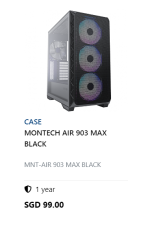
If you are extremely tight on budget, then Montech Air 903 is the best entry-level choice @ just $99.
1696336470932.png
https://www.hardwarezone.com.sg/tec...asing-new-mid-tower-pc-casing-singapore-price

Refer to @KleoZy video here for the case.


This is more optimal since a 13th GEN intel can push the GPU to work really hard. A 285W GPU when running 99%/100%, will draw at least 250W. It's neither low nor high but 100% enough to throttle your card after 15 minutes at such a state IF your air intake isn't great.

The other choice is to undervolt the card OR turn up the fan and accept the noise.

I find no point in saving $20 bucks and using a second-rate case on a high-end build where the airflow just sucks which doubles as an obstacle for future upgrades. Penny wise pound foolish.
 
Last edited:

sneakyj

Junior Member
Joined
Oct 2, 2023
Messages
2
Reaction score
0
the mb unless u are overclocking.. no need to change..
the PSU please change to a better one
overall seems ok..
definitely upgrade the psu, the asus rog strix 750w is just a $65 top up for a top tier unit.

if just gaming, personally id go with the ryzen version of this build tier for almost $300 less, even though it has half the ram, a slower nvme and an air cooler instead of an aio. u should be able to contact them to replace the sn770 with the sn850x (instead of add on), while the ram upgrade to 32gb rgb kits is only $110 at most, so overall will be slightly cheaper for similar performance. and of course upgrade the psu.
Thanks guys, will definitely change the PSU. I don't plan to overclock so I shall keep the MB..
Ah, that the thing - I'm using it 70% productivity 30% gaming hence the choice of 13600. Otherwise I would've considered a ryzen build. And cheers for the SSD upgrade idea too.

I think your upgrade choices are fine, then in hand, you should get a casing with better airflow.

Thanks for the recommendation on the case, I understand the justification. I can ask if they can swap it out. Hopefully it doesn't turn into a full custom build in terms of pricing..
 

Phen8210

High Supremacy Member
Joined
Jul 29, 2011
Messages
28,883
Reaction score
8,214
Thanks guys, will definitely change the PSU. I don't plan to overclock so I shall keep the MB..
Ah, that the thing - I'm using it 70% productivity 30% gaming hence the choice of 13600. Otherwise I would've considered a ryzen build. And cheers for the SSD upgrade idea too.


Thanks for the recommendation on the case, I understand the justification. I can ask if they can swap it out. Hopefully it doesn't turn into a full custom build in terms of pricing..

The msrp only $20 diff, shouldnt make such a big impact but companies want to sell their products :ROFLMAO:
 

Warplaner

Senior Member
Joined
Jan 23, 2014
Messages
2,210
Reaction score
12
Just bought this build from Dreamcore

$2905
Intel i5-13600KF
ASUS TUF Gaming B760 PLUS WiFi
ASUS Dual RTX4070 O12G
32GB Corsair Vengeance RGB DDR5-6000MHz CL40
1TB Crucial P5 Plus Gen4 SSD
Corsair HX850 80+ Platinum
Corsair H150i Elite XT LCD AIO Liquid Cooler (want LCD cooler and they only got this)
NZXT H9 Flow Black
Corsair SP120 3 Pack

Anything wrong with this build? They are also offering me upgrade to 4070 Ti for $450, should I take? Planning to use for 4 years at 1440p dual monitors. I want to run games at high or ultra settings, that's why considering the Ti. But looking at prices am thinking might be more worth to just change to 50 series GPU when they come out instead.
 

hiryu

Senior Member
Joined
May 22, 2002
Messages
607
Reaction score
19
Just bought this build from Dreamcore

$2905
Intel i5-13600KF
ASUS TUF Gaming B760 PLUS WiFi
ASUS Dual RTX4070 O12G
32GB Corsair Vengeance RGB DDR5-6000MHz CL40
1TB Crucial P5 Plus Gen4 SSD
Corsair HX850 80+ Platinum
Corsair H150i Elite XT LCD AIO Liquid Cooler (want LCD cooler and they only got this)
NZXT H9 Flow Black
Corsair SP120 3 Pack

Anything wrong with this build? They are also offering me upgrade to 4070 Ti for $450, should I take? Planning to use for 4 years at 1440p dual monitors. I want to run games at high or ultra settings, that's why considering the Ti. But looking at prices am thinking might be more worth to just change to 50 series GPU when they come out instead.
@Warplaner Hate to say this but the list price of all these items come up to $2672 so you overpaid a huge amount for them to build your PC. I could just upgrade to a 4070TI and you will only be looking at $2882. Bargain a bit and you will get everything here for less than what you paid but with a 4070TI.
 

jrwong84

Supremacy Member
Joined
Mar 18, 2013
Messages
6,163
Reaction score
1,172
Just bought this build from Dreamcore

$2905
Look like chop carrot price sorry to said too casing can put in triple fans gpu why they give you dual fan? Or you requested for it?.

70 to 70ti is not worth it because same vram 12gb don't fall into theirs traps.
 

NightRaven49

Master Member
Joined
May 17, 2019
Messages
3,699
Reaction score
1,544
Anything wrong with this build?
yep as the others mentioned, very expensive for what it offers.
u can build a slightly better system for at least $400 less.
partspricestorecomments
ryzen 5 7600 + asus tuf gaming b650m-plus wifi559dynacoresimilar gaming performance to 13600kf for a lot cheaper, better upgrade path
corsair h150i elite xt lcd362tradepac
teamgroup tforce delta rgb 2x 16gb 6000c38 ddr5160dynacoreslightly tighter subtimings (lower latency), still has rgb
2x crucial p5 plus 1tb99 x 2 = 198bizgram
sapphire pulse rx 7800 xt770bizgramslightly faster than 4070, more vram
cooler master xg plus platinum 850w185dynacoresame top tier quality, 850w, 80+ plat, has rgb
nzxt h9 flow210tradepac
arctic p12 argb pst 3pack52dynacoreone of the best value fans around, still has rgb
total: $2496. for close to 3k which is quoted price of ur build from dreamcore, i would build a 13700f + 7900xtx build as detailed in the first post, which would be significantly faster in both cpu and gpu performance. even if u top up for the h150i lcd, extra 1tb nvme, h9 flow and extra fans, will still cost less than their offered 4070ti """upgrade""".

They are also offering me upgrade to 4070 Ti for $450, should I take?
i wouldnt. the 4070 non ti can already drive around 120fps at 1440p in modern titles, which i feel is quite adequate. while from a value standpoint it makes sense (15% more money of the whole build for 25% more performance), the 4070ti is not a good value gpu overall and its 12gb of vram is quite anaemic given the price and may not be enough in a few years time.

tldr buy already, just enjoy.
 

Phen8210

High Supremacy Member
Joined
Jul 29, 2011
Messages
28,883
Reaction score
8,214
Look like chop carrot price sorry to said too casing can put in triple fans gpu why they give you dual fan? Or you requested for it?.

70 to 70ti is not worth it because same vram 12gb don't fall into theirs traps.

Asus Dual gg but not the worst.

Must thank god that its not zotac 2 fan, this 1 rly cmi.
 

Warplaner

Senior Member
Joined
Jan 23, 2014
Messages
2,210
Reaction score
12
thanks all for replies. looks like next time ownself build or find someone here to build better lol
 

hiryu

Senior Member
Joined
May 22, 2002
Messages
607
Reaction score
19
thanks all for replies. looks like next time ownself build or find someone here to build better lol
If you can DIY, of course better.
Otherwise paying a shop $30 to build after you buy the parts is also ok. Some of them might even do it free if you get the whole set of parts from them.

Overall I would suggest newbies to read the guide at the 1st page that @NightRaven49 did.
His research is thorough and suggestions for the parts make sense.
That's how I started for my 1st build in Sep and then slightly modifying some parts that I like.
Also try to talk to the veterans in this chat before making a purchase. They are all helpful and will help you get a bang for buck PC.
 

jrwong84

Supremacy Member
Joined
Mar 18, 2013
Messages
6,163
Reaction score
1,172
Asus Dual gg but not the worst.

Must thank god that its not zotac 2 fan, this 1 rly cmi.
Local many peoples like zotac because of 5 years warranty but i myself prefer palit design more and zotac temperature even higher tier version PSP very jialat one.

For gpu i will never get dual fan if my casing can fit in triple fan never liked any dual fan gpu design before.
 

DingDang51

Member
Joined
Aug 22, 2006
Messages
313
Reaction score
13
Looking to upgrade my super old basic rig. Mainly using for web browsing, streaming 1080p videos, occasional photo/video editing using Photoshop+Lightworks and FM23

Planning to reuse:
Monitor, Matx casing
Seasonic S12III 550W 80+ Bronze
Bluray drive, DVDW
Intel 240GB Ssd, HGST 3TB HDD

Planning to buy:
Ryzen 5 5600G
Asus Prime B550m-A wifi
Kingston Fury DDR4 3600mhz 2x16GB
Samsung Evo 970 Plus 500GB (for OS and apps only)

Budget ard $500

1. Is it worth it to upgrade mb to Asus Tuf gaming B550M Plus WiFi?
2. Is it worth swapping to Samsung 980 ssd for the same price?
3. Any issues with this rig?

Tks bros for your advice!
 

jrwong84

Supremacy Member
Joined
Mar 18, 2013
Messages
6,163
Reaction score
1,172
Looking to upgrade my super old basic rig. Mainly using for web browsing, streaming 1080p videos, occasional photo/video editing using Photoshop+Lightworks and FM23

Planning to reuse:
Monitor, Matx casing
Seasonic S12III 550W 80+ Bronze
Bluray drive, DVDW
Intel 240GB Ssd, HGST 3TB HDD

Planning to buy:
Ryzen 5 5600G
Asus Prime B550m-A wifi
Kingston Fury DDR4 3600mhz 2x16GB
Samsung Evo 970 Plus 500GB (for OS and apps only)

Budget ard $500

1. Is it worth it to upgrade mb to Asus Tuf gaming B550M Plus WiFi?
2. Is it worth swapping to Samsung 980 ssd for the same price?
3. Any issues with this rig?

Tks bros for your advice!
B550 can support pcie 4.0 your 970 plus is pcie 3.0 and 5600G don't support pcie 4.0 only 3.0 if you still want this nvme and cpu can downgrade motherboard to B450

5600g support pcie 3.0 so buying B550 is a waste but it doesn't mean it will not work with 970 plus pcie 3.0 still able to use

B550 is better if you got good gpu and nvme 4.0 and your cpu support pcie 4.0 like 5600 5600X 5700X 3600 Mostly G integrated graphics amd don't support pcie 4.0 so my advice is go drop to B450 or lower tier.
 
Important Forum Advisory Note
This forum is moderated by volunteer moderators who will react only to members' feedback on posts. Moderators are not employees or representatives of HWZ. Forum members and moderators are responsible for their own posts.

Please refer to our Community Guidelines and Standards, Terms of Service and Member T&Cs for more information.
Top