DIY SSD installation on Laptop

moodless

Senior Member
Joined
Dec 28, 2008
Messages
2,160
Reaction score
5
Hi all,

I want to keep my laptop alive (for work purposes) for perhaps 2 or 3 more years, currently it does not have any SSD installed - wanted to ask if it is easy to install? Have no experience handling laptops..

Laptop model is Samsung RF411

Specs are:
i7 2630QM CPU @ 2.00 GHZ
8GB Ram (No idea what type..)
HDD 500 Gig
Nvidia GT 525M

Looking at crucial website, i do have compatible model..
http://www.crucial.com/usa/en/compatible-upgrade-for/Samsung/rf411-s03

PS: Anybody staying in the east could help with the upgrade too?

Thanks in advance!
 
Last edited:

shadow84

High Supremacy Member
Joined
Apr 15, 2009
Messages
34,286
Reaction score
420
Presuming its out of warranty, open up the back of your laptop and examine the type of ssd being used. You may take a photo and post it here.

Is it normal 7mm or 9mm thick ssd or msata ssd?
 

Encrypted11

Supremacy Member
Joined
Jun 9, 2012
Messages
5,937
Reaction score
271
Samsung (Clonix) Data Migration tool is far more foolproof than EaseUS or Acronis imo but requires Samsung SSD. But you need to get either a 2.5" external hard drive enclosure or SATA to USB 2.0 cable for migrating data.
 

moodless

Senior Member
Joined
Dec 28, 2008
Messages
2,160
Reaction score
5
Presuming its out of warranty, open up the back of your laptop and examine the type of ssd being used. You may take a photo and post it here.

Is it normal 7mm or 9mm thick ssd or msata ssd?

Yes, it is out of warranty.
It currently does not have any SSD but is using the traditional HDD. I am planning to upgrade it.

Will open it up when i get home tonight!
But lookin at the crucial link for my laptop model, it should be 9.5mm.

Thanks!
 

moodless

Senior Member
Joined
Dec 28, 2008
Messages
2,160
Reaction score
5
Samsung (Clonix) Data Migration tool is far more foolproof than EaseUS or Acronis imo but requires Samsung SSD. But you need to get either a 2.5" external hard drive enclosure or SATA to USB 2.0 cable for migrating data.

Thanks for your advise!
I will probably only get a 128gb SSD and install the OS in there, while my existing HDD will continue to store data for my work.

I will do a back up of my work, and reset the laptop to factory default before doing the migration.

Cheers!
 

shadow84

High Supremacy Member
Joined
Apr 15, 2009
Messages
34,286
Reaction score
420
Yes, it is out of warranty.
It currently does not have any SSD but is using the traditional HDD. I am planning to upgrade it.

Will open it up when i get home tonight!
But lookin at the crucial link for my laptop model, it should be 9.5mm.

Thanks!

Best to confirm on the thickness of your hdd although if its 2.5" hdd, it would be 9mm. Crucial ssd do come with a 7mm to 9mm stick-on bracket for ssds to be used in laptops.

Thanks for your advise!
I will probably only get a 128gb SSD and install the OS in there, while my existing HDD will continue to store data for my work.

I will do a back up of my work, and reset the laptop to factory default before doing the migration.

Cheers!

Question is, can your laptop support 2x hdd/ssd? IIRC, new laptops will have this function, unless u swap out the optical bay. Best is to get min 250gb or 500gb ssd if your budget allows.
 

Encrypted11

Supremacy Member
Joined
Jun 9, 2012
Messages
5,937
Reaction score
271
Best to confirm on the thickness of your hdd although if its 2.5" hdd, it would be 9mm. Crucial ssd do come with a 7mm to 9mm stick-on bracket for ssds to be used in laptops.

Usually it is a small mounting bracket with slight insulation to the rest of the chassis. If its a 9mm bracket, it will be backward compatible to 7mm. Due to screws at same areas holding on it to bracket.

Spacer are not necessary unless its probably something that isn't screw mounted.
 

moodless

Senior Member
Joined
Dec 28, 2008
Messages
2,160
Reaction score
5
In this case I'll probably get a 256gb and work with my external HDD for storage if it doesn't support dual HDD+SSD.

Getting a 500gb SSD does not seem worth it for me to upgrade on such an old laptop. Thanks!

Best to confirm on the thickness of your hdd although if its 2.5" hdd, it would be 9mm. Crucial ssd do come with a 7mm to 9mm stick-on bracket for ssds to be used in laptops.


Question is, can your laptop support 2x hdd/ssd? IIRC, new laptops will have this function, unless u swap out the optical bay. Best is to get min 250gb or 500gb ssd if your budget allows.
 

moodless

Senior Member
Joined
Dec 28, 2008
Messages
2,160
Reaction score
5
Thanks! I can only open up tonight and check it out as I'm using it for work now.

Which brand do you guys recommend that can last me another 2 to 3 years? Probably don't need top notch brand like Samsung Evo as I have my desktop that is my main driver for games.

Thanks!

Usually it is a small mounting bracket with slight insulation to the rest of the chassis. If its a 9mm bracket, it will be backward compatible to 7mm. Due to screws at same areas holding on it to bracket.

Spacer are not necessary unless its probably something that isn't screw mounted.
 

Encrypted11

Supremacy Member
Joined
Jun 9, 2012
Messages
5,937
Reaction score
271
Anecdotal evidence suggests Samsung has one of the widest compatibility testing across different platforms. They were already the primary SSD pick for aftermarket SSD upgrades in like 2011 or 2012 already, even worked well with non-windows machines.
(i.e. The SSD pick for upgrading 2009-2012 macbooks)

Personally when I had some performance issues with an Intel drive (SSD 530) on a laptop, I was directed to their QVL (qualified vendor list) which was a small PDF consisting of Intel chipset based desktop machines and couldn't help me much.

I would still suggest Samsung (due to free downloadable copy of Clonix data migration) or Crucial for the copy of acronis.
Edit: But since cost/GB is far higher on Samsung, probably crucial will be a good alternative.
 
Last edited:

tungsten2

Master Member
Joined
May 30, 2000
Messages
4,147
Reaction score
1
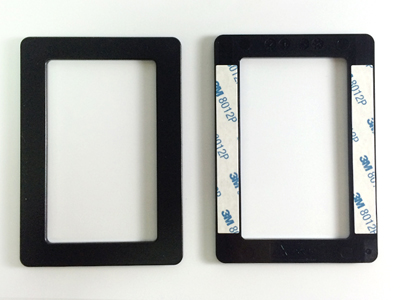
I bought a few SSD and only ADATA comes with the spacer. Its very useful as it hold your SSD in place and it does not rocks inside your laptop.
memorypack%20ssd%20spacer%207mm%20to%209mm%20adata%203.jpg


Register it and you can download the free Acronis True image HD, disk migration utility from ADATA site and use it to clone an image out from the existing hdd.

They even have a guide how to install and activate the Acronis utility.
 

CyberTron

Senior Member
Joined
Jan 1, 2000
Messages
1,278
Reaction score
0
Depends how your current hdd is partition, if it is a single 500gb partition, then ideally u should be a 512gb to ease the cloning process.

I think for brand of ssd, I think any of the big brands should be ok. If no data going to be stored just os and app, then u can probably go with cheaper ssd, but for me, I usually will pay more for a big brand like Samsung or intel, mainly for ease of mind and warranty.

For cloning software, I have tried the Samsung one and I think intel one as well, so far none works. Always failed halfway even though I a kway close to same or bigger size ssd. I end up using 3rd party tools instead.
 

ZrE0_Cha0s

Arch-Supremacy Member
Joined
Jun 21, 2011
Messages
16,703
Reaction score
26
if need spacer just get a thin cardboard and cut out the same size or slightly smaller than the ssd and just install it :D
 

lalalalalala

Great Supremacy Member
Joined
Dec 25, 2005
Messages
53,799
Reaction score
15,784
No need spacer la. Use double side tape can already.

More important is ur laptop can run 2 hdd anot? If not must remove the optical drive.

After that go ebay/aliexpress and buy a optical drive caddy. After it come then u mount ur ssd in and clone

Sent from OnePlus A0001 using GAGT
 

Encrypted11

Supremacy Member
Joined
Jun 9, 2012
Messages
5,937
Reaction score
271
Card board, double sided tape, black tape or screw mount to bracket all works. Laptop drive slots are usually brakcet + insulation based (to hide the original HDD's PCB) or tight fitting memory foam based fit to 2.5" drive inside.

Not trolling, being serious. But the point on optical bay caddy can consider too but usually laptops of that age the optical SATA port should be 2.0 based. IIRC the 2 main standards are 12.7mm and 9.5mm based.

Therefore the primary hard drive should go in there, after you turned the SSD to boot drive. Usually laptop BIOSes cant configure the boot priority, u need to let the windows MBR populate correctly by installing SSD only on the primary slot, followed by trial and error on optical bay if needed.
 
Last edited:
Important Forum Advisory Note
This forum is moderated by volunteer moderators who will react only to members' feedback on posts. Moderators are not employees or representatives of HWZ Forums. Forum members and moderators are responsible for their own posts. Please refer to our Community Guidelines and Standards and Terms and Conditions for more information.
Top