
DNS-323 Network Storage

MarineX

Banned
Joined
Jun 21, 2002
Messages
19,427
Reaction score
0
Sorry to post this again.

Anyone here uses the DNS323 internal DDNS function without any problem being blocked by Dyndddns for update abuse?

I'm using this and been blocked for abuse as my DNS323 seem to update dlinkddns on a more regular basis that the 576 hrs timeout entered.

Dlink support is not of a help, as they claim that the DDNS function is working.

Dyndns says that my client is updating too often.

Appreciate anyone who is using the built in DDNS that have problem and use alternative or those using it and does not have an problem for some feedback.

Thanks

did you set DDNS for both your router and DNS-323? You should set it on 1 of the either device only.

The problem doesnt lies with Dlink or DDNS.
 

hosm

Member
Joined
Aug 1, 2000
Messages
400
Reaction score
0
Thanks for the kind response.

I've only set the DDNS in the DNS323.
I'm using the 2 Wire 2700 by Singnet.

I am suspecting the DNS323 is sending out the IP update
As I have been monitoring
It is sending out every 24 hours if I set the timeout to 576 hours.


did you set DDNS for both your router and DNS-323? You should set it on 1 of the either device only.

The problem doesnt lies with Dlink or DDNS.
 

Lss

Honorary Member
Joined
Aug 14, 2002
Messages
122,501
Reaction score
14,544
currently i have a 1tb seagate HDD in my NAS-323. if i go get another of the same hdd, how can i make my HDD = RAID 1?

if i no wrong, i have to format both hdd before it works?
is there a way to do it so that i no need to format the old 1 so that the data in it remains?

better off asking d-link if you cant get answers here.
 

Errz

Arch-Supremacy Member
Joined
Nov 26, 2002
Messages
12,943
Reaction score
0
currently i have a 1tb seagate HDD in my NAS-323. if i go get another of the same hdd, how can i make my HDD = RAID 1?

if i no wrong, i have to format both hdd before it works?
is there a way to do it so that i no need to format the old 1 so that the data in it remains?

paiseh.. if u get a same drive space.. u just plug it in , it will tell u abt the raid 1 thingy.

ur data will be sync to the other new drive
 
Last edited:

radiac

Member
Joined
Jul 9, 2006
Messages
432
Reaction score
0
Don't have to. its a wireless itself. All you need to do is to wireless it to get it connected to your router... your PC(wireless/wired) will see its existence straight away.

thanks marineX !! i shall go find out more and at the same time see wad brother's technical support will say.
 

blackburn1

Junior Member
Joined
Sep 8, 2007
Messages
67
Reaction score
0
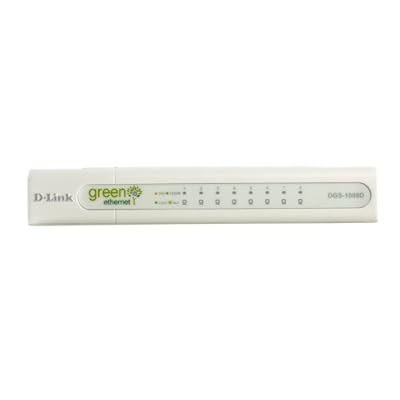
Go for D-Link's Green Ethernet Gigabit switches. That time I was looking for Gigabit switches also and was considering Linksys and D-Link. Here's my findings. Linksys gigabit switches seems to have problem of overheating which cause it to die off or become a 10/100 switch.

hi shadowandy thanks for the fast response. took your advise bought the D-Link dgs-1005d. pluck it into my network. tried streaming video from my nas. it didnt worked. tried playing an iso rip of my dvd movie. it refused to play. plucked the cables back to my miotv-router, the iso played without a stutter. was testing the new dlink switch but it just wouldnt play.

went and exchanged it for the tp-link gigabit switch. now everything works. wonder why?

21vVaV7b9oL._SS400_.jpg
 

absoluthk

Member
Joined
Nov 6, 2003
Messages
247
Reaction score
19
hey guys..

thinking of buying this.. but the thread seems a bit too long and the manual from dlink is uninformative

1. is the ext3 problem resolved?
2. does hdd rpm matters?
3. is there a web interface to access ur hdd from http-80?
4. is the official bittorrent stable enuff
5. can i plug a usb wireless to it? or do i need to hack the kernel to get it done
6. can it join windows domain?
7. can i set different folders for different users?
8. in case of dead box, can i access ALL the folders from linux live cd?
9. any case of been hacked? weak password, etc
 

quekky

Arch-Supremacy Member
Joined
Nov 12, 2000
Messages
18,440
Reaction score
0
hey guys..

thinking of buying this.. but the thread seems a bit too long and the manual from dlink is uninformative

1. is the ext3 problem resolved?
2. does hdd rpm matters?
3. is there a web interface to access ur hdd from http-80?
4. is the official bittorrent stable enuff
5. can i plug a usb wireless to it? or do i need to hack the kernel to get it done
6. can it join windows domain?
7. can i set different folders for different users?
8. in case of dead box, can i access ALL the folders from linux live cd?
9. any case of been hacked? weak password, etc
1. only ext2, no ext3 (but seems like unoffically can use ext3)
2. no
3. not offically
4. yes and no, depends on how you see it
5. no
6. yes
7. yes
8. yes
9. anything can be hack... it depends on how you setup
 

Lss

Honorary Member
Joined
Aug 14, 2002
Messages
122,501
Reaction score
14,544
1. only ext2, no ext3 (but seems like unoffically can use ext3)
2. no
3. not offically
4. yes and no, depends on how you see it
5. no
6. yes
7. yes
8. yes
9. anything can be hack... it depends on how you setup

1. afaik ext3 support was taken off after they had some issues with it.
3. http should be possible with some effort (probably using lighthttpd)
4. only if you dont mind waiting really really really long.
5. no one has ever tried wireless but usb storage has been done. there is a possibility because you can load your own kernel
 

kababoom

Arch-Supremacy Member
Joined
Sep 18, 2000
Messages
13,532
Reaction score
0
how's the bittorrent performance & any tools to check if the hdd got bad sectors on this nas anyone care to comment?
 
Last edited:

win_man

Great Supremacy Member
Joined
Sep 21, 2000
Messages
62,473
Reaction score
2,417
Is it recommended to use RAID0 for this.. planning to stripe 2 x 500GB for cloning machines, will be using Clonezilla.
 

richneo

Arch-Supremacy Member
Joined
Jan 1, 2000
Messages
17,467
Reaction score
10
normally i dun recommend people to use raid 0 or jbod

cos i find it too risky
 

haloedwin

Senior Member
Joined
Sep 25, 2002
Messages
1,921
Reaction score
0
any model of 1tb harddisk better with 323?

saw this comment on other review, No FTP server logging.

wat does it mean?

can i still get the files on the NAS on other computer through internet?
 
Last edited:

mun_hoe

Arch-Supremacy Member
Joined
Oct 21, 2001
Messages
21,090
Reaction score
29
wanna ask bros, if i intend to use it purely for network file sharing 24/7, is it recommended to buy "enterprise storage" drives or just normall consumer level drives? i'm planning to use this along with 2x hitachi 1TB ultrastar SATA drives, but the cost for that drive is over $370 compared to less than $200 for the consumer level drive. so it's kinda putting me off at the moment and wanna hear some feedback before i take the plunge for the enterprise drives.

wanna browse around and read up more to give myself some more options before i buy, already had a bad bad experience with my now dead maxtor shared storage II drive gone due to mechanical failure and there goes my data :(
 
Last edited:

kivine

Master Member
Joined
Apr 27, 2007
Messages
4,508
Reaction score
0
wanna ask bros, if i intend to use it purely for network file sharing 24/7, is it recommended to buy "enterprise storage" drives or just normall consumer level drives? i'm planning to use this along with 2x hitachi 1TB ultrastar SATA drives, but the cost for that drive is over $370 compared to less than $200 for the consumer level drive. so it's kinda putting me off at the moment and wanna hear some feedback before i take the plunge for the enterprise drives.

wanna browse around and read up more to give myself some more options before i buy, already had a bad bad experience with my now dead maxtor shared storage II drive gone due to mechanical failure and there goes my data :(
if you are going raid-0, of course you have to get the best there is.

however if u go raid-1, in my opinion i would get the normal consumer drives, since it is expected for you to assume that 1 drive will fail sooner or later, moreover-replacing a consumer drive is still cheaper compared to what u will get for a enterprise setup.
 

blackburn1

Junior Member
Joined
Sep 8, 2007
Messages
67
Reaction score
0
if you are going raid-0, of course you have to get the best there is.

not true. hdds fail because of the constant on off. if you keep the hdd spinning forever. it is less likely to fail. i have seen the consumer type hdd spinning for more than 10 years and still running :s13:
 

kivine

Master Member
Joined
Apr 27, 2007
Messages
4,508
Reaction score
0
not true. hdds fail because of the constant on off. if you keep the hdd spinning forever. it is less likely to fail. i have seen the consumer type hdd spinning for more than 10 years and still running :s13:
yes, i do know that. What i meant is for both raid1 and raid0
 

alannn

Member
Joined
Feb 24, 2005
Messages
425
Reaction score
10
hi everyone,wanna find out the bros here anyone of you own this and a ps3, and the success rate of the two working together well.Been reading from other site and forum , the result was mixed, some mention can only work with twonkymedia server which is a commercial product and cost money, other claim new firmware of both the product did the job, some completely undetected by ps3. As my main reason of getting this is for streaming from movies etc from this nas to ps3.

Saw in Sl another nas by planex ( PCI MZK-NAS02SG)

http://www.planex.com.sg/product/nas/mzk-nas02sg.htm

this one have a pre built-in DLNA which ps3 required. and at least the product cliam that it is compatible with ps3 ( but to what extent, i dont know). and is $259 compare to dlink $199.

Hoping to get some answers from the bros here cos getting either one soon.
 

shadowandy

Supremacy Member
Joined
Nov 30, 2000
Messages
7,288
Reaction score
0
For what I remember, firmware 1.04 has officially support ps3 and no additional softwares are needed. However, it is better for you to call d-link up to ask what type of media formats are supported.
 
Last edited:

TopCat_52

Master Member
Joined
Sep 29, 2001
Messages
3,355
Reaction score
0
My Dlink DNS-323 is officially SCREWED.

first the right bay hdd would not be detected. the hdd led would blink non-stop, so i rmaed the harddisk

now got back the rmaed hdd, and i put it in the left bay, with the exising one on the right bay, and yet i still have the same problem. sad what a lousy product
 
Important Forum Advisory Note
This forum is moderated by volunteer moderators who will react only to members' feedback on posts. Moderators are not employees or representatives of HWZ Forums. Forum members and moderators are responsible for their own posts. Please refer to our Community Guidelines and Standards and Terms and Conditions for more information.
Top