Do i have enough pcie lanes?

Phen8210

High Supremacy Member
Joined
Jul 29, 2011
Messages
29,030
Reaction score
8,284
Ryzen 5800x

Total 24 lane dedicated to
Chipset use 4
GPU use 16
m2_1 use 4


Also, this is written in the b550m pro4 manual.
"m2_2 is a gen3x2 slot, using m2_2 disables sata3 slots 5 and 6"
Is it safe to assume m2_2 sources its 2 lane from the chipset lanes?

I'm gonna equip 4 SATA SSD Drives on sata3 slot 1 2 3 and 4 and another NVME SSD on m2_2, not sure what to expect since all these devices gonna take from the chipset which only has 4 lane. Hope this make things clear.
 
Last edited:

Phen8210

High Supremacy Member
Joined
Jul 29, 2011
Messages
29,030
Reaction score
8,284
As stated, i already read the manual. Just need clarification :D
 
Last edited:

poooooo

Arch-Supremacy Member
Joined
May 17, 2012
Messages
12,911
Reaction score
3,400
Iirc b550 board is from cpu and the other from mobo chipset.
 

Clearnfc

Banned
Joined
Apr 10, 2019
Messages
14,093
Reaction score
3,729
Waht do you meant by enough PCIE lanes?? Enough for what?

All Ryzen has 16 for GPU and 4 for NVME and 4 for chipset.
 

Phen8210

High Supremacy Member
Joined
Jul 29, 2011
Messages
29,030
Reaction score
8,284
Waht do you meant by enough PCIE lanes?? Enough for what?

All Ryzen has 16 for GPU and 4 for NVME and 4 for chipset.

Currently i have 4 sata drives on sata_3 port 1 2 3 4. I want to add another nvme drive on m2_2 that uses 2 lane from chipset. If i not wrong all these drive will take lanes from chipset but it only has total of 4 and m2_2 already takes half of it.

I wonder how this will affect the speed or will my nvme drive on m2_2 not work at all.

Mb manual says when i plug in m2_2 it disables sata 3 5_6 whichis expected but that doesn't really answer what i need to know.
 

enenyi

Supremacy Member
Joined
Nov 22, 2011
Messages
5,927
Reaction score
5
Currently i have 4 sata drives on sata_3 port 1 2 3 4. I want to add another nvme drive on m2_2 that uses 2 lane from chipset. If i not wrong all these drive will take lanes from chipset but it only has total of 4 and m2_2 already takes half of it.

I wonder how this will affect the speed or will my nvme drive on m2_2 not work at all.

Mb manual says when i plug in m2_2 it disables sata 3 5_6 whichis expected but that doesn't really answer what i need to know.

You will only find out if you try it out yourself.
There are only 4 chipset lanes to share amongst the 2nd nvme drive, all SATA drives and all other connections to chipset. Motherboard manual just tells you what will be compromised. Whether nvme drive will end up being prioritised over the SATA drives or vice versa, will depend on motherboard implementation and OS implementation, no one can guarantee anything to you without you trying.
 

NightRaven49

Master Member
Joined
May 17, 2019
Messages
3,741
Reaction score
1,579
Currently i have 4 sata drives on sata_3 port 1 2 3 4. I want to add another nvme drive on m2_2 that uses 2 lane from chipset. If i not wrong all these drive will take lanes from chipset but it only has total of 4 and m2_2 already takes half of it.

I wonder how this will affect the speed or will my nvme drive on m2_2 not work at all.

Mb manual says when i plug in m2_2 it disables sata 3 5_6 whichis expected but that doesn't really answer what i need to know.

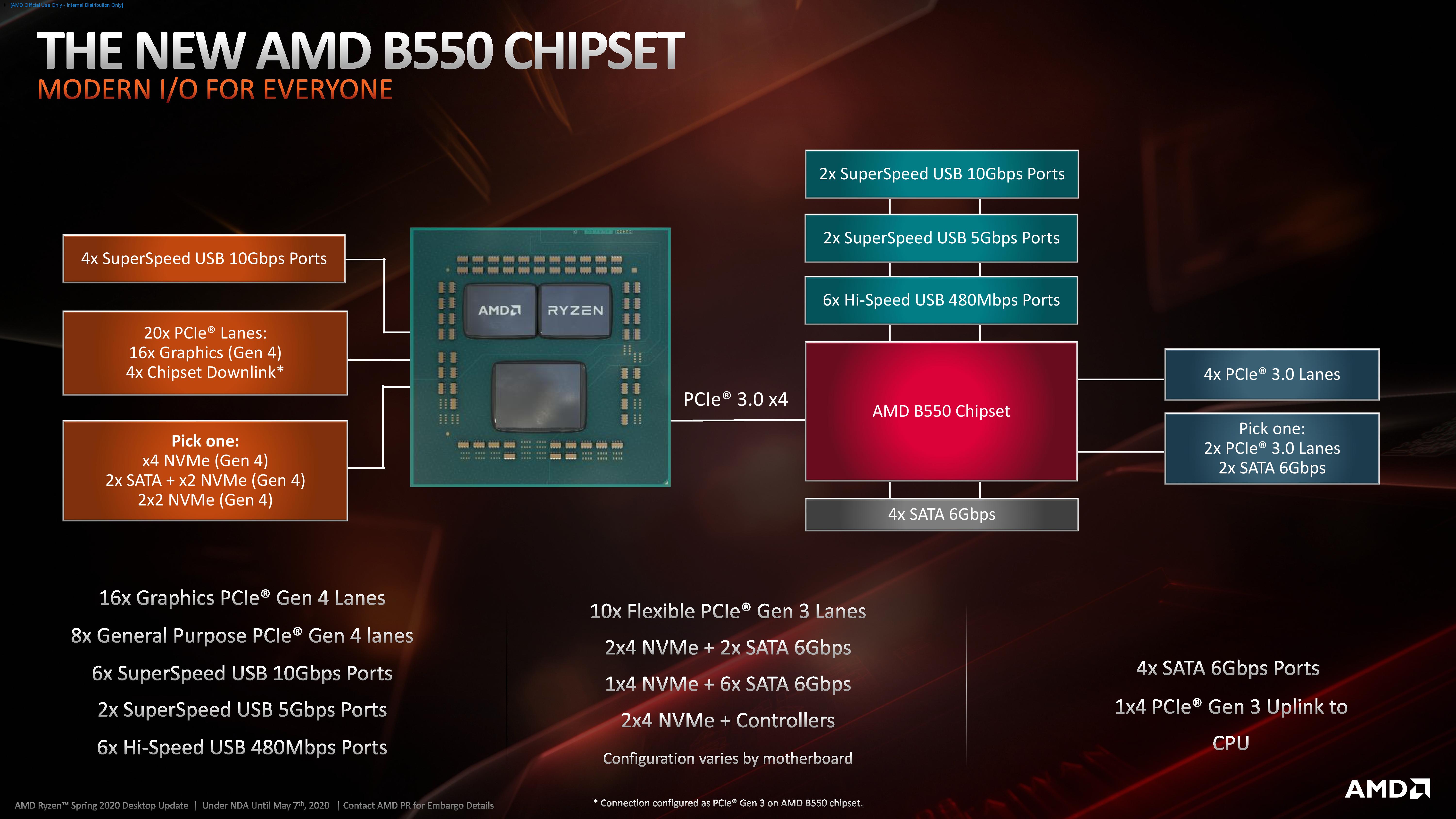
the chipset itself offers 10 pcie 3.0 lanes, even though the link to the cpu is only 4 lanes wide. 8 of these are for general purpose x1 x4 x16 slots, while 2 are either for your nvme or 2 sata ports.
 

Phen8210

High Supremacy Member
Joined
Jul 29, 2011
Messages
29,030
Reaction score
8,284
You will only find out if you try it out yourself.
There are only 4 chipset lanes to share amongst the 2nd nvme drive, all SATA drives and all other connections to chipset. Motherboard manual just tells you what will be compromised. Whether nvme drive will end up being prioritised over the SATA drives or vice versa, will depend on motherboard implementation and OS implementation, no one can guarantee anything to you without you trying.

yeap.. only 4 lanes to share. Guess i got no choice but to test out for myself. thanks btw
 

limcc

Supremacy Member
Joined
Jan 1, 2000
Messages
6,561
Reaction score
203
You can read review site for info, like Anandtech:
The AMD B550 Motherboard Overview: ASUS, GIGABYTE, MSI, ASRock, and Others.


Ryzen%203_B550_Press%20Deck_NDA%20Until%20May%207th-page-005.jpg


For Storage only:

CPU
x4 PCIe 4.0 NVMe
or
x2 PCIe 4.0 NVMe + 2 x SATA
or
x2 PCIe 4.0 NVMe + x2 PCIe 4.0 NVMe

Chipset
4 SATA + 4x PCIe 3.0
or
4 SATA + 2x PCIe 3.0 + 2 SATA

Most B550 Mobo usually offer "x4 PCIe NVMe" + "4 SATA + 4x PCIe 3.0". Those that offer 6x SATA will have 2x SATA disable when NVMe is installed on M2_2 so it can have x4 PCIe lanes.
 

hg2

Supremacy Member
Joined
Jan 1, 2000
Messages
7,949
Reaction score
803
Waht do you meant by enough PCIE lanes?? Enough for what?

All Ryzen has 16 for GPU and 4 for NVME and 4 for chipset.

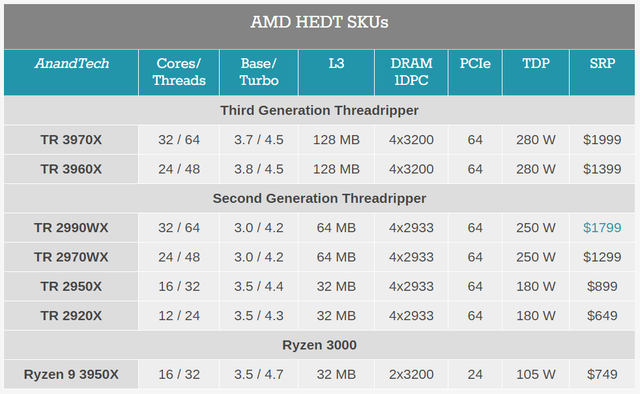
Yeah, confused as well... tot all lanes are fixed in ryzen CPU ? 24 lanes for Ryzen and 64 for thread rippers, 128 for some Epyc ? maybe some fancy board for have fancy south bound I/O chips to provide extra lanes....


https://usefulwebtool.com/
 

Phen8210

High Supremacy Member
Joined
Jul 29, 2011
Messages
29,030
Reaction score
8,284
Yeah, confused as well... tot all lanes are fixed in ryzen CPU ? 24 lanes for Ryzen and 64 for thread rippers, 128 for some Epyc ? maybe some fancy board for have fancy south bound I/O chips to provide extra lanes....


https://usefulwebtool.com/

You are not wrong.. they are fixed lanes just like I mentioned in my OP. 16 + 4 +4. Unless I am also missing something?
 

NightRaven49

Master Member
Joined
May 17, 2019
Messages
3,741
Reaction score
1,579
You are not wrong.. they are fixed lanes just like I mentioned in my OP. 16 + 4 +4. Unless I am also missing something?

you are forgetting the chipset itself offers more pcie lanes than the 4 that connects it to the cpu.
 
Important Forum Advisory Note
This forum is moderated by volunteer moderators who will react only to members' feedback on posts. Moderators are not employees or representatives of HWZ Forums. Forum members and moderators are responsible for their own posts. Please refer to our Community Guidelines and Standards and Terms and Conditions for more information.
Top