Eight Telecom discussion thread

benzene

Senior Member
Joined
Oct 17, 2009
Messages
1,097
Reaction score
122
So she proactively checked her system which did show the reason for rejection. 👍
(Punggol one is cannot do anything other than put through to the one-sided-video call where other party just there to pass message to backend.)

She couldn't make the changes but again proactively followed up on the matter and finally helped to resolve it. 👍
(Punggol one is cannot do anything other than put through to the one-sided-video call where other party just there to pass message to backend.)

Did you receive any correspondence from Eight when everything was sorted out, or you only knew when you got that SMS from Zym? Did you need to resubmit to Zym?
Because it was long weekend, therefore i received the msg from Zym first on last friday.
And Monday she send an email to me they resolved it internally.

From the way i look at Eight, is depends a lot if you meet the right person to help you.
The lucky plaza one was bad, hardly provide any help.
The Clementi one, i think her name is Imah, she is very helpful and friendly.
Zym customer service is so much better, they ask me for ID, authorization letter etc.
Port out fail 3 times, until visit to Clementi 4th time port in successfully
 

Habrosus

High Supremacy Member
Joined
Jul 23, 2005
Messages
29,348
Reaction score
13,279
Because it was long weekend, therefore i received the msg from Zym first on last friday.
And Monday she send an email to me they resolved it internally.

From the way i look at Eight, is depends a lot if you meet the right person to help you.
The lucky plaza one was bad, hardly provide any help.
The Clementi one, i think her name is Imah, she is very helpful and friendly.
Zym customer service is so much better, they ask me for ID, authorization letter etc.
Port out fail 3 times, until visit to Clementi 4th time port in successfully
Thanks for sharing. (y)

The recent months' events have given me the impression that the original Eight team has port themselves out already...
 

hereiam7788

Supremacy Member
Joined
Dec 10, 2015
Messages
5,272
Reaction score
1,017
what is travel sim actually?

I have 2 eSIMs on my iPhone
1) CelcomDiGI prepaid eSIM
2) eight eSIM

both of them i added normally, but whenever i come in to lion city, my celcomdigi prepaid eSIM will automatically be turned off. I did not remember that I added the celcomdigi prepaid eSIM as 'travel eSIM' before as it is just a normal prepaid line by celcomdigi that can make calls, SMS and use mobile data.

xC5228.jpg
 
Last edited:

xiaofan

High Supremacy Member
Joined
Sep 16, 2018
Messages
37,316
Reaction score
12,689
what is travel sim actually?

Edited -- please refer to the other reply later in this page.

1. For data needs overseas, you have a few options
1) Singapore Telcos' mobile service plan with roaming data
2) Buy the SIM card at destination country/region
3) Buy from a travel SIM provider, usually eSIM

2. giga has Travel eSIM business.

giga has region and global travel eSIM available from their official Shopee Store.

https://shopee.sg/gigaofficialstore?entryPoint=ShopByPDP&tab=category

3. There are many travel eSIM providers online.

Big brands from Google AI Search. But usually you may not to use them if you have specific places to travel to.
  • Airalo: widely considered the best overall for its massive selection of local, regional, and global plans (e.g., "Discover Global" eSIM).
  • Holafly: Known for unlimited data plans, ideal for heavy users, though often pricier, with options for daily or monthly, 5G-enabled packages.
  • Ubigi: Often rated best for speed and reliability, supporting many devices, and strong for both regional and international travel.
  • Nomad: Offers competitive, high-value data packages and sometimes free trial data.
  • Saily: A secure option from the makers of NordVPN, offering competitive global plans.
  • Jetpac: Popular for frequent travelers and includes perks like free lounge access during flight delays.
    ...
 
Last edited:

xiaofan

High Supremacy Member
Joined
Sep 16, 2018
Messages
37,316
Reaction score
12,689
what is travel sim actually?

I have 2 eSIMs on my iPhone
1) CelcomDiGI prepaid eSIM
2) eight eSIM

both of them i added normally, but whenever i come in to lion city, my celcomdigi prepaid eSIM will automatically be turned off. I did not remember that I added the celcomdigi prepaid eSIM as 'travel eSIM' before as it is just a normal prepaid line by celcomdigi that can make calls, SMS and use mobile data.

xC5228.jpg

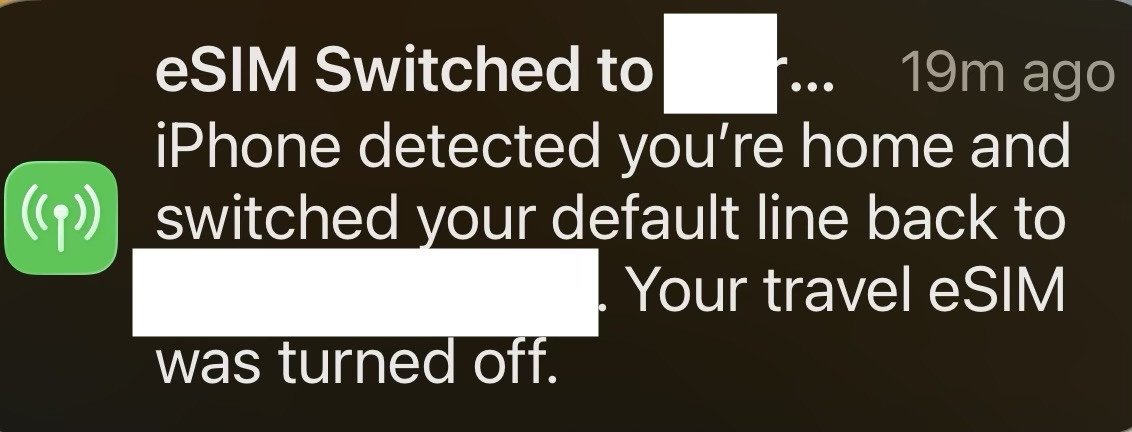
This one is an Apple thingy. It is reported that iPhone may label a new eSIM as a "Travel" or "Travel eSIM" automatically when it's activated in a new country or when it detects a prepaid, short-term data plan.

https://support.apple.com/en-sg/118227

Returning home from travelling internationally​

With iOS 26, if you are using a travel eSIM, your iPhone will automatically turn off your travel eSIM and turn your home SIM back on when you return, depending on your country or region.

If you do not get a notification that your travel eSIM has been turned off, make sure your primary line is turned on so that you can continue to stay connected. To confirm that your primary line is turned on, follow these steps:
  1. Open the Settings app.
  2. Tap Cellular.
  3. Make sure “Turn On this Line” is enabled next to the primary eSIM you want to use.
  4. Turn off any other travel eSIM lines no longer in use.
 

JAYSCS

Senior Member
Joined
Sep 30, 2021
Messages
1,216
Reaction score
1,007
This one is an Apple thingy. It is reported that iPhone may label a new eSIM as a "Travel" or "Travel eSIM" automatically when it's activated in a new country or when it detects a prepaid, short-term data plan.

https://support.apple.com/en-sg/118227

Returning home from travelling internationally​

With iOS 26, if you are using a travel eSIM, your iPhone will automatically turn off your travel eSIM and turn your home SIM back on when you return, depending on your country or region.

If you do not get a notification that your travel eSIM has been turned off, make sure your primary line is turned on so that you can continue to stay connected. To confirm that your primary line is turned on, follow these steps:
  1. Open the Settings app.
  2. Tap Cellular.
  3. Make sure “Turn On this Line” is enabled next to the primary eSIM you want to use.
  4. Turn off any other travel eSIM lines no longer in use.
Apple should not make this function automatic but as an option instead. The beauty of dual SIM phone is to always see two active signal symbol on task bar, indicating signal strength, VoLTE/VoNR/4G/5G...
 

xiaofan

High Supremacy Member
Joined
Sep 16, 2018
Messages
37,316
Reaction score
12,689
Apple should not make this function automatic but as an option instead. The beauty of dual SIM phone is to always see two active signal symbol on task bar, indicating signal strength, VoLTE/VoNR/4G/5G...

Indeed a good point.

The wrong automatic labeling could be a bug in iOS and Apple may fix it later.

It is said you can manually change the label.

But I have not encountered this issue with my wife's iPhone 14 as she is using single physical SIM (SingTel S$15.28 plan) on the iPhone 14. Then she has another Poco X6 Pro as a backup and also for roaming, using eight S$8 plan.
 

hereiam7788

Supremacy Member
Joined
Dec 10, 2015
Messages
5,272
Reaction score
1,017
This one is an Apple thingy. It is reported that iPhone may label a new eSIM as a "Travel" or "Travel eSIM" automatically when it's activated in a new country or when it detects a prepaid, short-term data plan.

https://support.apple.com/en-sg/118227

Returning home from travelling internationally​

With iOS 26, if you are using a travel eSIM, your iPhone will automatically turn off your travel eSIM and turn your home SIM back on when you return, depending on your country or region.

If you do not get a notification that your travel eSIM has been turned off, make sure your primary line is turned on so that you can continue to stay connected. To confirm that your primary line is turned on, follow these steps:
  1. Open the Settings app.
  2. Tap Cellular.
  3. Make sure “Turn On this Line” is enabled next to the primary eSIM you want to use.
  4. Turn off any other travel eSIM lines no longer in use.
The issue is that both eSIM even the bolehland one is not temperaily data sim, it is normal prepaid line.

it still get turned off automatically. However, after iOS 26.4, the prob seems to go away automatically. was suffering on this for quite some time.
 

xiaofan

High Supremacy Member
Joined
Sep 16, 2018
Messages
37,316
Reaction score
12,689
The issue is that both eSIM even the bolehland one is not temperaily data sim, it is normal prepaid line.

it still get turned off automatically. However, after iOS 26.4, the prob seems to go away automatically. was suffering on this for quite some time.

Good to hear that, that proves it is an iOS bug.

The wrong automatic labeling could be a bug in iOS and Apple may fix it later.
 

JAYSCS

Senior Member
Joined
Sep 30, 2021
Messages
1,216
Reaction score
1,007
The issue is that both eSIM even the bolehland one is not temperaily data sim, it is normal prepaid line.

it still get turned off automatically. However, after iOS 26.4, the prob seems to go away automatically. was suffering on this for quite some time.
Try Android with your next upgrade, it may not be perfect too but definitely less rigid and restricted. Dont get trapped by fruit brand fairy tale.
 

hereiam7788

Supremacy Member
Joined
Dec 10, 2015
Messages
5,272
Reaction score
1,017
This one is an Apple thingy. It is reported that iPhone may label a new eSIM as a "Travel" or "Travel eSIM" automatically when it's activated in a new country or when it detects a prepaid, short-term data plan.

https://support.apple.com/en-sg/118227

Returning home from travelling internationally​

With iOS 26, if you are using a travel eSIM, your iPhone will automatically turn off your travel eSIM and turn your home SIM back on when you return, depending on your country or region.

If you do not get a notification that your travel eSIM has been turned off, make sure your primary line is turned on so that you can continue to stay connected. To confirm that your primary line is turned on, follow these steps:
  1. Open the Settings app.
  2. Tap Cellular.
  3. Make sure “Turn On this Line” is enabled next to the primary eSIM you want to use.
  4. Turn off any other travel eSIM lines no longer in use.
the labeling does not help in the issue. Even u set the eSIM that is automatically turned off to name such as primary or whatever, it will still be turned off as long as leaving bolehland and back to lion city.

anyway, it is fixed now at least i do not have this issue anymore.
 

xiaofan

High Supremacy Member
Joined
Sep 16, 2018
Messages
37,316
Reaction score
12,689
Upgrade to 8 5G or switch to simba ? Main line using zero 1.

What is the reason to consider the upgrade? Congestion on the eight 4G network?

If you are willing to pay, just go with eight 5G.

Based on my limited testing of SIMBA S$12 plan for one month, eight S$8 plan is better than SIMBA S$12 plan for local usage.

Basically anything else is better than SIMBA for local usage now that I have tried many plans on all four networks.

SIMBA is not bad for roaming, but eight is also good.
 

xiaofan

High Supremacy Member
Joined
Sep 16, 2018
Messages
37,316
Reaction score
12,689
Eight 4g quite slow. Like 10mbps
So thought simba can be faster

SIMBA is anything but fast...

Since both are no contract, you can always try by yourself to see which is better.

When I say "Basically anything else is better than SIMBA for local usage now that I have tried many plans on all four networks", that is based on my experiences, yours may be different.
 
Important Forum Advisory Note
This forum is moderated by volunteer moderators who will react only to members' feedback on posts. Moderators are not employees or representatives of HWZ Forums. Forum members and moderators are responsible for their own posts. Please refer to our Community Guidelines and Standards and Terms and Conditions for more information.
Top