Entry level NAS

freescoring

Junior Member
Joined
Mar 26, 2008
Messages
57
Reaction score
1
I am looking recommendation for an entry level NAS to basically store/share files with my family members (in different locations) and to play video/movies on my TV.
Don't really need it for backup and would be good if it can support torrent.
Saw brands like Synology and WD are quite popular, QNAP and Buffalo gets mentioned too but there are so many options. Any advice would be very much appreciated.
Thanks!
 

yusoffb01

Arch-Supremacy Member
Joined
Jun 17, 2008
Messages
16,815
Reaction score
1,769
If you want to stream show you need one with intel processor. Synology 420+ costs like $680
 

xiaofan

High Supremacy Member
Joined
Sep 16, 2018
Messages
35,707
Reaction score
12,009
I am looking recommendation for an entry level NAS to basically store/share files with my family members (in different locations) and to play video/movies on my TV.
Don't really need it for backup and would be good if it can support torrent.
Saw brands like Synology and WD are quite popular, QNAP and Buffalo gets mentioned too but there are so many options. Any advice would be very much appreciated.
Thanks!

I will say avoid WD because of the bad software and mobile apps.

I am also looking at NAS to replace my old WD Mycloud 3TB. Looks like I would either to go with Synology/Qnap or to go with DIY route like TrueNAS Core.
 

Stanley W

Master Member
Joined
Jan 1, 2000
Messages
2,735
Reaction score
208
How about asustor5202.? Looks good from reviews...

Sent from HUAWEI NOH-NX9 using GAGT
 

yusoffb01

Arch-Supremacy Member
Joined
Jun 17, 2008
Messages
16,815
Reaction score
1,769
Wow, that is not an entry level NAS, right?

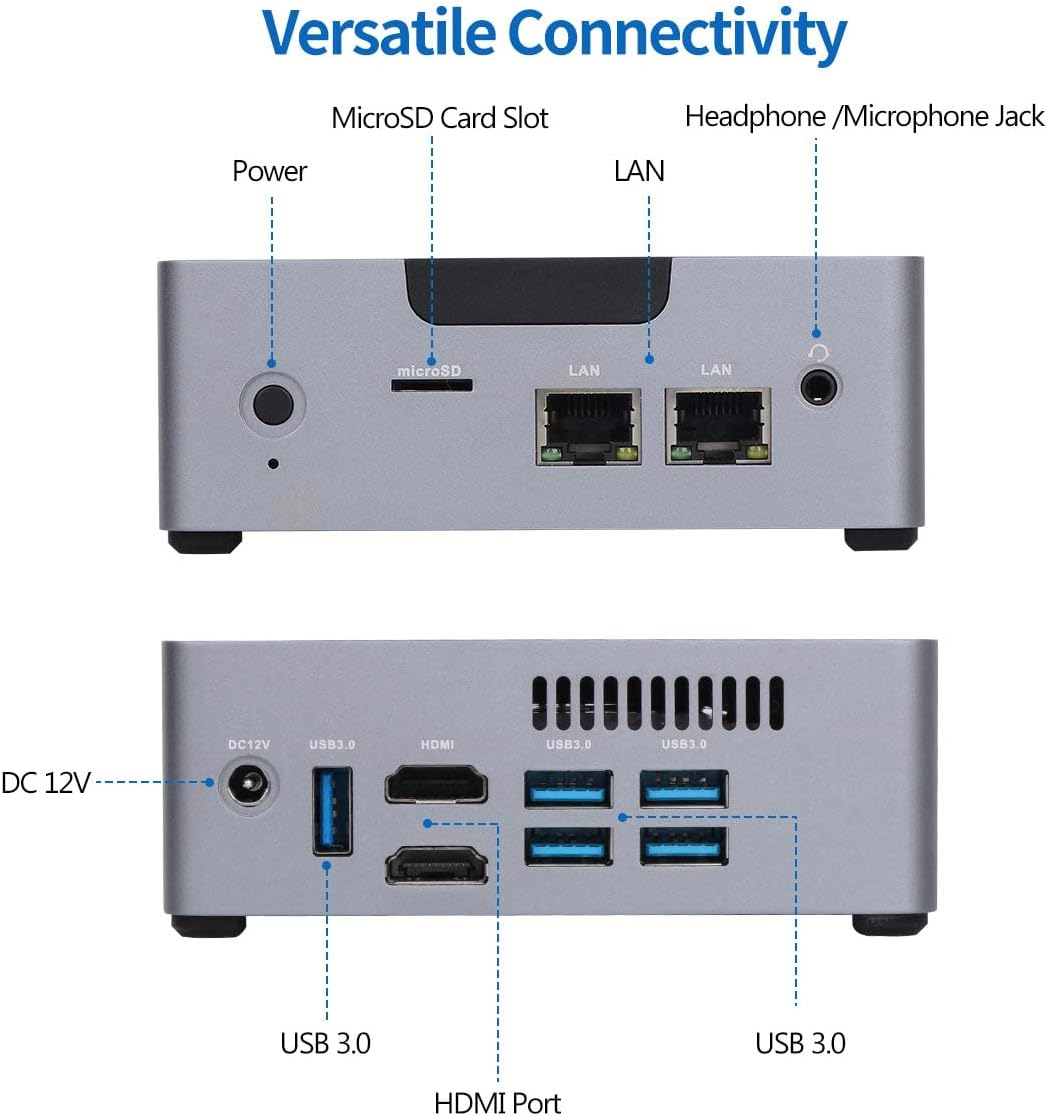
i went with nuc and snapraid route, <$250. if i were to redo, id get a mini pc with multiple ethernet ports, but that has no warranty. remote control done thru chrome remote desktop

ciGtyDh.jpg

PdteFGd.jpg

61GrTmBFQOL._AC_SL1500_.jpg
 
Last edited:

irbadboyz

Member
Joined
Mar 5, 2019
Messages
216
Reaction score
11
I am looking recommendation for an entry level NAS to basically store/share files with my family members (in different locations) and to play video/movies on my TV.
Don't really need it for backup and would be good if it can support torrent.
Saw brands like Synology and WD are quite popular, QNAP and Buffalo gets mentioned too but there are so many options. Any advice would be very much appreciated.
Thanks!

If you are looking for something that just does the basic storage job, the WD Mybook would suffice. But in the long run, the MyBook is not that great when the HDD fails, so bear that in mind.

Synology is good, but you will be bringing out more cash. On the other hand, you can do a simple raid1, so if one HDD fails, you can just swap out and you will be good to go.


IT Support Singapore
 

freescoring

Junior Member
Joined
Mar 26, 2008
Messages
57
Reaction score
1
If you want to stream show you need one with intel processor. Synology 420+ costs like $680

i went with nuc and snapraid route, <$250. if i were to redo, id get a mini pc with multiple ethernet ports, but that has no warranty. remote control done thru chrome remote desktop

ciGtyDh.jpg

PdteFGd.jpg

So, wanting to stream on TV would take a good processor, which is why you mentioned the 420+ and you would go with a minipc with ethernet ports?
Does it matter the TV that I use, I'm mainly using a LG UN8100
 
Last edited:

xiaofan

High Supremacy Member
Joined
Sep 16, 2018
Messages
35,707
Reaction score
12,009
i went with nuc and snapraid route, <$250. if i were to redo, id get a mini pc with multiple ethernet ports, but that has no warranty. remote control done thru chrome remote desktop

ciGtyDh.jpg

PdteFGd.jpg

Interesting setup with NUC plus four WD USB HDDs.

First time heard about SnapRaid. Looks like an interesting solution.
https://www.snapraid.it/compare
 

xiaofan

High Supremacy Member
Joined
Sep 16, 2018
Messages
35,707
Reaction score
12,009
So, wanting to stream on TV would take a good processor, which is why you mentioned the 420+ and you would go with a minipc with ethernet ports?

What is your TV?

When you say streaming, usually it means decoding is done on the server (eg: Plex) and that requires better CPU on the NAS side.

The other way is to use the client side (mobile phone, PC, smart TV, Android TV box, Apple TV) apps (eg: VLC, MX Player, etc) to decode, then the CPU on the NAS may not need to be so powerful.
 

freescoring

Junior Member
Joined
Mar 26, 2008
Messages
57
Reaction score
1
What is your TV?

When you say streaming, usually it means decoding is done on the server (eg: Plex) and that requires better CPU on the NAS side.

The other way is to use the client side (mobile phone, PC, smart TV, Android TV box, Apple TV) apps (eg: VLC, MX Player, etc) to decode, then the CPU on the NAS may not need to be so powerful.

I'm mainly using a LG UN8100 in the living room, an AOC 43M3295 in the bedroom.
 

xiaofan

High Supremacy Member
Joined
Sep 16, 2018
Messages
35,707
Reaction score
12,009
I'm mainly using a LG UN8100 in the living room, an AOC 43M3295 in the bedroom.

Your LG is a smart TV so I believe it should have apps which can play media on the NAS.

As for your AOC, it does not seem to be a smart TV so I am not sure.

You can always use a Android TV box to play the network media, they are cheap enough. Or you can buy highest end models like Nvidia Shield TV which can play all kinds of media format. They are not expensive at all if compared to your LG TV.

Nvidia Shield TV at S$279 / Pro at S$370, latest model
https://www.amazon.sg/NVIDIA-Androi...=9062499&hvtargid=pla-836668781953&psc=1&th=1
 

xiaofan

High Supremacy Member
Joined
Sep 16, 2018
Messages
35,707
Reaction score
12,009
Last edited:

xiaofan

High Supremacy Member
Joined
Sep 16, 2018
Messages
35,707
Reaction score
12,009
i went with nuc and snapraid route, <$250.

if i were to redo, id get a mini pc with multiple ethernet ports, but that has no warranty. remote control done thru chrome remote desktop

If you want to redo, will you still running SnapRaid under Windows?

When you say mini PC with multiple Ethernet ports, that is mainly for faster speed as you have demonstrated for Windows SMB file sharing, right?

Usually the mini PC will not have the HDD bay, will you still reuse your WD external USB drive?
 

freescoring

Junior Member
Joined
Mar 26, 2008
Messages
57
Reaction score
1
DS220+ has the same Intel Celeron processor as DS420+ and probably good enough.

I am actually looking at DS220+ myself. But of course DS420+ looks tempting as well.

Ref: DS220+ can be adequate as a Plex server for 4k media transcoding.
https://www.windowscentral.com/synology-diskstation-ds220-review

Deciding between DS218 and DS220+, 80 bucks difference.
Specs say the 218 also support Hardware Transcoding but not according to the plex reference sheet you mentioned, so that means I need to be make sure the formats are correct when I download?
 
Last edited:

Davidgkt77

Junior Member
Joined
Dec 5, 2020
Messages
1
Reaction score
0
DS220+ has the same Intel Celeron processor as DS420+ and probably good enough.

I am actually looking at DS220+ myself. But of course DS420+ looks tempting as well.

Ref: DS220+ can be adequate as a Plex server for 4k media transcoding.


I am considering 1 NAS too. able to be a storage point between multiple users and able to stream to the TV in the hall. The media files can be stored on the NAS and streamed when required right?

How are the users going to save the files to the NAS if they are using a mobile. Hopefully there is an option to. Just need to be connected to the same network?
 

yusoffb01

Arch-Supremacy Member
Joined
Jun 17, 2008
Messages
16,815
Reaction score
1,769
If you want to redo, will you still running SnapRaid under Windows?

When you say mini PC with multiple Ethernet ports, that is mainly for faster speed as you have demonstrated for Windows SMB file sharing, right?

Usually the mini PC will not have the HDD bay, will you still reuse your WD external USB drive?

yes. Normal nas with scrubbing feature is too expensive.

Snapraid
1) can run on windows
2) sacrifice only 1 drive for parity. can sacrifice more
3) can use different sized disks, as long as parity disk is the biggest
4) can add more disk in future, just rerun parity check
5) can be used on ext hdd dont need sata ports
6) if lose data on one disk, other disks still accessible
7) can rebuild any missing disk as long as only 1 disk fail at a time
8) can run scrubbing to find corrupted file. Can rebuild corrupted file using parity
9) can migrate hardware easily, just save settings
10) Only 1 disk run at a time when you access files.

Speed with 4 disks running on usb is 363MBps!
p4D0Xc4.jpg
 
Important Forum Advisory Note
This forum is moderated by volunteer moderators who will react only to members' feedback on posts. Moderators are not employees or representatives of HWZ Forums. Forum members and moderators are responsible for their own posts. Please refer to our Community Guidelines and Standards and Terms and Conditions for more information.
Top