

You are using an out of date browser. It may not display this or other websites correctly.
You should upgrade or use an alternative browser.
You should upgrade or use an alternative browser.
FD Node 304 with AIO Cooler?
- Thread starter croc1977
- Start date
More options
Who Replied?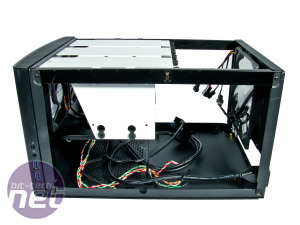
hi all just to check any advice putting AIO radiator 120mm inthere?
thanks
I used to have 1 AIO 120mm (Corsair H60 series) at the exhaust for this case but it was kinda ineffective, changed to a larger air cooler.
I also took away the front HDD/SDD mounts for more airflow.
You do not need to do this if your CPU and GPU are lower powered models (those lower end ones).

croc1977
Banned
- Joined
- Mar 30, 2002
- Messages
- 46,244
- Reaction score
- 2,208
actually im building a nas with this caseI used to have 1 AIO 120mm (Corsair H60 series) at the exhaust for this case but it was kinda ineffective, changed to a larger air cooler.
I also took away the front HDD/SDD mounts for more airflow.
You do not need to do this if your CPU and GPU are lower powered models (those lower end ones).
So currently i have in hand
16GB DDR4 (8 x 2)
Node 304 Case
Seagate Iron Wolf 4 TB x 4 ( From Exising NAS)
Using True or FreeNAS
So currently i lack off
- CPU ( Looking at Ryzen 3200G but seems everywhere sold out)
- M/B ( Looking at B450I Class .Either Gigabyte or MSI)
- PSU (Looking at CM 450W )
- NVME Drive ( Looking for 120/8GB )
Optional
- Sata PCIE Card for 5th and 6th Drive if required
Why H60 is ineffective? What kind of larger cooler u are talking?
actually im building a nas with this case
So currently i have in hand
16GB DDR4 (8 x 2)
Node 304 Case
Seagate Iron Wolf 4 TB x 4 ( From Exising NAS)
Using True or FreeNAS
So currently i lack off
- CPU ( Looking at Ryzen 3200G but seems everywhere sold out)
- M/B ( Looking at B450I Class .Either Gigabyte or MSI)
- PSU (Looking at CM 450W )
- NVME Drive ( Looking for 120/8GB )
Optional
- Sata PCIE Card for 5th and 6th Drive if required
Why H60 is ineffective? What kind of larger cooler u are talking?
Originally this was my NAS-like setup, with Haswell4570 processor. H60 was sufficient for that but the interior temperature were at least 25C above ambient. This is made worse when I added HDDs that blocked the front fans and a longer GPU which blocked even more airflow.
The HDDs die early in life, converted it to Ryzen3600 CPU with a short formfactor GTX1060, along with remaining working HDDs. At that time Corsair H60 starts to become ineffective, temperature go beyond 30C above ambient. For cooler I decided to change the AIO to Dark Rock 4 and remove all but 1 HDD at the front of the case. I generally feel that 120mm AIO is far too weak.
For this case you need to be careful of your PSU selection if you use discrete GPUs, some ATX PSUs (modular and non modular) have power cables which will actually push against the longer graphic cards, may actually cause issues...
I do not know of any ITX boards with NVMe on motherboard,hmm
Last edited:
croc1977
Banned
- Joined
- Mar 30, 2002
- Messages
- 46,244
- Reaction score
- 2,208
so you don't recommded to go for AIO for this setup ? cos the limited air flow? maybe i won't take up all 6 slot hdd then ...put 4slot max run raid 5 as per my nas now. but i won't put gpu inside that why i am looking for 'G' Ryzen modelOriginally this was my NAS-like setup, with Haswell4570 processor. H60 was sufficient for that but the interior temperature were at least 25C above ambient. This is made worse when I added HDDs that blocked the front fans and a longer GPU which blocked even more airflow.
The HDDs die early in life, converted it to Ryzen3600 CPU with a short formfactor GTX1060, along with remaining working HDDs. At that time Corsair H60 starts to become ineffective, temperature go beyond 30C above ambient. For cooler I decided to change the AIO to Dark Rock 4 and remove all but 1 HDD at the front of the case. I generally feel that 120mm AIO is far too weak.
For this case you need to be careful of your PSU selection if you use discrete GPUs, some ATX PSUs (modular and non modular) have power cables which will actually push against the longer graphic cards, may actually cause issues...
I do not know of any ITX boards with NVMe on motherboard,hmm
B450I have NVME Slots
https://www.amazon.sg/ASRock-Mother...dchild=1&keywords=b450i&qid=1614664383&sr=8-5
https://www.gigabyte.com/Motherboard/B450-I-AORUS-PRO-WIFI-rev-10#kf
Last edited:
so you don't recommded to go for AIO for this setup ? cos the limited air flow? maybe i won't take up all 6 slot hdd then ...put 4slot max run raid 5 as per my nas now
B450I have NVME Slots
https://www.amazon.sg/ASRock-Mother...dchild=1&keywords=b450i&qid=1614664383&sr=8-5
https://www.gigabyte.com/Motherboard/B450-I-AORUS-PRO-WIFI-rev-10#kf
I have the feeling that the HDDs at the front of your case will block most of the cold air intake, the solo 120mm fan at the back will have trouble pulling hot air out of the case on top of cooling the water loop, because of the radiator.
Maybe with a lower TDP CPU it could work better. Or perhaps find a way to exhaust upward also?
croc1977
Banned
- Joined
- Mar 30, 2002
- Messages
- 46,244
- Reaction score
- 2,208
or should i stay with stock AMD CPU fan and change out the 140mm fan to a better fan like those be quiet kind?I have the feeling that the HDDs at the front of your case will block most of the cold air intake, the solo 120mm fan at the back will have trouble pulling hot air out of the case on top of cooling the water loop, because of the radiator.
Maybe with a lower TDP CPU it could work better. Or perhaps find a way to exhaust upward also?
or should i stay with stock AMD CPU fan and change out the 140mm fan to a better fan like those be quiet kind?
If you're using a 4-core, 65W TDP CPU like the 3200G, stock fan will be more than enough. Using a good case fan for airflow is a good idea too. Personally I wouldn't think it's worth using an AIO to cool a CPU like the 3200G, as a good 240mm AIO costs half or even near the price of the CPU itself..
croc1977
Banned
- Joined
- Mar 30, 2002
- Messages
- 46,244
- Reaction score
- 2,208
thanks for this advice. will consider cos was headache on the radiator cable can squeeze so tight anotIf you're using a 4-core, 65W TDP CPU like the 3200G, stock fan will be more than enough. Using a good case fan for airflow is a good idea too. Personally I wouldn't think it's worth using an AIO to cool a CPU like the 3200G, as a good 240mm AIO costs half or even near the price of the CPU itself..
Last edited:
thanks for this advice. will consider cos watch headache on the radiator cable can squeeze so tight anot
Will save you a lot of money too. Case fans are pretty cheap these days, slim fans available too if you need more space. The amt you spend on an AIO, even small one, can prob get you even premium case fans like from Noctua or decent mainstream ones like Arctic, Scythe and CM etc. AIO use water to cool but they need airflow all the same, which can be tricky esp in a small case since the tubes and radiator themselves take up considerable amount of space.
thanks for this advice. will consider cos watch headache on the radiator cable can squeeze so tight anot
Personally,
1) I will try to find dust filter for the front fans.
2) Get the largest CPU tower cooler you can put into the case while allowing you to mount the front HDDs. Optimally with 140mm/150mm fans. This allows constant air flow around the case+motherboard+HDDs+SSDs
3) A 120mm exhaust fan just to pull hot air out from the CPU fan.
Hopefully the whole setup will be air pressure positive so that less dust accumulates in the case. Need to remember to clean the filters Infront of the front fans...
croc1977
Banned
- Joined
- Mar 30, 2002
- Messages
- 46,244
- Reaction score
- 2,208
for num 2 any recommedation?Personally,
1) I will try to find dust filter for the front fans.
2) Get the largest CPU tower cooler you can put into the case while allowing you to mount the front HDDs. Optimally with 140mm/150mm fans. This allows constant air flow around the case+motherboard+HDDs+SSDs
3) A 120mm exhaust fan just to pull hot air out from the CPU fan.
Hopefully the whole setup will be air pressure positive so that less dust accumulates in the case. Need to remember to clean the filters Infront of the front fans...
for num 2 any recommedation?
https://pcpartpicker.com/products/cpu-cooler/?compatible_with=BWFPxr
This is a good starting guide, how compatible also depends on your ITX motherboard and PSU due to clearances on RAM, CPU sockets and power cables. Smaller CPU coolers usually easier fit.
You can try using the stock CPU cooler first, monitor before upgrading.
Last edited:
croc1977
Banned
- Joined
- Mar 30, 2002
- Messages
- 46,244
- Reaction score
- 2,208
thanks alothttps://pcpartpicker.com/products/cpu-cooler/?compatible_with=BWFPxr
This is a good starting guide, how compatible also depends on your ITX motherboard and PSU due to clearances on RAM, CPU sockets and power cables. Smaller CPU coolers usually easier fit.
Eh, my suggestion is go to the manufacturer site and check for motherboard compatibility.. the key thing is does the a) backplate and b)the heatsink fit.. this probably applies more to ITX boards, cos they tend to have things squeezed together (e.g. VRM heatsink, rear I/O shield etc) or some nuts and bolts around.
E.g. I have the Asus B550I and MSI B460I boards. Using the Dark Rock TF cooler, it is compatible with the MSI B460I but not the Asus B550I.. On the other hand, my NZXT H1 AIO fits perfectly fine on the Asus B550I but I had to leave out the backplate when mounting on the B460I, leading to some flex on the motherboard (it's one of the reason I change cooler/case also). Same fan/cooler, diff board also have some difference. If you really like a specific cooler but not sure, can also try looking on reddit or YouTube.. sometimes other people figured out alternate mounting arrangement to let it fit on specific boards..
E.g. I have the Asus B550I and MSI B460I boards. Using the Dark Rock TF cooler, it is compatible with the MSI B460I but not the Asus B550I.. On the other hand, my NZXT H1 AIO fits perfectly fine on the Asus B550I but I had to leave out the backplate when mounting on the B460I, leading to some flex on the motherboard (it's one of the reason I change cooler/case also). Same fan/cooler, diff board also have some difference. If you really like a specific cooler but not sure, can also try looking on reddit or YouTube.. sometimes other people figured out alternate mounting arrangement to let it fit on specific boards..
Eh, my suggestion is go to the manufacturer site and check for motherboard compatibility.. the key thing is does the a) backplate and b)the heatsink fit.. this probably applies more to ITX boards, cos they tend to have things squeezed together (e.g. VRM heatsink, rear I/O shield etc) or some nuts and bolts around.
E.g. I have the Asus B550I and a MSI B460I boards. Using the Dark Rock TF cooler, it is compatible with the MSI B460I but not the Asus B550I.. On the other hand, my NZXT H1 AIO fits perfectly fine on the Asus B550I but I had to leave out the backplate when mounting on the B460I, leading to some flex on the motherboard (it's one of the reason I change cooler/case also). Same fan/cooler, diff board also have some difference. If you really like a specific cooler but not sure, can also try looking on reddit or YouTube.. sometimes other people figured out alternate mounting arrangement to let it fit on specific boards..
Yes. This happens to mATX boards too. It really pays to do research on early adopters.
croc1977
Banned
- Joined
- Mar 30, 2002
- Messages
- 46,244
- Reaction score
- 2,208
should i just go for low profile cpu cooler instead?Yes. This happens to mATX boards too. It really pays to do research on early adopters.
since im don't need to oc also
should i just go for low profile cpu cooler instead?
since im don't need to oc also
Not sure why you want low profile since Node 304 isn't exactly lacking height. You can probably fit NH-U14 in there with caveats:
https://pcpartpicker.com/b/snLJ7P
Just go with big, cheap and popular models.
croc1977
Banned
- Joined
- Mar 30, 2002
- Messages
- 46,244
- Reaction score
- 2,208
will it be too tight or cramp? esp during HDD replacement?Not sure why you want low profile since Node 304 isn't exactly lacking height. You can probably fit NH-U14 in there with caveats:
https://pcpartpicker.com/b/snLJ7P
Just go with big, cheap and popular models.
or maybe just go for stock fan from amd
Last edited:
Important Forum Advisory Note
This forum is moderated by volunteer moderators who will react only to members' feedback on posts. Moderators are not employees or representatives of HWZ Forums. Forum members and moderators are responsible for their own posts.
Please refer to our Community Guidelines and Standards and Terms and Conditions for more information.
