<First Timer> New Gaming Rig

Snoogles

Junior Member
Joined
Nov 25, 2015
Messages
4
Reaction score
0
Hello HWZ, my recent laptop of 4 years has just left me. I am looking to build a gaming rig this time but i do not have any experience as i was a laptop person. I am interested in building something to last me around 3 years with a budget of 2.4k or less.
I will be really grateful if someone can recommend me what i can buy and where to buy it from. Online is fine as long as there is warranty.

Here is the build i have come up with after some research:
CPU+mobo: i7 6700k + MSI Z170A gaming 5 (OC to 4.5 - 4.8)
GPU: Msi GTX 970
SSD: Samsung Evo 850 250GB (how do i choose which is the right fit?)
HDD: WD 1TB Blue
PSU: Please advise
RAM: 16gb DDR4?
Case: i would prefer something small and silent if not Fractal R5?
Case cooler: do i need it?

Please assist me :s11:

I dont need Mouse/Keyboard/monitor. But i need wifi as my room dont have the port.
 

MoneyFace =p

High Supremacy Member
Joined
Dec 17, 2010
Messages
35,380
Reaction score
402
Why do you need to overclock CPU? More for fun or practical usage?

What specifically are you doing with this PC?

Any preference for colour scheme? E.g. Black with White/Red/Blue/Green/Gold/etc…
Need any of these?

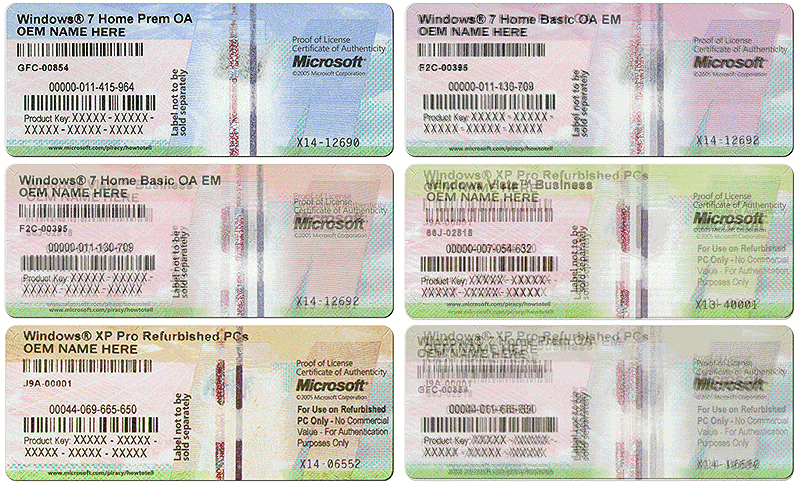
Your old laptop got this sticker on its base?
17625d1429928164t-window-7-activation-coa-stickers.gif

If have means you can use it and don't need to get a new copy of Windows.

PC to be placed on table or floor?
Which internet provider plan and router are you using now?
 

Snoogles

Junior Member
Joined
Nov 25, 2015
Messages
4
Reaction score
0
additional info

Saw from other thread.

I think this can provide more info for better assistance.
Any preference for colour theme? e.g. Black with Blue/Red/White
Probably black, cause white will turn yellow
Need any of these?
Speaker
WiFi adapter
Wifi Adapter
PC to be placed on table or floor?
Floor
Which internet provider plan and router are you using now?
singtel 500 plan with asus AC2400
Is your home in a relatively new apartment built in the past 8 years?
new
How far is your upcoming PC located from the router?
Router in living room PC in room, prettu near
Any obstruction between path?
1 wall

Your old laptop got this sticker on its base?
Yes, window 7 home prem OA

Why do you need to overclock CPU? More for fun or practical usage?
practical usage
What specifically are you doing with this PC?
Game, Stream and Photoshop and Video editing.
 
Last edited:

MoneyFace =p

High Supremacy Member
Joined
Dec 17, 2010
Messages
35,380
Reaction score
402
Saw from other thread.

I think this can provide more info for better assistance.
Any preference for colour theme? e.g. Black with Blue/Red/White
Probably black, cause white will turn yellow
Need any of these?
Speaker
WiFi adapter
Wifi Adapter
PC to be placed on table or floor?
Floor
Which internet provider plan and router are you using now?
singtel 500 plan with asus AC2400
Is your home in a relatively new apartment built in the past 8 years?
new
How far is your upcoming PC located from the router?
Router in living room PC in room, prettu near
Any obstruction between path?
1 wall

Your old laptop got this sticker on its base?
Yes, window 7 home prem OA

Why do you need to overclock CPU? More for fun or practical usage?
practical usage
What specifically are you doing with this PC?
Game, Stream and Photoshop and Video editing.
Your 'new' home is newly moved in or also newly built?
Have this utility box? Is your Singtel ONT inside? How about router?

ougGzsH.jpg


And also are you going to install the PC chassis into any form of cabinet? Any size/dimension constraint?
 
Last edited:

Snoogles

Junior Member
Joined
Nov 25, 2015
Messages
4
Reaction score
0
Your 'new' home is newly moved in or also newly built?
Have this utility box? Is your Singtel ONT inside? How about router?

Yes Yes. I have this utility box and my singtel ONT is inside. My router is about 2meters away from it and my room is around 5meters away from router? (pass the wall)

And also are you going to install the PC chassis into any form of cabinet? Any size/dimension constraint?Nope. just place on floor. But hopefully mid tower if cannot then fractal R5 or the other NZNT model
 

MoneyFace =p

High Supremacy Member
Joined
Dec 17, 2010
Messages
35,380
Reaction score
402
Your 'new' home is newly moved in or also newly built?
Have this utility box? Is your Singtel ONT inside? How about router?

Yes Yes. I have this utility box and my singtel ONT is inside. My router is about 2meters away from it and my room is around 5meters away from router? (pass the wall)

And also are you going to install the PC chassis into any form of cabinet? Any size/dimension constraint?Nope. just place on floor. But hopefully mid tower if cannot then fractal R5 or the other NZNT model
So does that means your home network configuration is as such?

ONT > Utility box LAN port > Living room LAN port > Router

And only your living room has the LAN port wall socket? Other rooms nope?

And also what sort of softwares are you running for your video edits?
 
Last edited:

Zeroplus1

Arch-Supremacy Member
Joined
Apr 26, 2003
Messages
21,490
Reaction score
0
Why do you need to overclock CPU? More for fun or practical usage?

What specifically are you doing with this PC?

Any preference for colour scheme? E.g. Black with White/Red/Blue/Green/Gold/etc…
Need any of these?

Your old laptop got this sticker on its base?
17625d1429928164t-window-7-activation-coa-stickers.gif


If have means you can use it and don't need to get a new copy of Windows.

PC to be placed on table or floor?
Which internet provider plan and router are you using now?


OEM license for his laptop can be reused. Can advise how?
 

Zeroplus1

Arch-Supremacy Member
Joined
Apr 26, 2003
Messages
21,490
Reaction score
0
Just key in during installation with Windows 7 OEM disc/thumbdrive. Been there done that.

oh, lol.... that's great. I have an old laptop lying ard.
let's say my laptop's license is Win 7 Home Premium, I can only install the same version for my desktop?
 

MoneyFace =p

High Supremacy Member
Joined
Dec 17, 2010
Messages
35,380
Reaction score
402
Anyway here's something ideal for you:

Stealth black themed

CPU+MB: Intel Core i7-6700K + Gigabyte GA-Z170A-D3H @ $741 (Fuwell)
WC: Corsair Hydro H100i GTX @ $160 (t258jgn)
RAM: Kingston HyperX Fury DDR4-2666 CL15 16GB Dual Channel Kit [Black] @ $188*
GPU: ASUS GTX 970 4GB STRIX OC @ $546*
Does not spin on low load and super quiet even on full load.
SSD: Samsung SSD 850 EVO 250GB X2 @ $246
1 for OS+Program+Games, 1 as Photoshop scratch disk.
Buy them on separate order to enjoy this price.

HDD: HGST Deskstar NAS 3TB @ $159*
ODD: ASUS 24X CD/DVD Writer [OEM] @ $25 (Fuwell)
Required for Windows 7 installation.
Download a copy of Windows 7 Home Premium SP1 64-bit OEM DVD ISO and burn into a disc.

PSU: Super Flower Leadex Silver 650W [80 Plus Silver] @ $79^
CASE: Fractal Design Define R5 Blackout Edition [Window] @ $145*
PWL: Sineoji PL1800EP 1800Mbps Gigabit HomePlug AV2 MIMO Pass Through @ $119 (SITEX 2015)

Total: $2408

Optional:
OS: Microsoft Windows 8 Professional 64-bit Product Key [OEM] @ $30 (Reddit)
Upgrade for free to Windows 10 via free Windows 8.1 update.

Buy others from Lazada Singapore.

Lazada Web prices after Shopback.sg 5% electronics rebate
*Price after Lazada Web MasterCard Monday / DBS/POSB Appy Friday / CITIBank Wild Weekend 10-15% off max $25 discount
^Price after possible Lazada App 12/12 Online Revolution Sale Spin Wheel $50 off $100 voucher [TBA later]
 
Last edited:

MoneyFace =p

High Supremacy Member
Joined
Dec 17, 2010
Messages
35,380
Reaction score
402
oh, lol.... that's great. I have an old laptop lying ard.
let's say my laptop's license is Win 7 Home Premium, I can only install the same version for my desktop?
Yes you can only install whatever version is stated on the sticker of course...

Take note if installing on a Skylake based system, you die die need to use the traditional Windows 7 installation DVD.
 

schlep

Senior Member
Joined
Aug 5, 2003
Messages
1,002
Reaction score
34
Rather than spending the money on a homeplug, I would rather you spend abt the same amount converting all your telephone points to LAN points in your rooms. You can read up the Internet Networking Forum section to learn more. Homeplugs are abit hit and miss. Sometimes you can maximize the speed, sometimes you just get 1/4 of it which is a waste.

The setup would be like.
(ONT->router->4or5 LAN points in Utility box)
->LAN pt in computer room
->LAN pt in Living room
 
Last edited:

MoneyFace =p

High Supremacy Member
Joined
Dec 17, 2010
Messages
35,380
Reaction score
402
Rather than spending the money on a homeplug, I would rather you spend abt the same amount converting all your telephone points to LAN points in your rooms. You can read up the Internet Networking Forum section to learn more. Homeplugs are abit hit and miss. Sometimes you can maximize the speed, sometimes you just get 1/4 of it which is a waste.

The setup would be like.
(ONT->router->4or5 LAN points in Utility box)
->LAN pt in computer room
->LAN pt in Living room

Unless TS is still renovating his new home, it will already be too late to consider that. And his home could already have these LAN port sockets preinstalled by developer, so need him to clarify with us first. Given that TS's home is relatively new, his electrical wiring is also in very favourable condition for better speed than others.

Oh and one thing, TS can request Sineoji to make an appointment at his home to trial their homeplugs before buying via networking subforum here.

My 16yo Sengkang HDB unit can hit 300 Mbps fyi.
 

schlep

Senior Member
Joined
Aug 5, 2003
Messages
1,002
Reaction score
34
Changing of telephone points to LAN points is quite a seamless process for new BTO flats. Unless the telephone points are already blocked by an existing cabinet or heavy furniture, it doesnt do much damage to the outlook of the house. I engaged BTO Home Networking from Facebook to convert the points for me.
Lets leave it as that before I go off topic too much. This is afterall a thread to recommend gaming rig parts. We are appreciative of you helping the HWZ community with all the recommendations.
Lastly, good to know a fellow Sengkang-er in the house.
 

Snoogles

Junior Member
Joined
Nov 25, 2015
Messages
4
Reaction score
0
So does that means your home network configuration is as such?

ONT > Utility box LAN port > Living room LAN port > Router

And only your living room has the LAN port wall socket? Other rooms nope?

And also what sort of softwares are you running for your video edits?

Yupp thats how my house is. Living room and Master Bed room. Other rooms are the TV one.

Final Cut pro
 
Important Forum Advisory Note
This forum is moderated by volunteer moderators who will react only to members' feedback on posts. Moderators are not employees or representatives of HWZ Forums. Forum members and moderators are responsible for their own posts. Please refer to our Community Guidelines and Standards and Terms and Conditions for more information.
Top