[For developers] Android Canary 2512 build now available!

limmk

High Supremacy Member
Joined
Jul 5, 2001
Messages
38,223
Reaction score
7,830
TL;DR
  • A future Android update will add a native flashlight brightness slider to the Quick Settings on Pixel phones.
  • The latest Android Canary release introduces a new visual design for this slider that resembles an actual flashlight.
  • This feature is not expected to launch in a stable release until the Android 16 QPR3 update next March.


Most Android phones have rear LEDs that can be used as a flashlight, but not all of them let you natively control the brightness. On Pixel phones, for instance, adjusting the flashlight brightness requires a third-party app. This is a hassle, and many users aren’t even aware such apps exist, leaving them unable to change their flashlight’s intensity.

A future Android release will finally let you adjust your Pixel phone’s flashlight strength from Quick Settings. Instead of a simple toggle, the Flashlight tile is being updated to be expandable, revealing a slider to control the flashlight’s intensity. While this slider had a barebones design in the 2508 Android Canary release, Google is now giving it a more striking visual update.


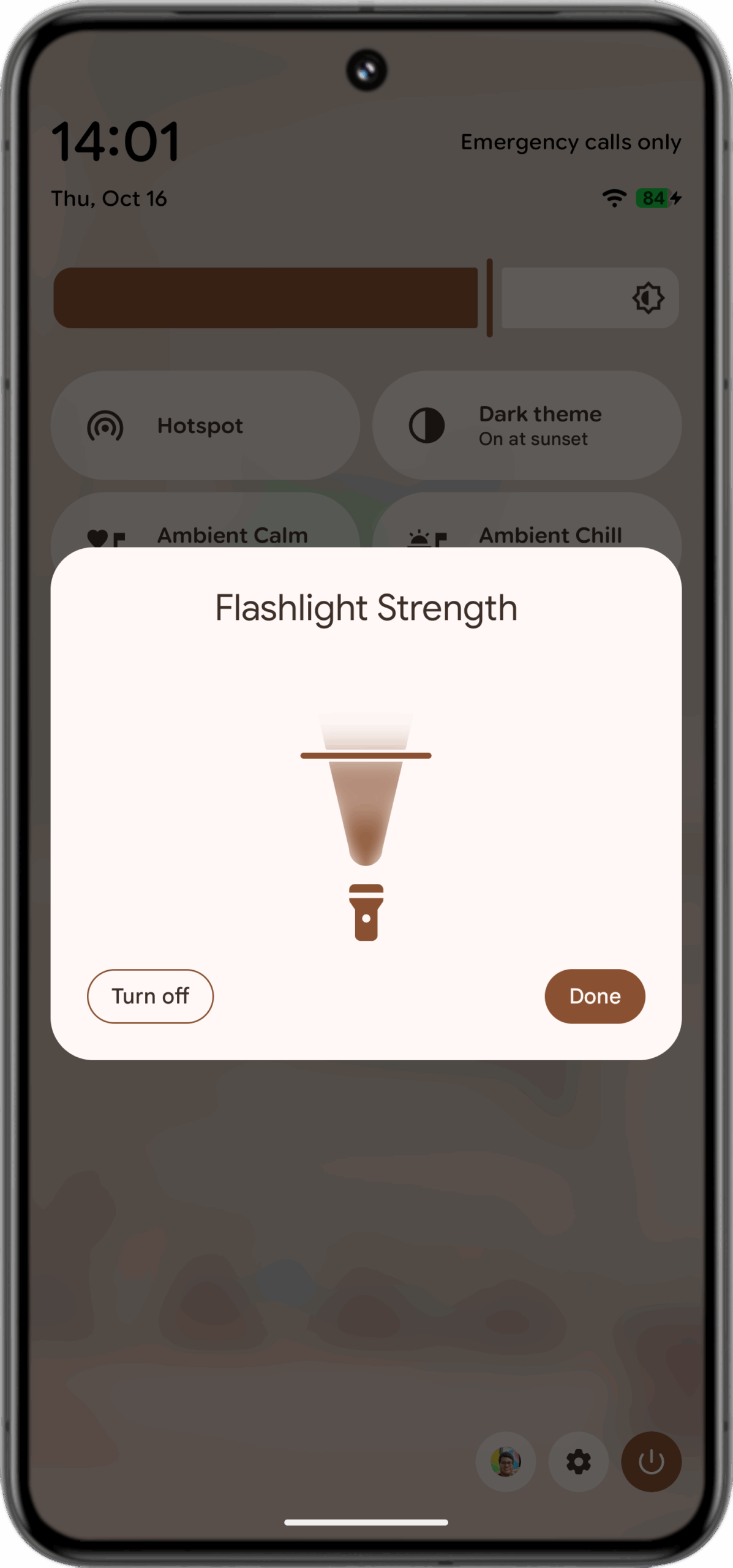
In the latest 2510 Android Canary release, the Flashlight Strength dialog features a new vertical slider that resembles an actual flashlight. As you drag the slider from the bottom (off) to the top (full brightness), an arc representing a beam of light expands to visualize the increased intensity.

This is purely a UI change, as the tile’s functionality remains the same. While the new vertical layout might feel less precise to some, it offers the same range of brightness adjustments as the previous design.

New flashlight brightness control UI in 2510 Android Canary
 
Last edited:

K202020K

Supremacy Member
Joined
Feb 14, 2017
Messages
5,149
Reaction score
951
Android is getting from bad to worse. No backward compatible with older apps like Days Since Pro 3. So after years of saving user data in the apps and backups with the in-app backup function, the user is unable to restore their data on Android 15 because data files could not be copied to the required working folder. Better to use Android 10 or 11.
 

limmk

High Supremacy Member
Joined
Jul 5, 2001
Messages
38,223
Reaction score
7,830
TL;DR
  • Google is working on a new setting that gives Pixel users more control over the Always-on Display.
  • This new option will automatically power down the display when no user activity is detected, helping save battery life.
  • The feature isn’t live yet, and it’s unclear exactly how Android will determine when the phone is inactive.


At the cost of some battery life, your phone’s always-on display (AOD) feature lets you see the time and new notifications at a glance. While most Android phones have an AOD, it doesn’t behave the same way on every device. Some phones let you schedule the AOD to benefit from its glanceable information without unnecessarily draining the battery. Pixel phones, however, offer no such controls — the AOD is either on or off during the day. Fortunately, Google is working on a new setting that will soon give Pixel users more control over this feature.

Earlier today, Google released a new Android Canary build. While its most visible change is a redesigned flashlight brightness slider, a look under the hood reveals that Google is also working on AOD enhancements. Code within the Settings app points to a new option to “turn off display on inactivity,” which “powers down the display when no user activity is detected to save power.” The string names confirm this new setting is for the AOD:

Code:
<string name="doze_always_on_inactivity_detection_title">Turn off display on inactivity</string>
<string name="doze_always_on_inactivity_detection_summary">Powers down the display when no user activity is detected to save power</string>

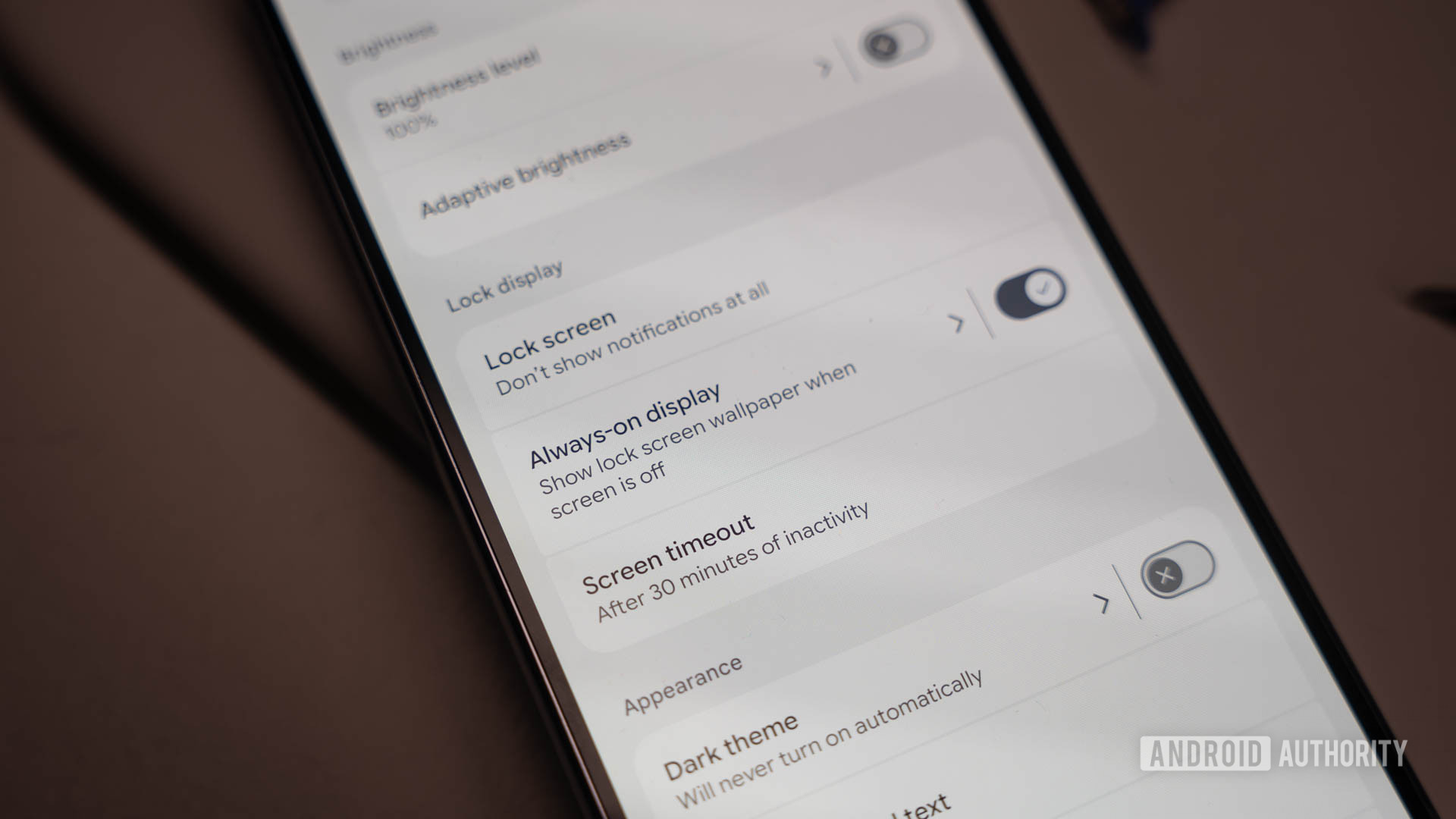
Although “doze” typically refers to Android’s low-power device standby state, it’s also used as a code-name for the ambient display feature in AOSP. Thus, we suspect this setting will appear under Settings > Display > Always-on display, though it isn’t live yet in the 2510 Android Canary release.

Google Pixel Always on Display Wallpaper Setting
Google Pixel Lock Screen Always on Display

The current AOD options on the Pixel 10 series.

Unfortunately, the code also doesn’t specify how Android will determine user activity or how long the phone must be inactive before the feature kicks in. We can look to Samsung’s implementation for a potential blueprint, though. Samsung phones offer an “auto” AOD option that disables the display when the phone is face down, in a dark place, or when it detects the user is asleep. Pixel phones already use their proximity sensors to disable AOD when your phone is face down or in a pocket, but they don’t otherwise track your activity. Thus, if you leave your Pixel phone alone on a table for several hours, its AOD will continue running until Bedtime Mode kicks in.

Regardless, it’s great to see Google finally adding more control over the AOD on Pixel phones. When the company introduced AOD wallpaper support on the new Pixel 10 series, we hoped it was just the beginning of a more customizable experience, and it appears we were right. Hopefully, these new power-saving options won’t be limited to new Pixel devices and will also be made available on existing ones.

This article was updated at 9:33 PM ET to clarify the use of the “Doze” code-name in AOSP and add additional details on how the Pixel’s AOD currently works.

 

limmk

High Supremacy Member
Joined
Jul 5, 2001
Messages
38,223
Reaction score
7,830


TL;DR
  • Google is adding a new setting to Android that lets you reorder the three-button navigation bar.
  • This will allow users to switch from the default “Back, Home, Recents” layout to the “Recents, Home, Back” layout common on Samsung phones.
  • The feature is live in the latest Android Canary build and may roll out to the public in the Android 16 QPR3 release.


If you’ve grown accustomed to using the three-button navigation bar on a Samsung phone, then you might have a hard time switching to a Google phone. That’s because Samsung uses a different layout for its version of the three-button navigation bar. Instead of putting the back button on the left like on stock Android, Samsung puts the back button on the right.

While Samsung does let you flip the order of these buttons to match stock Android’s layout, the opposite isn’t true. Stock Android doesn’t let you flip these buttons, so people switching from Samsung phones have to either retrain their muscle memory on the new button layout or switch to gesture navigation. To make it easier for Samsung users to switch to Pixel phones, Google is introducing a new Android setting that lets you reorder the buttons in the three-button navigation bar.

Back in August, we found evidence within Android code suggesting that the operating system will let you flip the order of the buttons in the navigation bar. Our findings were confirmed by code within the second beta of Android 16 QPR2, which adds a new “button order” menu that lets you choose between the default “Back, Home, Recents” layout and the flipped “Recents, Home, Back” layout.

Navigation button order settings in Android 16 QPR2 Beta 2


Although this new menu was hidden, we managed to enable it for a demonstration, as shown in the video embedded above. We weren’t sure when Google would actually roll this menu out, but thankfully, we didn’t have to wait long. After installing the latest Android Canary release (2510), we discovered that the new “button order” menu is now available under Settings > System > Navigation mode > 3-button navigation, and it works just as expected.

Given that this feature is now live in an Android Canary build, it’ll likely trickle down to the Beta and subsequently the Stable track. Unfortunately, this feature probably won’t make it into the upcoming Android 16 QPR2 update in December, but we might see it in March’s Android 16 QPR3 release. This isn’t the only new customization feature we’re expecting in that update; the new flashlight brightness slider is also anticipated for the Android 16 QPR3 release. While a lot can change before March, we hope Google sticks with this feature, as it’s something many people have been looking forward to.
 
Important Forum Advisory Note
This forum is moderated by volunteer moderators who will react only to members' feedback on posts. Moderators are not employees or representatives of HWZ. Forum members and moderators are responsible for their own posts.

Please refer to our Community Guidelines and Standards, Terms of Service and Member T&Cs for more information.
Top