
Forever free pihole blocking on google cloud compute

xiaofan

High Supremacy Member
Joined
Sep 16, 2018
Messages
36,493
Reaction score
12,374
Yup, I followed your first post.

In the firewall, I used 0.0.0.0/0 and added tcp and udp ports 53 and 80. I can access the pi-hole with the google public address via browser as well.
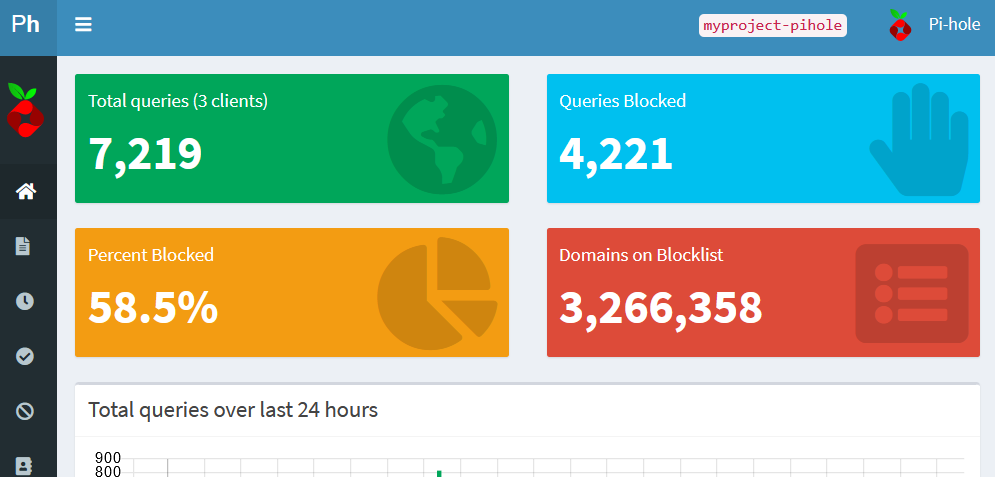

PH-SS-05-10-2020.png


When I update the wan dns on the router to the google public address, the internet connection disconnect.

Not sure if this matters - my isp is whizcomms and the wan ip is 156.249.x.x (whizcomms usually has an wan ip of 192.x.x.x, and I changed the ont with them).

What if you reboot the remote virtual server instance?

By the way, ONR is the main router so your router will get 192.168.x.x WAN address if your are using your own router in router mode (double NAT). Once you change to ONT, then your router is the main router and it will get public IP address (156.249.x.x) from Whizcomms as the WAN address.
 

yusoffb01

Arch-Supremacy Member
Joined
Jun 17, 2008
Messages
16,845
Reaction score
1,784
Yup, I followed your first post.

In the firewall, I used 0.0.0.0/0 and added tcp and udp ports 53 and 80. I can access the pi-hole with the google public address via browser as well.


PH-SS-05-10-2020.png


When I update the wan dns on the router to the google public address, the internet connection disconnect.

Not sure if this matters - my isp is whizcomms and the wan ip is 156.249.x.x (whizcomms usually has an wan ip of 192.x.x.x, and I changed the ont with them).

once u figure out dont use 0.0.0.0

im using whizcomms too. maybe if your router dont allow changing of wan dns, try lan dns so that wifi devices will connect to the google ip instead.

if that works, then change your wired deviced to manual dns.
 

xiaofan

High Supremacy Member
Joined
Sep 16, 2018
Messages
36,493
Reaction score
12,374
Googke Cloud Free Program
https://cloud.google.com/free/docs/gcp-free-tier

It seems to me that Google has reduced free US$300 credit free trial from one year to 90 days. When I signed up last year, it was one year.

That being said the GCP free tier is still free.

GCP Free Tier Usage Limits
https://cloud.google.com/free/docs/gcp-free-tier#free-tier-usage-limits

28 hours per day of "F" instances
9 hours per day of "B" instances
1 GB of egress per day


***** The guide has more details ****

https://github.com/rajannpatel/Pi-H...guard-VPN-Configs/blob/master/GOOGLE-CLOUD.md

1 vCPU + 614MB RAM (Note: not 3.75GB mentioned) f1-micro virtual machine instance per month in one of the following US regions:
Oregon: us-west1
Iowa: us-central1
South Carolina: us-east1

up to 30 GB HDD

5 GB of snapshots storage for backups of your server in the following regions:
Oregon: us-west1
Iowa: us-central1
South Carolina: us-east1
Taiwan: asia-east1
Belgium: europe-west1

1 GB network egress from North America to all region destinations (excluding China and Australia) per month.
 
Last edited:

yusoffb01

Arch-Supremacy Member
Joined
Jun 17, 2008
Messages
16,845
Reaction score
1,784
didnt realize my pihole hang since 9am today. had to stop and start compute instance. Good thing secondary adguard dns was supporting everything while pihole was down

ctZckJT.jpg

LqKr3Mv.jpg

50% cpu usage seems higher than normal
 
Last edited:

xiaofan

High Supremacy Member
Joined
Sep 16, 2018
Messages
36,493
Reaction score
12,374
didnt realize my pihole hang since 9am today. had to stop and start compute instance. Good thing secondary adguard dns was supporting everything while pihole was down

50% cpu usage seems higher than normal

Is this because the f1 micro instance only has 614MB memory and a slower CPU?

Anyway, I am actually running Pi-hole on a Southeast Asia E2 Small server with 2vCPU and 2GB memory. Typical CPU usage is below 10% but sometimes it shoot to 27%. This more it hangs at 9am as well and I noticed and restarted it.

Looks like my setup is not stable. I suspect the block list update is the potential problem. Need to clean up the list and try again.

I will also try a real Pi-Hole in the homework using Raspberry Pi 3B+.
 
Last edited:

xiaofan

High Supremacy Member
Joined
Sep 16, 2018
Messages
36,493
Reaction score
12,374
Looks like my setup is not stable. I suspect the block list update is the potential problem. Need to clean up the list and try again.

I will also try a real Pi-Hole in the homework using Raspberry Pi 3B+.

Indeed there are quite some invalid entries when I using "pihole -g" command.

Hopefully it will get more stable now. I will also learn more about the pi-hole settings and sqlite 3 database maintainence. In the end, the web interface is nice but not enough.

Some websites also suggest cron job to restart the server periodically.

There are 24 clients using the pi-hole server as per the Dashboard (19000+ queries, 1/3 blocked). Not so sure if this is also a problem or not.

Edit: number of clients should not be a real issue after the review of the clients list.
 
Last edited:

yusoffb01

Arch-Supremacy Member
Joined
Jun 17, 2008
Messages
16,845
Reaction score
1,784
Yup, I followed your first post.

In the firewall, I used 0.0.0.0/0 and added tcp and udp ports 53 and 80. I can access the pi-hole with the google public address via browser as well.


PH-SS-05-10-2020.png


When I update the wan dns on the router to the google public address, the internet connection disconnect.

Not sure if this matters - my isp is whizcomms and the wan ip is 156.249.x.x (whizcomms usually has an wan ip of 192.x.x.x, and I changed the ont with them).

I just realised if you add too many blocking pihole may not load some websites even tho it is whitelisted and traffic seems to pass thru. Adding secondary dns helps so your router/device will still load the website instead of giving up. Blocked website will still not load even if secondary dns is non-filtering due to nx response from pihole
 

xiaofan

High Supremacy Member
Joined
Sep 16, 2018
Messages
36,493
Reaction score
12,374
I just realised if you add too many blocking pihole may not load some websites even tho it is whitelisted and traffic seems to pass thru. Adding secondary dns helps so your router/device will still load the website instead of giving up. Blocked website will still not load even if secondary dns is non-filtering due to nx response from pihole

Good point.

Now I add Google DNS as the secondary DNS for all the devices. For the Pi-hole, I use Cloudflair, OpenDNS and Quad9 (majority will go to Cloudflair or OpenDNS).

The only problem is with the Windows laptop, where it does not really honor the primary DNS first and then secondary DNS later, rather it seems to randomly choose and often Google DNS will take precedence.

Android -- mostly okay (two DNS server entry only)

iOS -- seems no issues (multiple DNS servers possible).

I use DNS Leak Test site for testing to see whether the Pi-hole DNS is used or not.
https://www.dnsleaktest.com/

DNS server -- Google or SingTel , failed tests
DNS server -- Cloudflair, OpenDNS or Quad 9, passed tests.
 
Last edited:

xiaofan

High Supremacy Member
Joined
Sep 16, 2018
Messages
36,493
Reaction score
12,374
Yesterday I also tried the full wireguard plus pi-hole setup on the free tier Google cloud f1 micro virtual server instance. It seems to me the memory consumption is in line with the number without wireguard.

And then I just tested it outside home (wireless@Sgx or Singtel mobile), it seems to work well in both cases.
 
Last edited:

Proximus

Supremacy Member
Joined
May 21, 2001
Messages
7,004
Reaction score
93
Yesterday I also tried the full wireguard plus pi-hole setup on the free tier Google cloud f1 micro virtual server instance. It seems to me the memory consumption is in line with the number without wireguard.

And then I just tested it outside home (wireless@Sgx or Singtel mobile), it seems to work well in both cases.

Yup. Wire guard is little on memory consumption. Am running it with Pi-hole on my Pi 4.
 

Trans-Am

Supremacy Member
Joined
Apr 2, 2014
Messages
7,362
Reaction score
411
For those who want to auto update gravity daily, can do this: ( for those who self host at home)

1) SSH into Pi-Hole

2) type in this command:

sudo nano /etc/cron.d/pihole

3) Look for this line ( numbers might be different )

Ya3Ks7V.png


4) Change the value to this to update daily at 1AM

00 1 * * *
jW4whC5.png


FAQ
Q:How do i know if gravity has update successful?
Ans:Go to your Dashboard ( or Pi-Hole home page) and mouse over " Domains on blocklist after your update time. You should see this " updated xx:xx ago , count back the time and you can see if it update at schedule time.
vNjNuTu.png


Q: I set the timing at 1AM but when i count back it is 1.05am
Ans: This is because you have lots of configured adlists and need time to update everything.
 
Last edited:

xiaofan

High Supremacy Member
Joined
Sep 16, 2018
Messages
36,493
Reaction score
12,374

Other than the ads block lists mentioned before, I added one list targeting Chinese websites today.

https://anti-ad.net/
It has block list for dbsmasq, adguards home, pi-hole, smartdns and surge.

For pi-hole
https://anti-ad.net/domains.txt
 
Last edited:

Proximus

Supremacy Member
Joined
May 21, 2001
Messages
7,004
Reaction score
93
For those who want to auto update gravity daily, can do this: ( for those who self host at home)

1) SSH into Pi-Hole

2) type in this command:

sudo nano /etc/cron.d/pihole

3) Look for this line ( numbers might be different )

Ya3Ks7V.png


4) Change the value to this to update daily at 1AM

00 1 * * *
jW4whC5.png


FAQ
Q:How do i know if gravity has update successful?
Ans:Go to your Dashboard ( or Pi-Hole home page) and mouse over " Domains on blocklist after your update time. You should see this " updated xx:xx ago , count back the time and you can see if it update at schedule time.
vNjNuTu.png


Q: I set the timing at 1AM but when i count back it is 1.05am
Ans: This is because you have lots of configured adlists and need time to update everything.

Thnaks for sharing. Just wanted to add, if you not use CRON to set the gravity time interval, it will auto update every 7 days which I thinkit is reasonable as blocklist does not change very frequently.
 
Last edited:

Trans-Am

Supremacy Member
Joined
Apr 2, 2014
Messages
7,362
Reaction score
411
add in additional Upstream DNS Servers

If you want to add in more additional DNS servers but unable to as Pi-Hole can only add in additional 2 IPV4 & 2 IPV6 servers.
ZPBLkz9.png


Do this to add in additional DNS servers

1) SSH into Pi-Hole

2) type in this command:

sudo nano /etc/pihole/dns-servers.conf

3) Add in DNS server, 2 x IPV4 & 2x IPV6 ( For this example i will be using cloudflare which only block malware )

Cloudflare (Block Malware);1.1.1.2;1.0.0.2;2606:4700:4700::1112;2606:4700:4700::1002

4) Save

5)
AoWcB39.png


Sent from A universe Where pink PWNED everything using GAGT
 

yusoffb01

Arch-Supremacy Member
Joined
Jun 17, 2008
Messages
16,845
Reaction score
1,784
If you want to add in more additional DNS servers but unable to as Pi-Hole can only add in additional 2 IPV4 & 2 IPV6 servers.
[


Sent from A universe Where pink PWNED everything using GAGT

Nice didn't know possible
 

xiaofan

High Supremacy Member
Joined
Sep 16, 2018
Messages
36,493
Reaction score
12,374
how does this compare to Adguard Home? This is self hosted version and not the Adguard public DNS server.

Maybe Windows user can use this instead cos its easier than using Docker to install pi-hole. I will check it out later in the day on my Windows VPS server.

update: found this https://github.com/AdguardTeam/AdGuardHome#comparison-adguard-dns

It will be interesting to install AdGuard Home on the same free tier Google VPS (or your Windows VPS in your case) and then compare the performance with Pi-Hole.

Or install it on a Raspberry Pi or Virtual Machine within the home network, and then compare with Pi-hole.
 

Trans-Am

Supremacy Member
Joined
Apr 2, 2014
Messages
7,362
Reaction score
411
In advance dns setting, should we check this box " use DNSSEC"?

What are the pros & cons when using this setting?

Sent from A universe Where pink PWNED everything using GAGT
 

Hafi

Arch-Supremacy Member
Joined
Mar 30, 2003
Messages
15,340
Reaction score
5,351
It will be interesting to install AdGuard Home on the same free tier Google VPS (or your Windows VPS in your case) and then compare the performance with Pi-Hole.

Or install it on a Raspberry Pi or Virtual Machine within the home network, and then compare with Pi-hole.

I probably won't install pi-hole if Adguard Home works well for me cos I'll be using the paid version of Adguard for Windows/Android (software based) together with Adguard Home (DNS) which is free. If anybody is interested can get their lifetime license (5 devices) from StackSocial on BlackFriday @40% discount.

Reason being I wanna test out their DNS-over-HTTPS, DNS-over-TLS function. For this you'll need a domain with SSL certificate and host it on a VPS/server (DNS-over-HTTPS won't work for Raspberry Pi cos it is residing within local network).
 

xiaofan

High Supremacy Member
Joined
Sep 16, 2018
Messages
36,493
Reaction score
12,374
I probably won't install pi-hole if Adguard Home works well for me cos I'll be using the paid version of Adguard for Windows/Android (software based) together with Adguard Home (DNS) which is free. If anybody is interested can get their lifetime license (5 devices) from StackSocial on BlackFriday @40% discount.
Reason being I wanna test out their DNS-over-HTTPS, DNS-over-TLS function. For this you'll need a domain with SSL certificate and host it on a VPS/server (DNS-over-HTTPS won't work for Raspberry Pi cos it is residing within local network).
I see.

I have just set up one instance of Adguard Home on the Google Cloud free tier virtual micro server.

I have yet to set up the DNS over TLS/HTTPS function with adguard home yet. But it is possible.

Ref: a bit outdated guide

https://frankindev.com/2019/11/26/do...n-adguardhome/

Another guide in Traditional Chinese

https://www.jkg.tw/p2660/

Screenshot from Adguard Home web interface
5mRXPW6.jpg
 
Last edited:
Important Forum Advisory Note
This forum is moderated by volunteer moderators who will react only to members' feedback on posts. Moderators are not employees or representatives of HWZ Forums. Forum members and moderators are responsible for their own posts. Please refer to our Community Guidelines and Standards and Terms and Conditions for more information.
Top