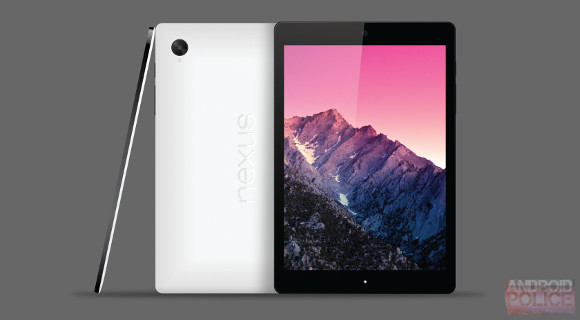
Google Nexus 7 2nd generation

hehuafa

Member
Joined
Feb 20, 2013
Messages
196
Reaction score
0

xKazeolus

Master Member
Joined
Jun 24, 2008
Messages
3,560
Reaction score
23
gsmarena_002.jpg


gsmarena_001.jpg
 

Rickosw

Senior Member
Joined
Mar 31, 2012
Messages
2,358
Reaction score
79
hi

updated to 4.4.4 this morning, small update 2.4MB took about 10 mins ...
now waiting for L update ...
 

zonester

Member
Joined
Dec 14, 2008
Messages
132
Reaction score
0
Battery Drains Too Fast

The battery life of my Nexus 7 (2nd generation) has not been good since when I first bought it last year, so would appreciate any help from here. I know there're some previous postings on battery life on HWZ, but could not find a direct solution yet.

When I put my Nexus with screen display off overnight (with Wifi, BT etc off also), the battery drains faster than I would expect. Please see screenshots which were captured at 2am today and at 7.30am today:

At 2am:
- battery: 64%
- highest usage is by "Android OS" (61%)

At 7.30am:
- battery: 41%
- highest usage is by "Android OS" (55%)

So in 5.5 hrs, the battery drained 23% without doing anything that I am aware of. I can confirm that typically it's "Android OS" that takes up the bulk of the battery drainage.

What can I do to reduce this rapid battery drainage? Anything to tweak that's related to "Android OS" (that description is too broad !) Thanks.


edit


edit


edit


edit
 

chengsun

High Supremacy Member
Joined
Oct 5, 2004
Messages
38,502
Reaction score
12
The battery life of my Nexus 7 (2nd generation) has not been good since when I first bought it last year, so would appreciate any help from here. I know there're some previous postings on battery life on HWZ, but could not find a direct solution yet.

When I put my Nexus with screen display off overnight (with Wifi, BT etc off also), the battery drains faster than I would expect. Please see screenshots which were captured at 2am today and at 7.30am today:

At 2am:
- battery: 64%
- highest usage is by "Android OS" (61%)

At 7.30am:
- battery: 41%
- highest usage is by "Android OS" (55%)

So in 5.5 hrs, the battery drained 23% without doing anything that I am aware of. I can confirm that typically it's "Android OS" that takes up the bulk of the battery drainage.

What can I do to reduce this rapid battery drainage? Anything to tweak that's related to "Android OS" (that description is too broad !) Thanks.


edit


edit


edit


edit
try reseting to factory default?
 

zonester

Member
Joined
Dec 14, 2008
Messages
132
Reaction score
0
try reseting to factory default?

I'm not too inclined to do that drastic step yet unless no choice. I"ve done some googling in the meantime also, and it's quite likely that the "rogue" battery drainage is due to "wakelocks" making some apps consume power/CPU also the tablet is supposed to be sleeping. Most of the internet postings point to "Android OS" being the biggest battery consumer, which is my case also.

There's a popular app called Wakelock Detector on Google Play, but it's only usable on rooted devices. Not sure if anybody knows of any other wakelock detection app that does not need me to root my Nexus?

By the way, how do you do that factor default reset that you recommend? Thanks.
 

chengsun

High Supremacy Member
Joined
Oct 5, 2004
Messages
38,502
Reaction score
12
I'm not too inclined to do that drastic step yet unless no choice. I"ve done some googling in the meantime also, and it's quite likely that the "rogue" battery drainage is due to "wakelocks" making some apps consume power/CPU also the tablet is supposed to be sleeping. Most of the internet postings point to "Android OS" being the biggest battery consumer, which is my case also.

There's a popular app called Wakelock Detector on Google Play, but it's only usable on rooted devices. Not sure if anybody knows of any other wakelock detection app that does not need me to root my Nexus?

By the way, how do you do that factor default reset that you recommend? Thanks.

I used to "feel" that my 2nd gen 7 battery kind of drained fast, so i call up Asus hotline ask about this, whether i should bring to service centre. 1st thing the girl asked me to train is reseting to factory default......

that was.... last yeat sept or oct time i think. later on i just **** care, then i think i did a reset in April.

actually, i dun feel too much now, maybe my usage not that heavy.
 

osirisx

Arch-Supremacy Member
Joined
Jun 21, 2007
Messages
19,730
Reaction score
3,344
My Nexus 7 got touchscreen got problem went to their service centre at burn road.
Now need to wait for them to repair. Hopefully this will fix the problem.

ya common problem, I sent mine for repair too
got some scratches when I got it back, they replace the backing for me after that

do any of you with 3g/lte encounter signal disconnection, when u wake it from sleep/turn on data
 

version10

Supremacy Member
Joined
Mar 6, 2005
Messages
7,512
Reaction score
0
Looking to get 1 either from Amazon or HWZ Marketplace but have a question hope you guys don't mind helping :D

For those who got it from Amazon, the charger they provided is the US type yea? Does it require a transformer or an adapter is enough? Or you'll just buy the local charger somewhere else

Thanks!
 

chengsun

High Supremacy Member
Joined
Oct 5, 2004
Messages
38,502
Reaction score
12
Looking to get 1 either from Amazon or HWZ Marketplace but have a question hope you guys don't mind helping :D

For those who got it from Amazon, the charger they provided is the US type yea? Does it require a transformer or an adapter is enough? Or you'll just buy the local charger somewhere else

Thanks!

I just use a USB to wall adapter + the USB cable
 

lordlad0

Arch-Supremacy Member
Joined
Jul 19, 2002
Messages
17,141
Reaction score
469
Did anyone with LTE version (local set) manage to get OTA 4.4.3?
i am with LTE local set (got with singtel LTE plan)...already on 4.4.3....though i upgrade using the factory image via fastboot.......

that's the whole point of nexus isn't it? Why wait for anybody (even google) to push to you when you are given the ability to do it yourself?
 

lordlad0

Arch-Supremacy Member
Joined
Jul 19, 2002
Messages
17,141
Reaction score
469
Looking to get 1 either from Amazon or HWZ Marketplace but have a question hope you guys don't mind helping :D

For those who got it from Amazon, the charger they provided is the US type yea? Does it require a transformer or an adapter is enough? Or you'll just buy the local charger somewhere else

Thanks!
i feel there's a need to put a sticky to educate users that ALL devices with micro-usb port as charging mechanism is compatible with (Almost) all chargers on the market....

heck, you can use ANY micro-usb cable to plug in to the apple ipad charger plug and it WILL work

unless your device is using proprietary chargers that is non-detachable with the cable.....

also, charging a tablet with a phone charger tends to be slower (or not charging at all in some cases)
 

version10

Supremacy Member
Joined
Mar 6, 2005
Messages
7,512
Reaction score
0
I just use a USB to wall adapter + the USB cable

i feel there's a need to put a sticky to educate users that ALL devices with micro-usb port as charging mechanism is compatible with (Almost) all chargers on the market....

heck, you can use ANY micro-usb cable to plug in to the apple ipad charger plug and it WILL work

unless your device is using proprietary chargers that is non-detachable with the cable.....

also, charging a tablet with a phone charger tends to be slower (or not charging at all in some cases)

Thank you!!! :D:s12:
 

ykeen

Moderator
Moderator
Joined
Jul 31, 2000
Messages
4,635
Reaction score
128
heck, you can use ANY micro-usb cable to plug in to the apple ipad charger plug and it WILL work
Caveat doing so with iPhone charger only resulted in USB charging 500mA instead of 1A on my nexus 5. Very impatient waiting for it to be charged. :D
 
Important Forum Advisory Note
This forum is moderated by volunteer moderators who will react only to members' feedback on posts. Moderators are not employees or representatives of HWZ Forums. Forum members and moderators are responsible for their own posts. Please refer to our Community Guidelines and Standards and Terms and Conditions for more information.
Top