Google Pixel 9 series

Which Pixel 9 series devices are you most interested in?

  • Pixel 9

  • Pixel 9 Pro

  • Pixel 9 Pro XL

  • Pixel 9 Pro Fold

  • Other [comment]


Results are only viewable after voting.

Loser

Arch-Supremacy Member
Joined
May 7, 2019
Messages
23,802
Reaction score
10,588
Hi all, this has been resolved. DBS actually blocked my card as they suspected fraud.
So you haven't been actively using it during the period you tried adding it to your Google wallet?
 

bvoice

Junior Member
Joined
Aug 10, 2017
Messages
36
Reaction score
1
But if they blocked your card how come can use physical card?
That's the thing that I wondered lor. Physical can use paywave. Recently a lot of googlepay/applepay fraud, probably that's why.
 
Last edited:

limmk

High Supremacy Member
Joined
Jul 5, 2001
Messages
43,276
Reaction score
8,348


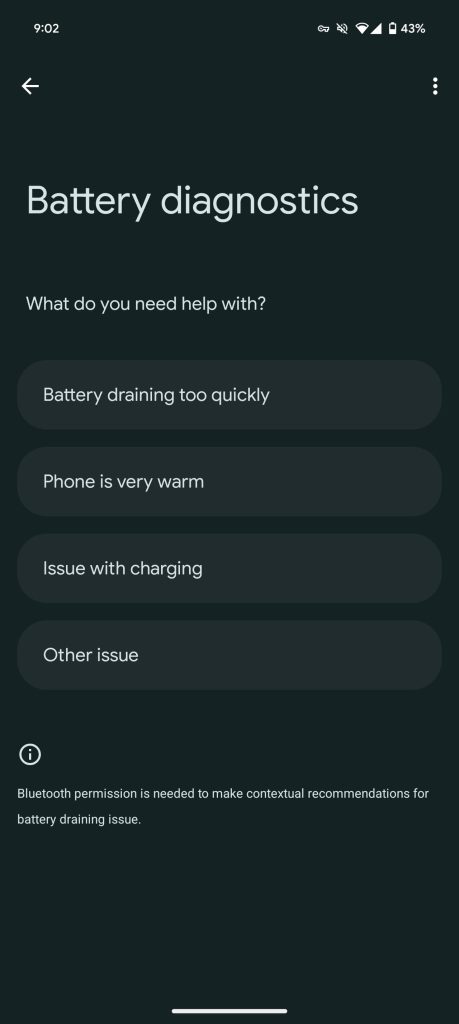
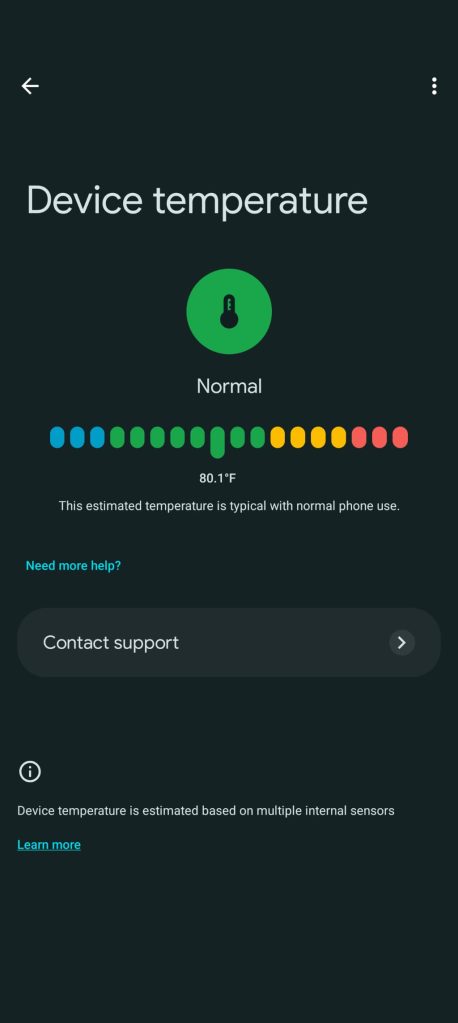
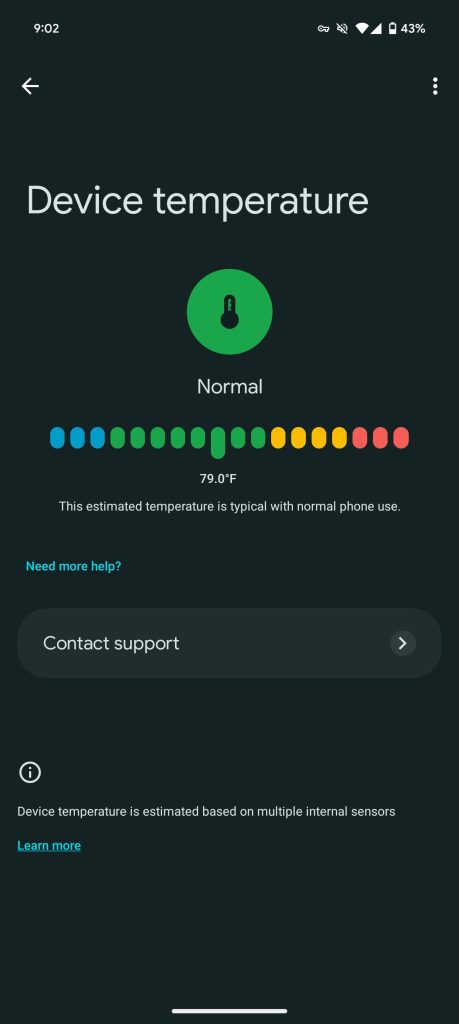
Following an update to the Pixel Troubleshooting app/service, the Pixel 6-9 can natively show “Device temperature.”

Go to Settings app > Battery > Battery diagnostics (at the bottom) > Phone is very warm. Previously, this page might just note how “All settings are optimized.”

Now, you get a Pixel temperature readout that updates in real-time. There are four color-coded “Labels”: Cold, Normal, Warm, and Elevated.

The following “descriptions”/messages are possible:

  • “Your phone’s estimated temperature is lower than normal. It may shut down suddenly.”
  • “This estimated temperature is typical with normal phone use.”
  • “Your phone is slightly warm, but this is normal during use. To prevent further temperature increases, screen brightness and network speeds may be reduced.”
  • “Your phone is slightly warm, but this is normal during use. To prevent further temperature increases, charging is paused, and screen brightness and network speeds may be reduced.”
  • “Your phone’s estimated temperature is higher than normal. Your phone will try to cool down by temporarily limiting performance and pausing certain features.”
Pixel 9 temperature
Pixel 9 temperature


Google explains how “Device temperature is estimated based on multiple internal sensors.” You might also see tips like:

  • “To cool down your phone, provide airflow to your phone if possible”
  • “Use only cases or covers made for your specific phone”
  • “To help cool your phone, close apps that use a lot of power like games or video streaming. You can reopen them later.”
  • “Protect your phone by putting it in an inner pocket close to your body, or using an insulated case”
  • “Let your phone rest and warm up for a few minutes before doing demanding tasks like gaming or video calls. This helps keep it safe from damage.”
Another way to access this page is by searching “Device temperature” in the Settings app. Pixel Troubleshooting was introduced last year.

Update: Live temperature is available with version 1.0.693922709 of the Pixel Troubleshooting app on the Pixel 6, 7, 8, and 9 series. (It doesn’t look to be available on the Tablet.) We’re seeing it on a Pixel 6 Pro, Pixel Fold, Pixel 8a and 9 Pro running the stable Android 15 November release or later.

This update is rolling out via the Play Store, but is not yet widely available. (You might have to visit the listing directly.)

Old vs. new

old-Pixel-9-battery-diagnostics.jpg
Pixel 9 temperature
 

joesph

Supremacy Member
Joined
May 15, 2005
Messages
9,461
Reaction score
734
Anyone can recommend a pixel 9 pro magsafe case and also an attachable magsafe cardholder (if there is even such a thing)
direct from the google store case-mate, it's hard plastic does not turn yellow $50 over, i'm using. or you can buy ring sticker...
 

joesph

Supremacy Member
Joined
May 15, 2005
Messages
9,461
Reaction score
734
Is anyone also struggling with fingerprint unlock on Pixel 9 Pro? It takes me a dozen tries just to unlock my phone.

I already have Screen Protector mode on.
use face very convenient, i learn that what my taobao tempered glass didn't work. now waiting for the awesomely expensive zagg xtr3 from u.s about $80 black friday shipped
 

joesph

Supremacy Member
Joined
May 15, 2005
Messages
9,461
Reaction score
734
Remove the screen protector and register your fingerprints. if it still doesn’t work, it’s possible your fingerprints are too faint to be detected or a faulty device
i asked one shopee seller if can work. answer no
 

Loser

Arch-Supremacy Member
Joined
May 7, 2019
Messages
23,802
Reaction score
10,588
BTW just want to put it on here for those who are considering between Spigen and ringke tempered glass, ringke is superior.

The clarity, coverage and feel are better and the edge is slightly rounded, reminds me very much of whitestone dome. But for those with cases that has higher coverage should go for Spigen for compatibility.

Fingerprint sensor sensitivity are similar and works well.
 
Last edited:

omelet

Senior Member
Joined
Dec 9, 2006
Messages
2,251
Reaction score
346
Brought P9PXL to a Japan trip.
1. Fingerprint scanner became worst. Keep failing and I had to enter pin. (Installed with Spigen tempered glass.) Came back to SG and it works fine again...o_O
2. GPS was really slow to lock on every time I open the Google Map, wasn't this bad on my P7P from my memories.
3. Lost cell connectivity quite often when in JP (Both Ubigi and Singtel roaming). Works fine in SG though.
 

Loser

Arch-Supremacy Member
Joined
May 7, 2019
Messages
23,802
Reaction score
10,588
Brought P9PXL to a Japan trip.
1. Fingerprint scanner became worst. Keep failing and I had to enter pin. (Installed with Spigen tempered glass.) Came back to SG and it works fine again...o_O
2. GPS was really slow to lock on every time I open the Google Map, wasn't this bad on my P7P from my memories.
3. Lost cell connectivity quite often when in JP (Both Ubigi and Singtel roaming). Works fine in SG though.
Maybe it's a Chinese set and it hates the japanese?
 

anthonygreenisreal

Arch-Supremacy Member
Joined
Oct 2, 2014
Messages
14,289
Reaction score
7,731
Brought P9PXL to a Japan trip.
1. Fingerprint scanner became worst. Keep failing and I had to enter pin. (Installed with Spigen tempered glass.) Came back to SG and it works fine again...o_O
2. GPS was really slow to lock on every time I open the Google Map, wasn't this bad on my P7P from my memories.
3. Lost cell connectivity quite often when in JP (Both Ubigi and Singtel roaming). Works fine in SG though.
I think maybe coz the finger too dry in Japan.
 

anthonygreenisreal

Arch-Supremacy Member
Joined
Oct 2, 2014
Messages
14,289
Reaction score
7,731
Wifi or mobile data? Not bad not bad.
I went outside around 2:20pm with 100% battery. Then reached home around 6:40pm. On data during this timing.
At home is on wifi.
Only started using 2 days ago. Hopefully the battery can settle with my usage pattern and get even better battery life.
 

Loser

Arch-Supremacy Member
Joined
May 7, 2019
Messages
23,802
Reaction score
10,588
I went outside around 2:20pm with 100% battery. Then reached home around 6:40pm. On data during this timing.
At home is on wifi.
Only started using 2 days ago. Hopefully the battery can settle with my usage pattern and get even better battery life.
Actually should be around there liao. Just hope it won't get worse. :o
 
Important Forum Advisory Note
This forum is moderated by volunteer moderators who will react only to members' feedback on posts. Moderators are not employees or representatives of HWZ Forums. Forum members and moderators are responsible for their own posts. Please refer to our Community Guidelines and Standards and Terms and Conditions for more information.
Top