[Google Pixel Update📱] Android 15 May Security Update rolling out

limmk

High Supremacy Member
Joined
Jul 5, 2001
Messages
41,216
Reaction score
8,166

Key Takeaways​

  • Google accidentally confirmed that Android 15 will roll out to Pixel phones today, gradually expanding to carriers worldwide.
  • Android 15 might be released alongside the October Pixel Feature Drop with new features.
  • Motorola might also start publicly testing Android 15 for its devices from today.


While Android 15's source code went live on AOSP in early September, Google never released the OTA update for Pixel phones and tablets. Multiple reports suggested the update could land in October, with a mid-September leak providing a more precise date of October 15. Now, Google itself has slipped up and confirmed that Android 15 will start rolling out to Pixel phones later today.

A post about Android 15 being available today went live ahead of time on Google's German Pixel Community forum. Although it has since been removed, multiple Redditors received an email about the post and have shared its screenshot. If anything, this is as good a confirmation as you can get about Android 15 rolling out to all compatible Pixel phones and tablets later today.

The company's post stated that it will gradually make the update available on carriers worldwide over the next week. So, if you have a carrier-locked Pixel, you might have to wait even longer. Based on Google's track record, the official announcement and the OTA should go live around 10 a.m. PT, with factory images likely being available for download around the same time.
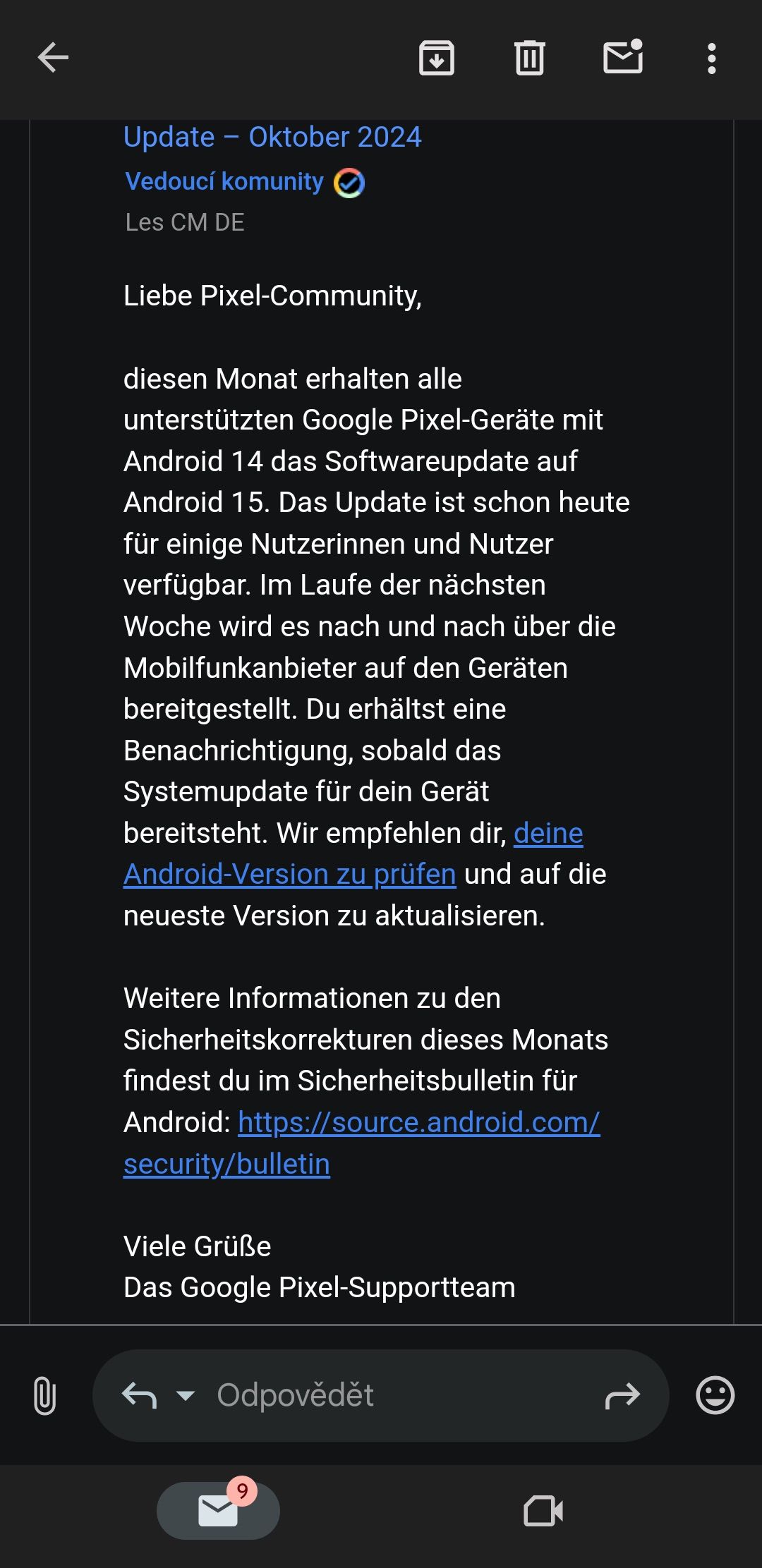
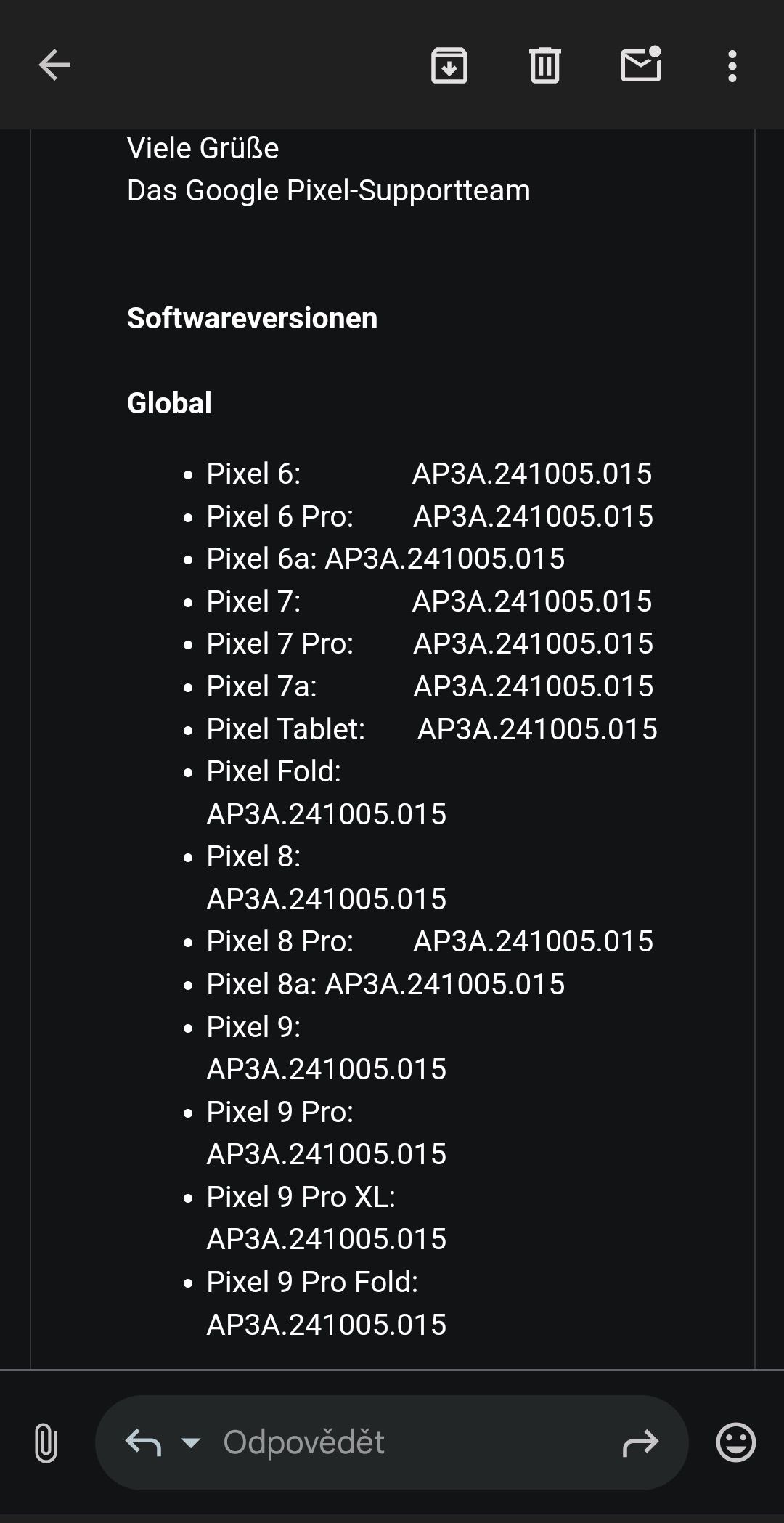
  • Android 15 roll out announcement on German Pixel Community forum
  • Android 15 roll out announcement on German Pixel Community forum
The Android 15 update should roll out alongside the October Pixel Feature Drop, so Google might introduce some new features and enhancements that were not a part of the beta program. The Pixel Watch should also get some new features today as a part of the Feature Drop.

Do note that if your Pixel is already running the Android 15 QPR1 beta, you won't get an option to install the stable build today. This will require you to leave the beta program, which will wipe clean the phone's internal storage.

Motorola might also commence its Android 15 beta program today​

Interestingly, Google might not be the only one to roll out Android 15 for its devices today. Some Moto Edge 50 Fusion users in India report receiving a prompt about the update being available for their devices. It seems, though, that this will be a beta build, with Motorola presumably only rolling it out to select users who are part of a beta program later today.


Besides Motorola, we might see Xiaomi, Vivo, Nothing, and others provide a more concrete release timeframe for their Android 15 updates later today or in the near future.
 

limmk

High Supremacy Member
Joined
Jul 5, 2001
Messages
41,216
Reaction score
8,166
TL;DR
  • The stable Android 15 update adds a new feature that dismisses notifications across Pixel devices.
  • Specifically, this feature syncs notification dismissals, so when you dismiss a notification on your Pixel phone, it won’t appear on your Pixel tablet, and vice versa.
  • There were hopes that Google would make this feature available for all Android devices, but it seems to be Pixel-exclusive for now.


If you have an Android tablet that you use on occasion, then you’re probably familiar with the issue of duplicate notifications. Notifications that you’ve already seen and dismissed on your Android phone will still appear on your Android tablet until you dismiss them there, too. This is admittedly a minor annoyance, but it makes Android feel like a disjointed ecosystem. Fortunately, Google has a solution to duplicate notifications in the Android 15 update it’s releasing today, but you’ll need to have Pixel devices to take advantage of it.

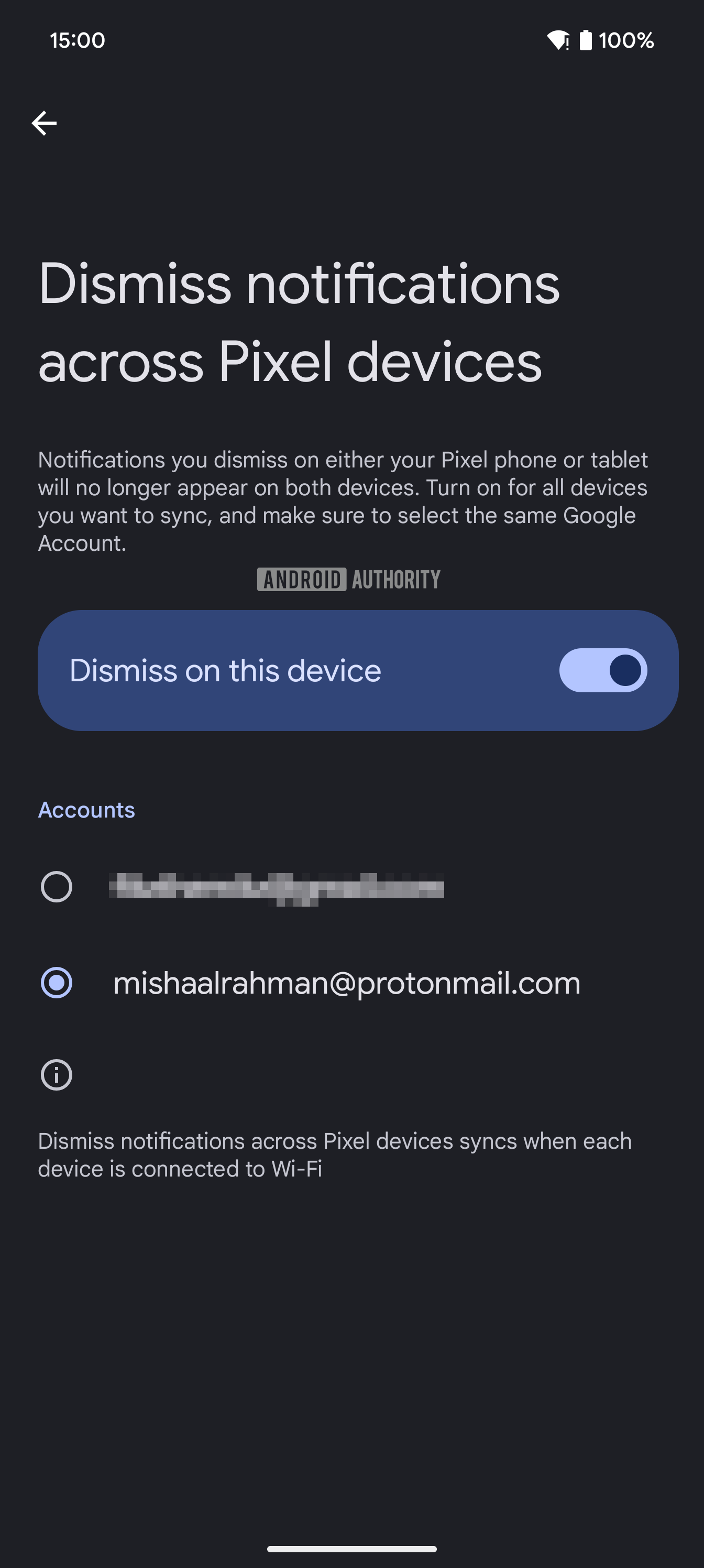
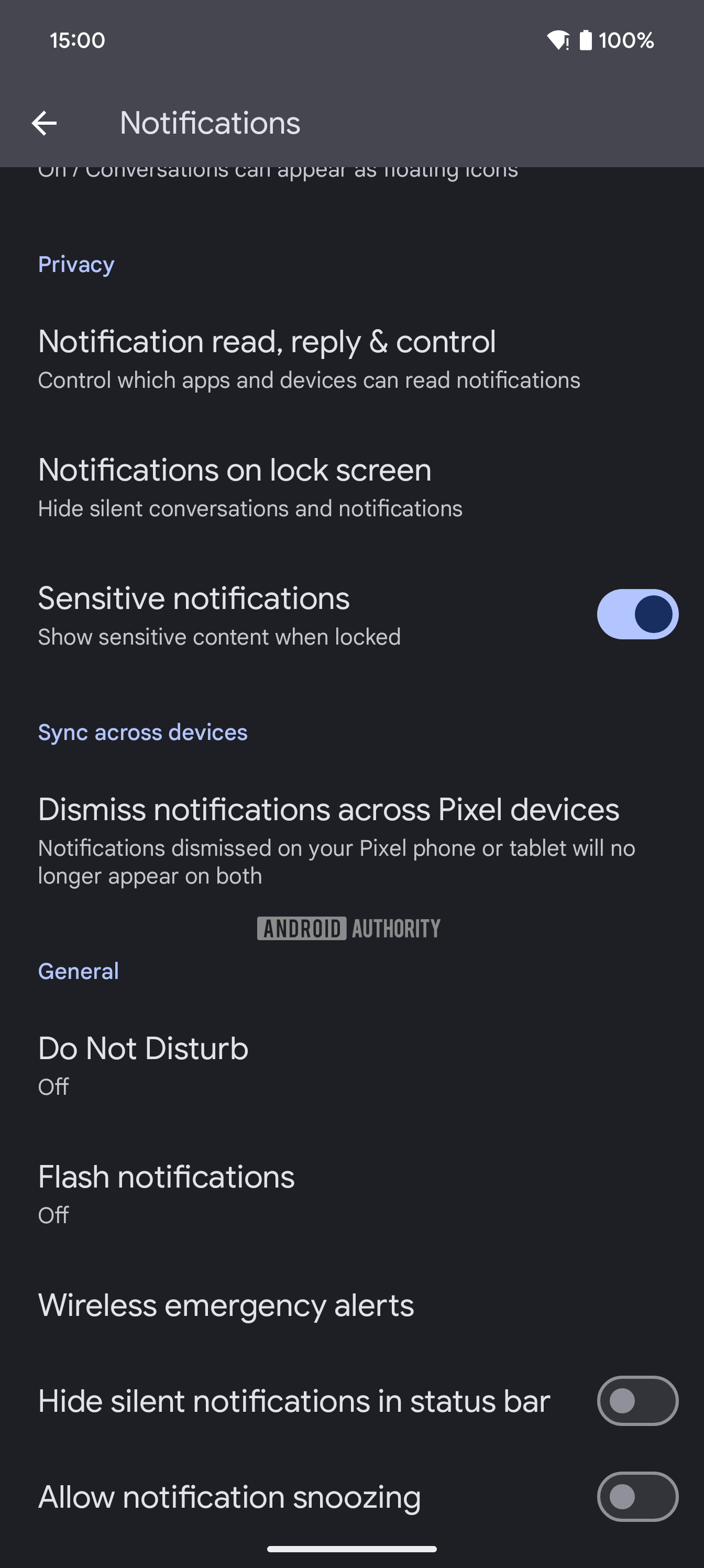
In the stable Android 15 update that Google released today for Pixel devices, the company is introducing a new “dismiss notifications across Pixel devices” option under Settings > Notifications. This feature is available on the Pixel 6 and later, including the Pixel Tablet, and its description says that “notifications dismissed on your Pixel phone or tablet will no longer appear on both.” Tapping the option opens up a page where you can enable the feature for one of your Google accounts (but not all of them).

Dismiss notifications across Pixel devices in notifications settings
Dismiss notifications across Pixel devices menu


In order to enable the feature, you first must grant the Device Connectivity Services app permission to access your notifications. Device Connectivity Services is a Pixel-exclusive system app that appears to be the one handling this notification syncing feature. It’s using Android’s Notification Listener API to read and dismiss notifications on your behalf. Access to this API is managed under Settings > Apps > Special app access > Notification read, reply & control.

Granting notification listener access to Device Connectivity Services


Google says this feature only dismisses notifications when each Pixel device that has the feature enabled is connected to Wi-Fi. Even though this feature probably wouldn’t eat up much battery life, it still makes sense only to run it when the device is on Wi-Fi, since most people leave their tablets at home. If Google had a 5G version of its Pixel Tablet, then I would argue that Google should add an option to enable the feature when you’re on mobile data. However, it doesn’t, so there’s no point in adding such an option.

That being said, I’m a bit disappointed this notification sync feature is exclusive to Pixel devices. When I first spotted evidence of this feature in the second beta for Android 15 QPR1, I wasn’t sure whether it would be available for all Android devices or only Pixel devices. Google recently started rolling out a suite of cross-device services that make Android devices work better together regardless of which brand they come from, so it would’ve made perfect sense for this feature to be added to that suite. Still, if you own a Pixel Tablet and a Pixel phone, then I’m sure you’ll find this new feature in the Android 15 update to be very useful.
 

limmk

High Supremacy Member
Joined
Jul 5, 2001
Messages
41,216
Reaction score
8,166
What’s that, you thought the Android 15 update didn’t bring with it a bunch of new features for your Pixel devices? You have to remember that Android versions are often more background-focused these days, with foundational changes being made to the OS that other phone manufacturers and developers can take advantage of. All of the forward-facing changes and fun comes in Pixel Feature Drops, which we most definitely are getting at this time.

That’s right, the Android 15 update today also happens to be the October 2024 Pixel Feature Drop and there is a bunch of new and expanded stuff to talk about here.

Prepare yourselves! Let’s talk first about everything new in the October Pixel Feature Drop for Google’s line-up of Pixel phones.

  • Theft Protection: The new Theft Protection suite started rolling out last week and we’ve talked a lot about it here. It is now officially here with Android 15 for. the Pixel 6 and above.
  • Private Space: Android 15’s new Private Space, where you can hide sensitive apps behind your secure lock is here on the Pixel 6 and above.
  • Pixel Weather app: The new Pixel Weather that debuted on the Pixel 9 series is rolling out older Pixel devices from the Pixel 6 on up.
  • Pollen Data Block: As a part of Pixel Weather, Google is adding a new pollen tracker to show pollen index levels, pollen types, and forecasts to help you better manage seasonal allergies. Google says this is available in France, Germany, Italy, and UK.
  • Gemini Extensions for Pixel Screenshots: For Gemini users, you can ask it to use Pixel Screenshots to find information you have saved or taken screenshots of. Assuming it works, Google says it should “instantly” take you to a screenshot you were looking for. This is rolling out to the Pixel 9 series in the US, Canada, Ireland, Australia, India, Singapore, and Malaysia.
  • Astrophotography: For the Pixel 6 and above, you can now manually flip to the Astrophotography mode by opening Night Sight and sliding the little night timer to “Astro.

  • Night Sight for Instagram: Google is rolling out Night Sight capabilities within the Instagram app’s camera experience. This should be available globally for the Pixel 6 and up, just not for any of the A series phones.
  • Underwater Photography and Video: If you own a Pixel 9, Pixel 9 Pro, or Pixel 9 Pro XL, you can take your phone, slap a waterproof case on it, and take “improved underwater photography and video recording.”
  • Object Temperature Sensor: The temperature sensor (Thermometer app) on the Pixel 8 Pro, Pixel 9 Pro, and Pixel 9 Pro XL has a new and more intuitive way to check temps by using the camera as a viewfinder, will give you live readings, and can save measurements to your recent results.
  • Widget Discovery: A new Widget Discovery feature can recommend categories of widgets and even provide a preview of what they can do for you. This is available to the Pixel 6 and above.

  • Adaptive Vibration: The Adaptive Vibration setting from Android 15 Beta 2 is here and “adjusts your phone’s vibrations based on your environment.” This is for the Pixel 7 and above.
  • Next Gen Call Screen: The newest version of Call Screen is expanding to the UK and Japan for the Pixel 6 and above.
  • Gemini Live (audio): Gemini Live is now available on the Pixel 6 and above in France, Germany, Brazil, India, Spain, and Latin America.
  • Audio Magic Eraser: Google has expanded its Audio Magic Eraser to all Pixel 8 devices globally, as well as in limited markets for the Pixel 9 series.
Because Google also happens to make a device called the Pixel Tablet and has pushed out a steady stream of tablet-focused improvements to Android in recent years, they now have separate Pixel Feature Drop lists for big screens. Well, they do this time because Android 15 is bringing a number of new goodies.

For the Pixel Tablet’s October Pixel Feature Drop, we have the following:

  • Cast to nearby Pixel devices: In the “next few weeks,” Google is planning a new feature that will let you cast media from your Pixel Tablet to your Pixel phone. You’ll simply bring the devices close together and things like Spotify or YouTube should be easily movable between them. Once available, this should work on the Pixel 6 Pro, Pixel 7 Pro, Pixel Fold, Pixel 8 Pro, Pixel 9 Pro, Pixel 9 Pro XL, Pixel 9 Pro Fold, and Pixel Tablet.
  • Notification Dismissals/Syncing: Ever leave your Pixel Tablet sitting around for days only to come back to it and notice very old notifications sitting around? Google is letting Pixel phones and the Tablet now talk to each other to sync those notifications between the two, so if you dismiss on one, it’ll do so on the other. This needs to be enabled and we’re trying to find out where exactly it lives. Once live, it should work on the Pixel 6+ and up.
  • Panel Screensaver: An always-on home controller can now show to let you control your smart home when your Pixel Tablet is docked and charging.
  • Photo Frame Actions: The photo frame screensaver on your Pixel Tablet will now let you share the photos it shows, just like your old Nest Hubs used to.
  • Clock Screensavers: There are new clock screensavers! Yay.
Here is the official availability list for everything we just talked about above:

MrkHK3a.jpeg


Alright, finally, the Pixel Buds now support talking to Gemini without taking your phone out, plus you can even talk to Gemini Live. This is available on the Pixel Buds Pro 2, Pixel Buds Pro, Pixel Buds A-Series, and the original Pixel Buds.

As is always the case, everything we’ve talked about should start rolling out as soon as today, but could take some time before it hits your device. All we can tell you is to keep an eye out.

// Google
 

kEvinErd

Supremacy Member
Joined
Dec 28, 2008
Messages
5,687
Reaction score
395
Show long name for apps in the app drawer is not working for me... (Can't be that Google region-lock this **** too???)

Lol brand new feature....already not working on Day 1 of stable build, which was released later than usual.
 

sevensomerset

Arch-Supremacy Member
Joined
Apr 8, 2005
Messages
17,564
Reaction score
125
updated to 15 yesterday, cannot find private space, not in app drawer bottom, search private space also not available.
using pixel 8 pro.
 

kopi22

High Supremacy Member
Joined
Dec 13, 2000
Messages
33,127
Reaction score
695
updated to 15 yesterday, cannot find private space, not in app drawer bottom, search private space also not available.
using pixel 8 pro.
Go to Security & privacy under Settings. Look for Private Space and set it up there. I hope that's what you are looking for.
 

kopi22

High Supremacy Member
Joined
Dec 13, 2000
Messages
33,127
Reaction score
695
Show long name for apps in the app drawer is not working for me... (Can't be that Google region-lock this **** too???)

Lol brand new feature....already not working on Day 1 of stable build, which was released later than usual.
So we will see the entire app names with the option enabled? Not sure how this work. Could it be for tablets or Pixel fold?
 
Last edited:

kEvinErd

Supremacy Member
Joined
Dec 28, 2008
Messages
5,687
Reaction score
395
So we will see the entire app names with the option enabled? Not sure how this work. Could it be for tablets or Pixel fold?
Yes, that's supposed to be what the setting is for. But it doesn't work on my Pixel 9 Pro XL. Tried restarting phone, force closing the launcher too. Anyone got it working?
 
Important Forum Advisory Note
This forum is moderated by volunteer moderators who will react only to members' feedback on posts. Moderators are not employees or representatives of HWZ Forums. Forum members and moderators are responsible for their own posts. Please refer to our Community Guidelines and Standards and Terms and Conditions for more information.
Top