For the past decade, Google has consistently published an Android Security Bulletin every month, even if the company wasn’t ready to roll out a security update to its own Pixel devices. These bulletins detail the vulnerabilities that have been fixed in that month’s security release, with issues ranging from low to critical in severity. Given how large and complex the Android operating system and its underlying components are, it’s not unusual to see a dozen or more vulnerabilities documented in a bulletin. However, the
July 2025 bulletin broke this decade-long trend: out of the 120 bulletins published up to that point, it was the first ever to not list a
single vulnerability.
In contrast, the latest
September 2025 bulletin listed a whopping 119 vulnerabilities. This disparity doesn’t mean Google had nothing to disclose in July; rather, it reflects strategic changes the company made to its Android security update process. These changes aim to help device manufacturers (OEMs) address high-risk issues more quickly and better protect users from active exploitation. Here’s what’s changing.
The life of a security patch: How Android security updates used to work
Google has done a lot of work over the years to proactively protect Android from vulnerabilities. For example, it writes new code in memory-safe languages like Rust and implements anti-exploitation protections such as hardware-backed control flow integrity (CFI) and memory tagging (MTE). These security improvements, coupled with Google’s efforts to
speed up Android updates and modularize the OS through initiatives like
Project Mainline, have made it difficult for bad actors to find and abuse critical security vulnerabilities. But with such a large, complex, and constantly updating codebase, some vulnerabilities are always waiting to be found.
While anyone can find Android security vulnerabilities, bad actors aren’t going to report them to Google. Instead, the vulnerabilities that get patched are privately reported by responsible researchers who work independently, for firms that partner with Google, or for Google itself. The Android security team then triages these reports to verify a vulnerability’s existence, assess its potential impact, and assign a severity rating (e.g., Moderate, High, or Critical). Once validated, the vulnerability receives a unique
Common Vulnerabilities and Exposures (CVE) identifier to make it easier to track. Finally, Google’s engineers, often in collaboration with the original reporter, develop and test a patch to fix the issue.
Once Google has finalized a security patch, the company doesn’t immediately release it. This is because it has no way of rolling out a security update to all Android devices over-the-air. The only exception is when the impacted component is part of a Project Mainline module, in which case Google itself can distribute a fix to all devices through a
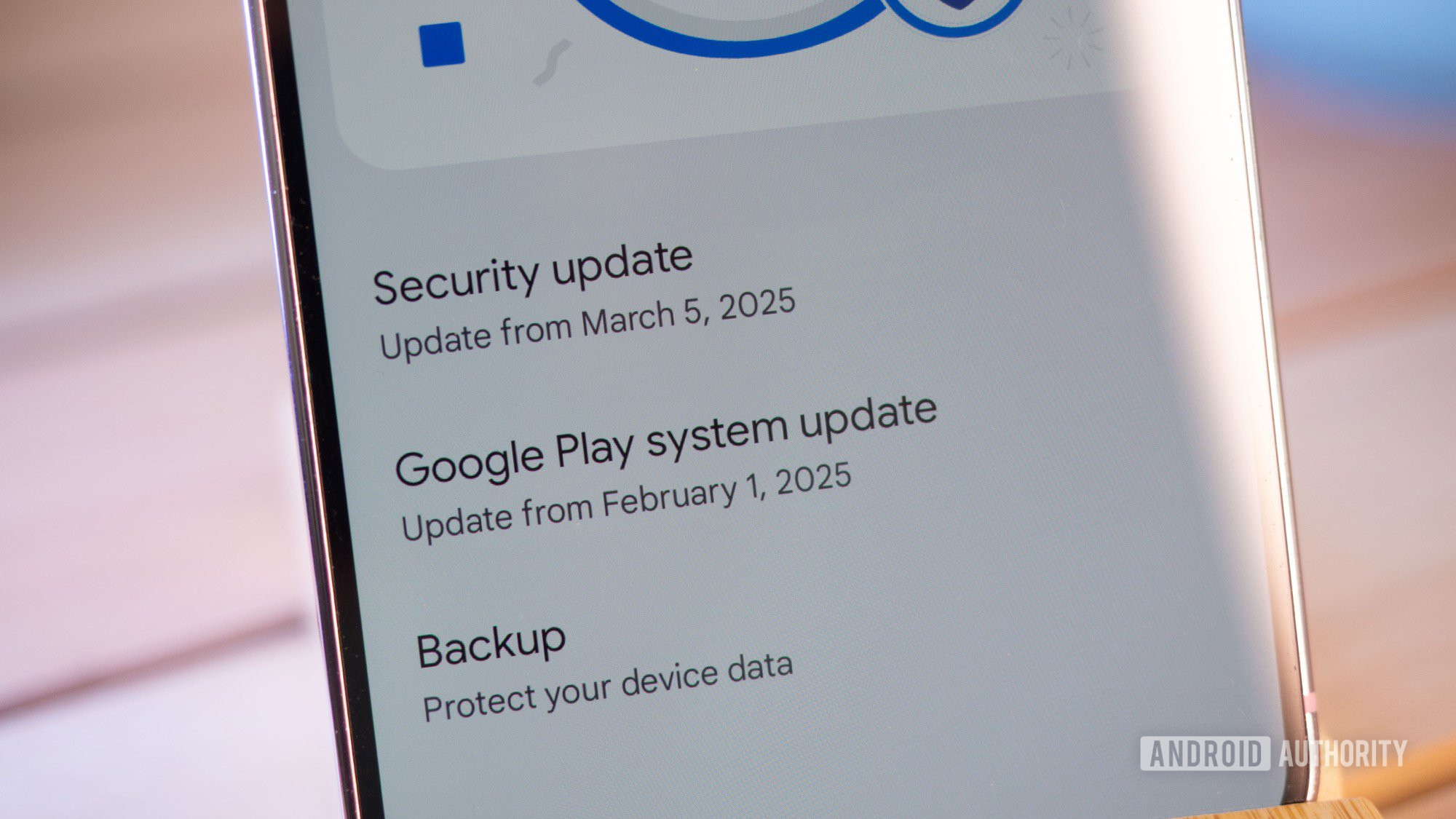
Google Play System Update. While Google could submit the patch to the
Android Open Source Project (AOSP) as soon as it’s ready, doing so would immediately publicize the vulnerability. The company refrains from this approach because it would leave partners scrambling to merge, test, and roll out an update.
This is why Google created the Android Security Bulletin (ASB). The ASB coordinates the disclosure of numerous security patches, grouping them into a single monthly release cycle so partners aren’t overwhelmed. There are two versions of the ASB: a public and a private one. The public ASB has been published every month since August 2015 and generally goes live on the first Monday of the month. The private ASB, on the other hand, is distributed to OEMs and chipset vendors approximately 30 days in advance, providing them with essential lead time to merge and test the patches before they’re publicly disclosed.
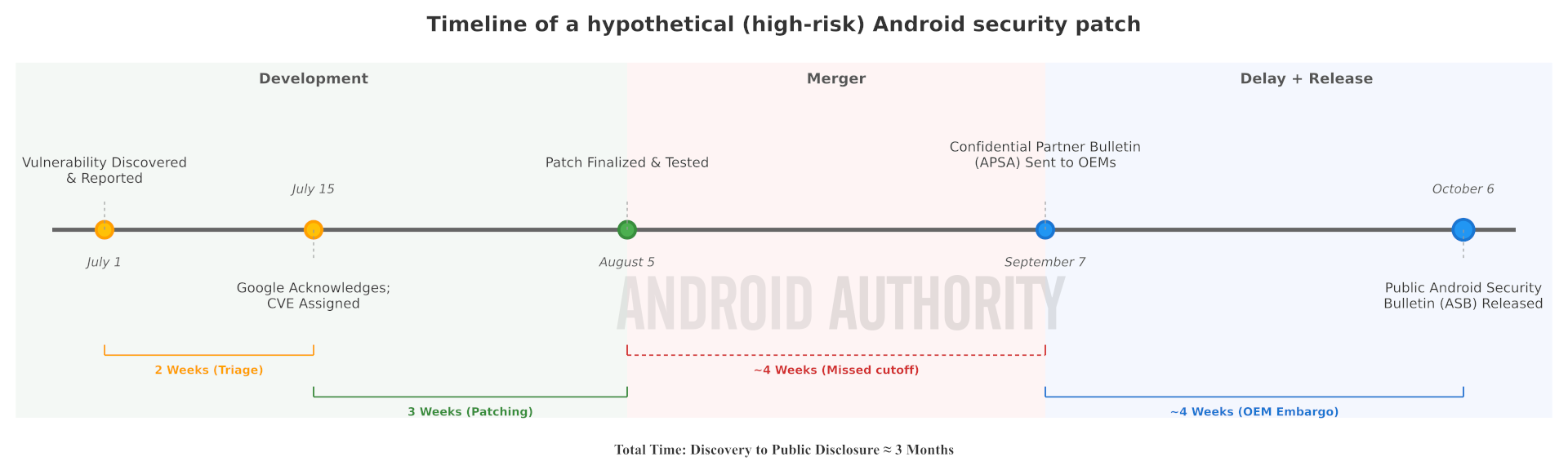
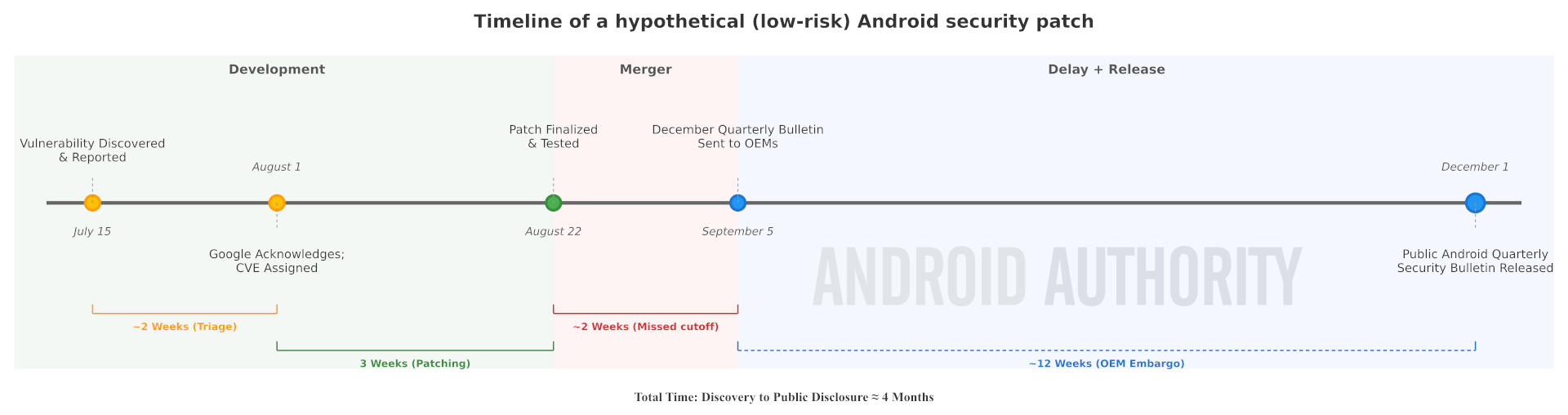
Here’s a timeline showing how a hypothetical vulnerability is handled, from its discovery to its inclusion in a public ASB. Keep in mind that the time it takes to triage and patch a vulnerability is highly variable. The timeline also illustrates a key delay: since the patch was finalized after the private ASB for September 2025 had already been sent to partners, it had to be included in the next one.
Even with this lead time, some OEMs struggle to roll out security updates for all their devices each month. In fact, many don’t even commit to monthly security updates for their entire lineup; their
update policies often stipulate that budget and mid-range devices only qualify for bi-monthly or quarterly patches. This is a common challenge for manufacturers managing heavily customized versions of Android across massive device portfolios. On top of that, they often need carrier approval to release updates in some regions. As a consequence, many Android devices are left without the latest security patches and are vulnerable to exploitation.
Google’s solution to this problem is to change the security update process. The company is adopting a new release strategy it calls the “Risk-Based Update System” (RBUS), which is designed to improve the security patching process for OEMs without sacrificing user security.
How Android’s new risk-based update process works
Instead of bundling all available security patches into the next ASB, Google now prioritizes shipping only “high-risk” vulnerabilities in its monthly releases. The majority of security fixes, meanwhile, will be shipped in quarterly ASBs. Google defines “high-risk” vulnerabilities as issues that are crucial to address immediately, such as those under active exploitation or that are part of a known exploit chain. This designation is based on real-world threat level and is distinct from a vulnerability’s formal “critical” or “high” severity rating.
This new approach has several key benefits for OEMs:
- OEMs have fewer patches to merge, test, and ship each month. This reduces the difficulty of shipping monthly updates and may result in some OEMs shipping them more frequently for more devices.
- OEMs have more flexibility in deciding how quickly they want to release security updates. Most can focus their efforts on larger quarterly releases, while others can optionally update monthly to meet specific compliance targets.
Because Google’s monthly bulletins now only include vulnerabilities it deems “high-risk,” some ASBs may list zero fixes. This is exactly what happened with the July 2025 ASB. That doesn’t mean there were no Android vulnerabilities to address; Samsung and Qualcomm, for instance, each listed multiple CVEs in their own July 2025 bulletins. However, since Google’s bulletin no longer lists most vulnerabilities, OEMs can choose whether to release security updates even when the official ASB is empty. For those that do, like Samsung, Google’s only stipulation is that they don’t publicly publish any details about the CVEs they patched.
A direct consequence of this change is that the March, June, September, and December ASBs will be substantially larger, as they align with
Android’s new quarterly release schedule. This explains why the September 2025 ASB listed a staggering 119 vulnerabilities, compared to the zero and six listed in the July and August 2025 bulletins, respectively. Since most security fixes will now arrive in these quarterly releases, OEMs are encouraged to adopt at least a quarterly update schedule for their devices to maximize user protection.