
GPU or Monitor

ab_cat

Supremacy Member
Joined
Mar 6, 2005
Messages
8,285
Reaction score
0
Hi,

My HP TouchSmart 600-1037D is showing blank screen and a single quick beep when power on.

I tried to connect to an external monitor via HDMI it is also flashing and showing nothing.
Also tried to remove the GPU card and boot but to no avail as I thought there could be a integrated GPU to take over which I am not sure.

Based on the part number, I think the cards that I used are:
1) 533359-001 - HP Game Console HDMI Input Board for Touchsmart 600 Desktop PC
e.g. https://harddiskdirect.com/533359-001-hp-laptop-accessory.html
2) 1gb HP TouchSmart NVIDIA GeForce G230 MXM Mobile Video Card 513184-001
e.g. https://www.ebay.com/p/1922946533

May I know:

1) Is this caused by a faulty GPU and not monitor fault?
2) Should I try to replace the GPU?
3) Do I also need to replace the HDMI board?
4) Where can I buy those part or can I get other new/better that compatible with this PC?

Trying to determine to see if it is worth to DIY and fix.
Thanks.
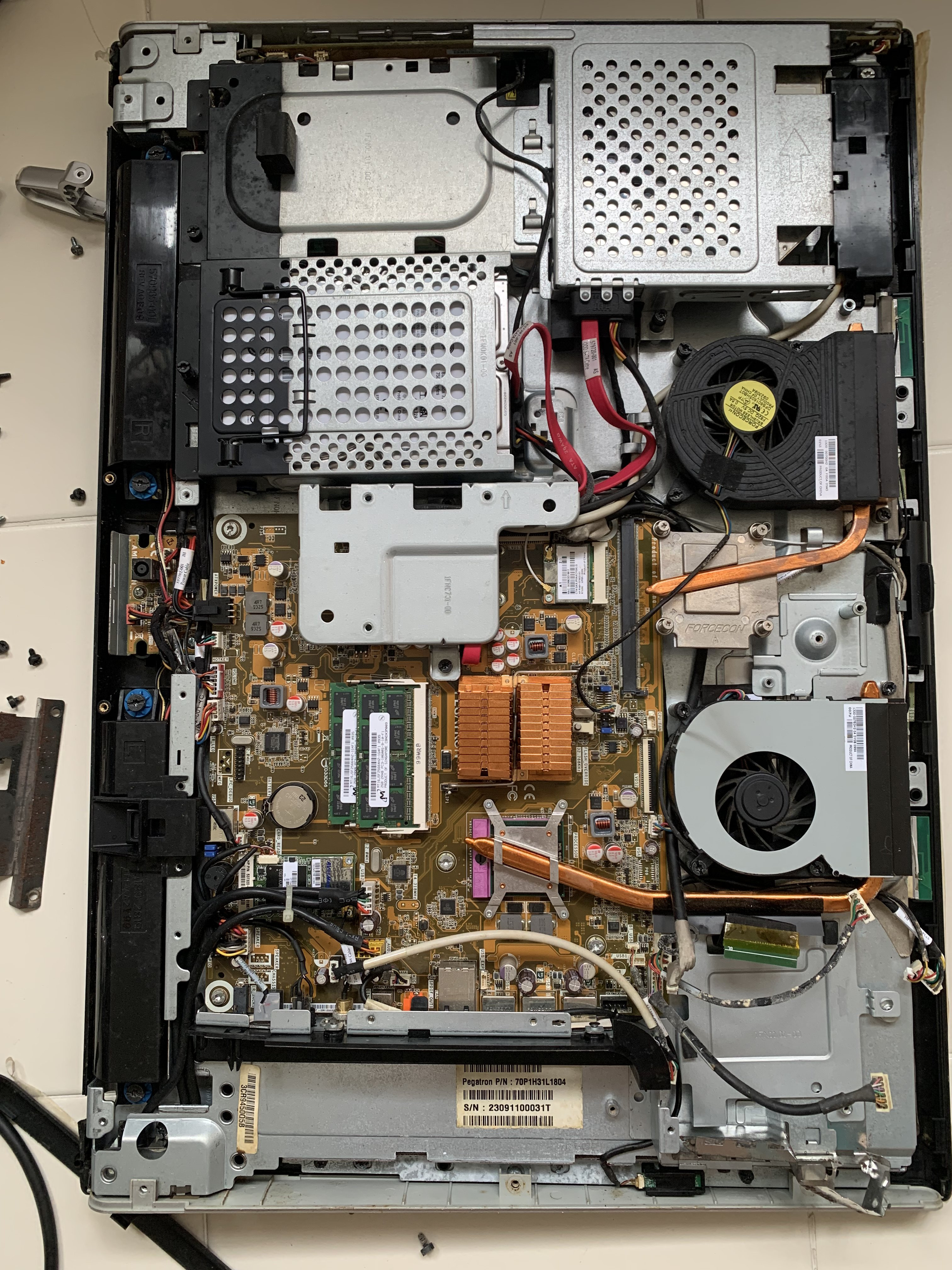
IMG-1842.jpg

IMG-1841.jpg
 

Shahmatt

Master Member
Joined
Oct 2, 2006
Messages
2,533
Reaction score
48
Try removing and reseating the two RAM chips.

First try reseating both.

If that doesn't work try inserting only one at a time in either slot to see if it makes a difference.
 

tsteo77

Senior Member
Joined
Oct 28, 2011
Messages
1,546
Reaction score
219
Hi,

My HP TouchSmart 600-1037D is showing blank screen and a single quick beep when power on.

I tried to connect to an external monitor via HDMI it is also flashing and showing nothing.
Also tried to remove the GPU card and boot but to no avail as I thought there could be a integrated GPU to take over which I am not sure.

Based on the part number, I think the cards that I used are:
1) 533359-001 - HP Game Console HDMI Input Board for Touchsmart 600 Desktop PC
e.g. https://harddiskdirect.com/533359-001-hp-laptop-accessory.html
2) 1gb HP TouchSmart NVIDIA GeForce G230 MXM Mobile Video Card 513184-001
e.g. https://www.ebay.com/p/1922946533

May I know:

1) Is this caused by a faulty GPU and not monitor fault?
2) Should I try to replace the GPU?
3) Do I also need to replace the HDMI board?
4) Where can I buy those part or can I get other new/better that compatible with this PC?

Trying to determine to see if it is worth to DIY and fix.
Thanks.
IMG-1842.jpg

IMG-1841.jpg
This > https://support.hp.com/sg-en/document/c02507400 is what i found based on the model of the computer given. Their technical support would know better. It's a low performance computer and also a branded computer. It will be a good time to upgrade to DIY brand computer.
 

ab_cat

Supremacy Member
Joined
Mar 6, 2005
Messages
8,285
Reaction score
0
Try removing and reseating the two RAM chips.

First try reseating both.

If that doesn't work try inserting only one at a time in either slot to see if it makes a difference.
Just tried but still black screen.
When I tried to insert only one at a time, there is no beep sound though.
Reseating both still has a single beep. (I think the beep sounds normal).
 

ab_cat

Supremacy Member
Joined
Mar 6, 2005
Messages
8,285
Reaction score
0
This > https://support.hp.com/sg-en/document/c02507400 is what i found based on the model of the computer given. Their technical support would know better. It's a low performance computer and also a branded computer. It will be a good time to upgrade to DIY brand computer.
Unfortunately this is an old PC which is out of warranty.
Additional information, when I power on the machine, and click on the "Home" button in the monitor, it does not show anything also. So I am clueless whether is it monitor or GPU.
 

tsteo77

Senior Member
Joined
Oct 28, 2011
Messages
1,546
Reaction score
219
Unfortunately this is an old PC which is out of warranty.
Additional information, when I power on the machine, and click on the "Home" button in the monitor, it does not show anything also. So I am clueless whether is it monitor or GPU.
I not as good as a computer technician for HP. Sine you tried reseating rams, switching gpus, connecting to external monitor
and this is a old computer, i would suspect a defective motherboard. Just let go, move on and upgrade.
 
Important Forum Advisory Note
This forum is moderated by volunteer moderators who will react only to members' feedback on posts. Moderators are not employees or representatives of HWZ Forums. Forum members and moderators are responsible for their own posts. Please refer to our Community Guidelines and Standards and Terms and Conditions for more information.
Top
