
GRABPay MasterCard

reddevil0728

Great Supremacy Member
Joined
Dec 16, 2005
Messages
66,167
Reaction score
5,824
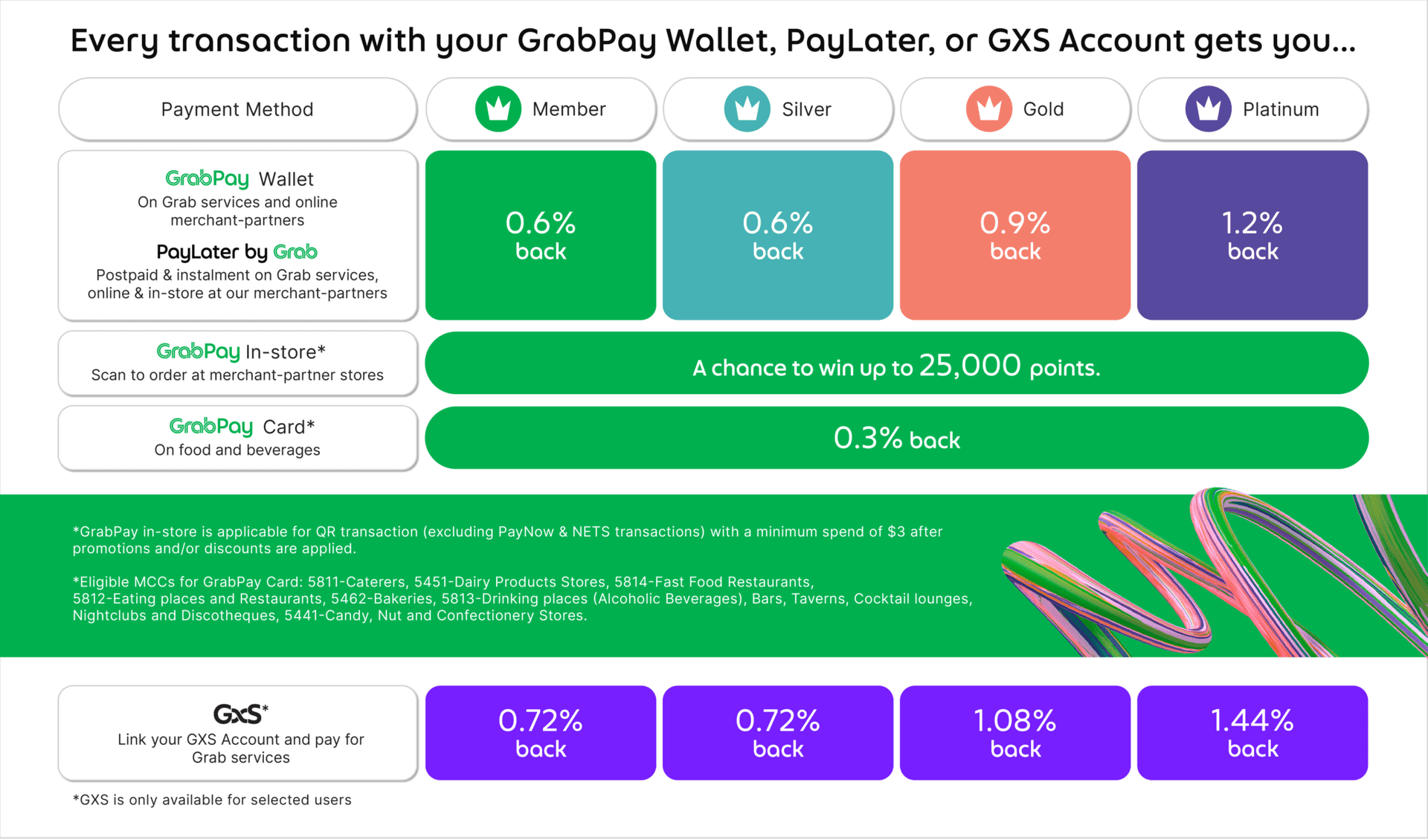
No more points from hawker transactions? Think I switch back to DASH for the time being ....
see this
the part about "A chance to win up to 25,000 points."
WebsiteVisual_1330x719-01-2048x1205.png


noted they added something new in the picture above. seems like minimum of $3 now and got limited eligible MCCs
 

juelim

Member
Joined
Dec 14, 2008
Messages
492
Reaction score
32
has anyone used Trust Card to topup Grab, as there are no charges (even thou is Visa)?

Also wonder if it clocks the non-Fairprice spend?

The fees for Grab top-ups by Visa cards are imposed by Grab, not Trust. So you will still be charged the fees, unless you use the Trust debit card.
 

bearkia

Member
Joined
Sep 20, 2022
Messages
108
Reaction score
41
DASH top-up using credit card got fees IIRC ...

Anyway, I top-up my DASH using GrabPay wallet nowadays, under "Transfer -> E-wallet" ......
Is it the 'Transfer' function under Grab? I dont have any transferable fund in Grab ;) but this is interesting
 

ekardo

Arch-Supremacy Member
Joined
Jan 1, 2000
Messages
20,798
Reaction score
1,013
have another 5k insurance to pay...thinking of using Amex -> GPMC via AXS online...
how to check if I have hit the limit for grab pay master card?
 

edwinksl

Senior Member
Joined
Jan 8, 2006
Messages
572
Reaction score
105
have another 5k insurance to pay...thinking of using Amex -> GPMC via AXS online...
how to check if I have hit the limit for grab pay master card?
Can check the limit in the app. Go to GrabPay Wallet and find 'Spend & Balance Limits'.
 

vsvs24

Arch-Supremacy Member
Joined
Feb 3, 2018
Messages
11,345
Reaction score
3,706
can provide more guidance where?
At wallet screen (the page where you do topup), on the top right there is 3 dots. Click on the 3 dots, you will see Spend & Balance limits

Seems it is for Android now ?


Then

 
Last edited:

wira

Supremacy Member
Joined
May 6, 2000
Messages
5,760
Reaction score
767
At wallet screen (the page where you do topup), on the top right there is 3 dots. Click on the 3 dots, you will see Spend & Balance limits

Seems it is for Android now ?


Then


i don see this option on iOS though
 

edwinksl

Senior Member
Joined
Jan 8, 2006
Messages
572
Reaction score
105
At wallet screen (the page where you do topup), on the top right there is 3 dots. Click on the 3 dots, you will see Spend & Balance limits

Seems it is for Android now ?


Then


Yup I am also using Android
 
Important Forum Advisory Note
This forum is moderated by volunteer moderators who will react only to members' feedback on posts. Moderators are not employees or representatives of HWZ Forums. Forum members and moderators are responsible for their own posts. Please refer to our Community Guidelines and Standards and Terms and Conditions for more information.
Top
