*HELP* Bsod + windows unable to startup

Gaylord

Senior Member
Joined
Jul 14, 2008
Messages
1,946
Reaction score
0
Hi guys, so my cpu is unable to start windows(7) and Windows repair ain't helping either. I think there might have been a power outage in my block when I left my desktop running in the day.

Everytime I try to start windows normally, there is a short bsod screen which briefly appears after the windows loading screen.

Any idea how to resolve this issue? I have alot of important information and work saved in my hdd, really can't afford to lose them!

Pls help, thanks in advance!!
 

Gaylord

Senior Member
Joined
Jul 14, 2008
Messages
1,946
Reaction score
0
check
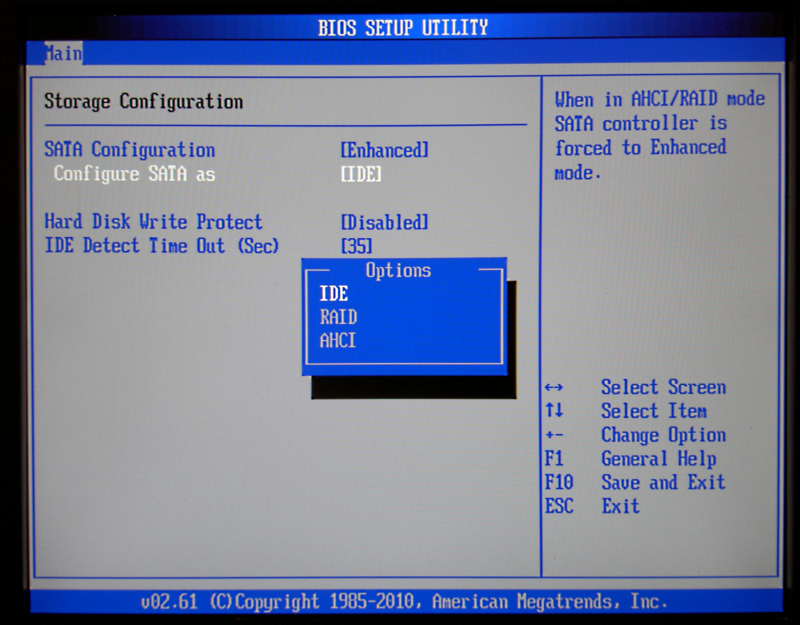
- ahci (sata vs legacy)?
- temperature?
- rams maybe?
- are the fans spinning properly?
- any weird sounds anywhere?
- graphics maybe?

How do I check all those properly? From what I see in the bios, temperature and fans are both fine, no weird sounds
 

grimfan

Supremacy Member
Joined
Sep 4, 2001
Messages
6,561
Reaction score
2
Hi guys, so my cpu is unable to start windows(7) and Windows repair ain't helping either. I think there might have been a power outage in my block when I left my desktop running in the day.

Everytime I try to start windows normally, there is a short bsod screen which briefly appears after the windows loading screen.

Any idea how to resolve this issue? I have alot of important information and work saved in my hdd, really can't afford to lose them!

Pls help, thanks in advance!!
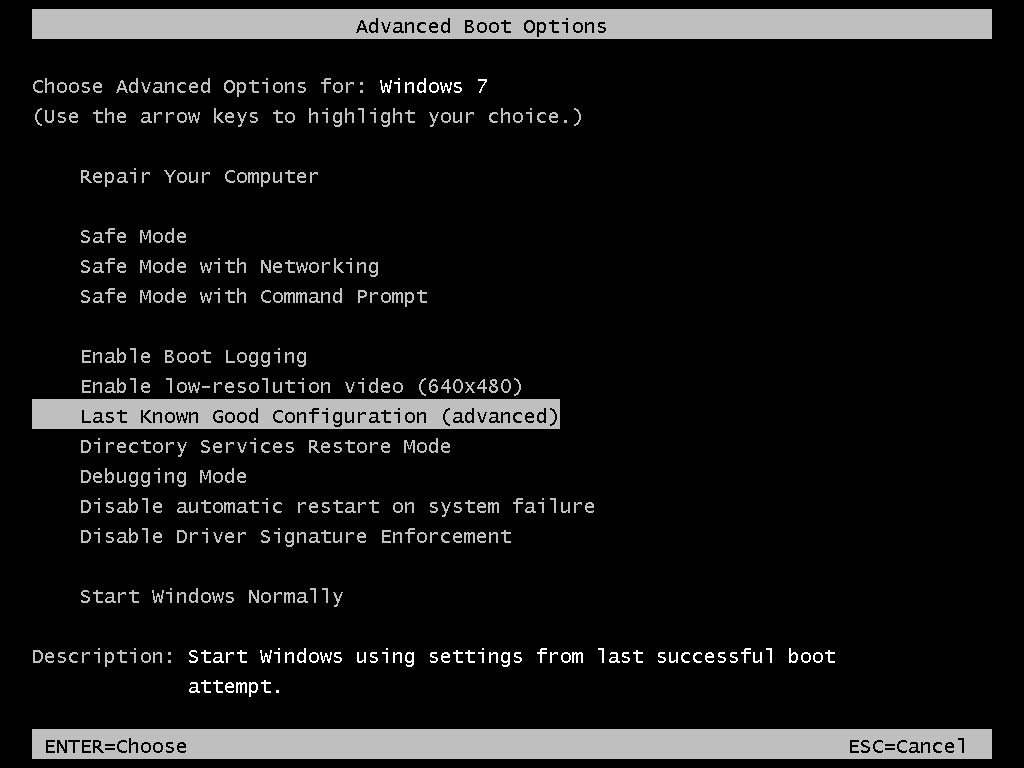
Hit F8 when starting up -> Advanced Boot Options -> Last Known Good Configuration

Advanced-Boot-Options.jpg
 

jtjt00

Arch-Supremacy Member
Joined
Jan 1, 2000
Messages
17,728
Reaction score
539
Look like your HDD has bad sectors in system files area and this prevent loading of system files during boot process.
 

wwenze

Greater Supremacy Member
Joined
Dec 2, 2002
Messages
87,365
Reaction score
30,918
yup this is the one

normally nowadays people use ssd (or to a lesser extent, conventional magnetic hdd) that is connected via the 22pin connector (15+7, both L shaped). so to accompany this, in BIOs, must select "SATA", not "IDE" (note that in some BIOs, "IDE" is also known as "LEGACY")

and RAID is seldom used, so far not many folks actually use more than one hard disk / ssd and set them up in RAID config (there is RAID 1, 0, 5, etc)

this sata config thing is one of the most innocent looking thingys that will trip up alot of setups. judging by fact that temperature are ok no weird noise, and assuming your rams and gfx are ok, then high chance this sata thingy should be it lol :)

thanks saif for the screencap

Use back the setting that was used when installing windows. I.e. if it was IDE when installing windows, need to use IDE in order to boot.

There is no SATA option.
 
Important Forum Advisory Note
This forum is moderated by volunteer moderators who will react only to members' feedback on posts. Moderators are not employees or representatives of HWZ Forums. Forum members and moderators are responsible for their own posts. Please refer to our Community Guidelines and Standards and Terms and Conditions for more information.
Top