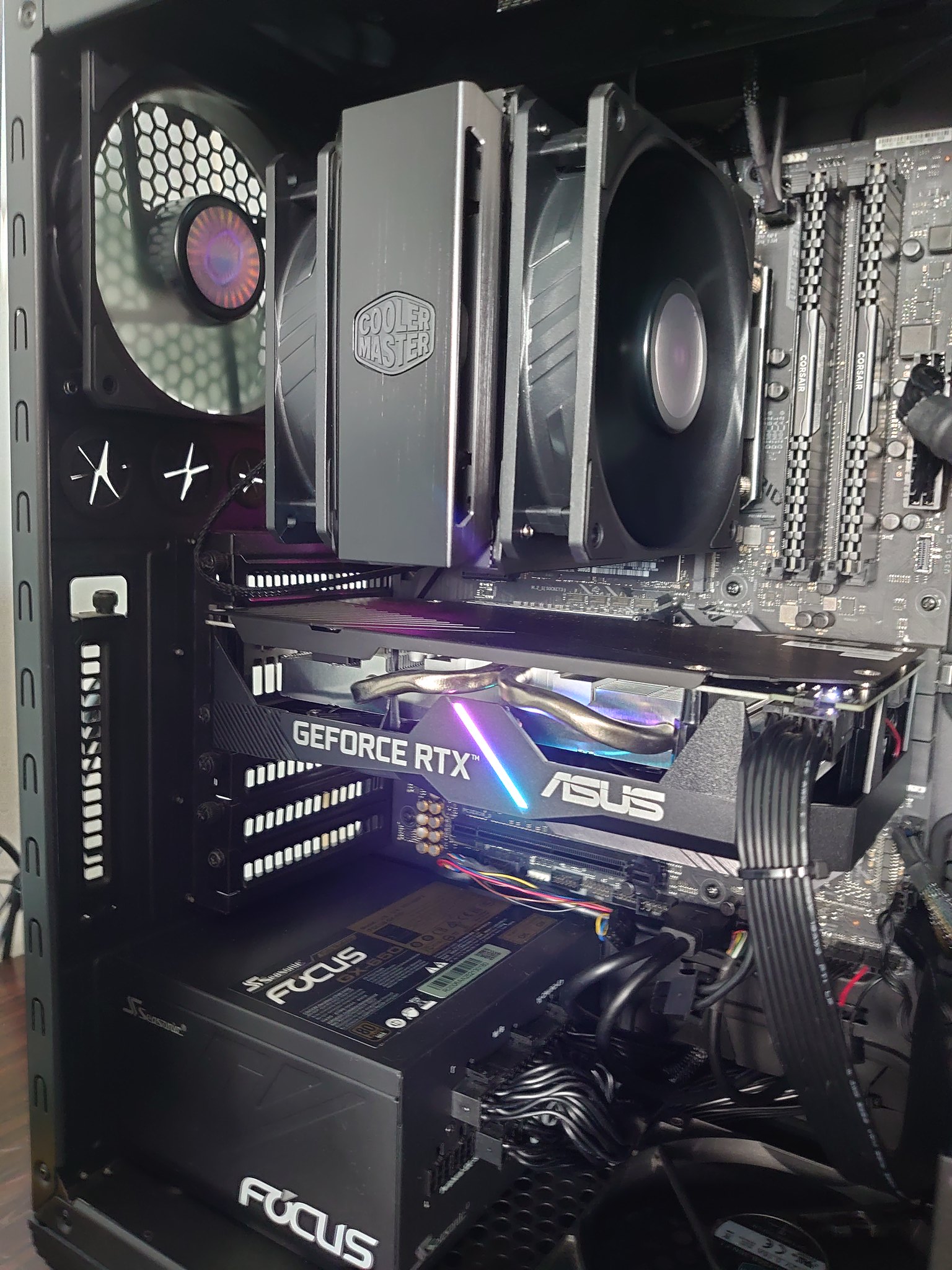
Help needed, tear down Asus 3070 Dual OC

Rice Kay

Junior Member
Joined
Jun 10, 2022
Messages
16
Reaction score
1
So, I got this Asus 3070 Dual OC at reasonable price. Overall, it's usable.

The problem is, it runs really hot. Like idling at 55C, 53% fan hot. And that is on a rainy day, 24-26C ambient.
If I run simple benchmark like Fire Spy or Heaven, it hits throttling temp (85-86C) within couple of minutes. about 1 minute for Fire Spy, 2-3 minutes for Heaven.
Even undervolting didn't solve the issue, it still hits throttling temp just took a couple minutes longer.
Basically this 3070 card runs at 3060 performance.
And that is in Performance mode. Try running on Quiet mode and (at least) half the screen is gone.
So it seems that we have a temperature problem here.

Also because it is Amazon US unit, it's a whole nother process for warranty claim.
Because I need to send it back to US and need a US address for them to send to before forward it back to me again.
Anyone have experience with Asus US RMA process?
I have asked comGateway and they don't do RMA forwarding unless buying from them.
Don't know if I can use vPost or even trust them with this.

Asus SG service center wouldn't touch it, even to repair at my own cost.
So, eventually, I might have to do it myself.
Because I suspect there's problem with the thermal paste application.
At the same time, I might as well redo the VRAM thermal pads too, because it might be torn once I open it.

So to the sifu around here, anyone have info on thermal pad thickness used for this particular model?
Or how to process Warranty claim for Asus US?
 
Joined
Oct 26, 2011
Messages
48,310
Reaction score
7,450
So, I got this Asus 3070 Dual OC at reasonable price. Overall, it's usable.

The problem is, it runs really hot. Like idling at 55C, 53% fan hot. And that is on a rainy day, 24-26C ambient.
If I run simple benchmark like Fire Spy or Heaven, it hits throttling temp (85-86C) within couple of minutes. about 1 minute for Fire Spy, 2-3 minutes for Heaven.
Even undervolting didn't solve the issue, it still hits throttling temp just took a couple minutes longer.
Basically this 3070 card runs at 3060 performance.
And that is in Performance mode. Try running on Quiet mode and (at least) half the screen is gone.
So it seems that we have a temperature problem here.

Also because it is Amazon US unit, it's a whole nother process for warranty claim.
Because I need to send it back to US and need a US address for them to send to before forward it back to me again.
Anyone have experience with Asus US RMA process?
I have asked comGateway and they don't do RMA forwarding unless buying from them.
Don't know if I can use vPost or even trust them with this.

Asus SG service center wouldn't touch it, even to repair at my own cost.
So, eventually, I might have to do it myself.
Because I suspect there's problem with the thermal paste application.
At the same time, I might as well redo the VRAM thermal pads too, because it might be torn once I open it.

So to the sifu around here, anyone have info on thermal pad thickness used for this particular model?
Or how to process Warranty claim for Asus US?

:unsure:
Is it your casing inside too hot?
You got try open air your casing?
 

obichacha

Master Member
Joined
Dec 1, 2015
Messages
3,055
Reaction score
538
55c game on looks very normal to me.
What about adding 2 more fans on top of a GPU fan, if the fan is downward just install 2 more 15mm slim fan intakes and blowing into GPU will work.
Usually I teardown and replace the thermal paste on my own, even convert this into a water block.
 
Last edited:

ragnarok95

Senior Moderator
Senior Moderator
Joined
Mar 9, 2004
Messages
125,335
Reaction score
6,593
Use Revo uninstaller to delete all your nvidia and Asus CPUtweak or MSI afterburn SW. Then reinstall the driver and MSI afterburn. My Asus card also used to sit 55 idle and reinstall works for me. My idle now is high 3X only. Can give it a go and see how.
 

poooooo

Arch-Supremacy Member
Joined
May 17, 2012
Messages
12,905
Reaction score
3,390
I've only tried with benchmarking at the moment.
Hitting throttle temp within 3 minutes on Heaven bench is very bad.
Try to record the temps playing some games with case side panel opened.
 

Koenig168

Arch-Supremacy Member
Joined
Nov 4, 2007
Messages
10,091
Reaction score
1,773
...

Or how to process Warranty claim for Asus US?

You can google "quality of Asus US customer service" on how the RMA process is like. :)

Asus is one brand I would always buy local unless the cost savings are very substantial or is something I cannot find locally.
 

Rice Kay

Junior Member
Joined
Jun 10, 2022
Messages
16
Reaction score
1
55c game on looks very normal to me.
What about adding 2 more fans on top of a GPU fan, if the fan is downward just install 2 more 15mm slim fan intakes and blowing into GPU will work.
Usually I teardown and replace the thermal paste on my own, even convert this into a water block.
It's 55C on idle, as in not opening any graphic program at all.
And that's with GPU fan spinning at 53%.

Opening any graphic program with benchmark it ramps up to 85 almost immediately.
 

Rice Kay

Junior Member
Joined
Jun 10, 2022
Messages
16
Reaction score
1
Use Revo uninstaller to delete all your nvidia and Asus CPUtweak or MSI afterburn SW. Then reinstall the driver and MSI afterburn. My Asus card also used to sit 55 idle and reinstall works for me. My idle now is high 3X only. Can give it a go and see how.
Will try and give an update.
 

Rice Kay

Junior Member
Joined
Jun 10, 2022
Messages
16
Reaction score
1
You can google "quality of Asus US customer service" on how the RMA process is like. :)

Asus is one brand I would always buy local unless the cost savings are very substantial or is something I cannot find locally.
LOL,
Part of the reason I'm wondering whether to go through all the hassle of RMA or just do a tear down myself.
 

Rice Kay

Junior Member
Joined
Jun 10, 2022
Messages
16
Reaction score
1
Usually I teardown and replace the thermal paste on my own, even convert this into a water block.
Any suggestion on teardown and thermal pads?
I've searched up and down for this particular model's pad thicknesss and couldn't find it anywhere.
 

Lastwishes

Senior Member
Joined
Jun 12, 2005
Messages
724
Reaction score
209
3070 non-ti should be using GDDR6, which don't run as hot as GDDR6X. You can still change out the thermal pads if you want, but you'll likely have to disassemble first to measure the thickness yourself. The consensus seems to be that it's not needed, which is probably why you can't find much information about the thickness.

Check the memory junction temperature first to see if it's actually running hot. This sounds more like just a gpu core temperature issue. If you're confident of doing a teardown yourself, just reapply a good quality thermal paste and reuse the original thermal pads for a start.
 

obichacha

Master Member
Joined
Dec 1, 2015
Messages
3,055
Reaction score
538
It's 55C on idle, as in not opening any graphic program at all.
And that's with GPU fan spinning at 53%.

Opening any graphic program with benchmark it ramps up to 85 almost immediately.
Omg that is too much.
Can you capture your desktop and show on gpu.
Hopefully got space to install extra fan or the side panel is glass panel.
Maybe the thermal pasted dried already.
 

Phen8210

High Supremacy Member
Joined
Jul 29, 2011
Messages
29,051
Reaction score
8,296
So, I got this Asus 3070 Dual OC at reasonable price. Overall, it's usable.

The problem is, it runs really hot. Like idling at 55C, 53% fan hot. And that is on a rainy day, 24-26C ambient.
If I run simple benchmark like Fire Spy or Heaven, it hits throttling temp (85-86C) within couple of minutes. about 1 minute for Fire Spy, 2-3 minutes for Heaven.
Even undervolting didn't solve the issue, it still hits throttling temp just took a couple minutes longer.
Basically this 3070 card runs at 3060 performance.
And that is in Performance mode. Try running on Quiet mode and (at least) half the screen is gone.
So it seems that we have a temperature problem here.

Also because it is Amazon US unit, it's a whole nother process for warranty claim.
Because I need to send it back to US and need a US address for them to send to before forward it back to me again.
Anyone have experience with Asus US RMA process?
I have asked comGateway and they don't do RMA forwarding unless buying from them.
Don't know if I can use vPost or even trust them with this.

Asus SG service center wouldn't touch it, even to repair at my own cost.
So, eventually, I might have to do it myself.
Because I suspect there's problem with the thermal paste application.
At the same time, I might as well redo the VRAM thermal pads too, because it might be torn once I open it.

So to the sifu around here, anyone have info on thermal pad thickness used for this particular model?
Or how to process Warranty claim for Asus US?

Many people don't realize this until they own one themselves.

This card is a humongous triple slot two fans, but it doesn't fare well. This is especially true when the card is at full load and when you are running benchmarks. Furthermore, if you don't have good airflow in the case, the problem gets worse.

The reports of their card running cool because it isn't even heavily loaded. Of course, it is not going to be hot.

What you are getting is normal, and I have already seen it plenty of times. Another user above showed you Reddit posts of others reporting the same issue, which is why there's nothing abnormal about it. There are just people who are observant to notice it. Also, you can have at most 2-3c improvement with the stuff you are trying to do.

I recommend getting three fan variants for 3070 and above and for 3060TI minimally suitable dual-fan variants. Also, it must have good case airflow, or the heat will be trapped, and temps will climb up like Bukit Timah hill.

If you get 3070TI and 3080 it becomes even worse at consistent heavy load 90%+ GPU usage. It's possible if you fine tune your game settings that allow to maximise the usage of your card while still able to target fps of 141/16x in game like how i always do.
 

obichacha

Master Member
Joined
Dec 1, 2015
Messages
3,055
Reaction score
538
Which case are you using? Opt to upgrade the case to a better especially
the case fans?
If Tecware or any cheap brands opt to consider better case brand like Lian Li Fractal design etc.

Example if the graphic card is like this very close to the chassis, is not very good as
the amount of air can be pulled into the graphic card is very limited not forgetting PSU
obstruct portion of the bottom intake so the GPU have limited room to breathe.

rtx_2060_gaming_pc_1640683587_5df0a31e_progressive.jpg


If you use a bigger case than cards like RTX3070 will have room to breathe since it can pull more
air into than limited space.

52134061822_fbcd60da07_k.jpg


So point here, even if you tear down the card repaste the thermal paste and pad.
It won't make a difference so you need to invest in a better case and better case fan.
My RTX 2060 Idle is around 50 Degree, load is around 70 Degree but I am using a
very old case that supports bottom fan which is old feature not seen in modern case.

I am using Cooler Master CM690 III, one 240mm front, one 120mm bottom, one 120mm exhaust
and two 140mm top. (All from Cooler Master)

Cheapest good CASE fan is Cooler Master sickflow with 62CFM airflow.
There's normal, with LED and RGB or AGRB version.

https://www.coolermaster.com/catalog/coolers/case-fan/sickleflow-120/
PS I know Cooler Master is not a favorite brand here, try not to come at me.
Everyone here have the right to share.
The top of photo very bad for GPU , can’t intake any fresh air, but the case seem like good for water cooling, the front side can install 360mm and top 360mm radiator as well.

The 2nd photo at least can install extra fan, cause still have more room.
SG$ 14.13 34% Off | Universal Desktop Computer VGA Cooler Dual 9CM 8CM Quiet Chassis PCI Bracket Graphics Card Cooling Triple Fan Partner 90mm 80MM
https://a.aliexpress.com/_mKeO0R4
 

ragnarok95

Senior Moderator
Senior Moderator
Joined
Mar 9, 2004
Messages
125,335
Reaction score
6,593
The top of photo very bad for GPU , can’t intake any fresh air, but the case seem like good for water cooling, the front side can install 360mm and top 360mm radiator as well.

It can. The bottom piece have ventilation holes that actually the GPU can take in cool air from the bottom front fan. TBH, i dun see how this is very bad for the GPU.
 

ragnarok95

Senior Moderator
Senior Moderator
Joined
Mar 9, 2004
Messages
125,335
Reaction score
6,593
Don't bother with these PCI-E fans. They still suck air from within the casing and it will cause more airflow problem.
 
Important Forum Advisory Note
This forum is moderated by volunteer moderators who will react only to members' feedback on posts. Moderators are not employees or representatives of HWZ Forums. Forum members and moderators are responsible for their own posts. Please refer to our Community Guidelines and Standards and Terms and Conditions for more information.
Top