Help on Wifi home networking

wookiezz

Junior Member
Joined
May 18, 2015
Messages
50
Reaction score
0
I will be moving into a resale condo (4br) in 3q of this year, and have a few queries which I'm hoping the tech gurus here could provide some insights:

I am only looking to sign up for the Starhub/M1 1gbps plans and plan to continue using my existing Asus network equipment, with a possible upgrade for a new Asus Router

1. To sign up with Starhub or M1? I've been a ST customer for many years in my existing HDB and have not faced any networking issues to date. However from what I understand ST requires you to use their ONR, which is what I have been using in my existing home. And my concern is that the routers which I have may not be fully optimised for a seamless network coverage. Is it better to just have ONT with SH/M1 instead?

2. As mentioned above, ST provided the ONR and an Asus RT-AX86U router for my hdb. I've currently connected 3 nos. Zen wifi ax mini and a zen wifi xd5 to this router via the AI Mesh system (all wireless). I'm still experiencing disconnection in my home when walking to and from rooms. If I move into my new place, is the Asus router and wireless mesh equipment sufficient for a seamless network coverage throughout the whole house, or do I need to purchase additional routers/network equipment like network switches ? I was thinking to purchase a new Asus wifi 6 router like the GT-AX11000 Pro.

I plan to have Ethernet points for each room including the living room, and will likely be mounting my router on the ceiling for better network coverage.

3. For the new home, can I do a mix of wired/wireless connections for the meshes for seamless network coverage with Asus?

I'm intending to keep my existing network equipment and not change brands to save costs

Thank you!
 

Apparatus

Great Supremacy Member
Joined
May 27, 2005
Messages
58,292
Reaction score
13,849

rosschang

Supremacy Member
Joined
Sep 3, 2007
Messages
5,152
Reaction score
1,737
mount AP on ceiling is always good idea.

just plan a few nos around ur house, get those POE AP + a POE switch = gao dim.

no advice on ur router vs ST/SH/M1. should avoid ONR.
 

Mach3.2

Great Supremacy Member
Joined
Apr 8, 2011
Messages
72,512
Reaction score
2,489
Just don't believe M1 speed. I have been using M1 1Gbps for nearly 30 yrs and staying North side cannot get that speed. Changed recently to SH 10Gbps

NGNBN was only conceived in 2008, how you arrive at 30 years? 🤣

That's beside the point, I have no issues maxing out 1Gbps using a download manager. In fact I can almost saturate both upload and download at the same time running a bidirectional iperf3 test to a local web hoster.


Bash:
tracert speedtest.sin1.sg.leaseweb.net

Tracing route to speedtest.sin1.sg.leaseweb.net [2402:a7c0:8100:a013::77]
over a maximum of 30 hops:

  1    <1 ms    <1 ms    <1 ms  0.0.4.7.1.0.4.2.ip6.arpa [2401:7400:c80a:xxxx:xxxx:xxxx:xxxx:xxxx]
  2     *        *        *     Request timed out.
  3     4 ms     4 ms     4 ms  0.0.4.7.1.0.4.2.ip6.arpa [2401:7400:800:2a::]
  4     4 ms     5 ms     4 ms  0.0.4.7.1.0.4.2.ip6.arpa [2401:7400:800:2a::1]
  5     5 ms     4 ms     4 ms  2401:7400:0:1::
  6     5 ms     5 ms     5 ms  2401:7400:0:2::1
  7     3 ms     3 ms     3 ms  16265.sgw.equinix.com [2001:de8:4::1:6265:1]
  8     *        *        *     Request timed out.
  9     6 ms     6 ms     5 ms  2402:a7c0:8000::199
 10     5 ms     5 ms     5 ms  2402:a7c0:8000::253
 11     6 ms     5 ms     6 ms  speedtest.sin1.sg.leaseweb.net [2402:a7c0:8100:a013::77]

Trace complete.


Bash:
- - - - - - - - - - - - - - - - - - - - - - - - -
[ ID][Role] Interval           Transfer     Bitrate         Retr
[  5][TX-C]   0.00-120.01 sec  1.29 GBytes  92.5 Mbits/sec                  sender
[  5][TX-C]   0.00-120.02 sec  1.29 GBytes  92.4 Mbits/sec                  receiver
[  7][TX-C]   0.00-120.01 sec  1.71 GBytes   122 Mbits/sec                  sender
[  7][TX-C]   0.00-120.02 sec  1.70 GBytes   122 Mbits/sec                  receiver
[  9][TX-C]   0.00-120.01 sec  1.29 GBytes  92.2 Mbits/sec                  sender
[  9][TX-C]   0.00-120.02 sec  1.29 GBytes  92.0 Mbits/sec                  receiver
[ 11][TX-C]   0.00-120.01 sec  1.41 GBytes   101 Mbits/sec                  sender
[ 11][TX-C]   0.00-120.02 sec  1.41 GBytes   101 Mbits/sec                  receiver
[ 13][TX-C]   0.00-120.01 sec  1.31 GBytes  93.8 Mbits/sec                  sender
[ 13][TX-C]   0.00-120.02 sec  1.31 GBytes  93.7 Mbits/sec                  receiver
[ 15][TX-C]   0.00-120.01 sec  1.38 GBytes  98.7 Mbits/sec                  sender
[ 15][TX-C]   0.00-120.02 sec  1.38 GBytes  98.7 Mbits/sec                  receiver
[ 17][TX-C]   0.00-120.01 sec  2.31 GBytes   165 Mbits/sec                  sender
[ 17][TX-C]   0.00-120.02 sec  2.31 GBytes   165 Mbits/sec                  receiver
[ 19][TX-C]   0.00-120.01 sec  1.39 GBytes  99.4 Mbits/sec                  sender
[ 19][TX-C]   0.00-120.02 sec  1.39 GBytes  99.3 Mbits/sec                  receiver
[SUM][TX-C]   0.00-120.01 sec  12.1 GBytes   864 Mbits/sec                  sender
[SUM][TX-C]   0.00-120.02 sec  12.1 GBytes   864 Mbits/sec                  receiver
[ 21][RX-C]   0.00-120.01 sec  1.68 GBytes   120 Mbits/sec  2004             sender
[ 21][RX-C]   0.00-120.02 sec  1.68 GBytes   120 Mbits/sec                  receiver
[ 23][RX-C]   0.00-120.01 sec  1.73 GBytes   124 Mbits/sec  1872             sender
[ 23][RX-C]   0.00-120.02 sec  1.73 GBytes   124 Mbits/sec                  receiver
[ 25][RX-C]   0.00-120.01 sec  1.38 GBytes  99.0 Mbits/sec  1948             sender
[ 25][RX-C]   0.00-120.02 sec  1.38 GBytes  98.9 Mbits/sec                  receiver
[ 27][RX-C]   0.00-120.01 sec  1.62 GBytes   116 Mbits/sec  1964             sender
[ 27][RX-C]   0.00-120.02 sec  1.62 GBytes   116 Mbits/sec                  receiver
[ 29][RX-C]   0.00-120.01 sec  1.46 GBytes   105 Mbits/sec  1978             sender
[ 29][RX-C]   0.00-120.02 sec  1.46 GBytes   104 Mbits/sec                  receiver
[ 31][RX-C]   0.00-120.01 sec  1.35 GBytes  96.3 Mbits/sec  1921             sender
[ 31][RX-C]   0.00-120.02 sec  1.34 GBytes  96.2 Mbits/sec                  receiver
[ 33][RX-C]   0.00-120.01 sec  1.47 GBytes   105 Mbits/sec  2140             sender
[ 33][RX-C]   0.00-120.02 sec  1.47 GBytes   105 Mbits/sec                  receiver
[ 35][RX-C]   0.00-120.01 sec  1.38 GBytes  99.0 Mbits/sec  2087             sender
[ 35][RX-C]   0.00-120.02 sec  1.38 GBytes  98.9 Mbits/sec                  receiver
[SUM][RX-C]   0.00-120.01 sec  12.1 GBytes   864 Mbits/sec  15914             sender
[SUM][RX-C]   0.00-120.02 sec  12.1 GBytes   864 Mbits/sec                  receiver

iperf Done.
 

Apparatus

Great Supremacy Member
Joined
May 27, 2005
Messages
58,292
Reaction score
13,849
NGNBN was only conceived in 2008, how you arrive at 30 years? 🤣

That's beside the point, I have no issues maxing out 1Gbps using a download manager. In fact I can almost saturate both upload and download at the same time running a bidirectional iperf3 test to a local web hoster.


Bash:
tracert speedtest.sin1.sg.leaseweb.net

Tracing route to speedtest.sin1.sg.leaseweb.net [2402:a7c0:8100:a013::77]
over a maximum of 30 hops:

  1    <1 ms    <1 ms    <1 ms  0.0.4.7.1.0.4.2.ip6.arpa [2401:7400:c80a:xxxx:xxxx:xxxx:xxxx:xxxx]
  2     *        *        *     Request timed out.
  3     4 ms     4 ms     4 ms  0.0.4.7.1.0.4.2.ip6.arpa [2401:7400:800:2a::]
  4     4 ms     5 ms     4 ms  0.0.4.7.1.0.4.2.ip6.arpa [2401:7400:800:2a::1]
  5     5 ms     4 ms     4 ms  2401:7400:0:1::
  6     5 ms     5 ms     5 ms  2401:7400:0:2::1
  7     3 ms     3 ms     3 ms  16265.sgw.equinix.com [2001:de8:4::1:6265:1]
  8     *        *        *     Request timed out.
  9     6 ms     6 ms     5 ms  2402:a7c0:8000::199
 10     5 ms     5 ms     5 ms  2402:a7c0:8000::253
 11     6 ms     5 ms     6 ms  speedtest.sin1.sg.leaseweb.net [2402:a7c0:8100:a013::77]

Trace complete.


Bash:
- - - - - - - - - - - - - - - - - - - - - - - - -
[ ID][Role] Interval           Transfer     Bitrate         Retr
[  5][TX-C]   0.00-120.01 sec  1.29 GBytes  92.5 Mbits/sec                  sender
[  5][TX-C]   0.00-120.02 sec  1.29 GBytes  92.4 Mbits/sec                  receiver
[  7][TX-C]   0.00-120.01 sec  1.71 GBytes   122 Mbits/sec                  sender
[  7][TX-C]   0.00-120.02 sec  1.70 GBytes   122 Mbits/sec                  receiver
[  9][TX-C]   0.00-120.01 sec  1.29 GBytes  92.2 Mbits/sec                  sender
[  9][TX-C]   0.00-120.02 sec  1.29 GBytes  92.0 Mbits/sec                  receiver
[ 11][TX-C]   0.00-120.01 sec  1.41 GBytes   101 Mbits/sec                  sender
[ 11][TX-C]   0.00-120.02 sec  1.41 GBytes   101 Mbits/sec                  receiver
[ 13][TX-C]   0.00-120.01 sec  1.31 GBytes  93.8 Mbits/sec                  sender
[ 13][TX-C]   0.00-120.02 sec  1.31 GBytes  93.7 Mbits/sec                  receiver
[ 15][TX-C]   0.00-120.01 sec  1.38 GBytes  98.7 Mbits/sec                  sender
[ 15][TX-C]   0.00-120.02 sec  1.38 GBytes  98.7 Mbits/sec                  receiver
[ 17][TX-C]   0.00-120.01 sec  2.31 GBytes   165 Mbits/sec                  sender
[ 17][TX-C]   0.00-120.02 sec  2.31 GBytes   165 Mbits/sec                  receiver
[ 19][TX-C]   0.00-120.01 sec  1.39 GBytes  99.4 Mbits/sec                  sender
[ 19][TX-C]   0.00-120.02 sec  1.39 GBytes  99.3 Mbits/sec                  receiver
[SUM][TX-C]   0.00-120.01 sec  12.1 GBytes   864 Mbits/sec                  sender
[SUM][TX-C]   0.00-120.02 sec  12.1 GBytes   864 Mbits/sec                  receiver
[ 21][RX-C]   0.00-120.01 sec  1.68 GBytes   120 Mbits/sec  2004             sender
[ 21][RX-C]   0.00-120.02 sec  1.68 GBytes   120 Mbits/sec                  receiver
[ 23][RX-C]   0.00-120.01 sec  1.73 GBytes   124 Mbits/sec  1872             sender
[ 23][RX-C]   0.00-120.02 sec  1.73 GBytes   124 Mbits/sec                  receiver
[ 25][RX-C]   0.00-120.01 sec  1.38 GBytes  99.0 Mbits/sec  1948             sender
[ 25][RX-C]   0.00-120.02 sec  1.38 GBytes  98.9 Mbits/sec                  receiver
[ 27][RX-C]   0.00-120.01 sec  1.62 GBytes   116 Mbits/sec  1964             sender
[ 27][RX-C]   0.00-120.02 sec  1.62 GBytes   116 Mbits/sec                  receiver
[ 29][RX-C]   0.00-120.01 sec  1.46 GBytes   105 Mbits/sec  1978             sender
[ 29][RX-C]   0.00-120.02 sec  1.46 GBytes   104 Mbits/sec                  receiver
[ 31][RX-C]   0.00-120.01 sec  1.35 GBytes  96.3 Mbits/sec  1921             sender
[ 31][RX-C]   0.00-120.02 sec  1.34 GBytes  96.2 Mbits/sec                  receiver
[ 33][RX-C]   0.00-120.01 sec  1.47 GBytes   105 Mbits/sec  2140             sender
[ 33][RX-C]   0.00-120.02 sec  1.47 GBytes   105 Mbits/sec                  receiver
[ 35][RX-C]   0.00-120.01 sec  1.38 GBytes  99.0 Mbits/sec  2087             sender
[ 35][RX-C]   0.00-120.02 sec  1.38 GBytes  98.9 Mbits/sec                  receiver
[SUM][RX-C]   0.00-120.01 sec  12.1 GBytes   864 Mbits/sec  15914             sender
[SUM][RX-C]   0.00-120.02 sec  12.1 GBytes   864 Mbits/sec                  receiver

iperf Done.

I moved to Woodlands 30 years back. Used ST for a short. I think they came to install the fiber points later. After that M1 1G all the way till recently changed to SH 10G

Speed depends on your location. For Woodlands I was getting 750+Mbps. Surprised that M1 don't conduct speed test across the whole island except some locations around Jurong/Aljunied
 
Last edited:

xiaofan

High Supremacy Member
Joined
Sep 16, 2018
Messages
36,473
Reaction score
12,371
I will be moving into a resale condo (4br) in 3q of this year, and have a few queries which I'm hoping the tech gurus here could provide some insights:

I am only looking to sign up for the Starhub/M1 1gbps plans and plan to continue using my existing Asus network equipment, with a possible upgrade for a new Asus Router

1. To sign up with Starhub or M1? I've been a ST customer for many years in my existing HDB and have not faced any networking issues to date. However from what I understand ST requires you to use their ONR, which is what I have been using in my existing home. And my concern is that the routers which I have may not be fully optimised for a seamless network coverage. Is it better to just have ONT with SH/M1 instead?

2. As mentioned above, ST provided the ONR and an Asus RT-AX86U router for my hdb. I've currently connected 3 nos. Zen wifi ax mini and a zen wifi xd5 to this router via the AI Mesh system (all wireless). I'm still experiencing disconnection in my home when walking to and from rooms. If I move into my new place, is the Asus router and wireless mesh equipment sufficient for a seamless network coverage throughout the whole house, or do I need to purchase additional routers/network equipment like network switches ? I was thinking to purchase a new Asus wifi 6 router like the GT-AX11000 Pro.

I plan to have Ethernet points for each room including the living room, and will likely be mounting my router on the ceiling for better network coverage.

3. For the new home, can I do a mix of wired/wireless connections for the meshes for seamless network coverage with Asus?

I'm intending to keep my existing network equipment and not change brands to save costs

Thank you!

1. Yes it makes sense to go with M1 or Starhub 1Gbps plan. It does not make good sense to pair a good Asus router like RT-AX86U or GT-AX11000 Pro with an ONR which will be the main router of the network.

Reference for ISP comparison -- just need to read the first two ports.
https://forums.hardwarezone.com.sg/threads/singapore-isp-comparisons.6665380/

ONT vs ONR
https://forums.hardwarezone.com.sg/...cs-of-home-networking.6653421/#post-138363236

2. It is expected that you do not have very good connection since you use low end dual band Asus ZenWiFi XD4/XD5 with wireless backhaul to the main RT-AX86U router.

But they can use effectively as AImesh node once you swtich to use Ethernet Backhaul.

3. It is recommended to use pure Ethernet backhaul if possible. Asus recommends up to 5 nodes using wireless backhaul but you can have a bit more if using Ethernet backhaul. They still recommend max of 5 nodes to have the best performance.
https://www.asus.com/support/faq/1044191/

4. Please post the floor plan with details of the Fibre Termination Point (usually you put the ONT there as well), DB box if any, LAN ports location and intended placement of the routers. Then we can see whether your existing setup can be used (or with the new GT-AX11000 Pro).

GT-AX11000 Pro will be good for future 2.5G plan as well (not so good for 10G plan). It has new VLAN and Guest Networking Pro function which can be useful if you are into IoT devices.
 

xiaofan

High Supremacy Member
Joined
Sep 16, 2018
Messages
36,473
Reaction score
12,371
NGNBN was only conceived in 2008, how you arrive at 30 years? 🤣

That's beside the point, I have no issues maxing out 1Gbps using a download manager. In fact I can almost saturate both upload and download at the same time running a bidirectional iperf3 test to a local web hoster.

It is interesting to see public iperf3 server in Singapore.

Unfortunately Singtel does not have good link to the server. It goes to HK and then come back to Singapore. The latency is even worst if using IPv6.

Code:
root@ubuntu2204ct01:~# mtr 23.108.99.54
                                                 My traceroute  [v0.95]
ubuntu2204ct01 (192.168.50.15) -> 23.108.99.54 (23.108.99.54)                                  2024-04-01T11:45:24+0000
Keys:  Help   Display mode   Restart statistics   Order of fields   quit
                                                                               Packets               Pings
 Host                                                                        Loss%   Snt   Last   Avg  Best  Wrst StDev
 1. RT-AX86U-2D40                                                             3.3%    30    0.7   0.8   0.6   0.9   0.1
 2. bb121-x-xxx-254.singnet.com.sg                                            0.0%    30    3.8   6.6   3.5  52.8   9.5
 3. 165.21.193.22                                                            10.0%    30    3.1   3.6   2.9   9.7   1.3
 4. 165.21.193.21                                                             0.0%    30    3.0   3.3   2.1   8.9   1.7
 5. 165.21.138.245                                                           26.7%    30    2.9   4.8   2.5  32.7   6.4
 6. 165.21.139.118                                                            0.0%    30    2.9   4.9   2.7  33.1   6.1
 7. 165.21.139.134                                                            0.0%    30    3.0   3.9   2.9  19.0   3.0
 8. 203.208.143.129                                                           3.3%    30    4.7   6.3   3.0  33.0   6.6
 9. 203.208.158.205                                                           0.0%    30    3.6   4.1   3.1  19.9   3.0
10. 203.208.158.10                                                            0.0%    30    3.3   3.7   3.1   7.3   0.8
11. 203.208.171.229                                                           0.0%    30   38.7  39.0  38.4  42.5   0.8
12. 203.208.154.14                                                            0.0%    30   38.9  39.4  38.7  47.5   1.7
13. 203.208.178.229                                                           0.0%    29   38.8  41.2  38.5  59.5   4.8
14. ae-19.r27.tkokhk01.hk.bb.gin.ntt.net                                     96.4%    29   42.2  42.2  42.2  42.2   0.0
15. (waiting for reply)
16. ae-0.a02.sngpsi07.sg.bb.gin.ntt.net                                       0.0%    29   36.4  37.6  36.1  51.2   3.2
17. ae-0.leaseweb.sngpsi07.sg.bb.gin.ntt.net                                  0.0%    29   36.7  37.3  36.1  50.6   2.7
18. be-1001.br02.sin-01.sg.leaseweb.net                                       0.0%    29   37.4  37.4  37.0  37.7   0.1
19. 23.106.255.7                                                              0.0%    29   37.0  36.9  36.5  38.0   0.3
20. speedtest.sin1.sg.leaseweb.net                                            0.0%    29   37.1  37.4  37.1  37.7   0.2

I can use my own iperf3 server though and I can saturate bi-direction link of 1Gbps (>900Mbps).

Singtel ONT -- TP-Link TL-SG-105E Smart Switch -- Asus RT-AX86U router -- Linux LxC container (port forwarding to expose the iperf3 server)
Singtel ONT -- TP-Link TL-SG-105E Smart Switch --OpenWRT virtual router (iperf3 client in this case)

You can see the common link [Singtel ONT -- TP-Link TL-SG-105E Smart Switch] will have bi-directional >900Mbps traffic with the following tests, even though the Asus router and OpenWRT router will have only single direction >900Mbps traffic.

Bash:
root@OpenWrt:~# iperf3 -c xxxxxxxx.asuscomm.com -R
Connecting to host xxxxxxxx.asuscomm.com, port 5201
Reverse mode, remote host xxxxxxxx.asuscomm.com is sending
[  5] local 219.xx.xx.xx port 33312 connected to 121.x.xx.xxx port 5201
[ ID] Interval           Transfer     Bitrate
[  5]   0.00-1.00   sec  88.2 MBytes   740 Mbits/sec
[  5]   1.00-2.00   sec   111 MBytes   932 Mbits/sec
[  5]   2.00-3.00   sec   111 MBytes   932 Mbits/sec
[  5]   3.00-4.00   sec   111 MBytes   932 Mbits/sec
[  5]   4.00-5.00   sec   111 MBytes   931 Mbits/sec
[  5]   5.00-6.00   sec   111 MBytes   932 Mbits/sec
[  5]   6.00-7.00   sec   111 MBytes   932 Mbits/sec
[  5]   7.00-8.00   sec   111 MBytes   932 Mbits/sec
[  5]   8.00-9.00   sec   111 MBytes   932 Mbits/sec
[  5]   9.00-10.00  sec   111 MBytes   932 Mbits/sec
- - - - - - - - - - - - - - - - - - - - - - - - -
[ ID] Interval           Transfer     Bitrate         Retr
[  5]   0.00-10.05  sec  1.07 GBytes   911 Mbits/sec   87             sender
[  5]   0.00-10.00  sec  1.06 GBytes   913 Mbits/sec                  receiver

iperf Done.
root@OpenWrt:~# iperf3 -c xxxxxxxx.asuscomm.com
Connecting to host xxxxxxxx.asuscomm.com, port 5201
[  5] local 219.xx.xx.xx port 54476 connected to 121.x.xxx.xxx port 5201
[ ID] Interval           Transfer     Bitrate         Retr  Cwnd
[  5]   0.00-1.00   sec  93.5 MBytes   784 Mbits/sec   89    527 KBytes
[  5]   1.00-2.00   sec   111 MBytes   934 Mbits/sec    1    518 KBytes
[  5]   2.00-3.00   sec   112 MBytes   935 Mbits/sec    1    503 KBytes
[  5]   3.00-4.00   sec   111 MBytes   933 Mbits/sec    4    358 KBytes
[  5]   4.00-5.00   sec   111 MBytes   933 Mbits/sec    6    331 KBytes
[  5]   5.00-6.00   sec   112 MBytes   935 Mbits/sec    0    525 KBytes
[  5]   6.00-7.00   sec   112 MBytes   943 Mbits/sec    1    515 KBytes
[  5]   7.00-8.00   sec   111 MBytes   929 Mbits/sec    6    457 KBytes
[  5]   8.00-9.00   sec   111 MBytes   932 Mbits/sec    1    428 KBytes
[  5]   9.00-10.00  sec   110 MBytes   925 Mbits/sec    6    436 KBytes
- - - - - - - - - - - - - - - - - - - - - - - - -
[ ID] Interval           Transfer     Bitrate         Retr
[  5]   0.00-10.00  sec  1.07 GBytes   918 Mbits/sec  115             sender
[  5]   0.00-10.05  sec  1.07 GBytes   912 Mbits/sec                  receiver

iperf Done.
 
Last edited:

boobip

Senior Member
Joined
May 8, 2003
Messages
1,371
Reaction score
135
From personal experience, Asus AIMesh using wireless backhaul sucks (even with matching routers), and that's what u're experiencing. Speeds at the satellite node are laughable (I had AX86U paired up in AiMesh and XT8 pairs using wireless backhaul previously). However, It improves greatly when u use ethernet backhaul, which I did eventually. My current setup is AX86U (primary) + AX86U (satellite) + XD5 (satellite)

The cause of disconnection when walking from room to room is due to your RSSI threshold settings under 'Roaming Assistant'. U need to use Wifi Analyzer app a few times over a few days to finetune the threshold DBM for the node to properly handoff, otherwise your device will stubbornly latch on to whichever node it first connects to.

If eventually, u still get frustrated with the roaming/handsoff, I suggest that you go for Netgear Orbi/Nighthawk Mesh systems. I've used Nighthawk MK63, Orbi 752, Orbi 852 before. Sans the lack of supposedly standard features that need subscription and inability to separate 2.4Ghz & 5Ghz SSIDs (Orbi only, u can separate band SSIDs in Nighthawk Mesh), I've never experienced my phone latching on to any nodes nor having to perform any settings to improve the handoff

Finally, go for ONT. Telco supplied ONR is trash
 
Last edited:

TanKianW

Supremacy Member
Joined
Apr 21, 2005
Messages
6,920
Reaction score
3,643
I will be moving into a resale condo (4br) in 3q of this year, and have a few queries which I'm hoping the tech gurus here could provide some insights:

I am only looking to sign up for the Starhub/M1 1gbps plans and plan to continue using my existing Asus network equipment, with a possible upgrade for a new Asus Router

1. To sign up with Starhub or M1? I've been a ST customer for many years in my existing HDB and have not faced any networking issues to date. However from what I understand ST requires you to use their ONR, which is what I have been using in my existing home. And my concern is that the routers which I have may not be fully optimised for a seamless network coverage. Is it better to just have ONT with SH/M1 instead?

2. As mentioned above, ST provided the ONR and an Asus RT-AX86U router for my hdb. I've currently connected 3 nos. Zen wifi ax mini and a zen wifi xd5 to this router via the AI Mesh system (all wireless). I'm still experiencing disconnection in my home when walking to and from rooms. If I move into my new place, is the Asus router and wireless mesh equipment sufficient for a seamless network coverage throughout the whole house, or do I need to purchase additional routers/network equipment like network switches ? I was thinking to purchase a new Asus wifi 6 router like the GT-AX11000 Pro.

I plan to have Ethernet points for each room including the living room, and will likely be mounting my router on the ceiling for better network coverage.

3. For the new home, can I do a mix of wired/wireless connections for the meshes for seamless network coverage with Asus?

I'm intending to keep my existing network equipment and not change brands to save costs

Thank you!

Rule of thumb:

Wired > Wired backhaul APs > Wireless backhaul APs

Wireless backhaul has always been the special use (edge) case with "quirkiness" and "poor reliability" even for enterprise APs which is better in "keeping alive". So I will always skip wireless backhaul if I have the choice. Wiring up every room will help a lot.​
 

wookiezz

Junior Member
Joined
May 18, 2015
Messages
50
Reaction score
0
1. Yes it makes sense to go with M1 or Starhub 1Gbps plan. It does not make good sense to pair a good Asus router like RT-AX86U or GT-AX11000 Pro with an ONR which will be the main router of the network.

Reference for ISP comparison -- just need to read the first two ports.
https://forums.hardwarezone.com.sg/threads/singapore-isp-comparisons.6665380/

ONT vs ONR
https://forums.hardwarezone.com.sg/...cs-of-home-networking.6653421/#post-138363236

2. It is expected that you do not have very good connection since you use low end dual band Asus ZenWiFi XD4/XD5 with wireless backhaul to the main RT-AX86U router.

But they can use effectively as AImesh node once you swtich to use Ethernet Backhaul.

3. It is recommended to use pure Ethernet backhaul if possible. Asus recommends up to 5 nodes using wireless backhaul but you can have a bit more if using Ethernet backhaul. They still recommend max of 5 nodes to have the best performance.
https://www.asus.com/support/faq/1044191/

4. Please post the floor plan with details of the Fibre Termination Point (usually you put the ONT there as well), DB box if any, LAN ports location and intended placement of the routers. Then we can see whether your existing setup can be used (or with the new GT-AX11000 Pro).

GT-AX11000 Pro will be good for future 2.5G plan as well (not so good for 10G plan). It has new VLAN and Guest Networking Pro function which can be useful if you are into IoT devices.
Wow thanks for the in-depth advice!

I've attached the floorplan in the link below (for some reason the link doesn't allow me to select the permalink under the photo option)

The DB has the fibre termination point, I'm not sure if all the rooms have a data point but if it doesn't I'll convert them.

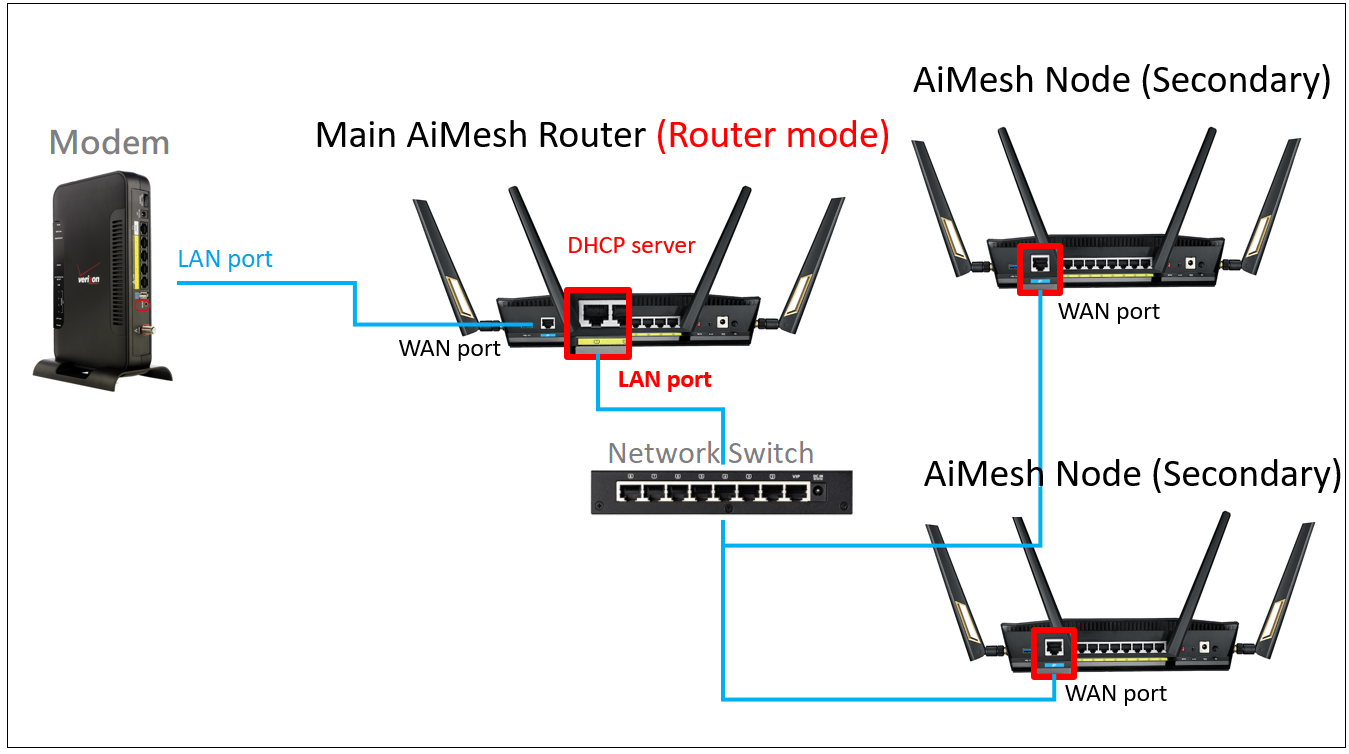
How do I configure an Ethernet backhaul for AI mesh?


lobukong

Member
Joined
Jun 16, 2011
Messages
365
Reaction score
200
M1 Woodlands area got problem? Previous notice very high ping(200-300ms) for Hoyoverse games in the evening peak hours (8pm-11pm). So have been using MR every since.
Just now switched from MR to M1, immediately noticed youtube on appletv(wired) will go black for about 1 sec after opening new videos, so I switched back to MR, then video can be opened immediately.
 

xiaofan

High Supremacy Member
Joined
Sep 16, 2018
Messages
36,473
Reaction score
12,371
Wow thanks for the in-depth advice!

I've attached the floorplan in the link below (for some reason the link doesn't allow me to select the permalink under the photo option)

The DB has the fibre termination point, I'm not sure if all the rooms have a data point but if it doesn't I'll convert them.

How do I configure an Ethernet backhaul for AI mesh?


Maybe this can be a good reference.
https://www.asus.com/support/faq/1044151/
0ffeac96-c66c-40c3-9723-48faccf25085.png


You do not need a switch in this case. BTW you can save some cost as well to go with dual band GT-AX6000 (BNIB from Carousell at around S$400 to S$450) as you are using Ethernet Backhaul. GT-AX6000 has no 10G port (dual 2.5G ports) and it is a dual band router. It has the same strong BCM4912 CPU as the GT-AX11000 Pro. GT-AX11000 Pro has 10G port and one 2.5G port. It is triband and therefore more expensive.

ONT -- Asus GT-AX11000 Pro in DB as main router -- LAN ports in the rooms
Living room LAN port -- RT-AX86U as AImesh node
Master bedroom LAN port -- Asus ZenWiFi XD5 as AImesh node
Bedroom 2 LAN port -- Asus ZenWiFi XD4 as AImesh node (optional)
Bedroom 4 LAN port -- Asus ZenWiFi XD4 as AImesh node (optional)
 
Last edited:

wookiezz

Junior Member
Joined
May 18, 2015
Messages
50
Reaction score
0
Maybe this can be a good reference.
https://www.asus.com/support/faq/1044151/
0ffeac96-c66c-40c3-9723-48faccf25085.png


You do not need a switch in this case. BTW you can save some cost as well to go with dual band GT-AX6000 (BNIB from Carousell at around S$400 to S$450) as you are using Ethernet Backhaul. GT-AX6000 has no 10G port (dual 2.5G ports) and it is a dual band router. It has the same strong BCM4912 CPU as the GT-AX11000 Pro. GT-AX11000 Pro has 10G port and one 2.5G port. It is triband and therefore more expensive.

ONT -- Asus GT-AX11000 Pro in DB as main router -- LAN ports in the rooms
Living room LAN port -- RT-AX86U as AImesh node
Master bedroom LAN port -- Asus ZenWiFi XD5 as AImesh node
Bedroom 2 LAN port -- Asus ZenWiFi XD4 as AImesh node (optional)
Bedroom 4 LAN port -- Asus ZenWiFi XD4 as AImesh node (optional)
Okay noted on the GT-AX6000! So I can still enable AI mesh also via a direct LAN connection to the mesh equipment (which is the Ethernet backhaul that you're referring to) ?
 

xiaofan

High Supremacy Member
Joined
Sep 16, 2018
Messages
36,473
Reaction score
12,371

wookiezz

Junior Member
Joined
May 18, 2015
Messages
50
Reaction score
0
From personal experience, Asus AIMesh using wireless backhaul sucks (even with matching routers), and that's what u're experiencing. Speeds at the satellite node are laughable (I had AX86U paired up in AiMesh and XT8 pairs using wireless backhaul previously). However, It improves greatly when u use ethernet backhaul, which I did eventually. My current setup is AX86U (primary) + AX86U (satellite) + XD5 (satellite)

The cause of disconnection when walking from room to room is due to your RSSI threshold settings under 'Roaming Assistant'. U need to use Wifi Analyzer app a few times over a few days to finetune the threshold DBM for the node to properly handoff, otherwise your device will stubbornly latch on to whichever node it first connects to.

If eventually, u still get frustrated with the roaming/handsoff, I suggest that you go for Netgear Orbi/Nighthawk Mesh systems. I've used Nighthawk MK63, Orbi 752, Orbi 852 before. Sans the lack of supposedly standard features that need subscription and inability to separate 2.4Ghz & 5Ghz SSIDs (Orbi only, u can separate band SSIDs in Nighthawk Mesh), I've never experienced my phone latching on to any nodes nor having to perform any settings to improve the handoff

Finally, go for ONT. Telco supplied ONR is trash
Are you able to advise or share any guides on how to configure with this RSSI threshold settings ?
 

sky00sky

High Supremacy Member
Joined
Oct 16, 2007
Messages
34,440
Reaction score
2,279
From personal experience, Asus AIMesh using wireless backhaul sucks (even with matching routers), and that's what u're experiencing. Speeds at the satellite node are laughable (I had AX86U paired up in AiMesh and XT8 pairs using wireless backhaul previously). However, It improves greatly when u use ethernet backhaul, which I did eventually. My current setup is AX86U (primary) + AX86U (satellite) + XD5 (satellite)

The cause of disconnection when walking from room to room is due to your RSSI threshold settings under 'Roaming Assistant'. U need to use Wifi Analyzer app a few times over a few days to finetune the threshold DBM for the node to properly handoff, otherwise your device will stubbornly latch on to whichever node it first connects to.

If eventually, u still get frustrated with the roaming/handsoff, I suggest that you go for Netgear Orbi/Nighthawk Mesh systems. I've used Nighthawk MK63, Orbi 752, Orbi 852 before. Sans the lack of supposedly standard features that need subscription and inability to separate 2.4Ghz & 5Ghz SSIDs (Orbi only, u can separate band SSIDs in Nighthawk Mesh), I've never experienced my phone latching on to any nodes nor having to perform any settings to improve the handoff

Finally, go for ONT. Telco supplied ONR is trash
Actually i noticed, you used Aimesh with the dualband router probably thats why its really shabby the results.


I used 3 x CT8, on wireless i mean it is not amazing but on M1 1gbps the my toilet throne at the obscure corner i still can use social media and play mobile games with 40-80 mbps on phone, MBR desktop i got 180-200.

On weekends , 3 coms can use valorant, 6 phones/pad, 2 lappy, 1 computer stream EPL, not experiencing major stutter or what not.

Maybe once in a while (like this week never happened) get those 100ms jittter or what not.
 

alex22

High Supremacy Member
Joined
Apr 29, 2001
Messages
26,546
Reaction score
7,668
M1 1Gbps speed

https://www.m1.com.sg/support/typical-speeds#accordion-6bf321f535-item-f62ceba0e8

Just don't believe M1 speed. Their locations of test is around Jurong/Aljunied areas only. I have been using M1 1Gbps for nearly 30 yrs and staying North side cannot get that speed. Changed recently to SH 10Gbps

SH 1Gbps speed

https://www.starhub.com/personal/broadband/typical-broadband-speed-plans.html
M1 fibre open less than 30 year in Singapore u sure u saying correct bo
 

Apparatus

Great Supremacy Member
Joined
May 27, 2005
Messages
58,292
Reaction score
13,849
M1 fibre open less than 30 year in Singapore u sure u saying correct bo

I said nearly 30 yrs not for 30 yrs. Can be 20+ yrs mah. I used ST for the first couple of years after that it's M1 all the way. Still remember using the dial-up modem then.......di di do do di di do eeeeee :LOL:
 

wookiezz

Junior Member
Joined
May 18, 2015
Messages
50
Reaction score
0
Another question regarding the LAN points for each bedroom, how do I check/determine internally if the wired cables are cat 5/6/6a?

Last thing I would want is a slow wired mesh connection due to hardware
 
Important Forum Advisory Note
This forum is moderated by volunteer moderators who will react only to members' feedback on posts. Moderators are not employees or representatives of HWZ Forums. Forum members and moderators are responsible for their own posts. Please refer to our Community Guidelines and Standards and Terms and Conditions for more information.
Top