HGST, where and which?

TeethOfMidas

Supremacy Member
Joined
Aug 24, 2016
Messages
5,185
Reaction score
3
Looking for a very reliable external HDD to store/backup pictures of my newborn child, was checking online for recommendations and HGST seems to be the preferred choice. Yet I'm unable to find much about where I could get HGST drives in SG..?

The pictures and videos are paramount to me, so I would want the most 'lasting'/reliable Ext HDD.

Can anyone advice where can I find a HGST (minimally 4TB*), and also what is the best way to ensure data recovery even in worst case scenario the HGST Ext HDD also fails some years down the road?

Thanks in advance!
 
Last edited:

Mach3.2

Great Supremacy Member
Joined
Apr 8, 2011
Messages
72,510
Reaction score
2,488
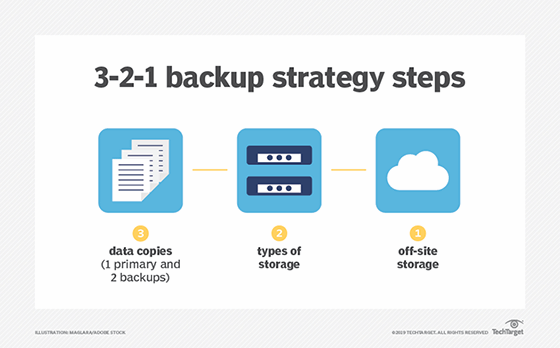
whatis-pillar_321_backup_mobile.png


Doesn't really matter what drive you get, the more important thing is to get your backup strategy right if you really don't want to lose those data.

You should have at least 2 copies of your data stored on different drives, and the drives should idealy be from different production batches.


For the most part 2 or 3 copies on different drives should do the trick, remember to verify that your files are not corrupted from time to time; untested backups are as good as no backup.
 

Koenig168

Arch-Supremacy Member
Joined
Nov 4, 2007
Messages
10,035
Reaction score
1,745
HGST was bought over by WD and there are no current HGST-branded external HDDs.

WD's external HDDs might contain HGST drives. So far the 3 WD external HDDs I've bought all contain HGST drives (most likely according to available data but cannot confirm) - 2 X 12TB and 1 X 14TB.

For your case, suggest you follow what Mach3.2 advised and not worry too much about reliability. The most reliable HDDs can also fail.
 
Joined
Oct 26, 2011
Messages
48,316
Reaction score
7,461
Looking for a very reliable external HDD to store/backup pictures of my newborn child, was checking online for recommendations and HGST seems to be the preferred choice. Yet I'm unable to find much about where I could get HGST drives in SG..?

The pictures and videos are paramount to me, so I would want the most 'lasting'/reliable Ext HDD.

Can anyone advice where can I find a HGST (minimally 4TB*), and also what is the best way to ensure data recovery even in worst case scenario the HGST Ext HDD also fails some years down the road?

Thanks in advance!

:unsure:
1) Buy 2x HDD
2) Save the same Data on at least 2x HDD
 

yusoffb01

Arch-Supremacy Member
Joined
Jun 17, 2008
Messages
16,815
Reaction score
1,769
Looking for a very reliable external HDD to store/backup pictures of my newborn child, was checking online for recommendations and HGST seems to be the preferred choice. Yet I'm unable to find much about where I could get HGST drives in SG..?

The pictures and videos are paramount to me, so I would want the most 'lasting'/reliable Ext HDD.

Can anyone advice where can I find a HGST (minimally 4TB*), and also what is the best way to ensure data recovery even in worst case scenario the HGST Ext HDD also fails some years down the road?

Thanks in advance!
buy pixel and keep online
r4Ox3Zz.jpeg
 

TeethOfMidas

Supremacy Member
Joined
Aug 24, 2016
Messages
5,185
Reaction score
3
whatis-pillar_321_backup_mobile.png


Doesn't really matter what drive you get, the more important thing is to get your backup strategy right if you really don't want to lose those data.

You should have at least 2 copies of your data stored on different drives, and the drives should idealy be from different production batches.


For the most part 2 or 3 copies on different drives should do the trick, remember to verify that your files are not corrupted from time to time; untested backups are as good as no backup.

Thanks for the pointers Mach3.2! (y)

One question: how do we verify that the files are not corrupted?
Just open a handful of random files whenever, and as long as they open fine they're considered good?
 

TeethOfMidas

Supremacy Member
Joined
Aug 24, 2016
Messages
5,185
Reaction score
3
HGST was bought over by WD and there are no current HGST-branded external HDDs.

WD's external HDDs might contain HGST drives. So far the 3 WD external HDDs I've bought all contain HGST drives (most likely according to available data but cannot confirm) - 2 X 12TB and 1 X 14TB.

For your case, suggest you follow what Mach3.2 advised and not worry too much about reliability. The most reliable HDDs can also fail.

That explains, no wonder it was so hard to find one online.
I'll be looking around for WD Ext HDDs then, thanks Koenig168! (y)
 

Mach3.2

Great Supremacy Member
Joined
Apr 8, 2011
Messages
72,510
Reaction score
2,488
I suppose you can compare hashes between multiple copies of your backup before and after you replicate the contents of your drive.

If there are corrupted media files before you replicate drive A to drive B, you would realise that because there is a hash mismatch. (Assuming you make no edits to the files, because editing the file will change the hash too)
The hash compare that you do after replicating drive A to drive B is to check that your replication is done error free.

See the reply by rojo on 4 Aug 2017
https://stackoverflow.com/questions/45494397/compare-files-from-two-folders-using-hash-sha1-in-batch^Might not work for nested directories, but I haven'ttired running it against nested directories.

https://superuser.com/questions/118...rify-data-integrity-for-home-use-with-windowsReply by Alex on Feb 24, 2017 gave some suggestions that you can try


Thanks for asking, I haven't really thought about verifying the integrity of my backups until you asked.. I can now use the same script too. :s13:

Edit: rsync with the --dry-run flag works too.

Edit 2: Can use HashCheck to generate a list of MD5 hashes, then use something like NotePad++ to do a compare between the 2 files.
http://code.kliu.org/hashcheck/


Edit 3: https://support.microsoft.com/en-us/topic/d92a713f-d793-7bd8-b0a4-4db811e29559
^I'll probably use this to generate a list of hashes, then compare the list using notepad++

Edit 4: Can't seem to download Microsoft's tool, maybe MultiHasher? Has a GUI which makes it easy to use. Same concept, generate a list of hash for your files, then compare the lists.
 
Last edited:

TeethOfMidas

Supremacy Member
Joined
Aug 24, 2016
Messages
5,185
Reaction score
3
buy pixel and keep online
r4Ox3Zz.jpeg

I'd always been a bit.. wary of Cloud storage, especially for 'human' contents. I don't mind storing media of my hobbies (non-'human') in Cloud.

Then again, there's also a part of me thinking about possible/invisible compressions to the files when uploading.

Hence so far, I'm still more inclined towards local backup/storages.

Thanks for the suggestion though, unlimited storage for free is pretty darn tempting!
 

TeethOfMidas

Supremacy Member
Joined
Aug 24, 2016
Messages
5,185
Reaction score
3
I suppose you can compare hashes between multiple copies of your backup before and after you replicate the contents of your drive.

If there are corrupted media files before you replicate drive A to drive B, you would realise that because there is a hash mismatch. (Assuming you make no edits to the files, because editing the file will change the hash too)
The hash compare that you do after replicating drive A to drive B is to check that your replication is done error free.

See the reply by rojo on 4 Aug 2017
https://stackoverflow.com/questions/45494397/compare-files-from-two-folders-using-hash-sha1-in-batch^Might not work for nested directories, but I haven'ttired running it against nested directories.

https://superuser.com/questions/118...rify-data-integrity-for-home-use-with-windowsReply by Alex on Feb 24, 2017 gave some suggestions that you can try


Thanks for asking, I haven't really thought about verifying the integrity of my backups until you asked.. I can now use the same script too. :s13:

Edit: rsync with the --dry-run flag works too.

Edit 2: Can use HashCheck to generate a list of MD5 hashes, then use something like NotePad++ to do a compare between the 2 files.
http://code.kliu.org/hashcheck/


Edit 3: https://support.microsoft.com/en-us/topic/d92a713f-d793-7bd8-b0a4-4db811e29559
^I'll probably use this to generate a list of hashes, then compare the list using notepad++

Edit 4: Can't seem to download Microsoft's tool, maybe MultiHasher? Has a GUI which makes it easy to use. Same concept, generate a list of hash for your files, then compare the lists.

Woah woah woah, now that's a whole other territory I need to find my way around, hashes and all šŸ˜…

Haha that's super useful still, I just gotta figure them out slowly.
Thanks again for your help and links man!! šŸ™
 

Mach3.2

Great Supremacy Member
Joined
Apr 8, 2011
Messages
72,510
Reaction score
2,488
Woah woah woah, now that's a whole other territory I need to find my way around, hashes and all šŸ˜…

Haha that's super useful still, I just gotta figure them out slowly.
Thanks again for your help and links man!! šŸ™
I'm trying MultiHasher right now, seem to work pretty well but you basically have to read all the files 1 by 1 so you're bottlenecked by your drive read speed.
You can just generate the hash from your master copy, then copy the hash database onto your replicated copy and run the "Verify File Integrity" function on the list stored on your backup drives.

It takes quite awhile to run through everything, especially if your folder is large.
 

TeethOfMidas

Supremacy Member
Joined
Aug 24, 2016
Messages
5,185
Reaction score
3
I'm trying MultiHasher right now, seem to work pretty well but you basically have to read all the files 1 by 1 so you're bottlenecked by your drive read speed.
You can just generate the hash from your master copy, then copy the hash database onto your replicated copy and run the "Verify File Integrity" function on the list stored on your backup drives.

It takes quite awhile to run through everything, especially if your folder is large.
Got it, I think I kinda understand what you mean haha.
I'll try them out! šŸ¤ž šŸ™Œ
 

TanKianW

Supremacy Member
Joined
Apr 21, 2005
Messages
6,899
Reaction score
3,604
Thanks for the pointers Mach3.2! (y)

One question: how do we verify that the files are not corrupted?
Just open a handful of random files whenever, and as long as they open fine they're considered good?

You should try out ZFS if you are into local (backup) storage with data integrity.

I have data kept >10years and still accessible (without errors) on my work servers till this day.

In fact, I am already planning to keep my kids photos until one day they need it for their wedding day montage.....

 
Last edited:
Important Forum Advisory Note
This forum is moderated by volunteer moderators who will react only to members' feedback on posts. Moderators are not employees or representatives of HWZ Forums. Forum members and moderators are responsible for their own posts. Please refer to our Community Guidelines and Standards and Terms and Conditions for more information.
Top