
You are using an out of date browser. It may not display this or other websites correctly.
You should upgrade or use an alternative browser.
You should upgrade or use an alternative browser.
High Temperature on rig
- Thread starter geniusboi
- Start date
More options
Who Replied?Update:
I have just removed the stock fan / heat sink and removed most of the dust on it. Use a camera blower and a very tiny paintbrush but still cannot totally remove them
Reapply thermal paste. Use nail polish remover (don't know if i did right, lol) to remove the old ones. Then apply a generous amount of Arctic MX-4. About a rice grain onto the centre of the processor. Then painstakingly reattached back the fan (quite difficult actually).
Fix back everything but the temperature still the same.

If the temps only surged after you upgraded the GPU (Before that was fine for the past 5-6 years?) then it's possible that the GPU is creating new heat that your chassis fans can't handle...
In the meantime, either swap your GPU back out or try turning HyperThreading off to see if it helps.
Can also take a pic of the interior, can take a look at the airflow.
Last edited:


If the temps only surged after you upgraded the GPU (Before that was fine for the past 5-6 years?) then the GPU is the likely culprit...
In the meantime, either swap your GPU back out or try turning HyperThreading off to see if it helps.
Can also take a pic of the interior, can take a look at the airflow.
I very long never check temperature already. So not sure if it is because of the gpu. Old one spoilt, thats why bought new one to replace. Just removed Intel Speedstep. Slighly better now. Idle at 55-64.
Does these photos shows my airflow?


Last edited:
Is your psu dumping hot air into the case?
PSU all the way at the bottom. Shouldn't be the culprit.
TS, your casing got exhaust fan?
The one all the way at the back in the pic attached is exhaust fan?
Last edited:
maybe try a different sensor program like hwinfo.
because all your other temps so high. could be bug of hwmonitor with your older hardware.
this kind of temps run a few minutes youtube 4k video may bsod. or even run some cinebench will shutdown.
because all your other temps so high. could be bug of hwmonitor with your older hardware.
this kind of temps run a few minutes youtube 4k video may bsod. or even run some cinebench will shutdown.
I very long never check temperature already. So not sure if it is because of the gpu. Old one spoilt, thats why bought new one to replace. Just removed Intel Speedstep. Slighly better now. Idle at 55-64.
Does these photos shows my airflow?
I see. 55-64 is still damn high, lol. The pics help, but only can see two fans. Is the top one intake, rear on exhaust? You mentioned your case has four fans? What's the actual config?
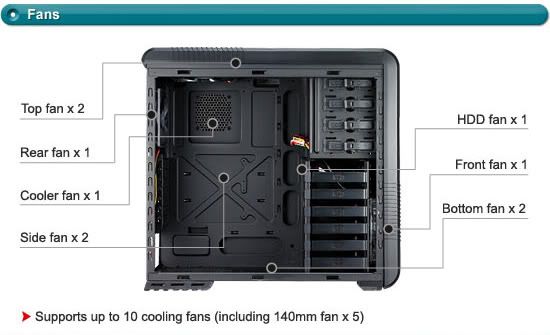
4 fans. One top one bottom one front one back.
Personally I'm not very exp with airflow, will let the more exp bros comment on this.

FroztSpectre
Arch-Supremacy Member
- Joined
- Dec 7, 2007
- Messages
- 15,275
- Reaction score
- 197
I see. 55-64 is still damn high, lol. The pics help, but only can see two fans. Is the top one intake, rear on exhaust? You mentioned your case has four fans? What's the actual config?
Personally I'm not very exp with airflow, will let the more exp bros comment on this.
Back and Top fan looks both exhaust to me.
Generally:

Back and Top fan looks both exhaust to me.
Generally:
Ah, yes. Thanks for clarifying. I was wondering that cos TS first post said "Currently have like 2 stock fans that comes with my casing. ". So I thought 2 fans only, lol. Later then saw the other comment.
Ah, yes. Thanks for clarifying. I was wondering that cos TS first post said "Currently have like 2 stock fans that comes with my casing. ". So I thought 2 fans only, lol. Later then saw the other comment.
So is correct right? My 2 other fan is at the harddisk area at the front and the psu area at the bottom. At the front fan X 1 and Bottom fan there got 1.
maybe try a different sensor program like hwinfo.
because all your other temps so high. could be bug of hwmonitor with your older hardware.
this kind of temps run a few minutes youtube 4k video may bsod. or even run some cinebench will shutdown.
Haha tried all the software already. HWinfo same temp.
Important Forum Advisory Note
This forum is moderated by volunteer moderators who will react only to members' feedback on posts. Moderators are not employees or representatives of HWZ Forums. Forum members and moderators are responsible for their own posts.
Please refer to our Community Guidelines and Standards and Terms and Conditions for more information.
