
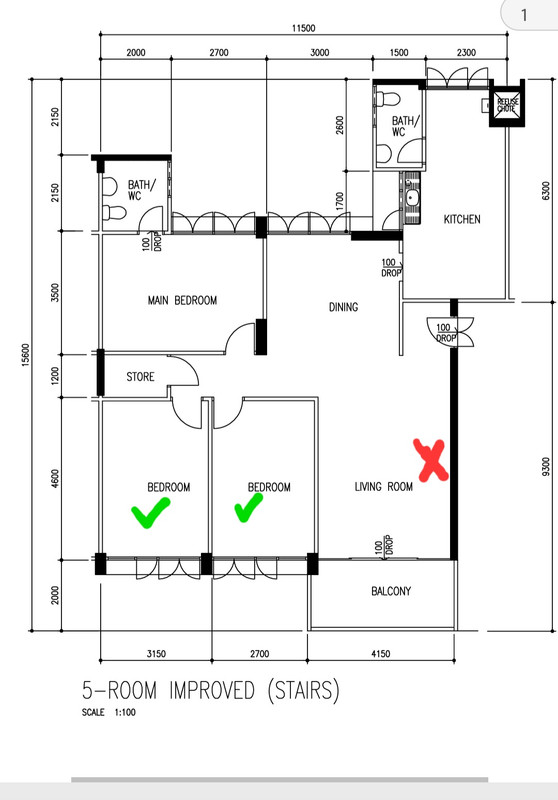
Cross is where my ONT is and I need reliable connections in the rooms. Huge thanks.
Hi all, I have attached my home floor plan. Anyone can advise what's the best way to setup a reliable network? Probably looking at just WiFi. The rooms has no network ports.
Cross is where my ONT is and I need reliable connections in the rooms. Huge thanks.

Any “legacy” TV coax connectors or even RJ11 phone connectors by any chance?The rooms has no network ports.
Thanks for the reply guys. For certain reasons, I can't access the rj11 ports. There are no tv coax connectors as well. I'm on singtel. Just the 1gb plan.
Do I just need a single router? The last time I had that the last rm had very weak signals. The rm nearest to the living rm has 2 computers and 1 printer. What router should I get? Budget not really an issue but I don't need top of the line tech.
Haha yes. Do you suggest that I run a cable from the ONT to the router and put it nearer to the wall? Or what might be a smarter option?Did you put your router next to the ONT the last time i.e. in the living room? If yes, then the last room will receive weak signal because signal needs to penetrate 2 walls
Place the router at the blue cross indicated. Mount it on the ceiling or on the cross beam if there's one using brackets. Run a RJ45 CAT 6 cable from the ONT to it. Since it's only a single cable you can get the smallest plastic trunking from the neighborhood hardware shop to run it. Buy the one with no double-sided tape and buy your own 3M 3.3Kg double-sided tape and paste it. The trunking that comes with double-sided tape is foam type which can be difficult to remove the sticky foam the next time if you remove the trunking.Haha yes. Do you suggest that I run a cable from the ONT to the router and put it nearer to the wall? Or what might be a smarter option?
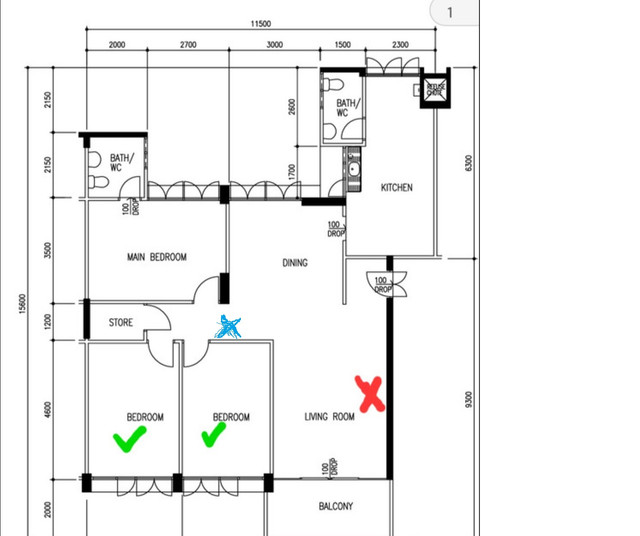

Thanks for the advice. Maybe trouble you to also recommend me a router to get?Place the router at the blue cross indicated. Mount it on the ceiling or on the cross beam if there's one using brackets. Run a RJ45 CAT 6 cable from the ONT to it. Since it's only a single cable you can get the smallest plastic trunking from the neighborhood hardware shop to run it. Buy the one with no double-sided tape and buy your own 3M 3.3Kg double-sided tape and paste it. The trunking that comes with double-sided tape is foam type which can be difficult to remove the sticky foam the next time if you remove the trunking.
Things to note
Make sure there's NO wardrobe or high bookself behind the walls where the wifi signal is penetrating. They can block the wifi signal
If your router comes with external antennas orientate the antennas accordingly to receive the best signals
With internal antennas (ie. router is cylindrical shape) place it lying down on the supporting brackets. Test which position gives the best wifi signals
Can get the C brackets and plastic trunking below
Thanks for the advice. Maybe trouble you to also recommend me a router to get?
I'll probably just get what you recommend. What does wireless backhaul means?Since you are on 1G then forget those routers with 2.5G/5G/10G LAN ports
Are you using 6GHz devices? If no, then forget those WiFi 6E/7 routers
So, you only left with tri-band WiFi 6 routers with 2.4G/5GHz-1/5GHz-2. 5GHz-2 is use for wireless backhaul. Better than those with dual-band in your case since you want wireless.
TP-LINK Archer AX90 AX6600 Tri-Band Gigabit Wi-Fi 6 Router is a good one but it's an EOL router. EOL means no more firmware upgrades
Shopee Singapore still selling it for $300.14
https://shopee.sg/TP-LINK-ARCHER-AX...d2&xptdk=8ecabff6-74bd-4e3f-b521-ab82eb6092d2
I'll probably just get what you recommend. What does wireless backhaul means?
Thanks for the detailed info. My mum is quite against me sticking plastic trunking and drilling holes for the c brackets so I have to go fully wireless. Is it possible for me to get a router to be placed beside the ONT and another extender or whatever we call it to be placed at the blue cross. I have a shelf there. Should I go for a dual mesh setup? If so what should I get?Forget that post you quoted. I'm updating the same post again.
I was actually thinking of a 2 wireless access points with a wireless connection between them. I was using a powerline option previously but it's kind of troublesome to setup and troublesome. It isn't very reliable as well. I'm just not sure what device to get now since my router kicked the bucket and I wanted to simplify my setup.I might be a bit contrarian here, but *if* you’re going to all the trouble of running wires then maybe it’s worth skipping the consumer grade wireless routers (or wireless access points) and getting something higher grade that’s more likely to get many years of timely security updates.
Singtel is ONR-based, I think. So an access point is really all you need, especially if you want to avoid double NATs. Maybe a Ubiquiti U6+ or Aruba A22? (Anyone have any current favorites? How’s Ruckus?)
If you want to avoid running wires then I think you still have a few good options:
- Powerline bridging is still available, mostly from TP-Link. For example, you could put one wireless access point in the bedroom next to the living room for whole home coverage and make the hop from your Singtel ONR to that WAP using a pair of powerline adapters. Powerline-based network bridging isn’t as reliable as coax (typically MoCA) or phone line (G.hn 2.0) bridging — find those RJ11 jacks if you can — but it can work.
- Get a good quality WAP that has two 5 GHz radios. Position it near your Singtel ONR, set one of the radios to 20 MHz wide Channel 165 (the “slower but farther” radio), set the other 5 GHz radio to 80 MHz width (the “faster but nearer” radio), set the 2.4 GHz radio to 20 MHz wide Channel 1 or Channel 13 (depending on your neighbors — NEVER use 40 MHz wide channels on 2.4 GHz; that’s just rude), and see how it goes. For example, the Netgear WAX630 can do this, but it’s a bit pricey. Any others?
- Of course there are lots of options involving 2 wireless access points with a wireless connection between them. But you don’t necessarily need to start with that option.
I was actually thinking of a 2 wireless access points with a wireless connection between them. I was using a powerline option previously but it's kind of troublesome to setup and troublesome. It isn't very reliable as well. I'm just not sure what device to get now since my router kicked the bucket and I wanted to simplify my setup.
Thanks for the detailed info. My mum is quite against me sticking plastic trunking and drilling holes for the c brackets so I have to go fully wireless. Is it possible for me to get a router to be placed beside the ONT and another extender or whatever we call it to be placed at the blue cross. I have a shelf there. Should I go for a dual mesh setup? If so what should I get?
Yes singtel 1 gbps using ONT. Not gaming or anything. Just streaming videos and doing work.Budget?
Singtel 1Gbps plan? Using ONT or ONR?
Will the Asus aimesh be suitable? Which one will be good ah?In that case you go for mesh routers
One can put beside the ONT in the hall and the other at the desired location and connect them using wireless backhaul
