

doki81
Arch-Supremacy Member
- Joined
- Jun 11, 2010
- Messages
- 12,605
- Reaction score
- 1,137
volume is soft...agree..they say chasis too thin..speaker become small...Like half of my ip15pm
volume is soft...agree..they say chasis too thin..speaker become small...Like half of my ip15pm
It worksAnyone got "Hey Google" to work on their v3?

Google app > Settings > Google Assistant > Hey Google & Voice Match > Hey Google (On it)Anyone got "Hey Google" to work on their v3?


Weird. On mine it says "The Google Assistant is not available now. Check your Assistant settings." But there's nothing in the Assistant setting that suggests I can switch on Google Assistant.It works

I opened Google app (not Chrome), but was not able to find the "Settings". I assume it's found under the logged in Google profile? Once I enter into the Google profile (top right icon), I scrolled down to Settings > Google Assistant, but don't find "Hey Google & Voice Match". Only "Voice Match".Google app > Settings > Google Assistant > Hey Google & Voice Match > Hey Google (On it)
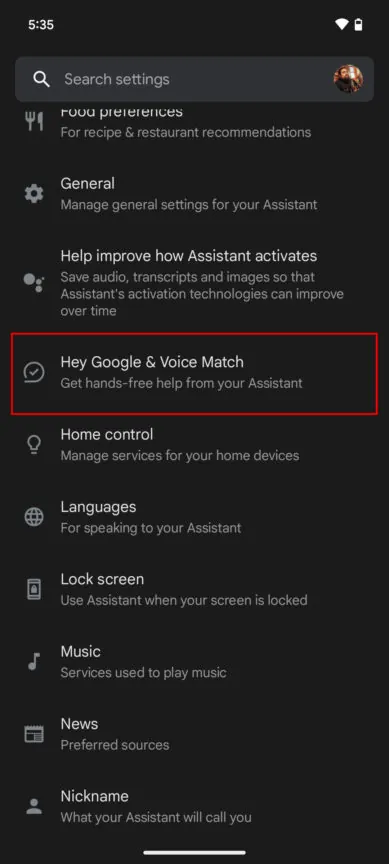
that's strange, Mine is the same as this screenshot. If has "Hey google & voice match which after you click on it, there's a slider for you to on " Hey Google"I tried to follow the steps here: https://www.androidauthority.com/ok-google-not-working-1018903 and first two sections all confirmed setup properly.
However, in the Make sure the Hey Google command is enabled section, I wasn't able to find the "Hey Google & Voice Match" option. My menu only has "General", then immediately go to "Home control".
i have this only when charging...but i am not using honor charger...Anyone's phone have a wierd sensation when folding? Mine has a wierd sensation like small vibration when folding, can be felt when I'm holding the phone and folding it.
Problem was that the "Hey Google" slider was disabled. I guess the problem was it didn't detect that Google was selected as the default Digital assistant app (even though it was). I got it resolved by going to the Default app settings, set the default to something else, then select Google again. I provided the steps in an earlier message above for those who had same issue as me.that's strange, Mine is the same as this screenshot. If has "Hey google & voice match which after you click on it, there's a slider for you to on " Hey Google"
got some learning curve coming from one UI...without routines and mode...a lot of automation missing


Yours is CN V3 issit??Problem was that the "Hey Google" slider was disabled. I guess the problem was it didn't detect that Google was selected as the default Digital assistant app (even though it was). I got it resolved by going to the Default app settings, set the default to something else, then select Google again. I provided the steps in an earlier message above for those who had same issue as me.

But the back cam module dont have right?FYI , the phone ordi has a screen protector on interior and exterior, if not sure just feel the front camera u should be able to feel there is a layer of plastic. So don't have to get a new screen protector if u want to save up a bit of $$$

Yes no pre installed protector on back cam islandBut the back cam module dont have right?

I want inner n outer diff wallpaper n layout la...Honor Magic series is receiving a massive MagicOS 8.0 feature update
Honor Magic V3 series users are grabbing a massive feature update with the MagicOS 8.0.0.172 version. The firmware brings several additions for the flagship lineup related to Magic Capsule, system apps, calling scenarios, multi-window section, and more.
Major feature update:
Starting with the software version, the Honor Magic series is collecting the major feature update with the MagicOS 8.0.0.172 build and a 1.25GB download size. This firmware is only available for the Chinese models but may soon reach the global units.
MagicOS 8.0.0.172 Changelog
System Application:
Users can record system sound during video or voice calls as desired. (Path: Settings > Accessibility Features > Screen Recording > Record from system sound.)
Users can select from 480P/720P/1080P for video quality in screen recordings. (Path: Settings > Accessibility Features > Screen recording > Video quality)
Magic Capsule:
Users can turn on or off beauty mode during video calls. (Path: Settings > Notifications and status bar > Magic Capsule > Beauty)
Users can turn on or off beauty during normal video calls. (Path: Settings > Accessibility Features > Call Enhancement > Video Call Beauty)
System Manager
Added a switch for security warnings. For apps already under system control, the risk badge will no longer be displayed after the switch is turned off, making the home screen icons appear more streamlined. (Path: System Manager > Virus Scan > Risk reminders.
Call
Users can merge call logs by contacts via a prompt window, making the call log interface simpler.
Enhances the call recording feature by integrating a notification switch after the recording ends and expanding the capacity for recording records, making recording more convenient and efficient.
Multi-Window
Optimizes the user experience of the assistive ball stays away from the front camera, thereby offering a simpler interface.
Favorites Space
Optimizes the smoothness of the motion effect in Favorites Space.
Power Consumption
Fixes the issue of abnormal power consumption in some scenarios.
System
This update improves the system’s stability to make your device run more stably.
Security:
Users now have the option to allow apps to use the device’s sensors, enabling the control of “shake-to-open” ads. (Path: Settings > Apps > Permission manager > Permissions > Device movement and orientation.
Integrates the Android September 2024 security patch for improved system security
