House keeping my desktop

TA200

Banned
Joined
Mar 20, 2003
Messages
16,126
Reaction score
915
unplug and replug after cleaning up the pc
can't remember if the whole 20+4 was stuffed into the motherboard 24pin

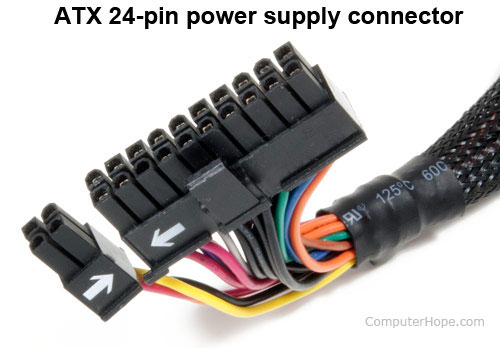
as i can't push the 4 pin to fix nicely next to the 20 pin, i leave it as shown in the illustrated photo, and everything works as per normal

did i leave out anything? is this correct?

rdPXnQhoHm2KYnUx.medium


my 20+4pin
atx-24-pin-connector.jpg
 

Northernray

Supremacy Member
Joined
Oct 8, 2008
Messages
5,223
Reaction score
2
You need to insert both the 20pins + 4 pins together and not separately.

It will still work with the 20 pins without major issue unless you system required high current supply.
 

Koenig168

Arch-Supremacy Member
Joined
Nov 4, 2007
Messages
10,037
Reaction score
1,748
IIRC you can use 20 pins provided the current draw does not exceed 350W or so. More than that and you risk frying the connector.

You need to align the 4-pins part with the 20-pins part before inserting together.
 

BrOwnTeddy

Banned
Joined
Sep 18, 2012
Messages
41,583
Reaction score
5,734
unplug and replug after cleaning up the pc
can't remember if the whole 20+4 was stuffed into the motherboard 24pin

as i can't push the 4 pin to fix nicely next to the 20 pin, i leave it as shown in the illustrated photo, and everything works as per normal

did i leave out anything? is this correct?

rdPXnQhoHm2KYnUx.medium


my 20+4pin
atx-24-pin-connector.jpg
If it fits, it will work.
If it doesn't fit, do not force.

Systems nowadays are pretty straightforward and its nearly impossible to get the orientation wrong.
 

TA200

Banned
Joined
Mar 20, 2003
Messages
16,126
Reaction score
915
IIRC you can use 20 pins provided the current draw does not exceed 350W or so. More than that and you risk frying the connector.

You need to align the 4-pins part with the 20-pins part before inserting together.

it seems 20 & 4 got a gap...when i put them side by side.

i go open up desktop later
 

Koenig168

Arch-Supremacy Member
Joined
Nov 4, 2007
Messages
10,037
Reaction score
1,748
it seems 20 & 4 got a gap...when i put them side by side.

i go open up desktop later

should be a bit of plastic sticking out, just put on top of that bit or slot in or something. definitely can be aligned
 

ystoh133

Member
Joined
Mar 16, 2013
Messages
185
Reaction score
0
it seems 20 & 4 got a gap...when i put them side by side.

i go open up desktop later

the gap can be closed, try sliding them together.

When you put in the connector the 4pin must already be attached with the 20pin, try not to put them in separately.
 
Important Forum Advisory Note
This forum is moderated by volunteer moderators who will react only to members' feedback on posts. Moderators are not employees or representatives of HWZ Forums. Forum members and moderators are responsible for their own posts. Please refer to our Community Guidelines and Standards and Terms and Conditions for more information.
Top