How to patch voice to Data

ang_moh

Member
Joined
Sep 12, 2009
Messages
146
Reaction score
3
Hi,
hope someone can give some advice.

I have in every room Lan ports but only in living room they are working with data whereas in the other rooms they are made for voice (phones) (Who in heaven puts in every room a phone ???).

In my old house I had all the cat cables coming out and I had just to place a switch et voila I had network in all rooms.

But this one looks different and I don't understand it.

Please see below picture. Can I rearrange those wires so I have data instead of voice or can I patch the ports at the walls ?


thx
 

weap0nx

Master Member
Joined
Sep 13, 2000
Messages
4,398
Reaction score
3
Check if the cable is Cat 5. It's definitely 4 pair UTP but it has to be Cat 5 for any guarantee of it working as ethernet cable.
 

ang_moh

Member
Joined
Sep 12, 2009
Messages
146
Reaction score
3
yes it's cat5, I know it can carry data but what I have to do ? Just clip the coloured ones to the white and blue in addition ?

thx
 

eyz

Arch-Supremacy Member
Joined
Jul 10, 2002
Messages
12,065
Reaction score
2,122
the panel doesn't look like a data patch panel. looks like it can only accomidae 2 pair of wires only. i might be wrong though.
 

pwongkk

High Supremacy Member
Joined
Jun 30, 2006
Messages
31,204
Reaction score
15,741
The panel looks more like for voice/telephone.

The remaining cables can still be used for data, but restricted to max FastEthernet.

What TS can do is either buy another cat 5 patch panel or faceplate with RJ45 keystone jacks. Uncoil the white orange/orange and white green/green pairs and punch into the keystone jacks according to the colour coding. Repeat the same for the other end.

Next, connect up the cables to the switch and that's it.
 

ang_moh

Member
Joined
Sep 12, 2009
Messages
146
Reaction score
3
thx for the replies.
I guess my hobby electric understanding ends here.

By faceplates I guess you mean the ones mounted to the walls in the rooms right ? Do they really need to be changed ?

WHat would it roughly cost to get it done ? I assume it would be a "regular" electrician ?

thx
 

eyz

Arch-Supremacy Member
Joined
Jul 10, 2002
Messages
12,065
Reaction score
2,122
ts, can you first trace out the cable that is linked to the living room? does it terminate at this panel as well?
 

pwongkk

High Supremacy Member
Joined
Jun 30, 2006
Messages
31,204
Reaction score
15,741
thx for the replies.
I guess my hobby electric understanding ends here.

By faceplates I guess you mean the ones mounted to the walls in the rooms right ? Do they really need to be changed ?

WHat would it roughly cost to get it done ? I assume it would be a "regular" electrician ?

thx

There are many ways you can do it. Yes, faceplate is the one mounted onto the wall.

I don't know what is the cost if you get an electrician. I did mine myself. My cable comes with only 3 pairs, anyway, it makes no difference. At my living room, I used 2 faceplates that can house 4 RJ45 keystone jacks each and used 3 pairs to wire up according to the colour codes.

Over at the other end, I used a faceplate for 2 keystone jacks - 1 RJ11 and the other RJ45. RJ11 use the white blue/blue pair. RJ45 same as the outside.

My wiring configuration is for running IP telephony, so 100mb is more than sufficient for me. The RJ11 port is provisioned in case 1 day I decided to switch back to normal phone system. At my living room, all 3 pairs of cables are connected into a single RJ45 jack. If you follow the colour codes correctly, it'll not overlap. FastEthernet uses pins 1,2,3,6. Telephone uses pins 4 snd 5.

If you want to use both ports concurrently, you'll need to custom make your ethernet cable to use only 2 pairs. Then get a RJ45 splitter with 2 outputs - 1 to connect your custom made lan cable and the other to the normal telephone cable. Next get a 1 to 5 RJ11 splitter to connect up your telephone wires.

Sounds complicated, you'll need to visualise and it can be done. The punch down tool for the keystone jack costs around $2 at SLT.
 

ang_moh

Member
Joined
Sep 12, 2009
Messages
146
Reaction score
3
Hi,
a small warm up of my old thread.

I opened one plate in office and there are only 4 wires, cat5 shld be 6 isn't it ?

Can this work anyway ? A network plug fits in , good sign ? Can I do a test by wiring according to colours and plug router in living room to faceplate in living room ?


thx
 
Last edited:

ang_moh

Member
Joined
Sep 12, 2009
Messages
146
Reaction score
3
Hi,
I started the project but seem not to be successful.

This is my layout, for testing I use the office so my iMac can connect via cable not wifi.
aww0.jpg

There is a cable ready to go from living room to distributor, I connected the router via 15m cable and the signal arrives at distributor. Checked with laptop directly connected to port in distributor (so no internet page wouldn't open but router admin can, to be checked later).

In office I did the termination of the jacks, hope I did correct, I went for B, a print identifies it as cat5e

0e56.jpg


So I un-wired all cables from panel (useless thing) and started terminating the ends. I can't see which is for which room, they seemed to have marked but not obvious what they mean.
4ww5.jpg


The termination of cables is darn tricky, I was surprised that it is such a pain in those modern times. I am missing a crimping tool and tried to push the golden pins in connectors with tongs :eek:
6fo6.jpg


After I did a few I connected the switch
7hfi.jpg


but nothing arrives at office :s11:

somewhere somethings not working
 

lancified

Member
Joined
Nov 24, 2000
Messages
408
Reaction score
8
hey bro,

your design and logic is correct, so i believe the problem would be your termination, probably bad crimping or wiring standard since you do not have a specialized tool.

I did the same project for my new house (lucky you, all my wires are 3P, yours are 4P), managed to spilt my wire to support both data (2p, fast ethernet) and voice (1p). I have all the tools necessary. If your house is somewhere near Sengkang, I dont mind dropping by to show you how to do it.

I wont accept any payment. Just an enthusiast to another. Maybe a cool beer after we end would be good :)
 

kon_sk

Member
Joined
Jul 19, 2013
Messages
186
Reaction score
0
hey bro,

your design and logic is correct, so i believe the problem would be your termination, probably bad crimping or wiring standard since you do not have a specialized tool.

I did the same project for my new house (lucky you, all my wires are 3P, yours are 4P), managed to spilt my wire to support both data (2p, fast ethernet) and voice (1p). I have all the tools necessary. If your house is somewhere near Sengkang, I dont mind dropping by to show you how to do it.

I wont accept any payment. Just an enthusiast to another. Maybe a cool beer after we end would be good :)

In a typical HDB flat, am i right to assume the termination point is outside the flat? Or it must be in the flat somewhere? I'd really like to do this (convert phone port to data port, since I'm using digital voice), but lack the know-how to even start.

Lighting electrician came by the other day to replace my ceiling lights, while they do help people laying new LAN point, they refuse to do the phone to data port conversion :(
 

ang_moh

Member
Joined
Sep 12, 2009
Messages
146
Reaction score
3
haha thanks for the offer.

Let me give it another shot, hope to get tomorrow a crimping tool, just need to find time to get new connectors. Meanwhile I put some beer in fridge :D


hey bro,

your design and logic is correct, so i believe the problem would be your termination, probably bad crimping or wiring standard since you do not have a specialized tool.

I did the same project for my new house (lucky you, all my wires are 3P, yours are 4P), managed to spilt my wire to support both data (2p, fast ethernet) and voice (1p). I have all the tools necessary. If your house is somewhere near Sengkang, I dont mind dropping by to show you how to do it.

I wont accept any payment. Just an enthusiast to another. Maybe a cool beer after we end would be good :)
 

quekky

Arch-Supremacy Member
Joined
Nov 12, 2000
Messages
18,440
Reaction score
0
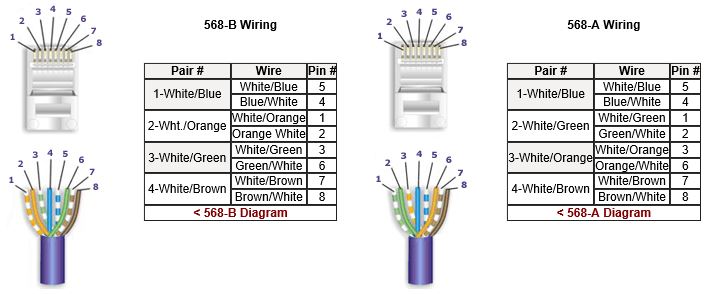
bro, i think you crimp the colors wrongly
How to Make a Category 5 / Cat 5E Patch Cable

table.jpg

brown is on the right, not left (when you look at the head upwards)


btw, u can use a multimeter (those with sound when you touch the prongs together) to test which cable goes to which.
just put 1 prong to 1 color at the faceplate, then at your patch panel touch the colors for each cable and listen to the beep
 
Last edited:

lancified

Member
Joined
Nov 24, 2000
Messages
408
Reaction score
8
In a typical HDB flat, am i right to assume the termination point is outside the flat? Or it must be in the flat somewhere? I'd really like to do this (convert phone port to data port, since I'm using digital voice), but lack the know-how to even start.

Lighting electrician came by the other day to replace my ceiling lights, while they do help people laying new LAN point, they refuse to do the phone to data port conversion :(

Hey bro, termination point should be inside the flat. For new flats, look for a blank panel normally located beside the TV point in the living room. Unscrew it and u will see all the cables inside.

Economic sense not to do for you. They can charge $150 per data point, but voice point only $30-$50. Basically same logic but nowadays since wires are pre-laid, they use 3P-4P wires which means it can be dual usage. They can't charge you full rate if no new cables are laid. Heck, even RJ11 cables can be converted to Cat5 too (as long as they are 2P).
 

lancified

Member
Joined
Nov 24, 2000
Messages
408
Reaction score
8
bro, i think you crimp the colors wrongly
How to Make a Category 5 / Cat 5E Patch Cable

table.jpg

brown is on the right, not left (when you look at the head upwards)


btw, u can use a multimeter (those with sound when you touch the prongs together) to test which cable goes to which.
just put 1 prong to 1 color at the faceplate, then at your patch panel touch the colors for each cable and listen to the beep

You are right! I just realised he crimped 8-1 instead of 1-8! problem solved!
 

kon_sk

Member
Joined
Jul 19, 2013
Messages
186
Reaction score
0
Hey bro, termination point should be inside the flat. For new flats, look for a blank panel normally located beside the TV point in the living room. Unscrew it and u will see all the cables inside.

Economic sense not to do for you. They can charge $150 per data point, but voice point only $30-$50. Basically same logic but nowadays since wires are pre-laid, they use 3P-4P wires which means it can be dual usage. They can't charge you full rate if no new cables are laid. Heck, even RJ11 cables can be converted to Cat5 too (as long as they are 2P).

Thanks! Think I found the distribution point, saw a 3 pair cable with one pair already screwed into the "cover plate" presumably to do the "distribution" within the home.

You were saying with 3 pair, I could wired it up such that I one pair can be used for phone, and 2 pair (4 wire) use for fast ethernet (100mbps), correct?.

With voice, in theory, I can wire the digital voice line from modem/router to one of the phone jacks, and I can plug my phone to any other jack within the house, and it should still work, right? :D

The big question, anyone know any contractor/electrician that can do this for me (including changing all the face plate in the house to phone & ethernet port). What is the reasonable price for this? :D
 
Important Forum Advisory Note
This forum is moderated by volunteer moderators who will react only to members' feedback on posts. Moderators are not employees or representatives of HWZ Forums. Forum members and moderators are responsible for their own posts. Please refer to our Community Guidelines and Standards and Terms and Conditions for more information.
Top