How to patch voice to Data

lancified

Member
Joined
Nov 24, 2000
Messages
408
Reaction score
8
Thanks! Think I found the distribution point, saw a 3 pair cable with one pair already screwed into the "cover plate" presumably to do the "distribution" within the home.

You were saying with 3 pair, I could wired it up such that I one pair can be used for phone, and 2 pair (4 wire) use for fast ethernet (100mbps), correct?.

With voice, in theory, I can wire the digital voice line from modem/router to one of the phone jacks, and I can plug my phone to any other jack within the house, and it should still work, right? :D

The big question, anyone know any contractor/electrician that can do this for me (including changing all the face plate in the house to phone & ethernet port). What is the reasonable price for this? :D

Great, you are on the right track.
Most electrician wont do it for you, I suggest you DIY.

Follow these steps, confirm wont go wrong.
1. Buy dual usage faceplates (1x RJ45 + 1x RJ11). u need to visit those specialised hardware stores to find them. Should be less than $20 each depending which brand u take.

2. You need a switch, recommended 5-8 ports giagbit switch (unmanaged will do, dont buy L3 switches if you dont know anything about it)

3. You need RJ45/RJ11 heads/clips. SLS/SLT sells them by pieces, should be about 50c-80c each. I usually buy bulk (100pcs) online, way cheaper.

4. You need to define a wiring standard. Suggest u keep whiteorange/orange/whitegreen/green for data, whiteblue/blue for voice.

5. Convert all the face plates in the rooms to the dual usage ones you bought. Punch 1-whiteorange, 2-orange, 3-whitegreen, 6-green into the data keystone. Punch 1-whiteblue, 2-blue into the voice keystone.

6. At the distribution point, remove the existing wires connected.

7. Convert every wire (WO,O,WG,G) into RJ45 terminals and crimp them. Leave the whiteblue/blue cables dangling.

8. Connect all the whiteblue cables together by using the existing "splitter" (it is attached to your "coverplate").

9. Similarly, connect all your blue cables together into another "channel" in the splitter.

10. Plug all the RJ45 into the switch and power it on.

11. Test your data network and test your voice network.

Tips for you - make sure you have good crimping skills, the wires inside the walls are pretty short, you dont have much buffer to crimp wrong and redo. Try to test every wire with a multimeter or cable tester before going on to the next wire.

Good luck! Else I can always help if your house is near me. No need to pay, I just like doing such things.
 

kon_sk

Member
Joined
Jul 19, 2013
Messages
186
Reaction score
0
Great, you are on the right track.
Most electrician wont do it for you, I suggest you DIY.

I'm close to hopeless with hardware. The last time i tried to add RAM to wifey computer, I ended up burning the whole motherboard, so I have swear off doing anything with my finger, the delicate wiring is definitely not my comfort zone! :s22:
 

ang_moh

Member
Joined
Sep 12, 2009
Messages
146
Reaction score
3
yeeah first success in office, was able to surf via cable :D

after chnaging cabling in connectors still nothing, then I took a screw driver and pushed the cables in jack further down et voila.

Also some noob shopping experience:

went to SLT as I thought that's the place for electrics and SLS reputation not so good especially towards ang mohs.

Went straight to first shop in basement, staff friendly and helpful but
- bought a punch tool 12$ but just made to go straight to waste bin (that's why I had to adjust with screw driver)
- Jacks and plugs ok but connectors not so great
- bought 15m CAT7 cable only because it's flat and white as it will be in living room and dun want to make wife scream with grey and fat cable paid 38$ then need a firewire cable and went anyway to SLS and saw exact same cable for ...... 30$ :eek: another 8 dollar wasted
- day later I bought connectors from SLS also plastic like first once slightly more expensive than SLT but smooth to crimp with flat screw driver :s8:


lesson learned: do homework, SLS not as bad as you always may think

now phase 2 to re-cable other room jacks
 

ang_moh

Member
Joined
Sep 12, 2009
Messages
146
Reaction score
3
guys, I need again your eagel eyes

out of 4 rooms 3 are now working but one die die just won't get through.

I did the cable plug/connector 3 times and the jack 2 times, this is how it looks

7tn0.jpg


lve1.jpg


pqsm.jpg


btw I had also bought a few jacks and they are also labeled as cat5e but the colour coding is completely different. I may try again with this jack ?

efh.png
[/URL]
 

lancified

Member
Joined
Nov 24, 2000
Messages
408
Reaction score
8
you sure there are no more hidden wires? your crimping and colour all correct. The only way to find out is to use a rj45 tester, it tests connectivity wire by wire to find the issue.
Keystone normally no problems, try to re-crimp the other end.
 

ang_moh

Member
Joined
Sep 12, 2009
Messages
146
Reaction score
3
interestengly it was the keystone, first I tried this other one (see photo previous post) with the same cabling I did the others but it didn't work, was n't sure about the colour coding, then I removed one of one of the rooms which I don't use and then finally got it up and running

project successfully closed

thanks for you great input and checking this this thread
 

umaisarah

Junior Member
Joined
Feb 15, 2007
Messages
61
Reaction score
0
Great, you are on the right track.
Most electrician wont do it for you, I suggest you DIY.

Follow these steps, confirm wont go wrong.
1. Buy dual usage faceplates (1x RJ45 + 1x RJ11). u need to visit those specialised hardware stores to find them. Should be less than $20 each depending which brand u take.

2. You need a switch, recommended 5-8 ports giagbit switch (unmanaged will do, dont buy L3 switches if you dont know anything about it)

3. You need RJ45/RJ11 heads/clips. SLS/SLT sells them by pieces, should be about 50c-80c each. I usually buy bulk (100pcs) online, way cheaper.

4. You need to define a wiring standard. Suggest u keep whiteorange/orange/whitegreen/green for data, whiteblue/blue for voice.

5. Convert all the face plates in the rooms to the dual usage ones you bought. Punch 1-whiteorange, 2-orange, 3-whitegreen, 6-green into the data keystone. Punch 1-whiteblue, 2-blue into the voice keystone.

6. At the distribution point, remove the existing wires connected.

7. Convert every wire (WO,O,WG,G) into RJ45 terminals and crimp them. Leave the whiteblue/blue cables dangling.

8. Connect all the whiteblue cables together by using the existing "splitter" (it is attached to your "coverplate").

9. Similarly, connect all your blue cables together into another "channel" in the splitter.

10. Plug all the RJ45 into the switch and power it on.

11. Test your data network and test your voice network.

Tips for you - make sure you have good crimping skills, the wires inside the walls are pretty short, you dont have much buffer to crimp wrong and redo. Try to test every wire with a multimeter or cable tester before going on to the next wire.

Good luck! Else I can always help if your house is near me. No need to pay, I just like doing such things.

Sir Lancified, you want to help Aunty, pls?

Aunty needs advice on home networking, NGBN and other IT stuff
 

kon_sk

Member
Joined
Jul 19, 2013
Messages
186
Reaction score
0
I'm extremely grateful to bro lancified for helping me to accomplish something that I never thought is possible. Now, all my phone point are running on fast ethernet, sweated a little because many years ago my electrician screw up all the cabling quite a fair bit, but bro lancified persisted and wired everything up... waaaaaaay better than I thought possible :s12:

Yay!!! :s12::s12::s12:
 

kon_sk

Member
Joined
Jul 19, 2013
Messages
186
Reaction score
0
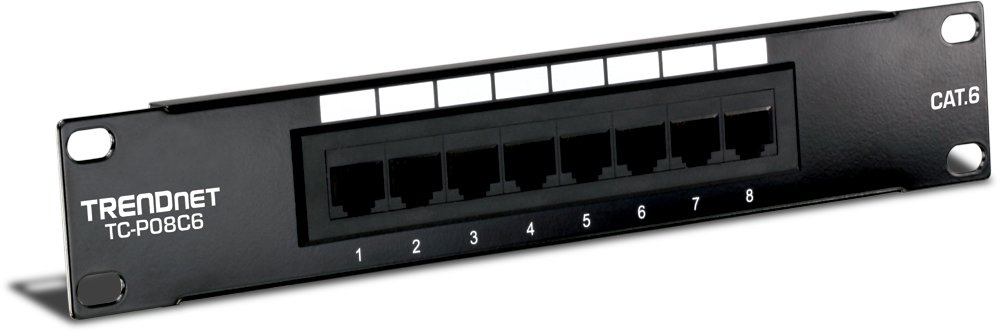
After what bro lancified show me yesterday, i thought it's a good idea to share what I thought would be a good idea for home owners. Instead of just crimping all the cable in the distribution box and connect it to your switch (esp those with cat5e/6 cable), it may be a better to get a simple patch panel and connect each of these to it... something like this
51XcDbDIL3L._SL1000_.jpg


Amazon.com: TRENDnet 8-Port Cat. 6 Unshielded Patch Panel (TC-P08C6): Computers & Accessories

This is nothing new esp to IT folks, but for IT-idiot like me, this is how a company normally do it, then only the ports that you need, you hook it up to a switch. This give the added flexibility if you choose to use a specific port/point in home for traditional land line phone service
 

lancified

Member
Joined
Nov 24, 2000
Messages
408
Reaction score
8
bro kon_sk, now u can start planning the networking requirements of your new place soon. Designate a central area to be your network distribution centre, this place will house your core switch and patch panel. You can either purchase a small equipment rack to house everything. Ask your ID to integrate the rack into the design so that it still looks cool.

Advise you to do everything Cat6 since it's all brand new
 

kon_sk

Member
Joined
Jul 19, 2013
Messages
186
Reaction score
0
bro kon_sk, now u can start planning the networking requirements of your new place soon. Designate a central area to be your network distribution centre, this place will house your core switch and patch panel. You can either purchase a small equipment rack to house everything. Ask your ID to integrate the rack into the design so that it still looks cool.

Advise you to do everything Cat6 since it's all brand new

I actually don't intend to hack to lay new cable since renovation will be kept to bare minimum, unless they give me the crappy 3 pair cable again, then no choice will replace them, otherwise, cat5E with gigabit speed should be good for many more years to come? :s12:

But like you said, must make sure the distribution point do up neatly for ease of future access/expansion as the case maybe!

But what you've share with us here is really invaluable. Wonder why nobody do this more often since it's so easy to upgrade houses that were built in the last 5 years... I mean, with cat5e, just put in patch panel, and owner is free to choose whether to use any specific point for voice or data :s22:
 

lancified

Member
Joined
Nov 24, 2000
Messages
408
Reaction score
8
I actually don't intend to hack to lay new cable since renovation will be kept to bare minimum, unless they give me the crappy 3 pair cable again, then no choice will replace them, otherwise, cat5E with gigabit speed should be good for many more years to come? :s12:

But like you said, must make sure the distribution point do up neatly for ease of future access/expansion as the case maybe!

But what you've share with us here is really invaluable. Wonder why nobody do this more often since it's so easy to upgrade houses that were built in the last 5 years... I mean, with cat5e, just put in patch panel, and owner is free to choose whether to use any specific point for voice or data :s22:

If you are going to hack, better to just use Cat6 since Cat6 is just slightly more expensive than Cat5e. About 10-15% more. if price difference too much then cat5e will do. If you are really going to lay new cables, go with 2 cable per room, 1 keep for spare.
 

zhchiam

Senior Member
Joined
Aug 19, 2000
Messages
537
Reaction score
1
I really regretted not doing Ethernet cabling 1 year ago when renovating my place, thought that wireless will work just fine but it turned out that the walls were solid and wireless signal from living room does not reach any of the rooms.

Now using Aztech Homeplugs - which is sufficient for my 10mbps ADSL, but jumping onto M1 fibre in a week's time. The homeplugs show a red light (poor signal) now but still manages 10mbps, but unlikely to cope with 200mbps in future.

Was quite hesitant to do re-wiring, just happen to chance upon this thread and this converting phone line to ethernet seems rather interesting.

Wondering is it dangerous to DIY (will I get electrocuted), and whether I will cause any electrical damage if I connect any of the wires wrongly? Thanks.
 

Dellboy

Member
Joined
Feb 4, 2002
Messages
239
Reaction score
13
Hi Folks, just to get some advice. My apartment is currently equipped with Cat5 to all rooms as phone lines, would it be wise to split one of such cable to run both network and analog phone? I understand that this can be done but there are others who cautioned the possibility of interference, or worse, equipment damage (in the event of incoming call causing vottage to jump).
 

kon_sk

Member
Joined
Jul 19, 2013
Messages
186
Reaction score
0
I really regretted not doing Ethernet cabling 1 year ago when renovating my place, thought that wireless will work just fine but it turned out that the walls were solid and wireless signal from living room does not reach any of the rooms.

Now using Aztech Homeplugs - which is sufficient for my 10mbps ADSL, but jumping onto M1 fibre in a week's time. The homeplugs show a red light (poor signal) now but still manages 10mbps, but unlikely to cope with 200mbps in future.

Was quite hesitant to do re-wiring, just happen to chance upon this thread and this converting phone line to ethernet seems rather interesting.

Wondering is it dangerous to DIY (will I get electrocuted), and whether I will cause any electrical damage if I connect any of the wires wrongly? Thanks.

As discussed above, you need to first find the "distribution" box of the phone lines, if your home have say 5 phone "points", then inside the distribution box you will find 5 phone cables that lead to each of these 'points' plus 1 or 2 more that are Singtel lines that comes into your phone from 'outside' your home (riser/etc).

Since you're using ADSL, you will have to be really careful since any wrong move you will end up disconnecting your own phone line =:p and consequently your internet connection as well.

All the phone line has no power except the one from Singtel, but i doubt they are enough to shock you.

Next, do you intend to keep the traditional phone line or switch to VOIP as well (normally through the ISP modem/ONT as the case maybe).

These are just some considerations for you to decide on before even starting.

As bro lancified mentioned before, you must have a clear objective of want you want.
 

kon_sk

Member
Joined
Jul 19, 2013
Messages
186
Reaction score
0
Hi Folks, just to get some advice. My apartment is currently equipped with Cat5 to all rooms as phone lines, would it be wise to split one of such cable to run both network and analog phone? I understand that this can be done but there are others who cautioned the possibility of interference, or worse, equipment damage (in the event of incoming call causing vottage to jump).

By Cat 5 i assume you have 3 pair of wire in the cable, 2 pair for Fast Ethernet, 1 pair for phone use (same as what I have now)

If on both end of the cable you wire 2 pair for data and 1 pair for phone, i don't see how you get surge from power since they are "separated".

Maybe it's possible if you wire the data port with 3 pair, and the other end you connect to the PSTN/phone line, then MAYBE you kena

Disclaimer: I don't know anything about such wiring, only "see" how it's done before and know nuts about them... just logically, if they are not "connected" I don't see how they can mess with each other :o

P/S: I have this setup at home myself, just that my phone line is disconnected/not in use as I'm using digital voice which I connect to starhub modem/router directly
 

zhchiam

Senior Member
Joined
Aug 19, 2000
Messages
537
Reaction score
1
As discussed above, you need to first find the "distribution" box of the phone lines, if your home have say 5 phone "points", then inside the distribution box you will find 5 phone cables that lead to each of these 'points' plus 1 or 2 more that are Singtel lines that comes into your phone from 'outside' your home (riser/etc).

Since you're using ADSL, you will have to be really careful since any wrong move you will end up disconnecting your own phone line =:p and consequently your internet connection as well.

All the phone line has no power except the one from Singtel, but i doubt they are enough to shock you.

Next, do you intend to keep the traditional phone line or switch to VOIP as well (normally through the ISP modem/ONT as the case maybe).

These are just some considerations for you to decide on before even starting.

As bro lancified mentioned before, you must have a clear objective of want you want.

Thanks for the reply. I'll first pull out and check my phone cabling whether there are enough cable wires to support fast ethernet (100mbps?).

I am currently using analogue home line (singtel), will be switching to digital line once I get the fibre broadband. Once that is done, I'll try to d/c the phone cabling in the distribution box since it won't be used.

Googled and saw a RJ11 to RJ45 converter -- Would this kind of converter do the job? Anyone tried before?

Telephone RJ11 Male to 8 Pin RJ45 Male Plug Cable 1 7M | eBay
 

zhchiam

Senior Member
Joined
Aug 19, 2000
Messages
537
Reaction score
1
By the way, distribution box is outside our home? i.e. with the power / water meters?
 
Important Forum Advisory Note
This forum is moderated by volunteer moderators who will react only to members' feedback on posts. Moderators are not employees or representatives of HWZ Forums. Forum members and moderators are responsible for their own posts. Please refer to our Community Guidelines and Standards and Terms and Conditions for more information.
Top