HP Enterprise MSR930 Router

Mugen

Master Member
Joined
Jun 2, 2000
Messages
3,461
Reaction score
4
Anyone here using this model for their home broadband?

I bought this thinking it would be an easy setup like any home router but turned out is not. LOL. I guess the Enterprise really meant something. Don't play play. :s13:

I'm no expert in CLI and such so maybe can get fellow HWZ here for help? I'm on M1 1Gbps plan with white Huawei ONT.

I managed to get into the web access with DHCP running and WAN status stated connected but I can't surf the internet. My plan is to use this as a main router and wired switch as well as with 2 POE APs within my home.
 

pegasus21

Senior Member
Joined
Nov 24, 2005
Messages
981
Reaction score
0
Haha... I have a couple of these lying around collecting dust since I use a Cisco based environment.

I decided to power one up and see. Since you managed to get to the Web UI, first follow the basic wizard config steps to set up GigabitEthernet 0/0 as your WAN interface using Auto connect mode for DHCP.

VLAN1 is your intranet subnet. Set whatever subnet you want. Enable DHCP server for your intranet accordingly.

After you apply and save the basic wizard config, add a NAT for GigabitEthernet 0/0 to interface address and your basic router should be usable.

You'll also want to restrict the IPs that can access the management of the router. This is under Advanced, Access sub menu. Probably restrict telnet and web(http) to your intranet subnet.

http://h20628.www2.hp.com/km-ext/kmcsdirect/emr_na-c03026850-1.pdf

BTW, I've just looked at the specs of the router and I wouldn't recommend this as your home router as it only has 300Kpps throughput (64 bytes) which assuming has the same throughput for 1518 bytes results only about 455MBps throughput. For bidirectional traffic it would be halved. There's no mention of whether the throughput is for bridging or routing and whether NAT/access lists are in place so take that figure with a grain of salt.

I expect it is only good for at most 100Mbps lines since it was given with a 30Mbps line.
 
Last edited:

KalTorak

Senior Member
Joined
Nov 27, 2000
Messages
1,579
Reaction score
23
Wow! This router I remember Singtel provision for their E-Lite business fibre plan (10M-100M) many years ago.

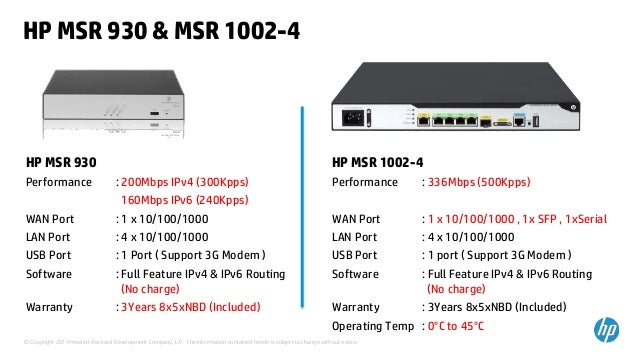
Hmmm, but I doubt you can fully utilize your M1 1Gbps since the WAN-LAN (routing) performance is only around 200Mbps? I hope you didn't actually buy this router. What PoE APs are you using?


hp-next-gen-msr-series-routers-technical-training-21-jan15-8-638.jpg


Sent from Xiaomi MI MAX using GAGT
 

Mugen

Master Member
Joined
Jun 2, 2000
Messages
3,461
Reaction score
4
Haha... I have a couple of these lying around collecting dust since I use a Cisco based environment.

I decided to power one up and see. Since you managed to get to the Web UI, first follow the basic wizard config steps to set up GigabitEthernet 0/0 as your WAN interface using Auto connect mode for DHCP.

VLAN1 is your intranet subnet. Set whatever subnet you want. Enable DHCP server for your intranet accordingly.

After you apply and save the basic wizard config, add a NAT for GigabitEthernet 0/0 to interface address and your basic router should be usable.

You'll also want to restrict the IPs that can access the management of the router. This is under Advanced, Access sub menu. Probably restrict telnet and web(http) to your intranet subnet.

http://h20628.www2.hp.com/km-ext/kmcsdirect/emr_na-c03026850-1.pdf

BTW, I've just looked at the specs of the router and I wouldn't recommend this as your home router as it only has 300Kpps throughput (64 bytes) which assuming has the same throughput for 1518 bytes results only about 455Mbps throughput. For bidirectional traffic it would be halved. There's no mention of whether the throughput is for bridging or routing and whether NAT/access lists are in place so take that figure with a grain of salt.

I expect it is only good for at most 100Mbps lines since it was given with a 30Mbps line.

Ah, I didn't add the NAT. No wonder. Will try that. Thanks.
 

Mugen

Master Member
Joined
Jun 2, 2000
Messages
3,461
Reaction score
4
Wow! This router I remember Singtel provision for their E-Lite business fibre plan (10M-100M) many years ago.

Hmmm, but I doubt you can fully utilize your M1 1Gbps since the WAN-LAN (routing) performance is only around 200Mbps? I hope you didn't actually buy this router. What PoE APs are you using?


hp-next-gen-msr-series-routers-technical-training-21-jan15-8-638.jpg


Sent from Xiaomi MI MAX using GAGT

I bought it quite cheap actually. The reason why is I intend to use it with POE APs which I have not buy any of AP yet. :)
 

KalTorak

Senior Member
Joined
Nov 27, 2000
Messages
1,579
Reaction score
23
I bought it quite cheap actually. The reason why is I intend to use it with POE APs which I have not buy any of AP yet. :)

What APs are you looking to get?

If you are getting Ubiquiti UniFi APs can also consider their EdgeRouter PoE (ERPoE-5). I'm using this to power 2x UAP-AC-LR. Confirm can fully utilize 1Gbps fibre plan!

Sent from Xiaomi MI MAX using GAGT
 

ArcticCheetah

Banned
Joined
Apr 16, 2009
Messages
35,920
Reaction score
2,040
1Gbit/s = 1000Mbit/s = 125Mbytes/s
Assume 1500bytes MTU
125/1500=0.08Mpps
0.08*1000=83Kpps
350Kpps not enough?
Vendor publish specs with low MTU to show the PPS calculation no point showing 1500MTU because defintely higher than physical PHY
 
Last edited:

KalTorak

Senior Member
Joined
Nov 27, 2000
Messages
1,579
Reaction score
23
1Gbit/s = 1000Mbit/s = 125Mbytes/s
Assume 1500bytes MTU
125/1500=0.08Mpps
0.08*1000=83Kpps
350Kpps not enough?
Vendor publish specs with low MTU to show the PPS calculation no point showing 1500MTU because defintely higher than physical PHY

Yeah, my bad. Sorry!

TS should try setting up NAT first to see if LAN clients can access to Internet.

Sent from Xiaomi MI MAX using GAGT
 

pegasus21

Senior Member
Joined
Nov 24, 2005
Messages
981
Reaction score
0
1Gbit/s = 1000Mbit/s = 125Mbytes/s
Assume 1500bytes MTU
125/1500=0.08Mpps
0.08*1000=83Kpps
350Kpps not enough?
Vendor publish specs with low MTU to show the PPS calculation no point showing 1500MTU because defintely higher than physical PHY

The issue is that the spec sheet never stated how the 300kpps is achieved. If it is just bridging, routing or switched without any advanced features like NAT, access list or queues, the figure is going to be on the very optimistic side and not going to reflect real world performance when used as an internet gateway router.

Based on the Image in the earlier post, it looks like it is only good for up to 200Mbps performance.
 

liangtam

High Supremacy Member
Joined
Aug 20, 2002
Messages
38,845
Reaction score
188
Some sample config w/ NAT for you

interface GigabitEthernet0/0
port link-mode route
nat outbound 2000
ip address dhcp-alloc
#
interface Vlan-interface1
ip address 192.168.1.1 255.255.255.0
dhcp server apply ip-pool vlan1
#
dhcp server ip-pool vlan1 extended
network ip range 192.168.1.2 192.168.1.254
network mask 255.255.255.0
gateway-list 192.168.1.1
dns-list 192.168.1.1

#
acl number 2000
rule 0 permit source 192.168.1.0 0.0.0.255
 

Mugen

Master Member
Joined
Jun 2, 2000
Messages
3,461
Reaction score
4
Thanks to all for the support. I managed to get it work by just doing it from the web access. I just do the NAT configuration on GigabitEthernet0/0 with Interface Address and viola!

Speed wise I compared with my Asus AC66U is still slower but in real usage, I don't see any slowness at all. In fact, I felt much more responsive and smooth!

I'm using my old AC66U as an AP mode for now. Will do more research on what POE AP to use. :)
 

Mugen

Master Member
Joined
Jun 2, 2000
Messages
3,461
Reaction score
4
Some sample config w/ NAT for you

interface GigabitEthernet0/0
port link-mode route
nat outbound 2000
ip address dhcp-alloc
#
interface Vlan-interface1
ip address 192.168.1.1 255.255.255.0
dhcp server apply ip-pool vlan1
#
dhcp server ip-pool vlan1 extended
network ip range 192.168.1.2 192.168.1.254
network mask 255.255.255.0
gateway-list 192.168.1.1
dns-list 192.168.1.1

#
acl number 2000
rule 0 permit source 192.168.1.0 0.0.0.255

"nat outbound 2000" and "acl number 2000", may I know what is this means?

Is this something that can improve the connection? Thanks
 

pegasus21

Senior Member
Joined
Nov 24, 2005
Messages
981
Reaction score
0
The 2000 only designates an ACL or access list to limit what IP addresses to operate on. In this case which IPs will be NAT.
 

roidred

Member
Joined
Sep 23, 2016
Messages
172
Reaction score
30
IPV6 Configuration MSR 954

Anyone was able to propagate the prefix /64 received from ISP on WAN port to LAN ports ?
I am receiving valid IPV6 on WAN port but not able to use the prefix on LAN ports. Any idea on configuration.
 
Important Forum Advisory Note
This forum is moderated by volunteer moderators who will react only to members' feedback on posts. Moderators are not employees or representatives of HWZ. Forum members and moderators are responsible for their own posts.

Please refer to our Community Guidelines and Standards, Terms of Service and Member T&Cs for more information.
Top