HTPC set up

FatalityV

Arch-Supremacy Member
Joined
Aug 8, 2009
Messages
24,921
Reaction score
10
I'm tryiong to do my first HTPC this time round, mainly to play videos from my ehd, in mp4, mkv format primarly (1080p and 720p).

First time building it so not very sure about what build I should go for. Any recommendations for parts? as cheap as possible :)
 

coyote

Greater Supremacy Member
Joined
Sep 20, 2000
Messages
82,610
Reaction score
27,495
AsRock B75 ITX + I3 3220, Cooler Master Elite 120 Advanced ITX chassis + FSP Hexa 500W psu + 4G Kingston value ram + 500G WD Blue harddisk. Prolink Wireless Laser mouse + keyboard. No monitor. Output straight to your 42" & above Full HD TV(anything smaller than 42", texts are too small to read from Sofa).
 
Last edited:

saysuzu

High Supremacy Member
Joined
Oct 31, 2007
Messages
27,562
Reaction score
2
just want to be off topic a bit:
why don't you want to buy a media player instead? nowadays the media player can play a lot of formats

relax, not a discouragement towards you building a HTPC, just want to seek your opinino
 

FatalityV

Arch-Supremacy Member
Joined
Aug 8, 2009
Messages
24,921
Reaction score
10
just want to be off topic a bit:
why don't you want to buy a media player instead? nowadays the media player can play a lot of formats

relax, not a discouragement towards you building a HTPC, just want to seek your opinino

I heard that even though media players are convenient and can play quite a variety of formats, sometimes the soft subs are not in sync, and/or the audio tends to be not in sync since I will be watching TV shows (korean) released by different release groups which encode their shows differently. I'm afraid that some of the encodes might encounter issues with the media player :/ that's why I'm opting for a HTPC instead.

Do I have to go for a i3 processor? would the budget intel processor be sufficient? the pentium g860 for example
 

koicafex

Great Supremacy Member
Joined
Jul 6, 2011
Messages
50,978
Reaction score
4
nvr encounter any prob after using my media player for 2yrs lo :s34:
 

coyote

Greater Supremacy Member
Joined
Sep 20, 2000
Messages
82,610
Reaction score
27,495
Lol, since you said you dont know korean, so if the voice is not sync well with the sub, you probably cant tell much unless its totally out of sync. Pc and mediaplayer slight different.
 

coyote

Greater Supremacy Member
Joined
Sep 20, 2000
Messages
82,610
Reaction score
27,495
I recommend i3 because the hardware accelaration of full hd content, whether in flash or html5 is not fully compatible across the board, sadly. In such situation, a powerful i3 will decode and playback with raw cpu power effortlessly.

Same goes to mediaplayer. And like ts said, the codec changes always, no one player can guarantee firmware upgrade always... Except the few like himedia, or may be the new kid on the block, minix.
 
Last edited:

Shutterbox

Greater Supremacy Member
Joined
Nov 23, 2008
Messages
82,898
Reaction score
21,346
Processors like g2010 can use for hoc? If can, what r th
 

Shutterbox

Greater Supremacy Member
Joined
Nov 23, 2008
Messages
82,898
Reaction score
21,346
Processors like g2010 can use for htpc full hd bluray viewing? If can, what r the constraints ?
 

coyote

Greater Supremacy Member
Joined
Sep 20, 2000
Messages
82,610
Reaction score
27,495
Seemed like people does not understand what I meant.

If you have the proper codec & media player installed to enabled the hardware accelerated playback of 1080p video file by the Intel HD2500 gpu, even a slow processor can handle that.

There are instances, for eg, a Full HD video embedded in youtube, you cannot choose which media player to play back, and if your browser + codec + other things isn't fully compatible to enable gpu hardware accelerated playback, it will fall back to the cpu to do the software decoding of the youtube video. If the cpu is too slow, it will not work.

So, getting a i3 is fail safe. Slower cpu than i3 may work in certain situations & may not work in certain situations, you have to try your luck.


I recommend i3 because the hardware accelaration of full hd content, whether in flash or html5 is not fully compatible across the board, sadly. In such situation, a powerful i3 will decode and playback with raw cpu power effortlessly.

Same goes to mediaplayer. And like ts said, the codec changes always, no one player can guarantee firmware upgrade always... Except the few like himedia, or may be the new kid on the block, minix.
 

antsig30

Member
Joined
Jan 6, 2002
Messages
493
Reaction score
37
Hi,

If I got a old MCE remote control. How do I make it work example for controlling XBMC using the recommended hardware. What extra stuff do I need to get?
 

t258jgn

High Supremacy Member
Joined
Oct 11, 2008
Messages
45,249
Reaction score
736
Can use EventGhost software


Hi,

If I got a old MCE remote control. How do I make it work example for controlling XBMC using the recommended hardware. What extra stuff do I need to get?
 

MoneyFace =p

High Supremacy Member
Joined
Dec 17, 2010
Messages
35,374
Reaction score
401
Seemed like people does not understand what I meant.

If you have the proper codec & media player installed to enabled the hardware accelerated playback of 1080p video file by the Intel HD2500 gpu, even a slow processor can handle that.

There are instances, for eg, a Full HD video embedded in youtube, you cannot choose which media player to play back, and if your browser + codec + other things isn't fully compatible to enable gpu hardware accelerated playback, it will fall back to the cpu to do the software decoding of the youtube video. If the cpu is too slow, it will not work.

So, getting a i3 is fail safe. Slower cpu than i3 may work in certain situations & may not work in certain situations, you have to try your luck.

Even if hardware acceleration doesn't work Intel desktop processors these days are powerful enough to handle the software decoding workload. Also, a cheap, passive running, lowest end recent gen graphics card + Celeron (which is also cheaper) will do the job just as fine so i don't see the need to spend much more on a Core i3 just to get the full hardware acceleration support. As far as i don't see TS selecting a chassis without expansion card support.
 

t258jgn

High Supremacy Member
Joined
Oct 11, 2008
Messages
45,249
Reaction score
736
err...how does the HTPC read the control from MCE remote? Does the motherboard already has the necessary hardware?

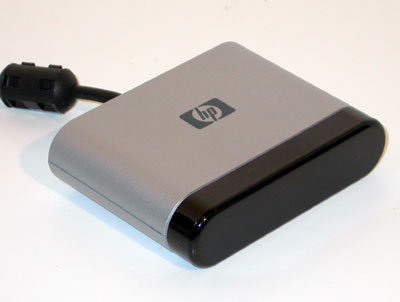
You have the USB IR Receiver?

If not, go eBay buy HP USB MCE IR Wireless Receiver.
Can also use with Logitech Harmony

receiver.jpg
 

coyote

Greater Supremacy Member
Joined
Sep 20, 2000
Messages
82,610
Reaction score
27,495
Even if hardware acceleration doesn't work Intel desktop processors these days are powerful enough to handle the software decoding workload. Also, a cheap, passive running, lowest end recent gen graphics card + Celeron (which is also cheaper) will do the job just as fine so i don't see the need to spend much more on a Core i3 just to get the full hardware acceleration support. As far as i don't see TS selecting a chassis without expansion card support.

Even the slowest celeron today can do software decoding? Probably it is. But Up till which one? I wont know.
 

quekky

Arch-Supremacy Member
Joined
Nov 12, 2000
Messages
18,440
Reaction score
0
the Celeron 847 may not be fast enough
found someone cpu at ard 80% playing only 720p. don't think it can play 1080p smoothly

the i3 3220 should be able to, but may not be able to use the best upscale
my i5 sometimes will lag when i on anti-ringing

also unknown is whether any of them can play h265
 
Important Forum Advisory Note
This forum is moderated by volunteer moderators who will react only to members' feedback on posts. Moderators are not employees or representatives of HWZ Forums. Forum members and moderators are responsible for their own posts. Please refer to our Community Guidelines and Standards and Terms and Conditions for more information.
Top