IBM ThinkPad Users' Group

OKK77

Arch-Supremacy Member
Joined
Apr 25, 2001
Messages
14,469
Reaction score
0
hmm i think my thinkpad t410 fingerprint reader gg... Should I rma it? Honestly, I don't miss the fingerprint reader

T420 should be less than 2 years old. If you have 3-year warranty, just get it replaced! Service centre is fast enough. :D
 

OKK77

Arch-Supremacy Member
Joined
Apr 25, 2001
Messages
14,469
Reaction score
0
It is not going to be cheap, especially from Lenovo directly. Unless the laptop is still under warrantty, which I assume it isn't.

It is more economical to get a refurbished HSF instead, either from Ebay or from those 2nd hand laptop repair stores at SLS.

Just my opinion! But good luck on your search. I know, cuz I have been there! :)

Some shops in SLS should have it. Do bring your original fan down as there is 2 types of fan for T61.

Thanks, bros. Got a direct quotation from Lenovo.

42X4685 for S$122 and labour charges at S$75. I guess I'll go ahead with it just to extend the life for another year or so.
 

baseline

Arch-Supremacy Member
Joined
Apr 5, 2008
Messages
10,548
Reaction score
9
anyone knows which type of ssd is suitable for x220? the size 7mm ssd.. crucial m4, samsung 830, sandisk extreme.

and any video or steps/settings to show how to install the OS or recovery into the new ssd?
 

miltongoh

Master Member
Joined
Sep 20, 2004
Messages
3,859
Reaction score
0
anyone knows which type of ssd is suitable for x220? the size 7mm ssd.. crucial m4, samsung 830, sandisk extreme.

and any video or steps/settings to show how to install the OS or recovery into the new ssd?

I am using T420 so I can't help you for the SSD for X220, I presume is the same.

As for the OS, what I did was to download the ISO for the respective OS (Windows 7 Professional, for me. I think yours too.)

Then just do a fresh installation. You got the CD key at the bottom of your laptop, should be at your battery portion or just find. Then use the key to activate your laptop. :)
 

stupidU

Member
Joined
Feb 5, 2006
Messages
255
Reaction score
0
T410s

Hi All,

anyone know roughly how much does it cost to replace the lcd screen?

my screen start to appear those colourful lines. which i have to knock or press the front cover to disappear the lines
 

Quest

Supremacy Member
Joined
Jan 1, 2000
Messages
6,587
Reaction score
14
anyone knows which type of ssd is suitable for x220? the size 7mm ssd.. crucial m4, samsung 830, sandisk extreme.

and any video or steps/settings to show how to install the OS or recovery into the new ssd?

i using kingston msata 64gb ssd on my x220...pretty gd :s12:
 

cscs3

Arch-Supremacy Member
Joined
Jun 4, 2000
Messages
21,732
Reaction score
133
Hi All,

anyone know roughly how much does it cost to replace the lcd screen?

my screen start to appear those colourful lines. which i have to knock or press the front cover to disappear the lines

Has a bad T61 and be;ieve screen is same part as T410 if yours is standard 1366 resolution. If interested, please pm me.
 

ginseng1

Master Member
Joined
Jan 20, 2002
Messages
3,048
Reaction score
0
i using kingston msata 64gb ssd on my x220...pretty gd :s12:

How dows the msata ssd work?

Used alone or together with a spinning hard disk?

If used together with a spinning HDD, where is the OS installed?

Or should I just go for a 2.5inch SSD since prices have dropped alot?

Thanks.
 

lemonn

High Supremacy Member
Joined
Jul 14, 2007
Messages
32,648
Reaction score
1
anyone knows which type of ssd is suitable for x220? the size 7mm ssd.. crucial m4, samsung 830, sandisk extreme.

and any video or steps/settings to show how to install the OS or recovery into the new ssd?

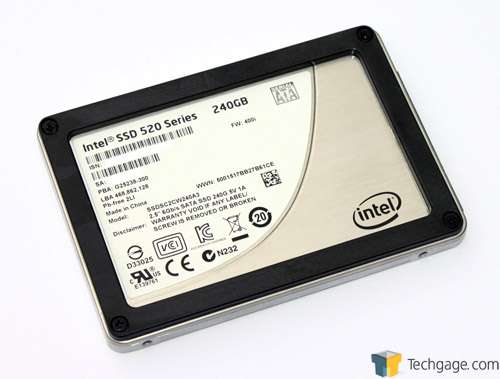
You can consider the intel 330 or 520, but you got to remove the bracket (black in picture below)

intel_520_ssd_01_thumb.jpg


You can use the recovery dvds if you created when you first purchased the laptop to recovery a fresh install of the os with recovery partition intact, or otherwise you will need to use software to clone over your current drive to the ssd.

Hope that helps ;)

I am using T420 so I can't help you for the SSD for X220, I presume is the same.

As for the OS, what I did was to download the ISO for the respective OS (Windows 7 Professional, for me. I think yours too.)

Then just do a fresh installation. You got the CD key at the bottom of your laptop, should be at your battery portion or just find. Then use the key to activate your laptop. :)

Nope it's not the same. The x220 and x230 uses slim 7mm 2.5" drives instead of the regular height 9mm ones. :)
 
Last edited:

lemonn

High Supremacy Member
Joined
Jul 14, 2007
Messages
32,648
Reaction score
1
How dows the msata ssd work?

Used alone or together with a spinning hard disk?

If used together with a spinning HDD, where is the OS installed?

Or should I just go for a 2.5inch SSD since prices have dropped alot?

Thanks.
There's 2 kinds, a cache drive and ssd.

Msata SSDs will be just like your normal SSDs and will appear as a drive under my computer (bootable).

Cache drives uses RAID to improve performance of your mechanical hdd. However i don't think lenovo enabled the caching/RAID feature for their msata port. The QM67 theoretically supports this feature though.
 

shawniiex

Arch-Supremacy Member
Joined
Mar 29, 2011
Messages
10,586
Reaction score
156
There's 2 kinds, a cache drive and ssd.

Msata SSDs will be just like your normal SSDs and will appear as a drive under my computer (bootable).

Cache drives uses RAID to improve performance of your mechanical hdd. However i don't think lenovo enabled the caching/RAID feature for their msata port. The QM67 theoretically supports this feature though.

just went to mydigitaldiscount site and found out that the old msata 50mm drives have been discontinued and replaced by two alternatives, one sandforce and one called bp3?

MyDigitalSSD 64GB SandForce SATA III Smart Series mSATA SSD | My Digital Discount

MyDigitalSSD 64GB 50mm BP3 Bullet Proof 3 mSATA 6G SSD | My Digital Discount

Two questions.
I can't remember, but are these the right msata drives compatible with my x220? And which one would be better stability?
 

lemonn

High Supremacy Member
Joined
Jul 14, 2007
Messages
32,648
Reaction score
1
just went to mydigitaldiscount site and found out that the old msata 50mm drives have been discontinued and replaced by two alternatives, one sandforce and one called bp3?

MyDigitalSSD 64GB SandForce SATA III Smart Series mSATA SSD | My Digital Discount

MyDigitalSSD 64GB 50mm BP3 Bullet Proof 3 mSATA 6G SSD | My Digital Discount

Two questions.
I can't remember, but are these the right msata drives compatible with my x220? And which one would be better stability?
It should work. But considering other brands? Can be cheaper by quite abit.
 

Quest

Supremacy Member
Joined
Jan 1, 2000
Messages
6,587
Reaction score
14
msata works just like a regular hhd, it is placed in the moderm slot...so if you have are using 3G, you can't add a msata ssd:s12:


How dows the msata ssd work?

Used alone or together with a spinning hard disk?

If used together with a spinning HDD, where is the OS installed?

Or should I just go for a 2.5inch SSD since prices have dropped alot?

Thanks.
 

shawniiex

Arch-Supremacy Member
Joined
Mar 29, 2011
Messages
10,586
Reaction score
156
msata works just like a regular hhd, it is placed in the moderm slot...so if you have are using 3G, you can't add a msata ssd:s12:

yeah that much i know. kinda hard to open up my thinkpad to place the msata in though, any video guide?

It should work. But considering other brands? Can be cheaper by quite abit.

hmm? any other brands? reliability?
 

ginseng1

Master Member
Joined
Jan 20, 2002
Messages
3,048
Reaction score
0
Thanks for the replies. I will be using my Crucial M4 256gb SSD. Lucky I ordered the 7mm size.
 

baseline

Arch-Supremacy Member
Joined
Apr 5, 2008
Messages
10,548
Reaction score
9
You can consider the intel 330 or 520, but you got to remove the bracket (black in picture below)

intel_520_ssd_01_thumb.jpg


You can use the recovery dvds if you created when you first purchased the laptop to recovery a fresh install of the os with recovery partition intact, or otherwise you will need to use software to clone over your current drive to the ssd.

Hope that helps ;)

I have the OS Recovery Disc and application and drivers recovery disc provided from x220. is that ok?
i ordered samsung 830 ssd..
 

Azrielsc

Senior Member
Joined
Feb 4, 2004
Messages
1,786
Reaction score
19
I have the OS Recovery Disc and application and drivers recovery disc provided from x220. is that ok?
i ordered samsung 830 ssd..

Yup, having the Factory recovery discs are fine. Used that to set up my mSATA SSD. Once that was done, I wiped the HDD and used it as secondary storage.
 

Azrielsc

Senior Member
Joined
Feb 4, 2004
Messages
1,786
Reaction score
19
Received a X230 today...

And I really miss the page back and forward keys that are on my X220. They replaced them with the PgUp and PgDn keys. :( The Esc & Delete keys have now strunk and the Fn keys are now the same colour as the rest of the key icons. The blue Enter icon is now back to black.

The island keys are NOT that bad as I thought but definitey not as good as the traditional keyboard, IMO.
 

baseline

Arch-Supremacy Member
Joined
Apr 5, 2008
Messages
10,548
Reaction score
9
Yup, having the Factory recovery discs are fine. Used that to set up my mSATA SSD. Once that was done, I wiped the HDD and used it as secondary storage.
So u modify the x220 to fit the ssd and hdd? How to do that?
 

ahtea

Arch-Supremacy Member
Joined
Dec 18, 2002
Messages
17,384
Reaction score
270
So u modify the x220 to fit the ssd and hdd? How to do that?
There is an additional PCI Express slot inside the X220 for you to install the mSATA SSD and use it along with your HDD.

After installing, you will need to customize the BIOS to make the mSATA as your boot disk.

This is provided you do not have the optional mobile broadband option customized for your X220.
 
Important Forum Advisory Note
This forum is moderated by volunteer moderators who will react only to members' feedback on posts. Moderators are not employees or representatives of HWZ Forums. Forum members and moderators are responsible for their own posts. Please refer to our Community Guidelines and Standards and Terms and Conditions for more information.
Top