Industrial Challenge - The Maze Runner

davidktw

Arch-Supremacy Member
Joined
Apr 15, 2010
Messages
13,550
Reaction score
1,302
Given the following architecture scenario
  • You have a remote linux system (R), that is located remotely within a private network where the linux firewall only allows SSH connection to be established to it from your personal linux system (L). The firewall governing the remote system (R) will not allow any outgoing connection established from the server itself to anywhere else.
  • Your personal linux system (L) in office has Internet access to anywhere. You can remotely access the remote system (R) via SSH.
Here is the Linux IPTables listing for your reference and usage in system (R) for you to simulate such a locked down environment. You can use them on a virtual machine you setup if required.
Code:
$ sudo iptables -nvL
Chain INPUT (policy DROP 2 packets, 712 bytes)
 pkts bytes target     prot opt in     out     source               destination
  280 25910 ACCEPT     tcp  --  *      *       0.0.0.0/0            0.0.0.0/0            state NEW,ESTABLISHED tcp dpt:22
    2   115 ACCEPT     all  --  lo     *       0.0.0.0/0            0.0.0.0/0

Chain FORWARD (policy DROP 0 packets, 0 bytes)
 pkts bytes target     prot opt in     out     source               destination

Chain OUTPUT (policy DROP 24 packets, 1776 bytes)
 pkts bytes target     prot opt in     out     source               destination
  164 22518 ACCEPT     tcp  --  *      *       0.0.0.0/0            0.0.0.0/0            state ESTABLISHED tcp
    2   115 ACCEPT     all  --  *      lo      0.0.0.0/0            0.0.0.0/0

Describe how you can connect from system(L) via ssh remotely over the Internet to system(R) and execute curl commands in system (R) to retrieve webpage contents at urls 'https://www.google.com', 'https://www.yahoo.com', and 'https://www.bing.com/' respectively, and save them on files in system (R).
Produce the *EXACT* CLI commands of doing so.
You can assume you are made available to the latest openssh and curl utilities.
No other tools other than the bash, openssh and curl are available to you.

Below is sample output for your consideration which does not save to file, but display the HTTP response headers on screen.
Code:
$ ssh ... user@remote_server
Welcome to ...

...

Last login: ...

$ curl -I ... 'https://www.google.com'
HTTP/2 200
content-type: text/html; charset=ISO-8859-1
cross-origin-opener-policy-report-only: same-origin-allow-popups; report-to="gws"
report-to: {"group":"gws","max_age":2592000,"endpoints":[{"url":"https://csp.withgoogle.com/csp/report-to/gws/other"}]}
p3p: CP="This is not a P3P policy! See g.co/p3phelp for more info."
date: Tue, 27 Dec 2022 22:31:32 GMT
server: gws
x-xss-protection: 0
x-frame-options: SAMEORIGIN
expires: Tue, 27 Dec 2022 22:31:32 GMT
cache-control: private
set-cookie: 1P_JAR=2022-12-27-22; expires=Thu, 26-Jan-2023 22:31:32 GMT; path=/; domain=.google.com; Secure
set-cookie: AEC=AakniGOowkox6z-fsyi4MwiwwzxbW9k4Oq19ivKAfUjCNy4fZh_gcdLrow; expires=Sun, 25-Jun-2023 22:31:32 GMT; path=/; domain=.google.com; Secure; HttpOnly; SameSite=lax
set-cookie: NID=511=As_zU8imjFIzMhe_Rm1L_A2fl-DONxMgt49arEt-yGgG3iyHXXfk-2w-f5foiT7DwDT9RdRwJKw92nlyfxT7htzX2zDDpWKApEYMJTcRBVj7rWJ1PSVo440hac8hpJphLdUYH2I0n1mF8E_AAm-PlvDxKE1Rs5IHBnHfaehgOpE; expires=Wed, 28-Jun-2023 22:31:32 GMT; path=/; domain=.google.com; HttpOnly
alt-svc: h3=":443"; ma=2592000,h3-29=":443"; ma=2592000,h3-Q050=":443"; ma=2592000,h3-Q046=":443"; ma=2592000,h3-Q043=":443"; ma=2592000,quic=":443"; ma=2592000; v="46,43"

This time round the challenge is not about programming languages but on networking concepts and your understanding on your tools.
This is also an industrial use case that is useful even today.
Feeling up to it ?
:)
 
Last edited:

davidktw

Arch-Supremacy Member
Joined
Apr 15, 2010
Messages
13,550
Reaction score
1,302
No challenger? Nowadays SWEs need the network firewall to be wide open to use the system?

:)
 

davidktw

Arch-Supremacy Member
Joined
Apr 15, 2010
Messages
13,550
Reaction score
1,302
Given the following architecture scenario
  • You have a remote linux system (R), that is located remotely within a private network where the linux firewall only allows SSH connection to be established to it from your personal linux system (L). The firewall governing the remote system (R) will not allow any outgoing connection established from the server itself to anywhere else.
  • Your personal linux system (L) in office has Internet access to anywhere. You can remotely access the remote system (R) via SSH.
Here is the Linux IPTables listing for your reference and usage in system (R) for you to simulate such a locked down environment. You can use them on a virtual machine you setup if required.
Code:
$ sudo iptables -nvL
Chain INPUT (policy DROP 2 packets, 712 bytes)
 pkts bytes target     prot opt in     out     source               destination
  280 25910 ACCEPT     tcp  --  *      *       0.0.0.0/0            0.0.0.0/0            state NEW,ESTABLISHED tcp dpt:22
    2   115 ACCEPT     all  --  lo     *       0.0.0.0/0            0.0.0.0/0

Chain FORWARD (policy DROP 0 packets, 0 bytes)
 pkts bytes target     prot opt in     out     source               destination

Chain OUTPUT (policy DROP 24 packets, 1776 bytes)
 pkts bytes target     prot opt in     out     source               destination
  164 22518 ACCEPT     tcp  --  *      *       0.0.0.0/0            0.0.0.0/0            state ESTABLISHED tcp
    2   115 ACCEPT     all  --  *      lo      0.0.0.0/0            0.0.0.0/0

Describe how you can connect from system(L) via ssh remotely over the Internet to system(R) and execute curl commands in system (R) to retrieve webpage contents at urls 'https://www.google.com', 'https://www.yahoo.com', and 'https://www.bing.com/' respectively, and save them on files in system (R).
Produce the *EXACT* CLI commands of doing so.
You can assume you are made available to the latest openssh and curl utilities.
No other tools other than the bash, openssh and curl are available to you.

Below is sample output for your consideration which does not save to file, but display the HTTP response headers on screen.
Code:
$ ssh ... user@remote_server
Welcome to ...

...

Last login: ...

$ curl -I ... 'https://www.google.com'
HTTP/2 200
content-type: text/html; charset=ISO-8859-1
cross-origin-opener-policy-report-only: same-origin-allow-popups; report-to="gws"
report-to: {"group":"gws","max_age":2592000,"endpoints":[{"url":"https://csp.withgoogle.com/csp/report-to/gws/other"}]}
p3p: CP="This is not a P3P policy! See g.co/p3phelp for more info."
date: Tue, 27 Dec 2022 22:31:32 GMT
server: gws
x-xss-protection: 0
x-frame-options: SAMEORIGIN
expires: Tue, 27 Dec 2022 22:31:32 GMT
cache-control: private
set-cookie: 1P_JAR=2022-12-27-22; expires=Thu, 26-Jan-2023 22:31:32 GMT; path=/; domain=.google.com; Secure
set-cookie: AEC=AakniGOowkox6z-fsyi4MwiwwzxbW9k4Oq19ivKAfUjCNy4fZh_gcdLrow; expires=Sun, 25-Jun-2023 22:31:32 GMT; path=/; domain=.google.com; Secure; HttpOnly; SameSite=lax
set-cookie: NID=511=As_zU8imjFIzMhe_Rm1L_A2fl-DONxMgt49arEt-yGgG3iyHXXfk-2w-f5foiT7DwDT9RdRwJKw92nlyfxT7htzX2zDDpWKApEYMJTcRBVj7rWJ1PSVo440hac8hpJphLdUYH2I0n1mF8E_AAm-PlvDxKE1Rs5IHBnHfaehgOpE; expires=Wed, 28-Jun-2023 22:31:32 GMT; path=/; domain=.google.com; HttpOnly
alt-svc: h3=":443"; ma=2592000,h3-29=":443"; ma=2592000,h3-Q050=":443"; ma=2592000,h3-Q046=":443"; ma=2592000,h3-Q043=":443"; ma=2592000,quic=":443"; ma=2592000; v="46,43"

This time round the challenge is not about programming languages but on networking concepts and your understanding on your tools.
This is also an industrial use case that is useful even today.
Feeling up to it ?
:)

Well well, seems like we don't have engineers whom know the solution or those that knows didn't take up the challenge. I really hope it is the latter for this is a very simple technique if you know OpenSSH and curl well.

It is simple as such

From system (L),
ssh -R 10080 user@remote_server_L

In system (R),
curl -x socks5h://localhost:10080 -o google.html 'https://www.google.com'

Key points to take away. NEW outgoing connections are all blocked, the remote system (R) wouldn't even be able to resolve the domain names, hence it can only be performed by system (L) which as total Internet access which obviously include access to a domain name system. (DNS). Both socks5-hostname and socks4a will forward the resolution of DN to the socks proxy. OpenSSH has a builtin SOCKS4/5 proxy at your disposal. You don't need to employ a HTTP proxy server at all to achieve this challenge.

Simply to say if you are not aware of this technique, it wouldn't be too versatile for you to navigate in highly secured environments.
Hope you learn something.

There is a part 2, but seriously I doubt it will make sense to put up if part 1 already seems like unachievable. Anyone can feel free to let me know part 2 if you are keen, otherwise we can give it a rest.
:)
 

peterchan75

Supremacy Member
Joined
Apr 26, 2003
Messages
6,754
Reaction score
533
Why not you try ? As long as the solution can work. Looking forward to it. :)
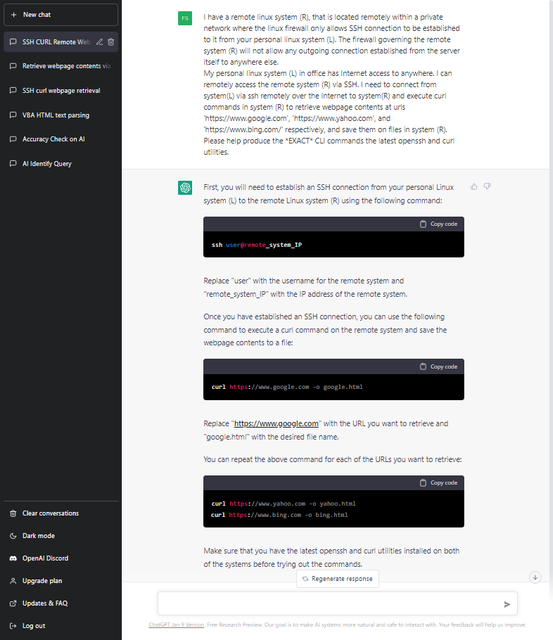
I try with chatGPT and here is the response.

chat-openai-com-chat.png
 

davidktw

Arch-Supremacy Member
Joined
Apr 15, 2010
Messages
13,550
Reaction score
1,302
I need to install the Windows Sub-system for Linux 2. :oops:

The ChatGPT solution is just simplistic executing command via a SSH session. There is nothing special about it.

It wouldn’t solve the challenge I set.
Read my solution properly.
:)
 
Important Forum Advisory Note
This forum is moderated by volunteer moderators who will react only to members' feedback on posts. Moderators are not employees or representatives of HWZ Forums. Forum members and moderators are responsible for their own posts. Please refer to our Community Guidelines and Standards and Terms and Conditions for more information.
Top