
When I take photo, during focusing the object looks very crisp and clear in my phone screen... but once I take photo the end result was not good as seen during focusing. I’ve tried many shots, still I feel the same.. Anyone feeling it or experiencing this problem...? Thanks.
You are using an out of date browser. It may not display this or other websites correctly.
You should upgrade or use an alternative browser.
You should upgrade or use an alternative browser.
iPhone X camera issue...
- Thread starter JavaTube
- Start date
More options
Who Replied?

PongRareRare
Senior Member
- Joined
- Oct 25, 2008
- Messages
- 2,047
- Reaction score
- 92
Just a wild guess, could it be the camera setting, high efficiency vs most compatible?
When I take photo, during focusing the object looks very crisp and clear in my phone screen... but once I take photo the end result was not good as seen during focusing. I’ve tried many shots, still I feel the same.. Anyone feeling it or experiencing this problem...? Thanks.
There seems to be this feature that when you are browsing photo to photo, the pictures are not as sharp as they are. (I'm guessing it is for quick loading)
But when you pinch to zoom in a bit - the photo will be full resolution.
Hope that helps.

TrueBeliever_jh
Honorary Member
- Joined
- Jun 8, 2006
- Messages
- 112,649
- Reaction score
- 4,415
if the photo is a live photo. it will be marked as "live" top left corner
go edit, you can choose the key frame from there.
go edit, you can choose the key frame from there.

discoburg
Supremacy Member
- Joined
- Oct 13, 2001
- Messages
- 7,762
- Reaction score
- 584
How to set to make the iPhone not taken a live photo?
if the photo is a live photo. it will be marked as "live" top left corner
go edit, you can choose the key frame from there.
TrueBeliever_jh
Honorary Member
- Joined
- Jun 8, 2006
- Messages
- 112,649
- Reaction score
- 4,415
there is 4 icons when taking photo. the icon besides flash, the circular one. can use it to toggle Live Photo.How to set to make the iPhone not taken a live photo?
usually dark low light shots? then its normal. bright day shot shouldnt have this problem.When I take photo, during focusing the object looks very crisp and clear in my phone screen... but once I take photo the end result was not good as seen during focusing. I’ve tried many shots, still I feel the same.. Anyone feeling it or experiencing this problem...? Thanks.
i noticed the same for dark shot. on the phoen screen everything seems great, after the shot, the photo has high noise, depending on how dark the shot is, the noise level gets higher hence ruining the photo. Its normal, even for DSLR and mirrorless etc
TrueBeliever_jh
Honorary Member
- Joined
- Jun 8, 2006
- Messages
- 112,649
- Reaction score
- 4,415
DSLR is normal. coz you are viewing directly through the viewfinder. so there is no telling the level of noise.
i wonder can do screenshot/screen capture in camera app or not?
i wonder can do screenshot/screen capture in camera app or not?
Last edited:
Dslr on liveview if we are comparing iPhone and mirrorlessDSLR is normal. coz you are viewing directly through the viewfinder. so there is no telling the level of noise.
i wonder can do screenshot/screen capture in camera app or not?
How to set to make the iPhone not taken a live photo?
there is 4 icons when taking photo. the icon besides flash, the circular one. can use it to toggle Live Photo.
Just a thought - I use to hate live photos for the additional space it takes up. But since iOS 11 when they implemented so many additional functions AFTER you take a Live photo (loop, bounce, Long Exposure).... I kept it on.
Plus also with the new HEIF format, space is reduced quite a bit.
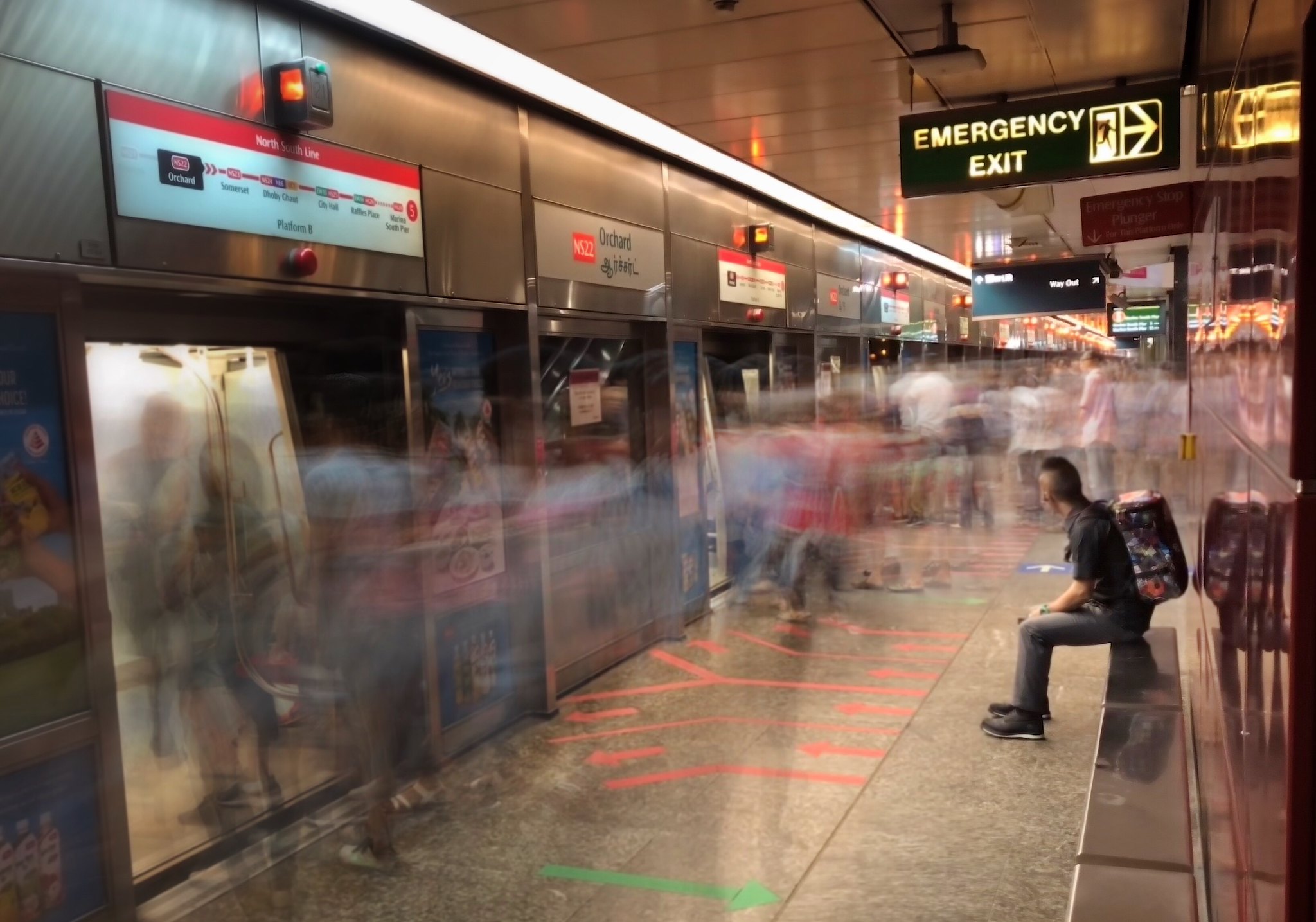
Long Exposure - can decide after taking the photo:
TrueBeliever_jh
Honorary Member
- Joined
- Jun 8, 2006
- Messages
- 112,649
- Reaction score
- 4,415
Just a thought - I use to hate live photos for the additional space it takes up. But since iOS 11 when they implemented so many additional functions AFTER you take a Live photo (loop, bounce, Long Exposure).... I kept it on.
Plus also with the new HEIF format, space is reduced quite a bit.
Long Exposure - can decide after taking the photo:
After taking your Live Photo, in iOS 11, head to your Photos gallery and choose the photo you want to add the effect to. Swipe upwards on the photo and you'll reveal a new interface underneath the photo. You'll find the Live Photos effects at the top of this area, with thumbnail previews of what the animation will look like.
this is pretty much hidden. choose the photo and swipe up.
Thanks for all your inputs... wether it is normal day light condition or low light I still feels iPhone X not capturing what I saw in the screen(after auto focus)... I’m using iPhones from iPhone 3GS. I’ve tested with my iPhone 7 Plus but I don’t experience this problem.. still figuring out.
Thanks for all your inputs... wether it is normal day light condition or low light I still feels iPhone X not capturing what I saw in the screen(after auto focus)... I’m using iPhones from iPhone 3GS. I’ve tested with my iPhone 7 Plus but I don’t experience this problem.. still figuring out.
Hi, I have been taking photos recently with my X and have the same concerns as you. Coming from a user using Iphone since 4s.
Is it because of the screen?
For me is i feel the quality of the photo taken is good when i view on the X. When i upload to forums or my Mac, the quality is quite bad IMHO.
Important Forum Advisory Note
This forum is moderated by volunteer moderators who will react only to members' feedback on posts. Moderators are not employees or representatives of HWZ Forums. Forum members and moderators are responsible for their own posts.
Please refer to our Community Guidelines and Standards and Terms and Conditions for more information.
