liangtam
High Supremacy Member
- Joined
- Aug 20, 2002
- Messages
- 38,916
- Reaction score
- 264
IMHO.
How can i like, temporarily disable ipv4 on my PC and see if ipv6 works properly ?

Untick IPv4 and tick IPv6
Happy Eyeballs isn't always useful
IMHO.
How can i like, temporarily disable ipv4 on my PC and see if ipv6 works properly ?
IMHO.
Untick IPv4 and tick IPv6
Happy Eyeballs isn't always useful

Updated post with the config images.One interesting topic for Singtel IPv6
Hi guys would like to check if anyone experienced the below:-
Singtel unbridged ONR and WAN has 2xxx ipv6 addresses the laptop has as well, but no matter how many times restarted the wifi router as well as the ONR as well as the laptop
the ipv6 still failed (failed IPV6 Dns)
Would like to have some kind advice and thanks in advance
On site troubleshooting tomorrow
lets see how it goes
lolx
Yea their Whatsapp mentioned twice that ipv6 was provision by their back end team,Tell the tech that he needs to contact the backend team to provision the IPv6 in order to sort out the issue.
If not it will be just a waste of your time and his time.
Based on my own experience and previous reports from other Singtel users, there is nothing in the Singtel XGS-PON ONR which can be configured to support Singtel native IPv6 without backend team intervention.

Did some digging into SIMBA/TPG 4G IPv6 using a ZTE USB LTE modem on OpenWrt/Linux. Interesting finding: at least on the session I tested, SIMBA gives a native globally routed IPv6 /64, and unsolicited inbound IPv6 is actually delivered all the way to the subscriber — I couldn't find evidence of a carrier-side stateful firewall.
The IPv6 setup is basically this:
SIM inserted / LTE registered
|
v
IPV4V6 PDP context
APN: TPG
|
v
LTE data active
|
v
CDC-ECM Ethernet (eth1)
|
| Router Solicitation
| -------------------->
|
| <--------------------
| Router Advertisement
|
| Prefix:
| 2400:79e0:9072:c1ee::/64
| A (SLAAC) flag = 1
|
v
Configure global IPv6 from /64
|
v
Default route via modem's
link-local IPv6 gateway
|
v
Native IPv6 Internet
The important bit is that this was RA/SLAAC provisioning rather than a DHCPv6 lease. odhcp6c sent DHCPv6 SOLICITs requesting IA_NA/IA_PD, but I didn't see a DHCPv6 Advertise/Reply. The useful information instead came from the modem's RA:
fe80::21b:fcff:fe9a:a400 > ff02::1:
ICMP6, router advertisement
router lifetime 65535s
prefix info:
2400:79e0:9072:c1ee::/64
Flags [auto]
After configuring an address from that /64 and routing through the advertised link-local gateway, normal outbound IPv6 worked, e.g. Cloudflare:
PING 2606:4700:4700::1111
64 bytes from 2606:4700:4700::1111
...
5 packets transmitted, 5 received, 0% packet loss
The more interesting test was inbound IPv6. I used two independent IPv6-connected machines elsewhere on the Internet and pinged the SIMBA address. tcpdump on the LTE interface showed the unsolicited requests arriving:
2406:3003:2001:34ee::yyy >
2400:79e0:9072:c1ee:xxx:
ICMP6, echo request
2406:3003:2006:c93d:zzz >
2400:79e0:9072:c1ee:xxx:
ICMP6, echo request
Initially the remote machines got Destination unreachable: Port unreachable. This turned out not to be SIMBA filtering anything — my OpenWrt firewall simply didn't yet classify the new LTE eth1 interface as WAN, so fw4's generic reject caught the packets. tcpdump actually showed the incoming request followed by the locally generated reject.
For confirmation I temporarily added:
nft insert rule inet fw4 input \
iifname "eth1" \
meta nfproto ipv6 \
icmpv6 type echo-request \
counter accept
Both remote machines could then ping the SIMBA IPv6 successfully. The counter reached:
counter packets 9 bytes 936 accept
I also tested something other than ICMP. Two remote hosts sent unsolicited UDP packets to port 51820, without the SIMBA connection initiating anything towards them first:
2406:3003:2001:34ee::yyy.51556 >
2400:79e0:9072:c1ee:xxx.51820:
UDP, length 20
2406:3003:2006:c93d:zzz.35494 >
2400:79e0:9072:c1ee:xxx.51820:
UDP, length 20
So the tested path is effectively:
Remote IPv6 PC #1 ─┐
│
Remote IPv6 PC #2 ─┼── Internet
│
v
SIMBA / TPG
LTE network
|
no observed
inbound state filter
|
v
2400:79e0:9072:c1ee::/64
|
v
LTE modem
|
eth1
|
v
OpenWrt firewall
< actual filter >
|
v
local services
So my conclusion is: SIMBA's IPv4 side may be behind CGNAT, but its IPv6 behaves like proper end-to-end Internet connectivity. The tested subscriber got a global /64, outbound IPv6 worked, and unsolicited inbound ICMPv6 and UDP from independent Internet hosts reached the LTE interface.
This could be quite useful for hosting a WireGuard endpoint or similar service directly over mobile IPv6 — no CGNAT traversal or port forwarding required.
The flip side is equally important: don't assume mobile IPv6 has the same implicit isolation as CGNAT IPv4. On this connection the OpenWrt IPv6 firewall is the actual security boundary, so WAN input/forwarding should default to reject/drop and only explicitly required services should be opened.
Obviously this is one experimentally verified SIMBA/TPG LTE session, not a promise that every SIM plan/APN/location/RAT or future SIMBA configuration behaves identically. Would be interesting if anyone else on SIMBA can reproduce it.
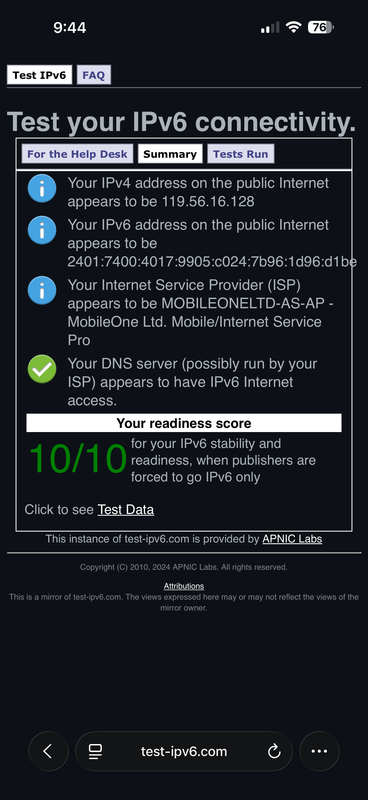
M1 Maxx mobile data ($12 plan) has NO ipv6 (neither 5G nor 4G) !
Using what phone ? For Android, you have to select "IPv4/IPv6" under APN protocol.M1 Maxx mobile data ($12 plan) has NO ipv6 (neither 5G nor 4G) !
iPhone 15 Pro Max, Maxx with eSim.Using what phone ? For Android, you have to select "IPv4/IPv6" under APN protocol.
I am on $7.90 ($9.90 after a year) plan, IPv6 is working for me, even 4G.

| Your IPv4 address on the public Internet appears to be 122.11.xxx.x (STARHUB-INTERNET - StarHub Ltd, SG) |
|
| Your IPv6 address on the public Internet appears to be 2406:3000:xxx:xxxx::xxxx:xxxx (STARHUB-MOBILE2 - StarHub Ltd, SG) |

| Your DNS server (possibly run by your ISP) appears to have IPv6 Internet access. |
| Your readiness score | |
|---|---|
| 10/10 | for your IPv6 stability and readiness, when publishers are forced to go IPv6 only |
|
| Your IPv4 address on the public Internet appears to be 122.11.xxx.xxx |
|
| Your IPv6 address on the public Internet appears to be 2406:3002:xx:xxxx::xxxx:xxxx |
|
| Your Internet Service Provider (ISP) appears to be STARHUB-INTERNET - StarHub Ltd, SG |
|
| Your DNS server (possibly run by your ISP) appears to have IPv6 Internet access. |
| Your readiness score | |
|---|---|
| 10/10 | for your IPv6 stability and readiness, when publishers are forced to go IPv6 only |
|
| Your IPv4 address on the public Internet appears to be 119.234.xx.xxx |
|
| Your IPv6 address on the public Internet appears to be 2400:1c00:xx:xxxx:xxxx:xxxx:xxxx:xxxx |
|
| Your Internet Service Provider (ISP) appears to be SINGTELMOBILE-AS-AP - SINGTEL MOBILE INTERNET SERVICE PROVIDER |
|
| Your DNS server (possibly run by your ISP) appears to have IPv6 Internet access. |
| Your readiness score | |
|---|---|
| 10/10 | for your IPv6 stability and readiness, when publishers are forced to go IPv6 only |
|
| Your IPv4 address on the public Internet appears to be 111.65.xx.xx |
|
| Your Internet Service Provider (ISP) appears to be SINGTELMOBILE-AS-AP - SINGTEL MOBILE INTERNET SERVICE PROVIDER |

| No IPv6 address detected [more info] |
|
| You appear to be able to browse the IPv4 Internet only. You will not be able to reach IPv6-only sites. |
|
| To ensure the best Internet performance and connectivity, ask your ISP about native IPv6. [more info] |
|
| Your DNS server (possibly run by your ISP) appears to have IPv6 Internet access. |
| Your readiness score | |
|---|---|
| 0/10 | for your IPv6 stability and readiness, when publishers are forced to go IPv6 only |
Using what phone ? For Android, you have to select "IPv4/IPv6" under APN protocol.
I am on $7.90 ($9.90 after a year) plan, IPv6 is working for me, even 4G.
M1 Maxx 4G using 4G modem Router support IPv6