IPv6 on M1 Broadband?

newsera

Senior Member
Joined
May 6, 2010
Messages
703
Reaction score
32
Has anyone configured IPv6 on M1 Broadband using Ubiquiti EdgeRouter / USG

I tried the below config but no luck.

Interestingly, when I add address dhcpv6 to eth0, it pulls an IP (/64) but when I do dhcpv6-pd (to enable the LAN clients with IPv6) it doesn't work. We can't run dhcpv6 and dhcpv6-pd on the same interface. So curious how people have resolved this?

As per my understanding, M1 does IPv6 with DHCPv6-PD(/64) + SLAAC

Even config on OpenWRT Routers (uci show) would be much appreciated.

eth0=WAN
switch0=LAN

Tried the below, but no luck

Markdown (GitHub flavored):
```

set interfaces ethernet eth0 dhcpv6-pd pd 0 prefix-length /64
set interfaces ethernet eth0 dhcpv6-pd rapid-commit disable
set interfaces ethernet eth0 dhcpv6-pd pd 0 interface switch0 host-address ::1
set interfaces ethernet eth0 dhcpv6-pd pd 0 interface switch0 service slaac
set firewall ipv6-name WAN6-IN default-action drop
set firewall ipv6-name WAN6-IN description "WAN IPv6 inbound traffic to LAN"
set firewall ipv6-name WAN6-IN enable-default-log
set firewall ipv6-name WAN6-IN rule 1 action accept
set firewall ipv6-name WAN6-IN rule 1 description "Allow established/related state"
set firewall ipv6-name WAN6-IN rule 1 state established enable
set firewall ipv6-name WAN6-IN rule 1 state related enable
set firewall ipv6-name WAN6-IN rule 2 action drop
set firewall ipv6-name WAN6-IN rule 2 description "Deny invalid state"
set firewall ipv6-name WAN6-IN rule 2 state invalid enable
set firewall ipv6-name WAN6-LOCAL default-action drop
set firewall ipv6-name WAN6-LOCAL description "WAN IPv6 inbound traffic to the router"
set firewall ipv6-name WAN6-LOCAL enable-default-log
set firewall ipv6-name WAN6-LOCAL rule 1 action accept
set firewall ipv6-name WAN6-LOCAL rule 1 description "Allow established/related state"
set firewall ipv6-name WAN6-LOCAL rule 1 state established enable
set firewall ipv6-name WAN6-LOCAL rule 1 state related enable
set firewall ipv6-name WAN6-LOCAL rule 2 action accept
set firewall ipv6-name WAN6-LOCAL rule 2 description "Allow DHCPv6"
set firewall ipv6-name WAN6-LOCAL rule 2 destination port 546
set firewall ipv6-name WAN6-LOCAL rule 2 protocol udp
set firewall ipv6-name WAN6-LOCAL rule 2 source port 547
set firewall ipv6-name WAN6-LOCAL rule 3 action accept
set firewall ipv6-name WAN6-LOCAL rule 3 description "Allow ICMPv6"
set firewall ipv6-name WAN6-LOCAL rule 3 protocol icmpv6
set firewall ipv6-name WAN6-LOCAL rule 4 action drop
set firewall ipv6-name WAN6-LOCAL rule 4 description "Deny invalid state"
set firewall ipv6-name WAN6-LOCAL rule 4 state invalid enable
set firewall ipv6-receive-redirects disable
set firewall ipv6-src-route disable
set interfaces ethernet eth0 firewall in ipv6-name WAN6-IN
set interfaces ethernet eth0 firewall local ipv6-name WAN6-LOCAL
[/ICODE]

If you do not get an IPv6 address, use the following commands to force DHCPv6 renew:

[ICODE]
release dhcpv6-pd interface eth0
delete dhcpv6-pd duid
renew dhcpv6-pd interface eth0
[/ICODE]

Tried this too! No output on "show dhcpv6-pd log"

[ICODE]
$ show firewall ipv6-name
--------------------------------------------------------------------------------
IPv6 Firewall "WAN6-IN":

 Active on (eth0,IN)

rule  action   proto     packets  bytes
----  ------   -----     -------  -----
1     accept   all       0        0
  condition - state RELATED,ESTABLISHED

2     drop     all       0        0
  condition - state INVALID

10000 drop     all       0        0
  condition -  LOG enabled

--------------------------------------------------------------------------------
IPv6 Firewall "WAN6-LOCAL":

 Active on (eth0,LOCAL)

rule  action   proto     packets  bytes
----  ------   -----     -------  -----
1     accept   all       0        0
  condition - state RELATED,ESTABLISHED

2     accept   udp       0        0
  condition - udp spt:dhcpv6-server dpt:dhcpv6-client

3     accept   ipv6-icmp 102      7168

4     drop     all       0        0
  condition - state INVALID

10000 drop     all       0        0
  condition -  LOG enabled

```
[/ICODE]
 
Last edited:

xiaofan

High Supremacy Member
Joined
Sep 16, 2018
Messages
32,594
Reaction score
10,127
@bert64 should be able to help you.

Here is one of his post but he is using pfSense.
https://forums.hardwarezone.com.sg/...ussion-part-2.5658375/page-362#post-131636274

FWIW i had some issues getting a DHCPv6 response from M1 with a Pfsense firewall... Turns out they are picky about the DUID sent by the client:
https://en.wikipedia.org/wiki/DHCPv6

DHCPv6 uses a "unique identifier" called "DUID" to identify the client device.

As per the DHCPv6 spec, there are 4 types of DUID supported, Pfsense defaults to "DUID-LLT" which uses your mac address plus a timestamp to form your DUID. With this setting, M1 never responded to the DHCPv6 requests.
When i changed it to DUID-LL (ie just use the mac address to form your DUID) it all worked.

So it would depend on the DHCPv6 client in your router. Some routers may default to different values, or may not give you the option to change the settings.
 

newsera

Senior Member
Joined
May 6, 2010
Messages
703
Reaction score
32
Thank you xiaofan@ I moved to OpenWRT (swapped router) and it surprisingly worked out of the box.
 

newsera

Senior Member
Joined
May 6, 2010
Messages
703
Reaction score
32
DD-WRT IPv6 Config for M1 Broadband. Note that I am using Google IPv6 DNS in Static DNS
Setup -> IPv6
Configuration
Enable IPv6 -> Enable
Type -> DHCPv6 with Prefix Delegation
Prefix Length -> 64
Static DNS 1: 2001:4860:4860::8888
Static DNS 2: 2001:4860:4860::8844
MTU: 1452

DHCPv6 Client Daemon

No Release on Reconnect -> Disable
Custom Configuration -> Disable

DHCPv6 Server Daemon

Enable Daemon -> Disable

Router Advertisement Daemon (radvd)

Enable Daemon -> Enable
Custom Configuration -> Disable
 

bert64

Senior Member
Joined
Jan 20, 2020
Messages
1,027
Reaction score
539
DD-WRT IPv6 Config for M1 Broadband. Note that I am using Google IPv6 DNS in Static DNS
Setup -> IPv6
Configuration
Enable IPv6 -> Enable
Type -> DHCPv6 with Prefix Delegation
Prefix Length -> 64
Static DNS 1: 2001:4860:4860::8888
Static DNS 2: 2001:4860:4860::8844
MTU: 1452

DHCPv6 Client Daemon

No Release on Reconnect -> Disable
Custom Configuration -> Disable

DHCPv6 Server Daemon

Enable Daemon -> Disable

Router Advertisement Daemon (radvd)

Enable Daemon -> Enable
Custom Configuration -> Disable
MTU should be 1500, it should still work with 1452 but you'll get a very minor drop in performance.
And if you disable "No Release on Reconnect" you will get allocated new address space every time you reconnect (not sure if you want this or not).

With a prefix length of 64 you can only create one LAN interface, sadly neither m1 nor starhub support a prefix length of 56, which is the standard.
 

bert64

Senior Member
Joined
Jan 20, 2020
Messages
1,027
Reaction score
539
Interestingly, when I add address dhcpv6 to eth0, it pulls an IP (/64) but when I do dhcpv6-pd (to enable the LAN clients with IPv6) it doesn't work. We can't run dhcpv6 and dhcpv6-pd on the same interface. So curious how people have resolved this?

Technically you don't need a WAN address on the router at all, as the router can use the link-local address of the ISP's gateway (you will see the default route has an fe80:: address), but M1 have it configured such that you get both a WAN address and a /64 prefix via DHCPv6.
A single DHCPv6 client should be able to request both at the same time (IA_NA and IA_PD) but i have no experience of using an edgerouter in this scenario.
 

newsera

Senior Member
Joined
May 6, 2010
Messages
703
Reaction score
32
Here is the working config on Ubiquiti EdgeRouter X for M1 Broadband. Tested on EdgeRouter X v2.0.9-hotfix.7

Note that you would receive a /128 on eth0 interface & /64 on switch0.

Used the wizard this time and just changed prefix length from default to /64 and things are looking good.

https://ipv6.chappell-family.com/ipv6tcptest/ looks good too

Markdown (GitHub flavored):
```
set firewall ipv6-name WANv6_IN default-action drop
set firewall ipv6-name WANv6_IN description 'WAN inbound traffic forwarded to LAN'
set firewall ipv6-name WANv6_IN enable-default-log

set firewall ipv6-name WANv6_IN rule 10 action accept
set firewall ipv6-name WANv6_IN rule 10 description 'Allow established/related sessions'
set firewall ipv6-name WANv6_IN rule 10 state established enable
set firewall ipv6-name WANv6_IN rule 10 state related enable

set firewall ipv6-name WANv6_IN rule 20 action drop
set firewall ipv6-name WANv6_IN rule 20 description 'Drop invalid state'
set firewall ipv6-name WANv6_IN rule 20 state invalid enable

set firewall ipv6-name WANv6_LOCAL default-action drop
set firewall ipv6-name WANv6_LOCAL description 'WAN inbound traffic to the router'
set firewall ipv6-name WANv6_LOCAL enable-default-log

set firewall ipv6-name WANv6_LOCAL rule 10 action accept
set firewall ipv6-name WANv6_LOCAL rule 10 description 'Allow established/related sessions'
set firewall ipv6-name WANv6_LOCAL rule 10 state established enable
set firewall ipv6-name WANv6_LOCAL rule 10 state related enable

set firewall ipv6-name WANv6_LOCAL rule 20 action drop
set firewall ipv6-name WANv6_LOCAL rule 20 description 'Drop invalid state'
set firewall ipv6-name WANv6_LOCAL rule 20 state invalid enable

set firewall ipv6-name WANv6_LOCAL rule 30 action accept
set firewall ipv6-name WANv6_LOCAL rule 30 description 'Allow IPv6 icmp'
set firewall ipv6-name WANv6_LOCAL rule 30 protocol ipv6-icmp

set firewall ipv6-name WANv6_LOCAL rule 40 action accept
set firewall ipv6-name WANv6_LOCAL rule 40 description 'allow dhcpv6'
set firewall ipv6-name WANv6_LOCAL rule 40 destination port 546
set firewall ipv6-name WANv6_LOCAL rule 40 protocol udp
set firewall ipv6-name WANv6_LOCAL rule 40 source port 547

set firewall ipv6-receive-redirects disable
set firewall ipv6-src-route disable
set firewall ip-src-route disable

set interfaces ethernet eth0 address dhcp
set interfaces ethernet eth0 description Internet
set interfaces ethernet eth0 dhcpv6-pd pd 0 interface switch0 host-address '::1'
set interfaces ethernet eth0 dhcpv6-pd pd 0 interface switch0 service slaac
set interfaces ethernet eth0 dhcpv6-pd pd 0 prefix-length /64
set interfaces ethernet eth0 dhcpv6-pd rapid-commit enable
set interfaces ethernet eth0 duplex auto

set interfaces ethernet eth0 firewall in ipv6-name WANv6_IN
set interfaces ethernet eth0 firewall local ipv6-name WANv6_LOCAL
set interfaces ethernet eth0 speed auto

a@n:~$ show firewall ipv6-name
--------------------------------------------------------------------------------
IPv6 Firewall "WANv6_IN":

 Active on (eth0,IN)

rule  action   proto     packets  bytes
----  ------   -----     -------  -----
10    accept   all       169738   188051615
  condition - state RELATED,ESTABLISHED

20    drop     all       6        396
  condition - state INVALID

10000 drop     all       140      12218
  condition -  LOG enabled

--------------------------------------------------------------------------------
IPv6 Firewall "WANv6_LOCAL":

 Active on (eth0,LOCAL)

rule  action   proto     packets  bytes
----  ------   -----     -------  -----
10    accept   all       0        0
  condition - state RELATED,ESTABLISHED

20    drop     all       0        0
  condition - state INVALID

30    accept   ipv6-icmp 88       6256

40    accept   udp       2        487
  condition - udp spt:dhcpv6-server dpt:dhcpv6-client

10000 drop     all       0        0
  condition -  LOG enabled

a@n:~$ show dhcpv6-pd log
Oct/22/2023 11:50:17: client6_recvadvert: unexpected advertise
Oct/22/2023 11:50:17: update_ia: status code for PD-0: success
Oct/22/2023 11:50:17: update_ia: status code for NA-0: success
a@n:~$
a@n:~$
```
 
Last edited:

Durian Shell

Member
Joined
Jun 26, 2018
Messages
187
Reaction score
45
Using M1 home 1G fiber Broadband
1: Asus router RT_AX55, firmware Version:3.0.0.4.386.52294 (improve IPV6), installed last week of Dec 2023.
2: Asus router IPV6 setup, select Native
https://ipv6test.google.com/

3: Check ICMPv6
https://ipv6-test.com/
After setting up the ICMPv6 firewall rule (setup PC's firewall)
ICMPv6 is reachable. Score 20/20.
IPV6 ping test, is working.
4: Check your network quality
https://speed.cloudflare.com/

No image attach (dont know how to attach image)


Enjoy your IPV6 network
 
Last edited:

Durian Shell

Member
Joined
Jun 26, 2018
Messages
187
Reaction score
45
Using M1 home 1G fiber Broadband
1: Asus router RT_AX55, firmware Version:3.0.0.4.386.52294 (improve IPV6), installed last week of Dec 2023.
2: Asus router IPV6 setup, select Native
https://ipv6test.google.com/

3: Check ICMPv6
https://ipv6-test.com/
After setting up the ICMPv6 firewall rule (setup PC's firewall)
ICMPv6 is reachable. Score 20/20.
IPV6 ping test, is working.
4: Check your network quality
https://speed.cloudflare.com/

No image attach (dont know how to attach image)


Enjoy your IPV6 network


Last edited:

Durian Shell

Member
Joined
Jun 26, 2018
Messages
187
Reaction score
45
Using M1 home 1G fiber Broadband
1: Asus router RT_AX55, firmware Version:3.0.0.4.386.52294 (improve IPV6), installed last week of Dec 2023.
2: Asus router IPV6 setup, select Native
https://ipv6test.google.com/

3: Check ICMPv6
https://ipv6-test.com/
After setting up the ICMPv6 firewall rule (setup PC's firewall)
ICMPv6 is reachable. Score 20/20.
IPV6 ping test, is working.
4: Check your network quality
https://speed.cloudflare.com/

No image attach (dont know how to attach image)


Enjoy your IPV6

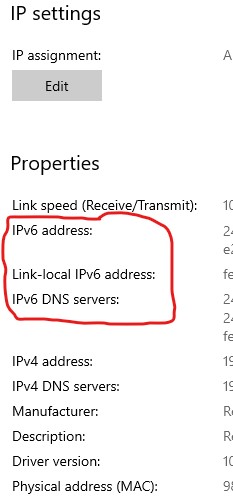
If you can see IPv6 address and IPv6 server DNS server on your PC, then select the Native inside your router IPv6 setup.

1: Open network & internet settings
2: Click properties
3: You will see the list:


Last edited:

Durian Shell

Member
Joined
Jun 26, 2018
Messages
187
Reaction score
45


Follow the image, after select, click Renew, then Release and save.
For using M1 free TP link BE1900 router.
 
Last edited:
Important Forum Advisory Note
This forum is moderated by volunteer moderators who will react only to members' feedback on posts. Moderators are not employees or representatives of HWZ. Forum members and moderators are responsible for their own posts.

Please refer to our Community Guidelines and Standards, Terms of Service and Member T&Cs for more information.
Top