
You are using an out of date browser. It may not display this or other websites correctly.
You should upgrade or use an alternative browser.
You should upgrade or use an alternative browser.
Is the upload speed normal?
- Thread starter correct
- Start date
More options
Who Replied?
Hi jtjt00,
Thanks
I have went to speedtest.net and it shows me 300+/- Mbps. I think all the network equipment is okay.
As for wired 300Mbps, what is the speed I should expect?
300 Mbps = 37.5 MBps? So I should get 30MBps+ instead?
Thanks! I wonder if this is normal or not.
Thanks
I have went to speedtest.net and it shows me 300+/- Mbps. I think all the network equipment is okay.
As for wired 300Mbps, what is the speed I should expect?
300 Mbps = 37.5 MBps? So I should get 30MBps+ instead?
Thanks! I wonder if this is normal or not.
Last edited:
This is 100Mbps speed.
Check your network equipment such as:
1. Desktop LAN
2. Router
3. LAN cable (already mention Cat.6, is really Cat.6 cable?)
1. Router is : DIR-868L
Ethernet Interface
4 Gigabit Ethernet (10/100/1000) Ports
1 Gigabit WAN (10/100/1000) Port
2. Asus k450ld
Direct LAN 10/100/1000Mbps
3. All wires are Cat6 (My speedtest shows 300+Mbps so can I say it isn't fake? And is the problem the ASUSTOR AS-202TE? Forgot to indicate this earlier.
Thanks!
When you said upload, are you transferring file from your laptop to internet or to Asustor AS-202TE?
Ah, yeah the upload speed from from my laptop to Asustor AS-202TE via LAN.
I couldn't find anything wrong with internet speed. just the upload speed to AS-202TE from my laptop.

jtjt00
Arch-Supremacy Member
- Joined
- Jan 1, 2000
- Messages
- 17,706
- Reaction score
- 528
Download NAS Tester:
NAS performance tester (C# and VB.Net)
Map your NAS in my computer or windows explorer
Run NAS Tester
NAS performance tester (C# and VB.Net)
Map your NAS in my computer or windows explorer
Run NAS Tester
Download NAS Tester:
NAS performance tester (C# and VB.Net)
Map your NAS in my computer or windows explorer
Run NAS Tester
I will try this tonight. Looks informative. Thanks!
And I don't have switches in between. Fibre termination point (FTP) > ONT > DIR-868L > It connects to 1 Laptop and NAS only in wired connection. For wireless, only to our mobile phones (will turn off).
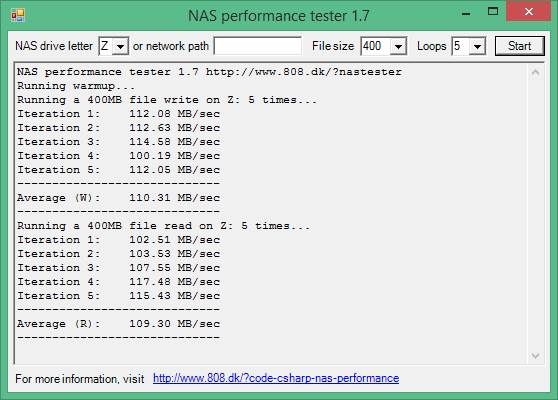


Okay, the cause is due one of the 'in-built-by-contractor' (inside the wall)' Cat 5 wires that is showing 100MBps. Thinking how to change... Argh... I am supposed at least Cat 5e.
But I have some improvements on the speeds now after moving the NAS to another location. Thanks!!!


I am currently using the same WD Red 4 TB + WD Green 1 TB (Spare). Not as good as yours (100+MB/s). nearly half as yours...
So is this the max of my NAS? Don't see any bottlenecks...
But I have some improvements on the speeds now after moving the NAS to another location. Thanks!!!
I am currently using the same WD Red 4 TB + WD Green 1 TB (Spare). Not as good as yours (100+MB/s). nearly half as yours...
So is this the max of my NAS? Don't see any bottlenecks...
Last edited:
jtjt00
Arch-Supremacy Member
- Joined
- Jan 1, 2000
- Messages
- 17,706
- Reaction score
- 528
Read this review to know more on the potential of your NAS:
ASUSTOR AS-202TE 2-Bay Consumer NAS Appliance Review
ASUSTOR AS-202TE 2-Bay Consumer NAS Appliance Review
Okay, the cause is due one of the 'in-built-by-contractor' (inside the wall)' Cat 5 wires that is showing 100MBps. Thinking how to change... Argh... I am supposed at least Cat 5e.
But I have some improvements on the speeds now after moving the NAS to another location. Thanks!!!
I am currently using the same WD Red 4 TB + WD Green 1 TB (Spare). Not as good as yours (100+MB/s). nearly half as yours...
So is this the max of my NAS? Don't see any bottlenecks...
jtjt00
Arch-Supremacy Member
- Joined
- Jan 1, 2000
- Messages
- 17,706
- Reaction score
- 528
Important Forum Advisory Note
This forum is moderated by volunteer moderators who will react only to members' feedback on posts. Moderators are not employees or representatives of HWZ Forums. Forum members and moderators are responsible for their own posts.
Please refer to our Community Guidelines and Standards and Terms and Conditions for more information.

