

You are using an out of date browser. It may not display this or other websites correctly.
You should upgrade or use an alternative browser.
You should upgrade or use an alternative browser.
Is Windows 10 chewing up your SSD write lifespan?
- Thread starter kimsix
- Start date
More options
Who Replied?Lastwishes
Senior Member
- Joined
- Jun 12, 2005
- Messages
- 724
- Reaction score
- 209
Several causes possible.
Pagefile.
Instant Replay function from Nvidia running in the background.
Do you hibernate your pc instead of sleep/shutdown?
Pagefile.
Instant Replay function from Nvidia running in the background.
Do you hibernate your pc instead of sleep/shutdown?

tigerwoods
Arch-Supremacy Member
- Joined
- Oct 7, 2005
- Messages
- 11,411
- Reaction score
- 2,633
internet cache files, cookies etc.

kimsix
Arch-Supremacy Member
- Joined
- Jan 6, 2009
- Messages
- 20,364
- Reaction score
- 10,224
Several causes possible.
Pagefile.
Instant Replay function from Nvidia running in the background.
Do you hibernate your pc instead of sleep/shutdown?
no leh, dont do all that things on this drive, very simple OS drive
internet cache files, cookies etc.
so jialat, eat so much?


Entry Level PC
Banned
- Joined
- Oct 26, 2011
- Messages
- 48,310
- Reaction score
- 7,450
Top image is about 1 year ago,
Bottom is today.
dont understand how win10 write 12,000GB in a year? i dont install apps in this OS drive
is HWINFO accruate here?

Pagefile Swapping,
YouTube,
Spotify,
etc
12TB a year only what.
120GB SSD lifespan got around 40TB total writes.
kimsix
Arch-Supremacy Member
- Joined
- Jan 6, 2009
- Messages
- 20,364
- Reaction score
- 10,224
Pagefile Swapping,
YouTube,
Spotify,
etc
12TB a year only what.
120GB SSD lifespan got around 40TB total writes.
do streaming on weekends, just watched prime video tomorrow wars.

quite sianz if ssd last 3-4 years?

Entry Level PC
Banned
- Joined
- Oct 26, 2011
- Messages
- 48,310
- Reaction score
- 7,450
do streaming on weekends, just watched prime video tomorrow wars.
quite sianz if ssd last 3-4 years?
SSD Warranty 3-5 years only what depending on brand and model.
Also got total write limit.
Moi use SSD as Secondary Storage for Games Only.
Lastwishes
Senior Member
- Joined
- Jun 12, 2005
- Messages
- 724
- Reaction score
- 209
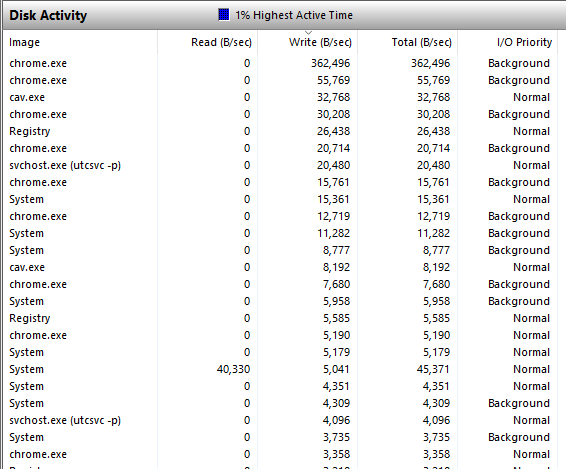
If you are worried, you can use resource monitor and identify the programs that's doing the writes, and see if there's an anomaly.
I have about 20TB written in a 2 year old nvme ssd, but I use it for games, apps and used to hibernate windows instead of sleep/shutting down.
The last one is probably the culprit for my case; the hibernate function writes the whole 32 gb ram to the ssd each time before hibernating; I've switched to sleep now.
If you shut down your pc each time, you should also check if you have fast bootup enabled: if this is enabled, this is basically a hybrid sleep where your system state is also written to the system disk when windows is shutting down.
I have about 20TB written in a 2 year old nvme ssd, but I use it for games, apps and used to hibernate windows instead of sleep/shutting down.
The last one is probably the culprit for my case; the hibernate function writes the whole 32 gb ram to the ssd each time before hibernating; I've switched to sleep now.
If you shut down your pc each time, you should also check if you have fast bootup enabled: if this is enabled, this is basically a hybrid sleep where your system state is also written to the system disk when windows is shutting down.
kimsix
Arch-Supremacy Member
- Joined
- Jan 6, 2009
- Messages
- 20,364
- Reaction score
- 10,224
is this your OS drive? got use chrome or streaming?
Same drive as you, got it 1 year ago as boot drive.
Perharps, you have "something" chewiong up the lifespan? Else you got a lemon?
this corsair is a lemon...hope not
i just checked bios, fast boot is off, no hibernate also.If you are worried, you can use resource monitor and identify the programs that's doing the writes, and see if there's an anomaly.
I have about 20TB written in a 2 year old nvme ssd, but I use it for games, apps and used to hibernate windows instead of sleep/shutting down.
The last one is probably the culprit for my case; the hibernate function writes the whole 32 gb ram to the ssd each time before hibernating; I've switched to sleep now.
If you shut down your pc each time, you should also check if you have fast bootup enabled: if this is enabled, this is basically a hybrid sleep where your system state is also written to the system disk when windows is shutting down.
do you use chrome browser?

Yongkit
Supremacy Member
- Joined
- Oct 9, 2015
- Messages
- 5,916
- Reaction score
- 2,501
Your drive is so much cooler in temperature than TS
Same drive as you, got it 1 year ago as boot drive.
Perharps, you have "something" chewiong up the lifespan? Else you got a lemon?
Yongkit
Supremacy Member
- Joined
- Oct 9, 2015
- Messages
- 5,916
- Reaction score
- 2,501
May I know if you do over provision for your drive? Also your drive temperature seems on the high level like it is constantly working ?is this your OS drive? got use chrome or streaming?
this corsair is a lemon...hope not
i just checked bios, fast boot is off, no hibernate also.
do you use chrome browser?
kimsix
Arch-Supremacy Member
- Joined
- Jan 6, 2009
- Messages
- 20,364
- Reaction score
- 10,224
May I know if you do over provision for your drive? Also your drive temperature seems on the high level like it is constantly working ?
no leh, i just install and go use the drive
temps like always this range in my casing during light use.
Yongkit
Supremacy Member
- Joined
- Oct 9, 2015
- Messages
- 5,916
- Reaction score
- 2,501

maybe you wanna try to download the official SSD toolbox software help you check if there are firmware update can help your drive?
if there are no overprovision done before, it is recommended to do so especially if you are using the drive close to its max capacity.
Lastwishes
Senior Member
- Joined
- Jun 12, 2005
- Messages
- 724
- Reaction score
- 209
I use Brave as my main browser, but I think all Chromium based browsers behave similarly. You can track the writes easier using this https://www.nirsoft.net/utils/app_read_write_counter.html.

wwenze
Greater Supremacy Member
- Joined
- Dec 2, 2002
- Messages
- 86,834
- Reaction score
- 30,427
Yea... I think it does eat a lot...
Previously using Windows 7 for a few years my SSD only had around 150 erase cycles
Now using Windows 10 for about the same duration I'm at 600-700 erase cycles already.
BTW host write values do not take into consideration write amplification, so the value does not change whether you overprovision or not.
Previously using Windows 7 for a few years my SSD only had around 150 erase cycles
Now using Windows 10 for about the same duration I'm at 600-700 erase cycles already.
BTW host write values do not take into consideration write amplification, so the value does not change whether you overprovision or not.

Proximus
Supremacy Member
- Joined
- May 21, 2001
- Messages
- 7,004
- Reaction score
- 93
is this your OS drive? got use chrome or streaming?
this corsair is a lemon...hope not
Yes it is my OS drive and I used FF/Edge. No streaming... nobody want to see Uncle face lah...
Proximus
Supremacy Member
- Joined
- May 21, 2001
- Messages
- 7,004
- Reaction score
- 93
Your drive is so much cooler in temperature than TS
Today cold..... Typically it is in the lowest 40s
Proximus
Supremacy Member
- Joined
- May 21, 2001
- Messages
- 7,004
- Reaction score
- 93
View attachment 29145
maybe you wanna try to download the official SSD toolbox software help you check if there are firmware update can help your drive?
if there are no overprovision done before, it is recommended to do so especially if you are using the drive close to its max capacity.
Do NOT update MP600 to the latest FW.... Heard horror stories about it in Corsair forums.
Just saw others posting similar issues as TS
https://forum.corsair.com/v3/showthread.php?t=206059
Important Forum Advisory Note
This forum is moderated by volunteer moderators who will react only to members' feedback on posts. Moderators are not employees or representatives of HWZ Forums. Forum members and moderators are responsible for their own posts.
Please refer to our Community Guidelines and Standards and Terms and Conditions for more information.
