

[Issue] PC can's boot- DRAM and CPU led not lighted up

majora

Master Member
Joined
Mar 20, 2005
Messages
2,976
Reaction score
8
Would need some technical support from experts here..

After a restart, my pc (diy 2 years back) could not be booted up. Did some checks such as ensuring cables are secured, re-slotting ram, switching between HDMI/display port connection to mobo/graphic card.

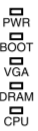
After closer inspection, realized that both 'DRAM' and 'CPU' led from the mobo is not lighted up:
1.png


The top 3 (pwr, boot and vga) are lighted.

Does this mean that either my motherboard or processor is spoilt? Since i bought this diy set from PC theme, should I bring back the whole CPU to them for diagnosis?

Thanks :)
 

megaweb

Arch-Supremacy Member
Joined
May 5, 2000
Messages
10,108
Reaction score
1,258
Would need some technical support from experts here..

After a restart, my pc (diy 2 years back) could not be booted up. Did some checks such as ensuring cables are secured, re-slotting ram, switching between HDMI/display port connection to mobo/graphic card.

After closer inspection, realized that both 'DRAM' and 'CPU' led from the mobo is not lighted up:
1.png


The top 3 (pwr, boot and vga) are lighted.

Does this mean that either my motherboard or processor is spoilt? Since i bought this diy set from PC theme, should I bring back the whole CPU to them for diagnosis?

Thanks :)

If it is under warranty, yes bring it back to PC theme. Alternatively, you can ask for Nigel to help to find out the fault. His details are found in his Facebook link.
 

abstrax

Senior Member
Joined
Nov 29, 2001
Messages
1,551
Reaction score
172
Thanks for the info.
So it might be either RAM or graphic card.

Prior to this, I encountered various hangs while playing dota2 on my 1060 3gb. Perhaps its time to change my graphic card.. :s22:

are the fans spinning when the gpu is starting to get hot?
 

grimfan

Supremacy Member
Joined
Sep 4, 2001
Messages
6,561
Reaction score
2
Are those post code LEDs? Check your motherboard documentation to understand what they mean when lighted up.

If I am not wrong lighted up means there is an issue with that component.

Did you ensure that all your cables are plugged back in after your troubleshooting? E.g. graphics card PCI-E power, motherboard 4 pin power connector etc.

Is your graphic card firmly sitting in the PCI-E slot. I know of some people who thought they sat their graphics into the slot but actually it's not fully inserted.
 

majora

Master Member
Joined
Mar 20, 2005
Messages
2,976
Reaction score
8
Are those post code LEDs? Check your motherboard documentation to understand what they mean when lighted up.

If I am not wrong lighted up means there is an issue with that component.

Did you ensure that all your cables are plugged back in after your troubleshooting? E.g. graphics card PCI-E power, motherboard 4 pin power connector etc.

Is your graphic card firmly sitting in the PCI-E slot. I know of some people who thought they sat their graphics into the slot but actually it's not fully inserted.

Sorry for the delay in updates. Finally had sit down to diagnose this issue one more time.

Yes you may be right. After some trials and errors, it was really my graphic card that’s faulty. I am using my mobo’s hdmi connection now and everything works fine now, managed to log into windows :s12:
 

abstrax

Senior Member
Joined
Nov 29, 2001
Messages
1,551
Reaction score
172
Sorry for the delay in updates. Finally had sit down to diagnose this issue one more time.

Yes you may be right. After some trials and errors, it was really my graphic card that’s faulty. I am using my mobo’s hdmi connection now and everything works fine now, managed to log into windows :s12:

time to upgrade...for a better gpu...
 

majora

Master Member
Joined
Mar 20, 2005
Messages
2,976
Reaction score
8
Update #2

I was playing around in bios and realized that actually my graphic card was detected.. but I just don't know why I cant launch into bios if my cpu is connected to my monitor via display port. Monitor confirm no problem cos I have been connecting my laptop to it for work.

In the end, this whole episode was because of 1 HDD failure. After i unplug the sata cable which is connected to that HDD from my mobo, my com can launch as per normal. Did some trial and error by restarting my com with the 'failed' HDD plugged in, com can's start up again..

Well, as least I can wait for 3070/3060ti stock to be available while using my old 1060 3gb :s13:
 

ZrE0_Cha0s

Arch-Supremacy Member
Joined
Jun 21, 2011
Messages
16,703
Reaction score
26
most likely is your bios have smart on. so when it detect the failed hdd it stop working?

but by right it should show what is failing instead of not booting up to see what is the failure.
 

majora

Master Member
Joined
Mar 20, 2005
Messages
2,976
Reaction score
8
most likely is your bios have smart on. so when it detect the failed hdd it stop working?

but by right it should show what is failing instead of not booting up to see what is the failure.

Yea, there was a message at the bottom which I overlooked. It was saying something sata6 hdd failure, please backup your data and remove your hdd.
 
Important Forum Advisory Note
This forum is moderated by volunteer moderators who will react only to members' feedback on posts. Moderators are not employees or representatives of HWZ Forums. Forum members and moderators are responsible for their own posts. Please refer to our Community Guidelines and Standards and Terms and Conditions for more information.
Top