Issues booting into windows

omelet

Senior Member
Joined
Dec 9, 2006
Messages
2,251
Reaction score
346
Hi all, my PC suddenly slowed down to a halt and hang while I was using it halfway with repeating music. Therefore, I decided to restart it. However, I can no longer go pass the windows logo. The display blanks out as though there was no input.

I also noticed that sometimes during POST, there was some never seen before square box like artifact. But only at POST, doesn't always happen.

I am able to go into a very low resolution safe mode and uninstall the driver, thinking maybe something wrong with the video driver. But once restarted, I still can't go pass the windows logo.

So, I went back into safe mode, but this time it can only last a few min before going blank screen again (no input).

Can I be sure to say my graphic card has spoilt? or was it something else like the PSU? Had been using this PC fine for many years.
I do not have any spares to test so seeking some opinions. Thanks

This is my specs:
Intel Core i5 2500
8GB 1600 CL7 (4x2GB)
Palit GTS 460
240GB Intel SSD 530
2x WD Green 2TB
Seasonic M12II 650W
Windows 10 Pro
 

Elijahonli

High Supremacy Member
Joined
Oct 27, 2008
Messages
25,846
Reaction score
159
Hi all, my PC suddenly slowed down to a halt and hang while I was using it halfway with repeating music. Therefore, I decided to restart it. However, I can no longer go pass the windows logo. The display blanks out as though there was no input.

I also noticed that sometimes during POST, there was some never seen before square box like artifact. But only at POST, doesn't always happen.

I am able to go into a very low resolution safe mode and uninstall the driver, thinking maybe something wrong with the video driver. But once restarted, I still can't go pass the windows logo.

So, I went back into safe mode, but this time it can only last a few min before going blank screen again (no input).

Can I be sure to say my graphic card has spoilt? or was it something else like the PSU? Had been using this PC fine for many years.
I do not have any spares to test so seeking some opinions. Thanks

This is my specs:
Intel Core i5 2500
8GB 1600 CL7 (4x2GB)
Palit GTS 460
240GB Intel SSD 530
2x WD Green 2TB
Seasonic M12II 650W
Windows 10 Pro
ur i5 2500 has onboard gpu... maybe remove the gtx460 gpu and test with onboard graphics?
 

lobo76

Supremacy Member
Joined
Nov 24, 2003
Messages
7,416
Reaction score
0
Test the hdd too. Unplug the 2 WD green and try. Sometime 1 hdd die, will stop the system from starting.
 

omelet

Senior Member
Joined
Dec 9, 2006
Messages
2,251
Reaction score
346
ur i5 2500 has onboard gpu... maybe remove the gtx460 gpu and test with onboard graphics?

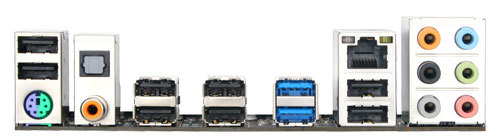
Hi, thanks for replying. I am using Gigabyte GA-P67A-UD3R-B3 motherboard. It does not have any form of video output.
 

omelet

Senior Member
Joined
Dec 9, 2006
Messages
2,251
Reaction score
346
Test the hdd too. Unplug the 2 WD green and try. Sometime 1 hdd die, will stop the system from starting.

Thanks, will try it.

Motherboard I/O should have at least a vga or dvi port

http://www.gigabyte.sg/products/product-page.aspx?pid=3764#ov

3931.jpg


:(:(:(
 

xxDonmaxx

Member
Joined
Nov 6, 2010
Messages
144
Reaction score
0
Aiyo that motherboard i/o... maybe you should list down the methods you have tried and see how we can help you find the problem.

PS: I don't want to joke about it but could this be a Win10 problem?
 

Elijahonli

High Supremacy Member
Joined
Oct 27, 2008
Messages
25,846
Reaction score
159
Aiyo that motherboard i/o... maybe you should list down the methods you have tried and see how we can help you find the problem.

PS: I don't want to joke about it but could this be a Win10 problem?
dont be stupid.... windows 10 create artifacts? im using windows 10 without any issues. Furthermore please see his post. artifacts in POST. u tell me ur motherboard run windows 10 bios ?
 

grimfan

Supremacy Member
Joined
Sep 4, 2001
Messages
6,561
Reaction score
2
Just upgraded to Windows 10? Be sure to update your storage/SATA drivers. I had some stuttering audio issues due I/O problems with the default SATA drivers provided in the upgrade.

I had a startup/tray program that gave me problems logging into the desktop also. You might want to test if you have many of those too.
 

omelet

Senior Member
Joined
Dec 9, 2006
Messages
2,251
Reaction score
346
Hi all, thanks for all the suggestion.
Anyway, I managed to loan a Quadro unit from my company to test it out...
Seems to work fine so far...looks like need to buy new graphic card...:sad::s13:
 

mosmos

High Honorary Member
Joined
Feb 25, 2001
Messages
175,262
Reaction score
8,523
Hi all, thanks for all the suggestion.
Anyway, I managed to loan a Quadro unit from my company to test it out...
Seems to work fine so far...looks like need to buy new graphic card...:sad::s13:
also check your connectors, maybe just loose, not spoilt~
 
Important Forum Advisory Note
This forum is moderated by volunteer moderators who will react only to members' feedback on posts. Moderators are not employees or representatives of HWZ Forums. Forum members and moderators are responsible for their own posts. Please refer to our Community Guidelines and Standards and Terms and Conditions for more information.
Top