

Hi all, I need some advice on the issue. Run Speedtest ok, gaming, browsing all no issue. But when I load my chart ninjatrader, it is lagging. I have disable firewall and call whizcomms (done reset on backend) but still lag. But when I use hotspot from mobile, it's running perfectly fine. So what is the issue? Can I use this issue as a reason to break the contract without penalty? I can't find any solution online. Pls advice. Thanks
You are using an out of date browser. It may not display this or other websites correctly.
You should upgrade or use an alternative browser.
You should upgrade or use an alternative browser.
Lagging issue with ninjatrader
- Thread starter sk37
- Start date
More options
Who Replied?
reddevil0728
Great Supremacy Member
- Joined
- Dec 16, 2005
- Messages
- 66,284
- Reaction score
- 5,865
A couple of things to separate out.Hi all, I need some advice on the issue. Run Speedtest ok, gaming, browsing all no issue. But when I load my chart ninjatrader, it is lagging. I have disable firewall and call whizcomms (done reset on backend) but still lag. But when I use hotspot from mobile, it's running perfectly fine. So what is the issue? Can I use this issue as a reason to break the contract without penalty? I can't find any solution online. Pls advice. Thanks
Whether you can break the contract without penalty is purely down to what’s written in the service agreement. That’s really the first thing to check.
Having one specific app lag also doesn’t automatically mean the ISP is at fault. Different applications behave differently depending on how and where they connect, and some factors are outside the ISP’s direct control.
Even if the contract does allow termination under certain conditions, you’d still need to show that the issue is clearly caused by the ISP, and not the trading platform itself, routing outside the ISP, or your own device/setup. Otherwise, imagine the situation if contracts could be broken whenever a particular app didn’t perform well.
Using a mobile hotspot helps narrow things down, but by itself it isn’t proof of ISP responsibility… it just shows the app behaves differently on a different network.
- Joined
- Sep 16, 2018
- Messages
- 36,209
- Reaction score
- 12,242
Hi all, I need some advice on the issue. Run Speedtest ok, gaming, browsing all no issue. But when I load my chart ninjatrader, it is lagging. I have disable firewall and call whizcomms (done reset on backend) but still lag. But when I use hotspot from mobile, it's running perfectly fine. So what is the issue? Can I use this issue as a reason to break the contract without penalty? I can't find any solution online. Pls advice. Thanks
Put it simple, whatever the root cause is, do not expect you can break the contract without penalty for this particular issue.
You may want to post the server address for the users here to see if it is a problem just for WC or it is a common issue also for SingTel (WC is using SingTel network), or it is even a common issue across SingTel, M1 and StarHub.
When you use Mobile, what is your mobile service provider?
Take note SingTel has many different IPv4 blocks and different IPv4 blocks may have different routing performance. SingTel Mobile may also have different routing compared to SingTel Fibre Internet Service.
Within SingTel network, WC users will also have lower priority and potential worse routing performance than SingTel users.
IMHO.Hi all, I need some advice on the issue. Run Speedtest ok, gaming, browsing all no issue. But when I load my chart ninjatrader, it is lagging. I have disable firewall and call whizcomms (done reset on backend) but still lag. But when I use hotspot from mobile, it's running perfectly fine. So what is the issue? Can I use this issue as a reason to break the contract without penalty? I can't find any solution online. Pls advice. Thanks
Let me guess, your hotspot is M1 ?
Nope. Eight.IMHO.
Let me guess, your hotspot is M1 ?
i suggest running a ping and tracert via command prompt to ninjatrader both on WC and eight. see what's the difference in ping and routing.Hi all, I need some advice on the issue. Run Speedtest ok, gaming, browsing all no issue. But when I load my chart ninjatrader, it is lagging. I have disable firewall and call whizcomms (done reset on backend) but still lag. But when I use hotspot from mobile, it's running perfectly fine. So what is the issue? Can I use this issue as a reason to break the contract without penalty? I can't find any solution online. Pls advice. Thanks

My knowledge on all this network thing is limited. I tried to look for ninjatrader server address, I think is www.cqgtrader.com (208.48.16.200) it show time out
this is the answer i get from google.
CQG's servers, including those associated with cqgtrader.com, generally do not respond to standard ICMP ping requests. Therefore, a conventional "ping" command from your computer will likely result in a "Request timed out" or "Destination Host Unreachable" message, even if the service is operational.
so i tried tracert result as follow. its look like result no good. but i don't what it mean. can anyone try to do tracert and compare the result with mine? can you all let me know which isp also. thanks.
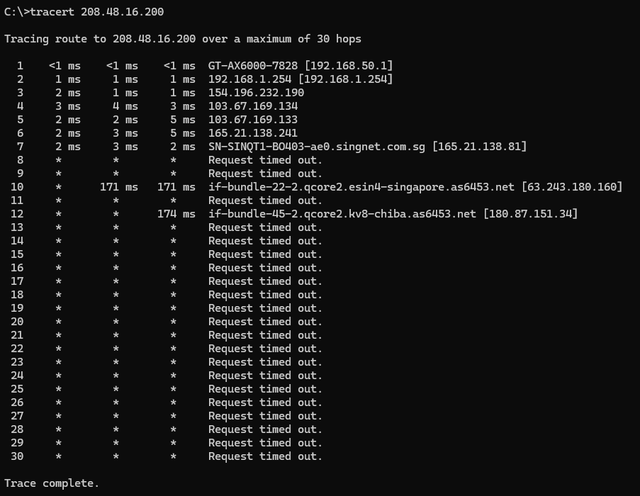
CQG's servers, including those associated with cqgtrader.com, generally do not respond to standard ICMP ping requests. Therefore, a conventional "ping" command from your computer will likely result in a "Request timed out" or "Destination Host Unreachable" message, even if the service is operational.
so i tried tracert result as follow. its look like result no good. but i don't what it mean. can anyone try to do tracert and compare the result with mine? can you all let me know which isp also. thanks.
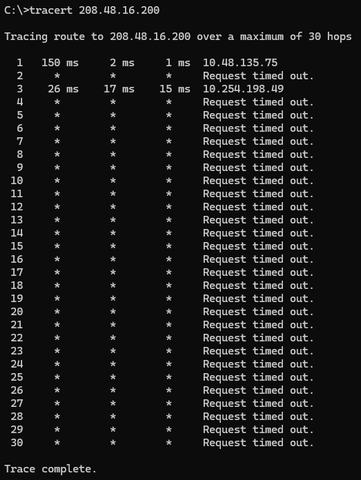
Asus gt-ax6000. Btw i did a direct connect to modem previouly but still lagWhat’s the router you are using?

Alphas
High Supremacy Member
- Joined
- Oct 6, 2004
- Messages
- 41,244
- Reaction score
- 5,669
Disable AI protection, all monitoring settings and reboot it.Asus gt-ax6000. Btw i did a direct connect to modem previouly but still lag

TanKianW
Supremacy Member
- Joined
- Apr 21, 2005
- Messages
- 6,907
- Reaction score
- 3,616
Hi all, I need some advice on the issue. Run Speedtest ok, gaming, browsing all no issue. But when I load my chart ninjatrader, it is lagging. I have disable firewall and call whizcomms (done reset on backend) but still lag. But when I use hotspot from mobile, it's running perfectly fine. So what is the issue? Can I use this issue as a reason to break the contract without penalty? I can't find any solution online. Pls advice. Thanks
If doing it for a living, subscribe a second line for failover.
Now fiber so affordable, 1 line cmi, just get another that suit your use case.
I just check. already disabled.Disable AI protection, all monitoring settings and reboot it.
so how to know which isp no issue running the software before signing the contract?If doing it for a living, subscribe a second line for failover.
Now fiber so affordable, 1 line cmi, just get another that suit your use case.
TanKianW
Supremacy Member
- Joined
- Apr 21, 2005
- Messages
- 6,907
- Reaction score
- 3,616
so how to know which isp no issue running the software before signing the contract?
Search the forum threads that conduct traceroute/ping tests for studies/data collection/just-for-fun-sake. Ask (nicely) the forumers there using other ISPs to post their traceroute and ping, then make a comparison.
@sk37 doing you a favour here.
The IP address 208.48.16.200 belongs to CQG Inc, with its own corporate network AS25765. They appear to have CyrusOne and Level3 as their upstream providers. The server is based in Chicago.
This is the traceroute from my MyRepublic (Gamer) plan. I have noticed that for MR, access to servers in the US East Coast tend to be via Europe, versus a Japan route for the West Coast.
Target IP: 208.48.16.200
Hop Sent PL% Min Max Avg Host Name / [IP]
1 20 0 0.58 1.75 1.12 xxx
2 20 0 2.27 3.66 2.90 100.81.128.3 [100.81.128.3]
3 20 0 2.54 4.16 3.14 103-6-148-178.myrepublic.com.sg [103.6.148.178]
4 20 0 2.69 4.24 3.45 103-6-148-13.myrepublic.com.sg [103.6.148.13]
5 20 0 2.98 28.01 7.82 203.116.31.145 [203.116.31.145]
6 20 0 2.76 4.87 3.76 203.116.3-77.unknown.starhub.net.sg [203.116.3.77]
7 20 0 3.63 5.38 4.28 203.118.6.190 [203.118.6.190]
8 20 0 3.54 8.53 4.25 vl413-s20.cyberway.com.sg [203.116.3.33]
9 20 0 171.49 183.00 172.93 ae15.mpr1.lhr15.uk.above.net [195.66.224.76]
10 20 50 236.08 237.13 236.55 ae4.cr1.lhr11.uk.eth.zayo.com [64.125.28.194]
11 20 100 0 0 0 [-]
12 20 35 236.44 237.88 237.13 ae45.cr1.ewr1.us.zip.zayo.com [64.125.22.224]
13 20 0 236.92 238.16 237.53 ae5.cr2.ewr14.us.zip.zayo.com [64.125.22.223]
14 14 86 237.89 237.95 237.92 ae7.cr1.ord8.us.zip.zayo.com [64.125.29.24]
15 16 44 236.75 237.62 237.22 ae3.cr2.ord9.us.zip.zayo.com [64.125.30.77]
16 20 0 234.16 235.92 234.91 ae11.mpr2.ind1.us.zip.zayo.com [64.125.20.11]
17 20 0 237.17 238.74 237.87 ae0.mpr2.ind1.us.zip.zayo.com [64.125.20.160]
18 20 0 230.80 232.68 231.61 128.177.92.106 [128.177.92.106]
19 20 0 230.29 232.33 231.03 be-1005-r0.cvg1.cyrusone.net [209.172.217.209]
20 20 0 234.90 236.89 235.67 be-4003-r0.chi2.cyrusone.net [209.172.217.26]
21 20 0 230.26 231.56 230.75 216.117.22.150 [216.117.22.150]
22 20 100 0 0 0 208.48.16.200 [208.48.16.200]
This is the traceroute from Singtel, which should be similar to Whizcomms. Singtel's traceroute ends in LA. It doesn't show the internal hops within the US from LA across to Chicago:
Target IP: 208.48.16.200
Hop Sent PL% Min Max Avg Host Name / [IP]
1 19 0 0.28 9.65 1.22 xxx
2 20 0 1.00 9.52 1.71 bb116-14-127-252.singnet.com.sg [116.14.127.252]
3 20 70 2.24 7.29 3.94 165.21.193.22 [165.21.193.22]
4 20 0 1.24 2.47 1.54 165.21.193.21 [165.21.193.21]
5 20 0 1.40 17.30 2.98 165.21.138.241 [165.21.138.241]
6 20 0 1.00 10.40 2.01 SN-SINQT1-BO403-ae0.singnet.com.sg [165.21.138.81]
7 20 100 0 0 0 [-]
8 20 75 174.52 398.28 220.96 if-be-22-2.ecore1.svq-singapore.as6453.net [180.87.105.48]
9 18 44 174.12 181.92 175.37 if-bundle-53-2.qcore1.tv2-tokyo.as6453.net [209.58.61.96]
10 17 82 176.74 179.15 177.63 if-bundle-16-2.qcore2.tv2-tokyo.as6453.net [209.58.61.35]
11 19 47 176.07 176.52 176.29 if-ae-58-2.tcore1.av3-toyohashi.as6453.net [180.87.180.152]
12 20 65 178.10 184.67 179.44 if-ae-2-2.tcore2.av3-toyohashi.as6453.net [180.87.3.131]
13 20 90 175.98 176.22 176.10 if-bundle-28-2.qcore1.lvw-losangeles.as6453.net [64.86.252.32]
14 20 100 0 0 0 208.48.16.200 [208.48.16.200]
This is the traceroute from M1. The latency is higher because I'm using the 5G connection, but the routing ought to be the same as broadband:
Target IP: 208.48.16.200
Hop Sent PL% Min Max Avg Host Name / [IP]
1 19 0 0.58 1.31 0.92 xxx
2 20 0 0.91 1.33 1.06 100.127.125.128 [100.127.125.128]
3 20 100 0 0 0 [-]
4 20 0 9.63 23.91 16.32 172.23.151.177 [172.23.151.177]
5 20 25 11.89 27.28 17.26 100.65.0.29 [100.65.0.29]
6 20 100 0 0 0 [-]
7 20 100 0 0 0 [-]
8 20 0 11.10 28.09 20.28 222.245.65.202.unknown.m1.com.sg [202.65.245.222]
9 20 0 10.05 28.78 16.87 215.245.65.202.unknown.m1.com.sg [202.65.245.215]
10 20 20 12.72 25.38 19.17 sng-b4-link.ip.twelve99.net [213.248.100.86]
11 20 15 14.48 44.23 22.41 sng-b6-link.ip.twelve99.net [62.115.136.198]
12 20 0 187.98 201.28 194.51 lax-bb2-link.ip.twelve99.net [62.115.141.130]
13 20 100 0 0 0 [-]
14 20 100 0 0 0 [-]
15 20 0 230.09 259.86 237.95 ae0.11.edge2.chicago10.net.lumen.tech [4.69.219.18]
16 20 100 0 0 0 208.48.16.200 [208.48.16.200]
The data that we don't have however, is the return path from the Chicago server to the respective ISPs, which could affect your speed also.
The IP address 208.48.16.200 belongs to CQG Inc, with its own corporate network AS25765. They appear to have CyrusOne and Level3 as their upstream providers. The server is based in Chicago.
This is the traceroute from my MyRepublic (Gamer) plan. I have noticed that for MR, access to servers in the US East Coast tend to be via Europe, versus a Japan route for the West Coast.
Target IP: 208.48.16.200
Hop Sent PL% Min Max Avg Host Name / [IP]
1 20 0 0.58 1.75 1.12 xxx
2 20 0 2.27 3.66 2.90 100.81.128.3 [100.81.128.3]
3 20 0 2.54 4.16 3.14 103-6-148-178.myrepublic.com.sg [103.6.148.178]
4 20 0 2.69 4.24 3.45 103-6-148-13.myrepublic.com.sg [103.6.148.13]
5 20 0 2.98 28.01 7.82 203.116.31.145 [203.116.31.145]
6 20 0 2.76 4.87 3.76 203.116.3-77.unknown.starhub.net.sg [203.116.3.77]
7 20 0 3.63 5.38 4.28 203.118.6.190 [203.118.6.190]
8 20 0 3.54 8.53 4.25 vl413-s20.cyberway.com.sg [203.116.3.33]
9 20 0 171.49 183.00 172.93 ae15.mpr1.lhr15.uk.above.net [195.66.224.76]
10 20 50 236.08 237.13 236.55 ae4.cr1.lhr11.uk.eth.zayo.com [64.125.28.194]
11 20 100 0 0 0 [-]
12 20 35 236.44 237.88 237.13 ae45.cr1.ewr1.us.zip.zayo.com [64.125.22.224]
13 20 0 236.92 238.16 237.53 ae5.cr2.ewr14.us.zip.zayo.com [64.125.22.223]
14 14 86 237.89 237.95 237.92 ae7.cr1.ord8.us.zip.zayo.com [64.125.29.24]
15 16 44 236.75 237.62 237.22 ae3.cr2.ord9.us.zip.zayo.com [64.125.30.77]
16 20 0 234.16 235.92 234.91 ae11.mpr2.ind1.us.zip.zayo.com [64.125.20.11]
17 20 0 237.17 238.74 237.87 ae0.mpr2.ind1.us.zip.zayo.com [64.125.20.160]
18 20 0 230.80 232.68 231.61 128.177.92.106 [128.177.92.106]
19 20 0 230.29 232.33 231.03 be-1005-r0.cvg1.cyrusone.net [209.172.217.209]
20 20 0 234.90 236.89 235.67 be-4003-r0.chi2.cyrusone.net [209.172.217.26]
21 20 0 230.26 231.56 230.75 216.117.22.150 [216.117.22.150]
22 20 100 0 0 0 208.48.16.200 [208.48.16.200]
This is the traceroute from Singtel, which should be similar to Whizcomms. Singtel's traceroute ends in LA. It doesn't show the internal hops within the US from LA across to Chicago:
Target IP: 208.48.16.200
Hop Sent PL% Min Max Avg Host Name / [IP]
1 19 0 0.28 9.65 1.22 xxx
2 20 0 1.00 9.52 1.71 bb116-14-127-252.singnet.com.sg [116.14.127.252]
3 20 70 2.24 7.29 3.94 165.21.193.22 [165.21.193.22]
4 20 0 1.24 2.47 1.54 165.21.193.21 [165.21.193.21]
5 20 0 1.40 17.30 2.98 165.21.138.241 [165.21.138.241]
6 20 0 1.00 10.40 2.01 SN-SINQT1-BO403-ae0.singnet.com.sg [165.21.138.81]
7 20 100 0 0 0 [-]
8 20 75 174.52 398.28 220.96 if-be-22-2.ecore1.svq-singapore.as6453.net [180.87.105.48]
9 18 44 174.12 181.92 175.37 if-bundle-53-2.qcore1.tv2-tokyo.as6453.net [209.58.61.96]
10 17 82 176.74 179.15 177.63 if-bundle-16-2.qcore2.tv2-tokyo.as6453.net [209.58.61.35]
11 19 47 176.07 176.52 176.29 if-ae-58-2.tcore1.av3-toyohashi.as6453.net [180.87.180.152]
12 20 65 178.10 184.67 179.44 if-ae-2-2.tcore2.av3-toyohashi.as6453.net [180.87.3.131]
13 20 90 175.98 176.22 176.10 if-bundle-28-2.qcore1.lvw-losangeles.as6453.net [64.86.252.32]
14 20 100 0 0 0 208.48.16.200 [208.48.16.200]
This is the traceroute from M1. The latency is higher because I'm using the 5G connection, but the routing ought to be the same as broadband:
Target IP: 208.48.16.200
Hop Sent PL% Min Max Avg Host Name / [IP]
1 19 0 0.58 1.31 0.92 xxx
2 20 0 0.91 1.33 1.06 100.127.125.128 [100.127.125.128]
3 20 100 0 0 0 [-]
4 20 0 9.63 23.91 16.32 172.23.151.177 [172.23.151.177]
5 20 25 11.89 27.28 17.26 100.65.0.29 [100.65.0.29]
6 20 100 0 0 0 [-]
7 20 100 0 0 0 [-]
8 20 0 11.10 28.09 20.28 222.245.65.202.unknown.m1.com.sg [202.65.245.222]
9 20 0 10.05 28.78 16.87 215.245.65.202.unknown.m1.com.sg [202.65.245.215]
10 20 20 12.72 25.38 19.17 sng-b4-link.ip.twelve99.net [213.248.100.86]
11 20 15 14.48 44.23 22.41 sng-b6-link.ip.twelve99.net [62.115.136.198]
12 20 0 187.98 201.28 194.51 lax-bb2-link.ip.twelve99.net [62.115.141.130]
13 20 100 0 0 0 [-]
14 20 100 0 0 0 [-]
15 20 0 230.09 259.86 237.95 ae0.11.edge2.chicago10.net.lumen.tech [4.69.219.18]
16 20 100 0 0 0 208.48.16.200 [208.48.16.200]
The data that we don't have however, is the return path from the Chicago server to the respective ISPs, which could affect your speed also.

hwzlite
Master Member
- Joined
- Jan 27, 2007
- Messages
- 3,071
- Reaction score
- 3,215
Do tryout the free Cloudflare's WARP (VPN) which might provide optimum peering through Cloudflare's global network, potentially bypassing congested routes.
Sample traceroute from Ripe Atlas Probe @ Cloudflare .SG :
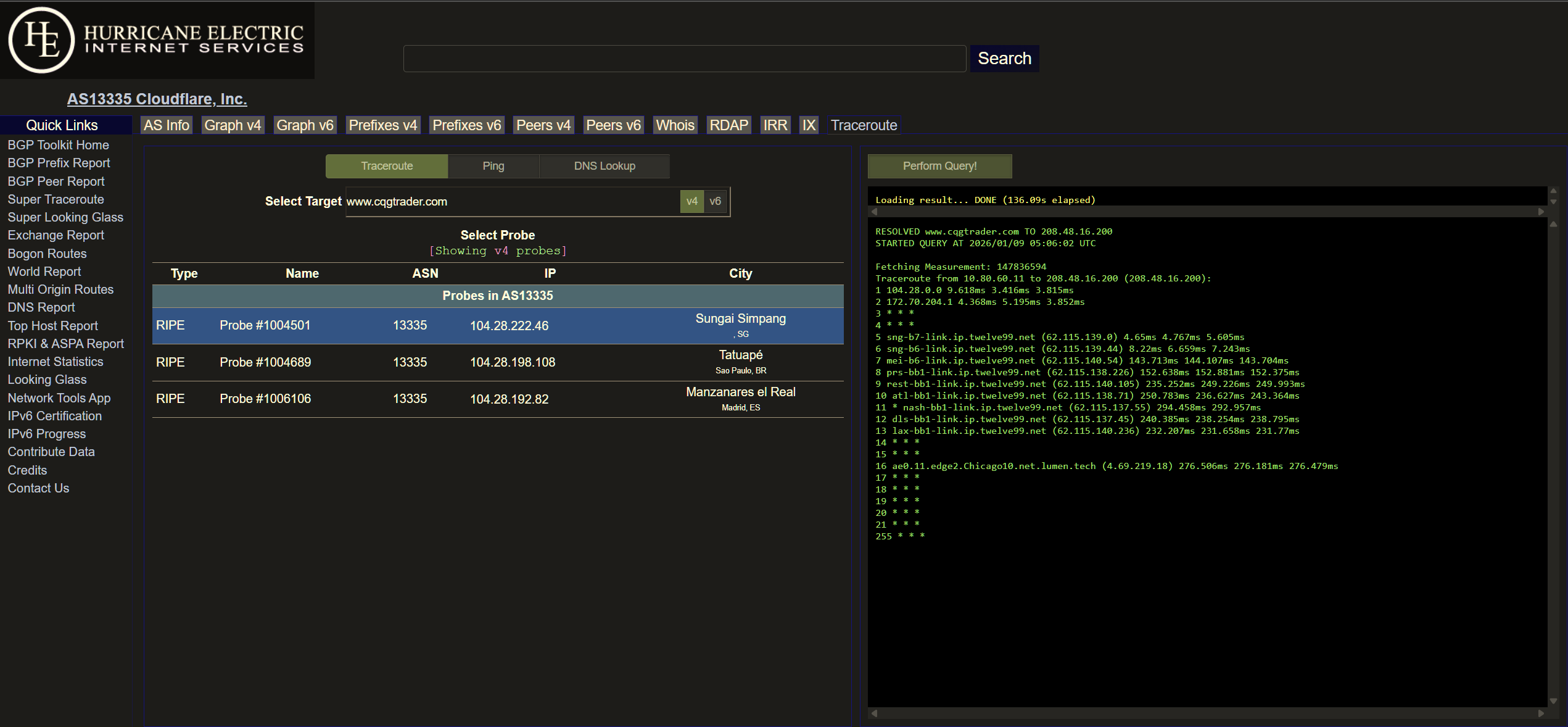
Above indicated every responded hops with consistent full 3x Round-Trip Time (RTT) results without asterisks/star (*).
Ref: Traceroute: Finding meaning among the stars
Sample traceroute from Ripe Atlas Probe @ Cloudflare .SG :
Above indicated every responded hops with consistent full 3x Round-Trip Time (RTT) results without asterisks/star (*).
Ref: Traceroute: Finding meaning among the stars
@sk37 doing you a favour here.
The IP address 208.48.16.200 belongs to CQG Inc, with its own corporate network AS25765. They appear to have CyrusOne and Level3 as their upstream providers. The server is based in Chicago.
This is the traceroute from my MyRepublic (Gamer) plan. I have noticed that for MR, access to servers in the US East Coast tend to be via Europe, versus a Japan route for the West Coast.
Target IP: 208.48.16.200
Hop Sent PL% Min Max Avg Host Name / [IP]
1 20 0 0.58 1.75 1.12 xxx
2 20 0 2.27 3.66 2.90 100.81.128.3 [100.81.128.3]
3 20 0 2.54 4.16 3.14 103-6-148-178.myrepublic.com.sg [103.6.148.178]
4 20 0 2.69 4.24 3.45 103-6-148-13.myrepublic.com.sg [103.6.148.13]
5 20 0 2.98 28.01 7.82 203.116.31.145 [203.116.31.145]
6 20 0 2.76 4.87 3.76 203.116.3-77.unknown.starhub.net.sg [203.116.3.77]
7 20 0 3.63 5.38 4.28 203.118.6.190 [203.118.6.190]
8 20 0 3.54 8.53 4.25 vl413-s20.cyberway.com.sg [203.116.3.33]
9 20 0 171.49 183.00 172.93 ae15.mpr1.lhr15.uk.above.net [195.66.224.76]
10 20 50 236.08 237.13 236.55 ae4.cr1.lhr11.uk.eth.zayo.com [64.125.28.194]
11 20 100 0 0 0 [-]
12 20 35 236.44 237.88 237.13 ae45.cr1.ewr1.us.zip.zayo.com [64.125.22.224]
13 20 0 236.92 238.16 237.53 ae5.cr2.ewr14.us.zip.zayo.com [64.125.22.223]
14 14 86 237.89 237.95 237.92 ae7.cr1.ord8.us.zip.zayo.com [64.125.29.24]
15 16 44 236.75 237.62 237.22 ae3.cr2.ord9.us.zip.zayo.com [64.125.30.77]
16 20 0 234.16 235.92 234.91 ae11.mpr2.ind1.us.zip.zayo.com [64.125.20.11]
17 20 0 237.17 238.74 237.87 ae0.mpr2.ind1.us.zip.zayo.com [64.125.20.160]
18 20 0 230.80 232.68 231.61 128.177.92.106 [128.177.92.106]
19 20 0 230.29 232.33 231.03 be-1005-r0.cvg1.cyrusone.net [209.172.217.209]
20 20 0 234.90 236.89 235.67 be-4003-r0.chi2.cyrusone.net [209.172.217.26]
21 20 0 230.26 231.56 230.75 216.117.22.150 [216.117.22.150]
22 20 100 0 0 0 208.48.16.200 [208.48.16.200]
This is the traceroute from Singtel, which should be similar to Whizcomms. Singtel's traceroute ends in LA. It doesn't show the internal hops within the US from LA across to Chicago:
Target IP: 208.48.16.200
Hop Sent PL% Min Max Avg Host Name / [IP]
1 19 0 0.28 9.65 1.22 xxx
2 20 0 1.00 9.52 1.71 bb116-14-127-252.singnet.com.sg [116.14.127.252]
3 20 70 2.24 7.29 3.94 165.21.193.22 [165.21.193.22]
4 20 0 1.24 2.47 1.54 165.21.193.21 [165.21.193.21]
5 20 0 1.40 17.30 2.98 165.21.138.241 [165.21.138.241]
6 20 0 1.00 10.40 2.01 SN-SINQT1-BO403-ae0.singnet.com.sg [165.21.138.81]
7 20 100 0 0 0 [-]
8 20 75 174.52 398.28 220.96 if-be-22-2.ecore1.svq-singapore.as6453.net [180.87.105.48]
9 18 44 174.12 181.92 175.37 if-bundle-53-2.qcore1.tv2-tokyo.as6453.net [209.58.61.96]
10 17 82 176.74 179.15 177.63 if-bundle-16-2.qcore2.tv2-tokyo.as6453.net [209.58.61.35]
11 19 47 176.07 176.52 176.29 if-ae-58-2.tcore1.av3-toyohashi.as6453.net [180.87.180.152]
12 20 65 178.10 184.67 179.44 if-ae-2-2.tcore2.av3-toyohashi.as6453.net [180.87.3.131]
13 20 90 175.98 176.22 176.10 if-bundle-28-2.qcore1.lvw-losangeles.as6453.net [64.86.252.32]
14 20 100 0 0 0 208.48.16.200 [208.48.16.200]
This is the traceroute from M1. The latency is higher because I'm using the 5G connection, but the routing ought to be the same as broadband:
Target IP: 208.48.16.200
Hop Sent PL% Min Max Avg Host Name / [IP]
1 19 0 0.58 1.31 0.92 xxx
2 20 0 0.91 1.33 1.06 100.127.125.128 [100.127.125.128]
3 20 100 0 0 0 [-]
4 20 0 9.63 23.91 16.32 172.23.151.177 [172.23.151.177]
5 20 25 11.89 27.28 17.26 100.65.0.29 [100.65.0.29]
6 20 100 0 0 0 [-]
7 20 100 0 0 0 [-]
8 20 0 11.10 28.09 20.28 222.245.65.202.unknown.m1.com.sg [202.65.245.222]
9 20 0 10.05 28.78 16.87 215.245.65.202.unknown.m1.com.sg [202.65.245.215]
10 20 20 12.72 25.38 19.17 sng-b4-link.ip.twelve99.net [213.248.100.86]
11 20 15 14.48 44.23 22.41 sng-b6-link.ip.twelve99.net [62.115.136.198]
12 20 0 187.98 201.28 194.51 lax-bb2-link.ip.twelve99.net [62.115.141.130]
13 20 100 0 0 0 [-]
14 20 100 0 0 0 [-]
15 20 0 230.09 259.86 237.95 ae0.11.edge2.chicago10.net.lumen.tech [4.69.219.18]
16 20 100 0 0 0 208.48.16.200 [208.48.16.200]
The data that we don't have however, is the return path from the Chicago server to the respective ISPs, which could affect your speed also.
I don't have much technical knowledge on all this network thing so I am really thankful and appreciated. Surely you can just direct me to search the forum myself but you choose to help instead. really thanks for your time and effort to run the data.
Important Forum Advisory Note
This forum is moderated by volunteer moderators who will react only to members' feedback on posts. Moderators are not employees or representatives of HWZ Forums. Forum members and moderators are responsible for their own posts.
Please refer to our Community Guidelines and Standards and Terms and Conditions for more information.
